
How to Send Large Files to Clients
Send large documents and asset packages to clients with clear size limits, revision names and a return path. Compare plans before choosing a delivery tool.
Illustrative example: Examples use fictional deliveries. Product captures show the real application with fictional data.
To send large files to clients, check the size of each file, choose a delivery method that supports it, and tell the recipient what to download or return. For documents and design assets, Droplana provides one private, persistent client portal for sending work and receiving files back.
Its maximum is 5 GB per file, including with a Storage addon. A 6 GB ZIP does not fit, even if your account has plenty of free storage. For codecs and video exports, use the separate guide to sending large video files.
Choose a plan to send large files to clients
| Plan | Monthly price | Total storage | Maximum per file |
|---|---|---|---|
| Free | €0 | 2 GB | 100 MB |
| Solo | €19 + tax | 50 GB | 1 GB |
| Practice | €49 + tax | 250 GB | 2 GB |
| Studio | €99 + tax | 1 TB | 5 GB |
Free supports three clients and one business user. Paid plans allow unlimited clients; storage is shared across them. Solo includes one business user, Practice five and Studio unlimited. Annual prices are €190, €490 and €990 + tax respectively. A Storage addon on a paid plan costs €15/month or €150/year + tax, adds 500 GB and raises the per-file limit to 5 GB. Additional addons add storage, not a higher file ceiling.
Both incoming client files and outgoing business files count toward the business's limits. When storage is full, new uploads are blocked; existing files remain accessible. There is no overage billing.
1. Prepare a delivery the client can identify
For an illustrative agency handoff, use three files: Campaign-Brief-v02.pdf at 12 MB, Print-Artwork-v03.pdf at 240 MB and Brand-Assets-v01.zip at 800 MB. All three fit Solo's per-file limit, provided the account has enough remaining storage. The two larger files do not fit Free.
Put a short contents list inside an asset ZIP before uploading it. A ZIP is a file to download, not a browsable portal folder. Check the result after compression; grouping already-compressed images may not make the package much smaller. If a package is over 5 GB, agree smaller, useful packages or use another delivery service.
2. Upload to the correct client
The business signs in, selects the client and uploads the prepared files. Check the client name before uploading. Each client has one portal; several projects for that client share it, so include the project name in filenames.
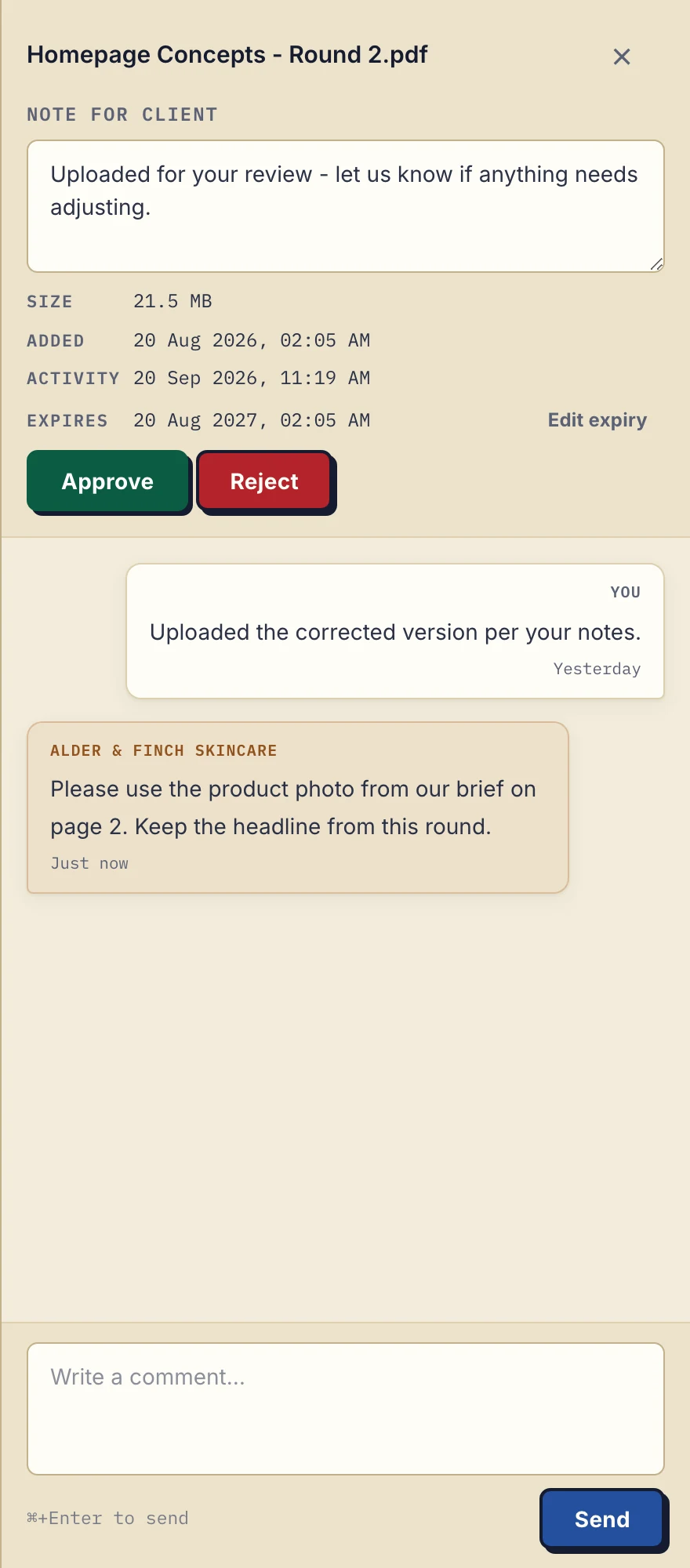
Product demonstration with fictional agency data: the desktop file sidebar keeps a delivery note and client reply with a design PDF. This is not a large-upload performance result. View the full-size demonstration.
Do not promise separate permissions for each project or file within that client portal. Add only the contacts who should see that client's exchange.
3. Explain access and the return trip
Clients create no account. In the default Strict mode, they verify their email on a new device; a verified browser is remembered for 90 days. That access period is separate from file retention.
A useful handoff names the files and the action. For the fictional campaign above:
Campaign-Brief-v02 is ready to read. Download Print-Artwork-v03 and Brand-Assets-v01 for production. Please put corrections in a comment on the relevant file, or upload a marked-up copy here. Reply by Friday if that review date works for you.
Enable client uploads if a marked-up PDF or missing source asset must come back. If you need several specific documents, list them in a document checklist. Sending the portal address does not itself remove verification or enable uploads.
4. Keep revision names explicit
Upload a revised document as a new file, for example Print-Artwork-v04.pdf, and say which earlier file it supersedes. Droplana does not automatically replace or compare revisions. Comments belong to individual files.
An Approved or Rejected marker can record a file's status. Either side can change or clear it; it is not an immutable sign-off or a substitute for the agreement your project needs.
5. Agree when to download and archive
Free keeps each file for up to 180 days from upload. Only those files expire; the client, portal access and Free account stay active. Active paid plans have no plan-imposed retention limit, subject to expiry settings, deletion and cancellation. A persistent portal address is not a promise of permanent file storage. Agree an availability period and keep a separate archive.
Tell the client the agreed download deadline in your delivery note. Expiring the portal copy does not recall copies they have already downloaded. Keep originals and any records your business needs in your own storage.
Where Droplana fits
Droplana suits recurring document and asset exchange for agencies and freelancers. Files, comments and metadata are hosted in Germany. Use it when the client needs a clear return path alongside delivery.
A cloud drive may suit an existing shared-folder workflow. Droplana does not replace your internal storage, edit documents or synchronize a local project folder. Pick the tool around the actual file sizes and how the client needs to respond.
Questions before you start
What is the largest file I can send?
Free allows 100 MB per file, Solo 1 GB, Practice 2 GB and Studio 5 GB. A Storage addon on a paid plan raises the limit to 5 GB. No plan or addon accepts a file over 5 GB.
Does uploading a revision replace the old file?
No. A new upload is a separate file. Name revisions clearly and tell the client which one to use; comments stay with the individual file.
Can the client send a file back?
Yes, if the business enables client uploads. The client creates no account, but Strict mode requires email verification on a new device. Incoming files use the business account’s storage and file-size limits.
Check the plan limits and pricing, then try one representative delivery with a client.