
Client File Approval Tool: An Agency Review Process
A client file approval tool keeps feedback beside each deliverable. See how Droplana comments and reversible markers work, and when formal proofing is needed.
Product demonstration: Screenshots show the actual product with fictional data. Sample messages and scenarios are illustrative, not customer results.
A client file approval tool gives an agency and its client one place to review a named deliverable, leave comments and record a response. In Droplana, that means per-file comments and reversible Approved or Rejected markers. A person still decides which revision to use and when to proceed.
Droplana gives each client a private, persistent portal for sending documents and receiving files back. Clients do not create accounts. Strict mode, the default, verifies email on a new device; a verified browser is remembered for 90 days.
What to expect from a client file approval tool
For a campaign with a concept PDF, a logo pack and client-supplied photos, keep the request on the file it concerns. The client can send source material back when uploads are enabled, then comment on the agency's outgoing work in the same portal.
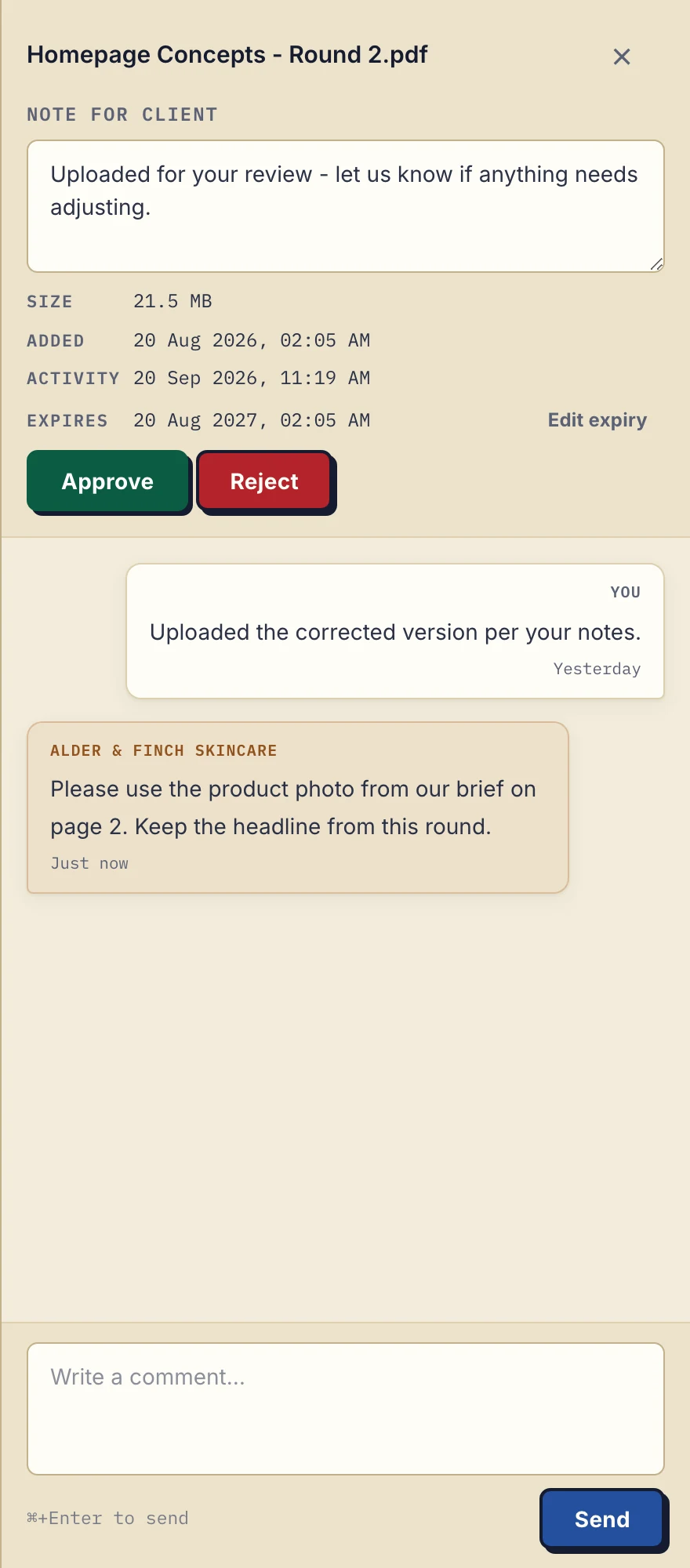
Product demonstration with fictional data. Alder & Finch Skincare asks for a change on Homepage Concepts - Round 2.pdf. The comment refers to a page; it is not an annotation on the image. View the full-size comment panel.
The business can set a marker from its file list; the client can do so from the file sidebar. Both can clear it. There is no separate Pending or Awaiting approval status. An unset marker means no current marker, not that nobody has opened the file.
A request the client can answer
Illustrative agency request, adapted to the pictured file:
Please review Homepage Concepts - Round 2.pdf, especially the product photo on page 2. Leave changes in this file's comments. If you want us to use this revision, say what you reviewed and mark this file Approved. Please respond by the date we agreed for the campaign.
The client might request the photo from their brief while keeping this round's headline. The agency reads the comment, makes the change in its design tool, exports Round 3 and uploads it as a new file. A comment on Round 3 should explain what changed and identify it as the file needing review.
Each upload is separate. Comments and markers do not transfer to the revision. A download records a download, not reading or acceptance. Check the written response before using a file for production.
Read the status on the right asset
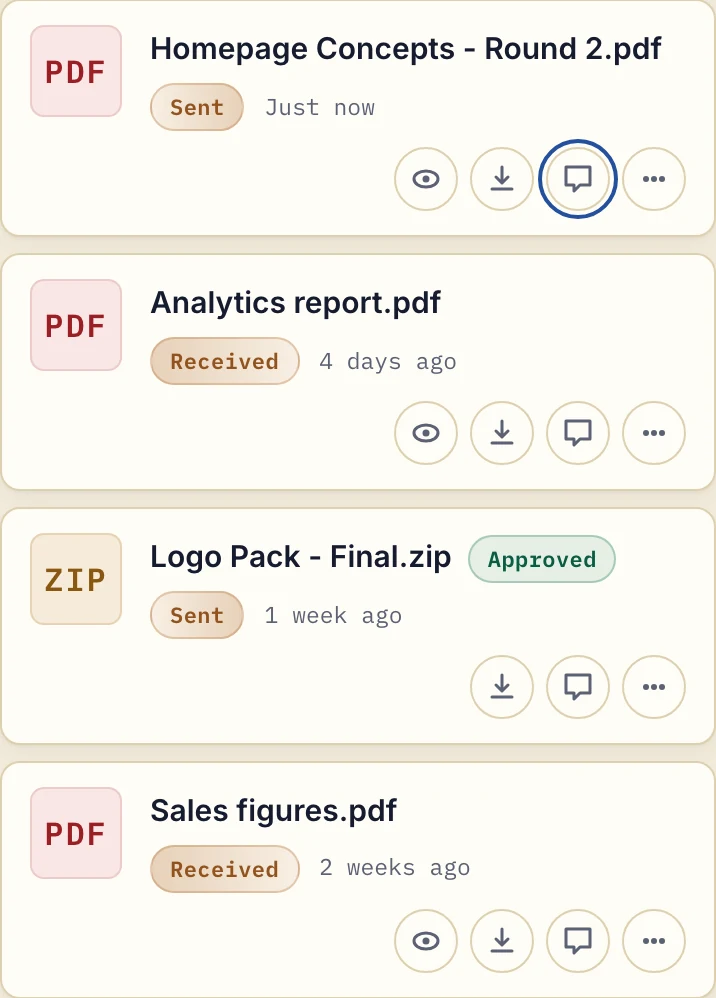
Product demonstration with fictional data. Names were entered manually. The Approved marker on the logo pack does not approve the separate concept PDF. View the full-size file list.
Rejected does not lock or remove the file, so put the reason in a comment. A marker is not a signature, proof of reading or locked sign-off.
A final logo pack can be Approved while the concept PDF is still under discussion. Do not infer approval of a whole campaign from one marked file. Someone at the agency should name the exact files cleared for delivery and check that any unresolved comments have been addressed.
When a specialist proofing tool is needed
Droplana has no image annotation, side-by-side version comparison, sequential approvers or locked sign-off. It does not choose the latest revision or send automatic approval reminders. If your client requires those controls, use a proofing or formal approval system that provides them.
This simpler exchange can suit agencies and freelancers with several clients who need files and ordinary feedback together. If your project tool should hear about new uploads and comments, every plan includes signed webhooks and an MCP server for an AI assistant or automation tool. The email comparison explains the tradeoffs when attachments already work for your team. For personal data in deliverables, review file sharing and data protection too; portal access does not decide your handling obligations.
Try one deliverable first
The Free plan is enough for this test. Solo costs €19/month or €190/year plus tax, with unlimited clients, 50 GB total storage, files up to 1 GB and one seat. Active paid plans have no plan-imposed retention limit, subject to expiry settings, deletion and cancellation.
Start with one fictional client and one exported PDF. Send it, request a specific comment, upload a revision and check each file's marker before using the process on a live campaign. The pricing page shows team plans if more than one agency user needs access.
Questions before you start
Can a client sign the deliverable instead of approving it?
If a marker is not enough, the client can sign the PDF in the browser after verifying their email. The signed PDF is saved as a new file next to the original, and the server records who signed, when and from what IP address. It is marked as signed, not a qualified or certified signature.
Does Droplana compare revisions automatically?
No. Every upload is a separate file. Name each revision yourself and explain changes in its comments. Droplana does not provide image annotation, version comparison, sequential approvers or locked sign-off.
What can I try on the Free plan?
Free costs €0 and includes 3 clients, 2 GB total storage and files up to 100 MB, with one business seat. Files are kept for up to 180 days after upload; the client and portal remain.