
Your clients, one link.
Send the brief questions, get the answers back and deliver the first draft through the same client portal.
Droplana is a client document portal for freelancers. Each client gets one private portal where you send the brief and drafts and they send back answers, copy and logo files. Clients need no account, password or app, and Free covers your first 3 clients.
The brief questions go out by email, the answers come back as a reply to a different thread, and the logo arrives in chat as a screenshot. A client portal for freelancers earns its place on the first exchange. Start with one client and one brief, then use the same portal for drafts, feedback and final files.
A client portal for freelancers, from brief to final file
1. Make the first request small
Upload Website - Brief questions.pdf and add a document checklist for the completed brief. Ask for the copy and logo files you need to start. The client opens their link and returns the files without creating an account.
2. Check the returned brief
Download Website - Completed brief.pdf and leave a per-file comment on anything missing. If a page needs correcting, ask for a new upload. Files cannot be overwritten; use round numbers to distinguish drafts.
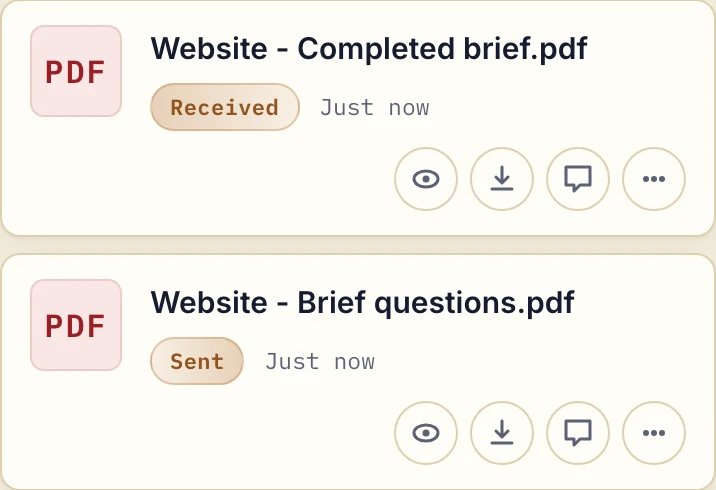
Actual app with fictional sample PDFs at phone width. Sent and Received identify the two sides of this example.
3. Deliver a draft, then the final export
Upload your draft and invite comments beside that file. Once the revision is ready, name the final export clearly. Keep your editable working files and backup in your own tools; the portal holds the exchange with the client.
Try this request: “Please open your portal, download the brief questions and upload the completed brief with your logo files. Put any questions beside the brief so we can keep the discussion with it.”
Check the fit before collecting files
Droplana has no time tracking, invoicing, task assignment or document editor. It does not replace the tools you use to create the work. For examples tied to your craft, see the pages for designers and developers.
Start with fictional or non-sensitive documents and try the full exchange from your own phone. The client instructions explain the controls; document checklists explain how to request missing files.
Access, storage and a starting plan
Each client has a separate portal. Authorized business team members share access to the business's clients, files and comments. Files, comments and metadata are stored in Germany; see the security details.
Free covers 3 clients, 2 GB total storage and files up to 100 MB. Solo costs €19/month plus applicable tax, with unlimited clients, 50 GB storage and a 1 GB file limit. Free and Solo include one seat; Practice includes 5 seats and Studio unlimited seats, including the owner.
Free files are kept for up to 180 days after upload; the client portal does not expire with them. Active paid plans have no automatic age-based file expiry, but chosen expiry dates, deletion and subscription rules still apply.
The tools you need, on every plan.
Share files, leave comments, request documents with checklists and sign PDFs in your browser. Your logo is included too.
Clients never pay or create an account. EU hosting, encryption and data export included.
Save 2 months with annual billing
Free Start here
For your first 3 clients
€0/monthNo credit card required
- Just you
- 3 clients
- 2 GB storage
- Up to 100 MB per file
- Files kept for 6 months
Solo
For independent professionals
€19/month+ tax
€190/year+ tax
- Just you
- Unlimited clients
- 50 GB storage
- Up to 1 GB per file
- Email support
Practice
For small firms
€49/month+ tax
€490/year+ tax
- Team size: 5
- Unlimited clients
- 250 GB storage
- Up to 2 GB per file
- Priority support
Studio
For growing teams
€99/month+ tax
€990/year+ tax
- Team size: Unlimited
- Unlimited clients
- 1 TB storage
- Up to 5 GB per file
- Priority support
- Personal setup call
On Free, each file expires 180 days after upload. Your clients and their access stay active, so you can keep sharing new files. Active paid plans have no plan-imposed retention limit. Expiry settings, deletion and cancellation rules still apply; a persistent portal address does not guarantee permanent file availability. Team sizes include you. No setup fees or automatic overage charges. Prices exclude applicable tax.
Compare plan details
| Included | Free | Solo | Practice | Studio |
|---|---|---|---|---|
| Team size | Just you | Just you | 5 | Unlimited |
| Clients | 3 | Unlimited | Unlimited | Unlimited |
| Storage | 2 GB | 50 GB | 250 GB | 1 TB |
| Maximum file size | 100 MB | 1 GB | 2 GB | 5 GB |
| File retention | 180 days from upload | No limit | No limit | No limit |
| Your Droplana address | Includes a random suffix | Your chosen name | Your chosen name | Your chosen name |
| Data Processing Agreement | Standard | Standard | Countersigned available | Countersigned available |
| Support | Priority | Priority | ||
| Personal setup call | Not included | Not included | Not included | Included |
Need more storage?
Add 500 GB for €15/month + tax, or €150/year + tax. Each storage add-on also raises your maximum file size to 5 GB.
Available on all paid plans from your billing page. Add more than one for another 500 GB each. Your team size stays the same.
Use the client portal buying guide to compare access, storage and document workflows. The email comparison explains what changes when files and replies move out of your inbox.
Questions before the first exchange
What happens when I need a fourth client?
Free covers 3 clients. Solo costs €19/month plus applicable tax and includes unlimited clients, 50 GB storage and files up to 1 GB. Solo has one seat, including the owner.
Can I use it for a first client without paying?
Yes. Free includes 3 clients, 2 GB total storage and files up to 100 MB, with no credit card required. Each Free file is kept for up to 180 days after upload.
Will a client need to sign up to send me the brief?
No. The client opens their portal link and, under the default Strict security level, confirms their email on a new device. Then they download the brief questions and upload their answers, with no account to create.
Do Free files disappear?
Each Free file is kept for up to 180 days after upload, then it expires. The client and their portal stay, so you can keep sending new files. Paid plans have no plan limit on how long files are kept.