
Which document is still missing from that email thread?
Move the request, the reply and the returned work into one client portal. Keep email for the conversations that belong there.
You requested a bank statement, a payroll summary and equipment receipts. Two attachments arrived. One statement stops before the closing balance. Finding the missing request and explaining the incomplete file means opening the thread again.
Droplana is a client document portal for that repeated, two-way exchange: each client gets one private portal, with no account to create. The request list, uploaded files, corrections and the work you return sit in the same client's portal. You still review the documents; the portal gives both sides a place to see what needs attention.
Droplana vs email: choose by the work
Keep the exchange in email when it is occasional, the document set is small and both sides can find what they need. A new tool is not useful merely because it is new.
Evaluate Droplana when you repeatedly collect documents, explain missing pages and return work to the same clients. Accounting firms are one example. If you are comparing the category more broadly, use the client portal buying guide.
This comparison is published by Droplana. Email capabilities depend on the provider and your setup; the comparison below concerns an attachment-based exchange, not every mail product or add-on.
The same request, visible to both sides
In this fictional demonstration, the payroll summary and statement have arrived. Equipment receipts are still missing. The client can choose a file or photograph paper from their phone.
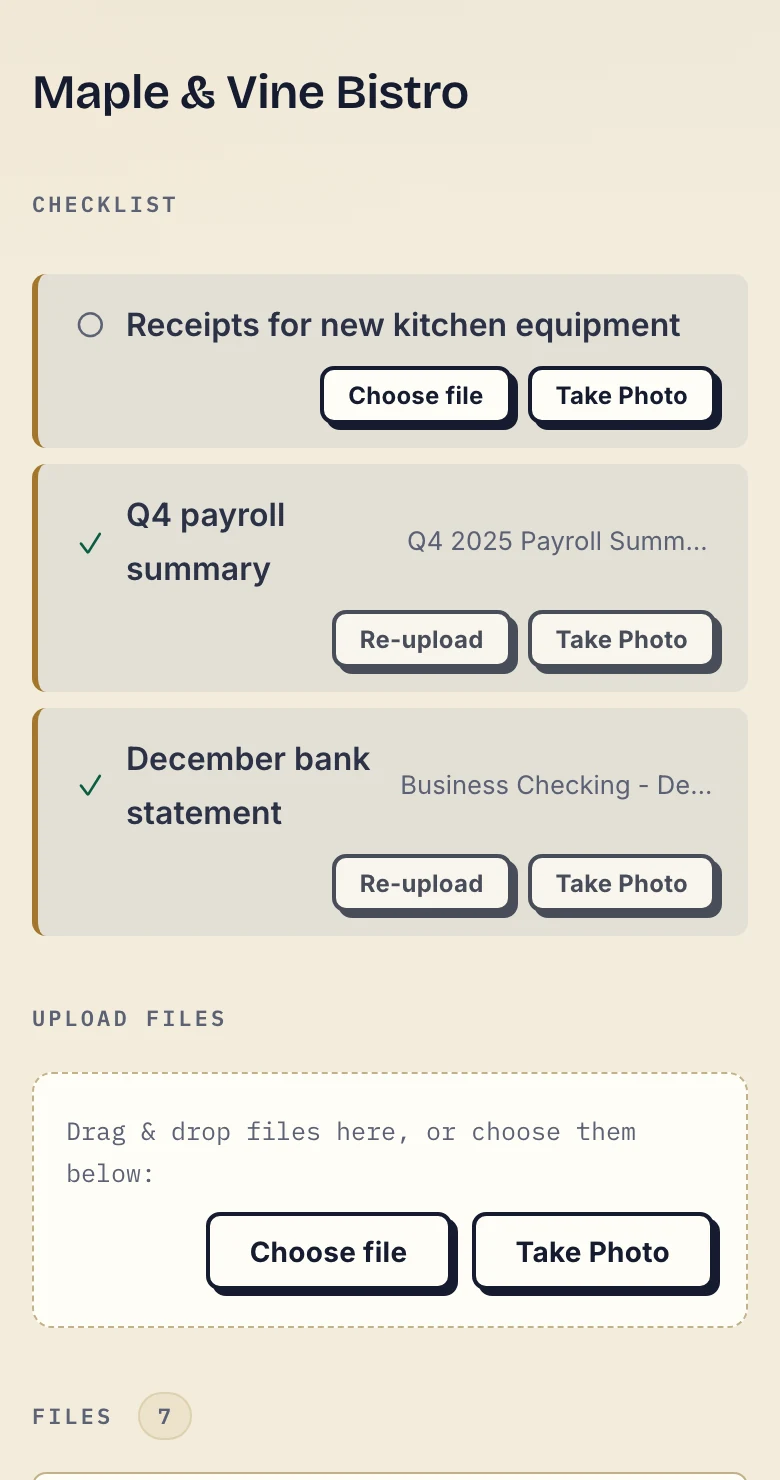
Actual app with fictional client data, cropped below the header. Inspect the client screenshot.
Receipt does not mean completeness. The business checks the statement and asks for its missing pages in a comment on that file. The original remains; the client uploads a separate complete copy.
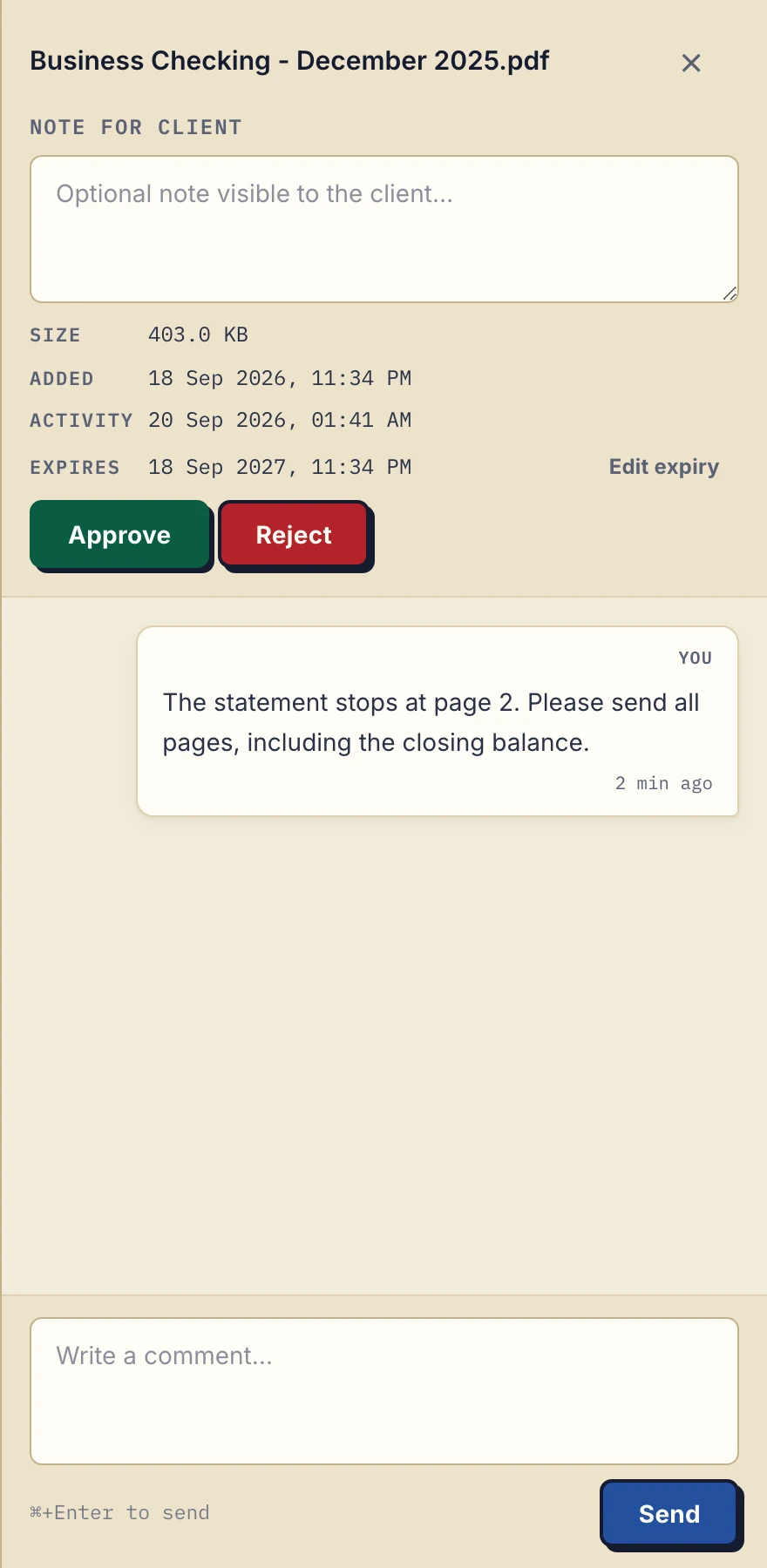
The correction is attached to the document it concerns. Fictional demonstration data. Inspect the comment screenshot.
When the work is ready, upload the deliverable to the same portal. Your client returns to the same address to download it, subject to the file's retention and access rules.
Compare the exchange, not a feature count
| Document job | Attachment-based email | Droplana |
|---|---|---|
| See what is still missing | Match replies and attachments to your request list | A checklist shows requested and received items; you review whether the upload is correct |
| Explain an incomplete document | Name the file and missing detail in your reply | Comment on that file in the client's portal |
| Send a revised file | Send another attachment with a clear revision name | Upload a separate file with a clear name; no automatic version history |
| Return finished work | Send an attachment or the link you use for delivery | Upload it to the same client portal |
| Sign a PDF | Use your chosen signing process and return its result | Identified participants can sign in-browser; not a qualified electronic signature |
| End access | Downloaded attachment copies remain with recipients | Revoke portal sessions and links; already downloaded copies still remain |
| Large files | Message size limits set by your mail provider, often around 20-25 MB | 100 MB on Free, 1 GB Solo, 2 GB Practice, 5 GB Studio |
| Where documents are stored | In your mailbox, the client's mailbox and every inbox a thread was forwarded to | Hetzner in Germany, encrypted at rest per file; operated by an EU company in Croatia, with a DPA on every plan |
| Start using it | Continue with the mailbox and controls you already use | Create the client, authorize their email and send a magic link |
Droplana has no document editor or shared live editing, and it does not import your inbox. Your business team shares access to the business's clients, with no restricted matter teams or per-file permissions.
Move one exchange, not your whole inbox
- Pick one current client and one small document request. Keep historical email where your records policy requires it.
- Create the client with a name and URL slug. Add a checklist with the exact documents and periods you need.
- Open Share, add the authorized email and use Add & Send. Default Strict access verifies that address on a new device.
- Send a short explanation using the wording below. Ask the client to reply through the portal for this document set.
- Review the first upload, leave any correction on the file, and return a sample deliverable through the same portal.
For this document request, please use your Droplana portal. You will receive an email access link; no account or password is needed. The checklist shows what I still need. If a document needs clarification, I will leave a comment on that file. I will also put the completed work in the same portal.
Download an editable client invitation, or use the one-client migration checklist. Both are manual templates. The setup and client guide shows the actual flow.
Optional checklist due dates have their own client reminders. Each is prepared two days before and on the date, and reaches the client with their next email, which can be later that day or the next day. Both the business and client can switch them off. They do not replace the inactivity ladder or guarantee a reply.
Check the limits before the first upload
Free supports 3 clients, 2 GB total storage and files up to 100 MB. Each Free file is kept for up to 180 days after upload; the client and portal access remain active. Paid plans start at 19 EUR/month plus tax for Solo, with unlimited clients and separate storage, per-file and team limits.
Practice and Studio support invited colleagues; Free and Solo have the owner's seat only. An active paid-plan Storage addon raises the file ceiling to 5 GB. Larger individual files need another transfer method.
The tools you need, on every plan.
Share files, leave comments, request documents with checklists and sign PDFs in your browser. Your logo is included too.
Clients never pay or create an account. EU hosting, encryption and data export included.
Save 2 months with annual billing
Free Start here
For your first 3 clients
€0/monthNo credit card required
- Just you
- 3 clients
- 2 GB storage
- Up to 100 MB per file
- Files kept for 6 months
Solo
For independent professionals
€19/month+ tax
€190/year+ tax
- Just you
- Unlimited clients
- 50 GB storage
- Up to 1 GB per file
- Email support
Practice
For small firms
€49/month+ tax
€490/year+ tax
- Team size: 5
- Unlimited clients
- 250 GB storage
- Up to 2 GB per file
- Priority support
Studio
For growing teams
€99/month+ tax
€990/year+ tax
- Team size: Unlimited
- Unlimited clients
- 1 TB storage
- Up to 5 GB per file
- Priority support
- Personal setup call
On Free, each file expires 180 days after upload. Your clients and their access stay active, so you can keep sharing new files. Active paid plans have no plan-imposed retention limit. Expiry settings, deletion and cancellation rules still apply; a persistent portal address does not guarantee permanent file availability. Team sizes include you. No setup fees or automatic overage charges. Prices exclude applicable tax.
Compare plan details
| Included | Free | Solo | Practice | Studio |
|---|---|---|---|---|
| Team size | Just you | Just you | 5 | Unlimited |
| Clients | 3 | Unlimited | Unlimited | Unlimited |
| Storage | 2 GB | 50 GB | 250 GB | 1 TB |
| Maximum file size | 100 MB | 1 GB | 2 GB | 5 GB |
| File retention | 180 days from upload | No limit | No limit | No limit |
| Your Droplana address | Includes a random suffix | Your chosen name | Your chosen name | Your chosen name |
| Data Processing Agreement | Standard | Standard | Countersigned available | Countersigned available |
| Support | Priority | Priority | ||
| Personal setup call | Not included | Not included | Not included | Included |
Need more storage?
Add 500 GB for €15/month + tax, or €150/year + tax. Each storage add-on also raises your maximum file size to 5 GB.
Available on all paid plans from your billing page. Add more than one for another 500 GB each. Your team size stays the same.
Questions about moving away from attachments
Does Droplana replace email?
No. Keep email for first contact, scheduling and general conversation. Droplana holds the client document exchange and per-file comments. It still uses email for sign-in links and system notifications.
Do clients have to register?
No client account, password or app is required. Under default Strict access, the client verifies an authorized email on a new device. The browser is remembered for 90 days after verification; this is separate from file retention.
Does moving a file to Droplana recall the emailed attachment?
No. Moving work into a portal does not remove old email attachments or copies someone already downloaded. Revoking Droplana access ends portal sessions and links; it cannot recall downloaded copies.
Will Droplana chase every missing document for me?
Fixed checklist stall reminders are on by default and can be disabled. A client gets one nudge after 7 inactive days with missing items; the business gets the escalation after 14 days. Each stage sends once per stall. It is not a configurable follow-up workflow or a guarantee that the client replies.
Can I keep the documents there indefinitely?
Free files are kept for up to 180 days after upload. Active paid plans have no plan-imposed retention limit, but explicit expiry, deletion and cancellation rules still apply. A persistent portal address does not guarantee permanent access to a file. Keep independent records where your work requires them.
If your files already live in shared folders, compare Droplana with a cloud-drive workflow. If documents also arrive through chat, see Droplana vs messaging apps; for large one-off sends, see Droplana vs WeTransfer. For the fixed reminder behavior, read document checklists.