
How to Share Files With Clients Without the Chaos
Stop emailing attachments and hunting versions. Here's a clean, practical approach to sharing files with clients - from first draft to final delivery.
Product demonstration: Product screenshots use fictional demonstration data; the designer and consultant workflows are illustrative, not measured customer results.

To share files with clients, give each client one place to receive documents, send files back and leave feedback. A simple client portal keeps that exchange together without asking you to set up project management or a CRM.
This guide covers the tools, the workflow and the mistakes to avoid. If the difficult part is getting documents back, start with how to collect files from clients.
Quick answer
- Use a dedicated workspace per client, not email attachments
- Clients should be able to access files without creating an account
- Files and messages belong in the same place, not split across tools
- Keep revisions in the same workspace and name the current file clearly
Not every exchange needs a portal. For one attachment with little follow-up, an agreed email process may be enough. For one delivery batch, a transfer service can work. For documents you edit together, use shared storage with the permissions your work needs. A per-client portal pays off when requests, returned files and feedback repeat.
Why email doesn't work for file delivery
Email was designed for short messages, not for managing documents across revision cycles. Here is what breaks first:
- Attachments get buried. Three weeks and 40 replies later, the file is somewhere in the thread. Neither you nor the client is sure which message.
- Version confusion compounds. You send v1. Client requests changes. You send v2. They reply to the v1 email with more feedback. Now you have two threads with conflicting notes.
- Large attachments bounce. Mail providers limit attachment size, and a large file can fail or land in spam. For big exports, see how to send large video files to clients.
- Links expire. Transfer links can expire - one reason people look at alternatives to WeTransfer. Drive links sometimes stop working when you reorganize folders.
- You can't tell if they downloaded it. You send the file. You wait. You follow up. You find out they never checked their email.
None of these is serious on its own. Across five to ten active clients, together they take a real share of time nobody bills for.
The common workarounds (and why they fall short)
Most freelancers try one of these before finding something that works.
Shared Drive folders - familiar, and useful when permissions and folder structure are maintained. Across several clients, deciding where each exchange belongs can take more care. See why shared Drive folders become a mess for the organisational problem.
WeTransfer - a transfer service worth comparing when you send a batch of files. Check the plan's expiry settings against how long your client needs access.
Dropbox Paper / Notion - strong for internal work and more awkward for client delivery. Depending on the sharing settings, clients may need an account, and the navigation is built for the team that made the page, not for an outside reader.
Keeping it in email - works for light, short engagements. Breaks down quickly after that.
The pattern: each of these handles one part of the problem, but none is built for the full cycle of sharing, feedback, revision and delivery.
How to share files with clients (step by step)
Step 1: Create one workspace per client
The most important structural decision. Don't share individual files - share a workspace where all files for that client live.
When you create a per-client workspace, the client always has one place to go. You don't have to re-explain where to look. They don't have to search their inbox for "that link from April."
Step 2: Upload files with clear names and context
Name files clearly: homepage-design-v1.png, not final_FINAL_v3_USE_THIS.png. Include a short message alongside each upload explaining what it is and what you need from them. The message and the file belong in the same place.
Step 3: Give each client one place to return to
One portal per client is the access point for everything. Not a new link per file. Not a new link per revision. The same place, always, for this client.
When clients ask "can you resend?", the answer is "it's in your portal, where it always is." In Droplana the client needs no account: on the default Strict level they confirm their email on a new device, or sign in with Google or Microsoft, and the browser is remembered for 90 days. The address stays the same; it is not an open link that anyone holding it can use.
Step 4: Collect feedback in context
Feedback should live next to the file, not in a separate email thread. When a client comments where the file lives, the context stays. You don't have to decode "the one in the top right corner" from an email when the actual file is right there.
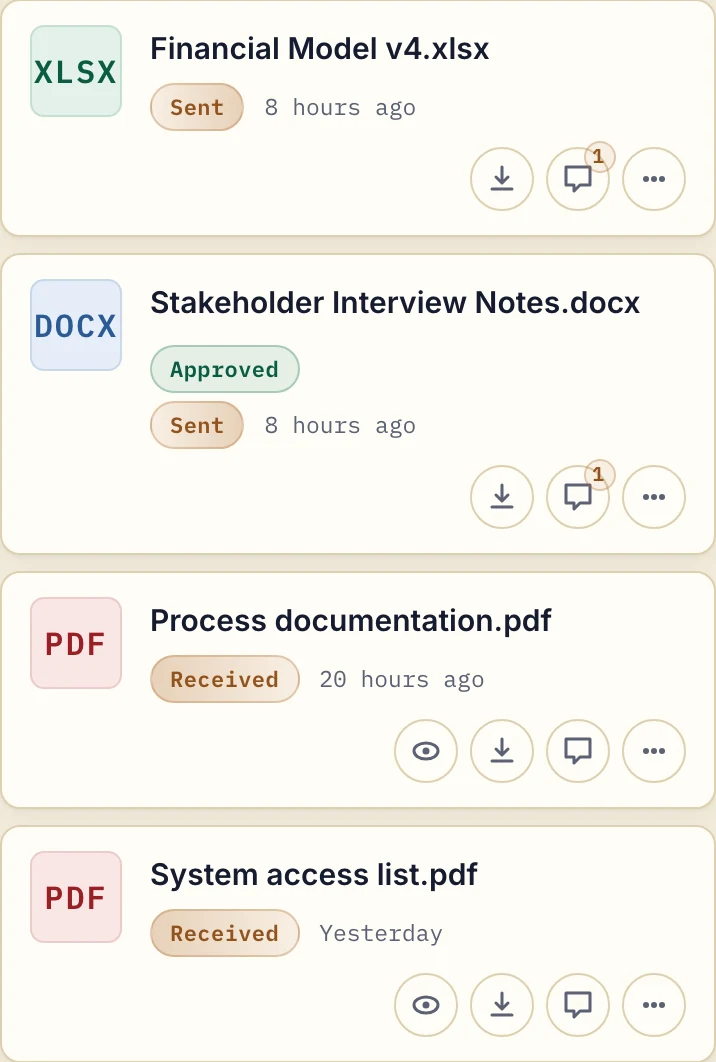
Product demonstration with fictional data. The client can download the sent files and comment on each one. Approved is a reversible file marker, not proof of acceptance.
An illustrative handoff for a consultant sending a model:
Please review financial-model-v4.xlsx at [portal link], especially [assumption]. Add questions to that file's comments by [date]. This is the revision to use; v3 remains for context. Tell [contact] if access or downloading fails.
Step 5: Keep revisions in the same workspace
When you revise a file, upload the new version to the same workspace. Don't create a new link. Don't start a new email thread. The client opens the same place they always open and sees the updated file.
Name the revision clearly and say which file the client should review. In Droplana, uploading a revision creates a new file and keeps the original; there is no automatic version history. Either side can set or clear an Approved or Rejected marker, so agree what it means and do not use it in place of a required signature.
Step 6: Close out cleanly
When a project ends, agree how long files should stay accessible, and tell the client to save their final copy. Keep access open for ongoing work, or revoke it when the relationship ends. A portal is not a backup or an archive: on Droplana Free each file is kept for up to 180 days after upload, and paid plans have no plan-imposed retention limit, subject to expiry settings and deletion.
Example workflow: a freelance brand designer
Consider an illustrative freelance designer with six to eight active clients, working through email and transfer links. Every project means a new folder in Drive, a new transfer link per upload and a separate email thread for feedback.
The specific pain: clients keep losing the link. "Can you resend the branding files?" arrives months after the project ended.
A per-client portal changes the setup:
- Each client gets one portal at the start of the engagement.
- All files, revisions and per-file comments live there.
- Final deliverables stay at the same address for as long as the designer keeps them, so the client has a place to look before asking for a resend.
Where Droplana fits
Droplana is a client document portal built for this workflow: one private, persistent portal per client, files with per-file comments in the same view, and no account for the client. Clients can also send files back, including phone photos of paper, and document checklists show them what you still need.
It is designed for professional service firms, agencies and client-facing teams that want a simple document exchange without the complexity of an all-in-one platform. It is not project management, invoicing or a Drive replacement. Files, comments and metadata are stored on Hetzner infrastructure in Germany, and a DPA is available on every plan, which matters if you work with clients in Europe. There is no ready-made connector to your internal systems, but every plan includes signed webhooks and an MCP server for an AI assistant or automation tool.
Free covers three clients, 2 GB of storage and files up to 100 MB, with no credit card. Solo is €19/month or €190/year plus tax for unlimited clients, 50 GB and 1 GB files; teams need Practice or Studio. See pricing for the full plans.
Start with one client and run one project through it, from the first file to the final delivery: try Droplana free.