
The feedback is in. Which file is it about?
Collect the brief, send the draft and keep the client's comments on that file. One portal for the exchange, while production stays in your agency's tools.
Product demonstration: Actual app screenshots with fictional agency and client data. They are not customer results.
Your client wants the product photo changed on page 2, but the headline kept. That comment needs to sit with Homepage Concepts - Round 2.pdf, where your account manager and the client can find it again.
Droplana is a client portal for agencies. Each client has one private, persistent portal, with no signup or app, where you collect briefs and assets, send deliverables and receive feedback. Your agency keeps production and project planning in its existing tools.
Ask for the inputs by name
List the approved budget, product updates and assets you need. The client sees requested and received items, with optional due dates.
Send the draft to the same place
Upload the deliverable into the client's portal. Use a clear revision name so everyone can identify the file being discussed.
Keep the correction on that file
A comment belongs to one file. Your client can name the page, explain the change and return to the conversation with the draft.
Give colleagues the same view
On Practice and Studio, invited colleagues see the same client exchange. Account handovers do not depend on forwarding one person's email thread.
A client portal for agencies, from inputs to feedback
Northlight Creative Agency and Alder & Finch Skincare are fictional demo businesses. The screenshots below show the actual app, not a proposed interface or a customer testimonial.
1. Collect the campaign inputs
Ask for specific documents rather than "everything for the campaign." In this example, the client has supplied the approved budget, analytics report, product updates and sales figures. The checklist shows that all four have arrived; your team still reviews whether they are usable.
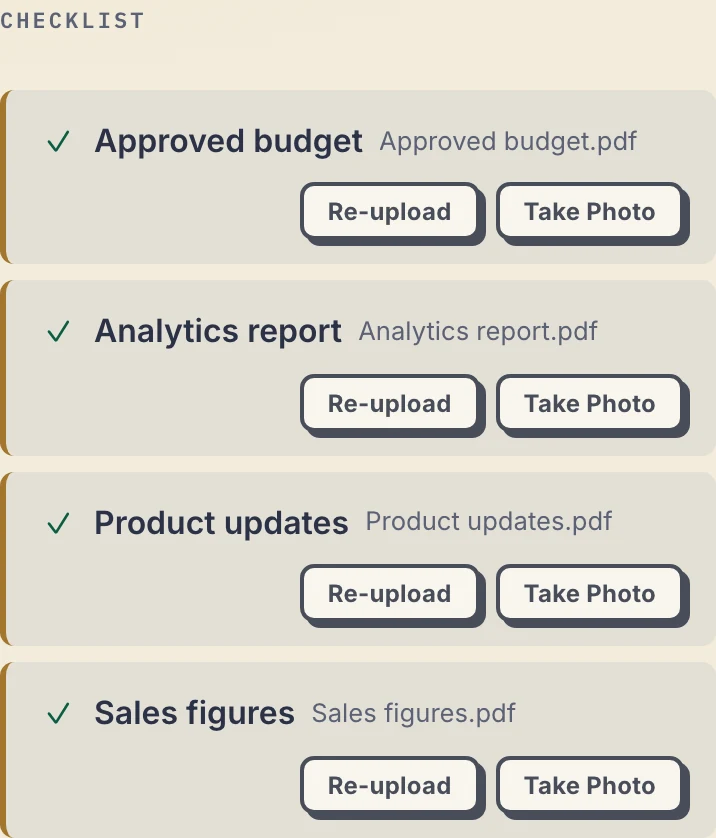
Client phone view, cropped to the checklist. Inspect the client screenshot.
For a new campaign, adapt the list to the work: brief, brand guidelines, approved copy and product photography. Use exported reports or files here; arrange access to advertising and production accounts through those tools' own invitation controls.
Optional due dates appear to both sides. A due-date reminder is prepared two days before and on the date, is not sent once the item is provided, and reaches the client with their next email. If the client goes quiet for 7 days with items missing, they get a nudge; after 14 days the reminder comes to you. You can turn reminders off. See the document checklist rules.
2. Put the feedback beside the named draft
The agency sends Homepage Concepts - Round 2.pdf. The client asks to change the product photo on page 2 and keep the headline. That comment stays with Round 2, rather than becoming an unattached message in the project chat.
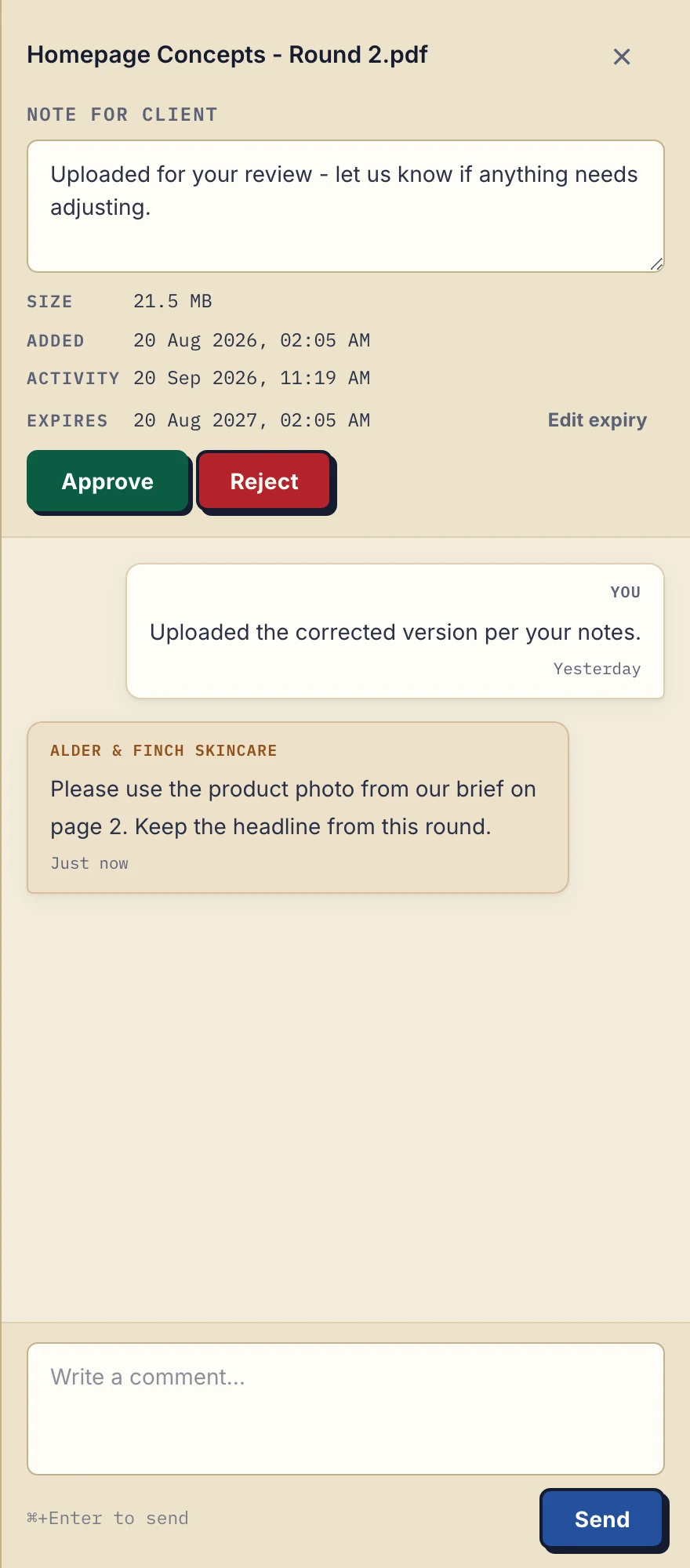
Business view of comments on the fictional client's Round 2 PDF. Inspect the comment screenshot.
3. Name the next revision yourself
After making the change in your design tool, upload a separate file such as Homepage Concepts - Round 3.pdf. Tell the client which round to review. The new upload does not replace Round 2, inherit its approval or create a version comparison.
A client can mark a file Approved or Rejected and leave a reason in a comment. Either side can clear that status. If your process requires controlled reviewer order, a locked sign-off or annotations on the artwork, use a proofing system that provides those controls.
Keep the production tools that do the production work
Droplana exchanges files and comments. It does not edit the artwork, annotate images, compare versions, review video frame by frame or assign reviewers. There is no connector to your design or project tools and no automatic sync; you upload exports and download client inputs manually. If you want to automate part of it, an automation tool can connect through the MCP server to upload files or add comments, and webhooks can tell your own systems when a client uploads or signs.
Your colleagues share access to the business's clients. Contacts authorized for one client share that portal. It is a poor fit if you need separate confidential account teams or different files hidden from different reviewers in the same client portal.
When an engagement ends, revoke the client's access. It takes effect immediately, although copies the client already downloaded stay with them. On Free, files are kept for up to 180 days after upload; paid plans have no plan limit on how long files are kept.
Try one real review round
Create the client with a name and URL slug, add the request checklist and upload a sample draft. Under Share, add the authorized email and select Add & Send. Ask the client to upload one input, comment on the draft and download the next revision.
Use the editable client invitation and setup guide. Decide after that exchange whether it saves enough coordination to introduce to the next account.
Free covers 3 clients, 2 GB storage, files up to 100 MB and one owner seat. An agency inviting colleagues needs Practice or Studio: Practice is 49 EUR/month plus tax with 5 seats including the owner, 250 GB storage and 2 GB per file. Studio is 99 EUR/month plus tax with unlimited team size, 1 TB storage and 5 GB per file.
Free
€0/month
Just you
3 clients
2 GB storage
Up to 100 MB per file
Solo
€19/month
€190/year
Just you
Unlimited clients
50 GB storage
Up to 1 GB per file
Practice
€49/month
€490/year
Team size: 5
Unlimited clients
250 GB storage
Up to 2 GB per file
Studio
€99/month
€990/year
Team size: Unlimited
Unlimited clients
1 TB storage
Up to 5 GB per file
On Free, each file expires 180 days after upload. Your clients and their access stay active, so you can keep sharing new files. Active paid plans have no plan-imposed retention limit. Expiry settings, deletion and cancellation rules still apply; a persistent portal address does not guarantee permanent file availability. Team sizes include you. No setup fees or automatic overage charges. Prices exclude applicable tax.
Compare plan detailsClient documents, access and branding
Files, comments and metadata are stored on Hetzner infrastructure in Germany. A DPA is available on every plan. Read the security explanation for access and provider boundaries; EU hosting is not a blanket compliance guarantee.
Your logo appears in the portal on every plan. Paid plans have a clean subdomain without the Free random suffix. There is no custom domain or accent-color control, and the footer retains Droplana branding.
Questions before you start
Does Droplana replace a creative proofing tool?
No. Feedback is a comment on a file, not an annotation on a design or a video frame. There is no version comparison, automatic version history, reviewer assignment or multi-stage approval gate. Keep a proofing tool if those controls are required.
What does Approved mean?
Approved is a file status that either side can set or clear; Rejected is the other status. It does not lock the file or create an immutable sign-off. A status, a comment and in-browser PDF signing are separate actions.
Can several account managers use it?
Yes, on Practice or Studio. Practice includes 5 seats counting the owner; Studio has unlimited team size. Members share access to the business's clients. There are no private account-manager client lists or per-file permissions. Free and Solo have one owner seat.
Does a client contact need an account to comment on a draft?
No. There is no signup, password or app. Under the default Strict access, the contact verifies an authorized email on a new device, and the browser is remembered for 90 days. Then they can open the draft, comment on it and upload assets.
Can we send large video files or use our own domain?
Free allows 100 MB per file, Solo 1 GB, Practice 2 GB and Studio 5 GB. An active paid-plan Storage addon raises the file ceiling to 5 GB. Larger files need another method. Your logo is included on every plan, but there is no custom domain, accent-color control or full white-label option.
If clients currently send attachments, use the email comparison. For the broader buying decision, see the client portal guide. For a design-focused workflow, see Droplana for designers.