
The worksheet goes out. The reflection comes back.
Give each coaching client one place for session notes, worksheets and their completed work. Keep booking, calls and progress tracking in the tools you already use.
Droplana is a client portal for coaches to exchange session materials and completed work. Each client gets one private, persistent portal with per-file comments and no client signup.
Coaching runs for months: session notes, worksheets, recordings, reflections. Spread across email, Drive and WhatsApp, last month's worksheet is hard to find three weeks later. Keep booking, calls and payments in the tools you use now, and give the materials one home.
One portal per client
Session notes and worksheets sit in the client's own portal, in date order. One link, for as long as you work together.
Work comes back between sessions
Clients upload a completed worksheet or photograph a handwritten page with their phone. No app to install.
Questions on the file
A client leaves a question on this week's worksheet. You answer there, and both of you see it before the next session.
Still there next programme
Paid plans have no plan limit on how long files are kept. A client returning for a second programme finds the first one in the same portal.
A client portal for coaches between sessions
Upload Session 03 - Reflection worksheet.pdf after your call. The client downloads it, completes it outside Droplana and uploads Session 03 - Completed reflection.pdf. Both files stay in that client's portal, with a comment thread on each.
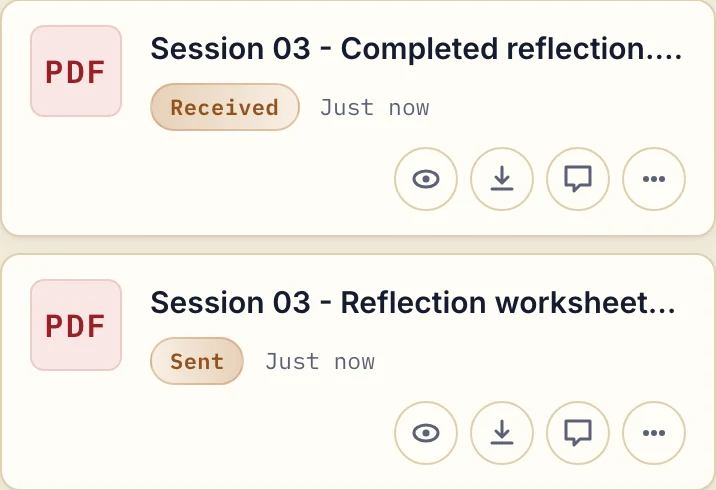
Actual product view with fictional coaching documents. Sent and Received describe the exchange from the coach's side.
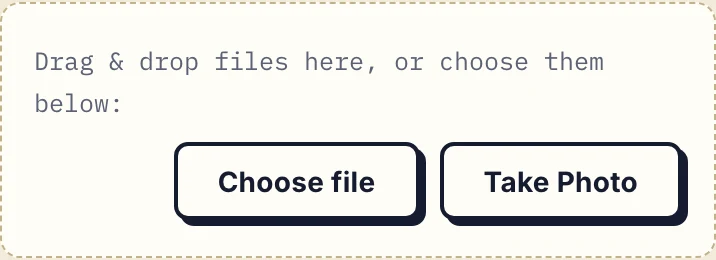
A client working on paper can photograph the completed sheet. The phone upload controls let them choose an existing file or take a photo, without installing an app.
A message you can adapt:
The Session 03 worksheet is in your portal. Download it and complete it before our next call, then upload the finished file or a clear photo of each page. Leave any questions as a comment on the worksheet.
Keep session materials useful
Name notes and worksheets by session and date. Upload recordings only when their size fits your plan, or place a recording link in a comment on the session notes. Access to an external recording still depends on the service hosting it.
At the next session, open the returned reflection and discuss the client's comments. You both know where things stand.
Career coaches can exchange CV drafts and interview preparation. Executive coaches can send assessments and receive reflections. For group programmes, each participant needs their own client portal; participants do not share a group discussion space. Consultants use the same structure for advisory documents.
Choose what belongs in the portal
Files are stored in Germany and encrypted at rest per file, with a DPA available on all plans. Your business team has access across its clients; there are no private caseload permissions between coaches. Review the security model before using it for sensitive material.
Droplana is not a clinical or health-record system. If your work is regulated as therapy or healthcare, use a record system built for it.
If worksheets and replies are mixed into chat, compare a portal with messaging apps. For the wider choice, use the client portal guide to assess document exchange separately from scheduling or course delivery.
Try one worksheet with one client
Start on Free with 3 clients, 2 GB total storage and 100 MB per file. Solo is €19/month plus tax with unlimited clients, 50 GB and 1 GB per file. A recording larger than the plan's file limit needs a smaller export or another delivery method.
Questions before you start
Can clients return a completed worksheet?
Yes, when client uploads are enabled. They download and complete the worksheet outside Droplana, then upload the finished file or phone photos. Comments stay attached to the individual file.
Does Droplana replace a coaching platform?
No. It exchanges documents and file comments. It does not provide scheduling, payments, course hosting, progress tracking or clinical records.
Do coaching clients need an account?
No. Clients open their portal without creating a Droplana account or installing an app. Strict mode is the default and asks for email verification on a new device, so a forwarded link alone does not open a client portal on another device. The browser is then remembered for 90 days.
Can past clients still find their materials?
Yes, on a paid plan. There is no plan limit on how long files are kept, so a client returning for a second programme finds the first one in the same portal, unless you set an expiry date or delete files. On Free, each file is kept for up to 180 days from upload.
Choose a plan for your document exchange
The tools you need, on every plan.
Share files, leave comments, request documents with checklists and sign PDFs in your browser. Your logo is included too.
Clients never pay or create an account. EU hosting, encryption and data export included.
Save 2 months with annual billing
Free Start here
For your first 3 clients
€0/monthNo credit card required
- Just you
- 3 clients
- 2 GB storage
- Up to 100 MB per file
- Files kept for 6 months
Solo
For independent professionals
€19/month+ tax
€190/year+ tax
- Just you
- Unlimited clients
- 50 GB storage
- Up to 1 GB per file
- Email support
Practice
For small firms
€49/month+ tax
€490/year+ tax
- Team size: 5
- Unlimited clients
- 250 GB storage
- Up to 2 GB per file
- Priority support
Studio
For growing teams
€99/month+ tax
€990/year+ tax
- Team size: Unlimited
- Unlimited clients
- 1 TB storage
- Up to 5 GB per file
- Priority support
- Personal setup call
On Free, each file expires 180 days after upload. Your clients and their access stay active, so you can keep sharing new files. Active paid plans have no plan-imposed retention limit. Expiry settings, deletion and cancellation rules still apply; a persistent portal address does not guarantee permanent file availability. Team sizes include you. No setup fees or automatic overage charges. Prices exclude applicable tax.
Compare plan details
| Included | Free | Solo | Practice | Studio |
|---|---|---|---|---|
| Team size | Just you | Just you | 5 | Unlimited |
| Clients | 3 | Unlimited | Unlimited | Unlimited |
| Storage | 2 GB | 50 GB | 250 GB | 1 TB |
| Maximum file size | 100 MB | 1 GB | 2 GB | 5 GB |
| File retention | 180 days from upload | No limit | No limit | No limit |
| Your Droplana address | Includes a random suffix | Your chosen name | Your chosen name | Your chosen name |
| Data Processing Agreement | Standard | Standard | Countersigned available | Countersigned available |
| Support | Priority | Priority | ||
| Personal setup call | Not included | Not included | Not included | Included |
Need more storage?
Add 500 GB for €15/month + tax, or €150/year + tax. Each storage add-on also raises your maximum file size to 5 GB.
Available on all paid plans from your billing page. Add more than one for another 500 GB each. Your team size stays the same.