
The focused client portal without the second-user jump
Copilot is now called Assembly: a client platform with CRM, billing, messages, files and automations, priced by plan and internal user. Droplana is a client document portal priced per business: each client gets one private portal to send and receive documents, with no account to create.
This page compares Droplana with Assembly, the client portal product formerly named Copilot. It is not about GitHub Copilot or Microsoft Copilot. Published by Droplana, one of the products compared. Assembly's pricing checked on its own page on September 23, 2026. The screenshot uses fictional data and is not a customer result.
Droplana is a client document portal: one private, permanent portal per client for two-way document exchange, with no client account. Assembly is a client platform for service businesses that combines CRM, messages, files, billing and payments, an app builder and automations in one branded product. The vendor explains the name change in its Copilot-to-Assembly announcement.
What Assembly does well
Assembly is a carefully designed product. A firm can give each client one branded place for messages, invoices, contracts, files and help articles, and connect steps between them. For a firm that wants the whole client experience in one product, and is ready to move billing and contracts into it, that is a strong offer.
The price of a second person
The two products charge for different things. Assembly's plans each include a number of internal users and active contacts. Droplana prices per business, with seats in each plan and unlimited clients on paid plans.
| Assembly plan (checked 2026-09-23) | Billed monthly | Billed annually | Internal users | Active contacts |
|---|---|---|---|---|
| Free | 0 USD | 0 USD | 1 | 5 |
| Starter | 49 USD/month | 29 USD/month | 1 | 50 |
| Professional | 149 USD/month | 90 USD/month | 3 | 500 |
| Advanced | See vendor | See vendor | 5 | Unlimited |
| Droplana plan | Monthly | Annual | Seats (owner included) | Clients |
|---|---|---|---|---|
| Free | 0 EUR | 0 EUR | 1 | 3 |
| Solo | 19 EUR/month | 190 EUR/year | 1 | Unlimited |
| Practice | 49 EUR/month | 490 EUR/year | 5 | Unlimited |
| Studio | 99 EUR/month | 990 EUR/year | Unlimited | Unlimited |
Droplana prices exclude tax. On these figures, a one-person firm on Assembly Starter that hires a colleague moves to Professional: 49 to 149 USD a month, or 29 to 90 USD a month on annual billing. In Droplana, the same step is Solo to Practice, 19 to 49 EUR a month. The client count matters too: Starter covers 50 active contacts, while Droplana's paid plans have no client limit. Assembly also lists extra apps at 5 USD a month each. Assembly's pricing page is the place to confirm current numbers.
Droplana vs Assembly side by side
| Assembly | Droplana | |
|---|---|---|
| Built for | The whole client experience in one branded platform | Exchanging documents with clients |
| CRM, billing and payments | Included | Not available |
| Contracts | Evaluate its contract apps for your process | In-browser PDF signing of your own PDFs; no templates |
| Messages | Included | No chat; comments on each file |
| Automations | Automation builder on Professional | Only fixed checklist reminders |
| Asking for documents | Through forms, apps and automations | Document checklist with optional due dates and reminders |
| Client access | Client portal tied to active contact records | A private link with no account; email confirmation on a new device by default |
| Branding | Custom domains from Professional | Your logo in the dashboard and portals; no custom domain |
| Integrations | Starter lists an API and connector | MCP server and signed webhooks; no Assembly connector |
| Data location | Confirm data region and processing terms with Assembly | Hetzner in Germany; encrypted at rest per file; DPA on every plan |
Assembly's plans and features change. Check its website for current details.
Try the document half next to your existing tools
For a consulting assignment, leave contacts, proposals, invoices and milestones in the business platform you already use. Add the client in Droplana, request their process documentation and cost breakdown against a document checklist, and send the finished report back through the same portal. The client comments on the report. Any accepted deliverable goes into your records by download; there is no CRM sync or invoice trigger.
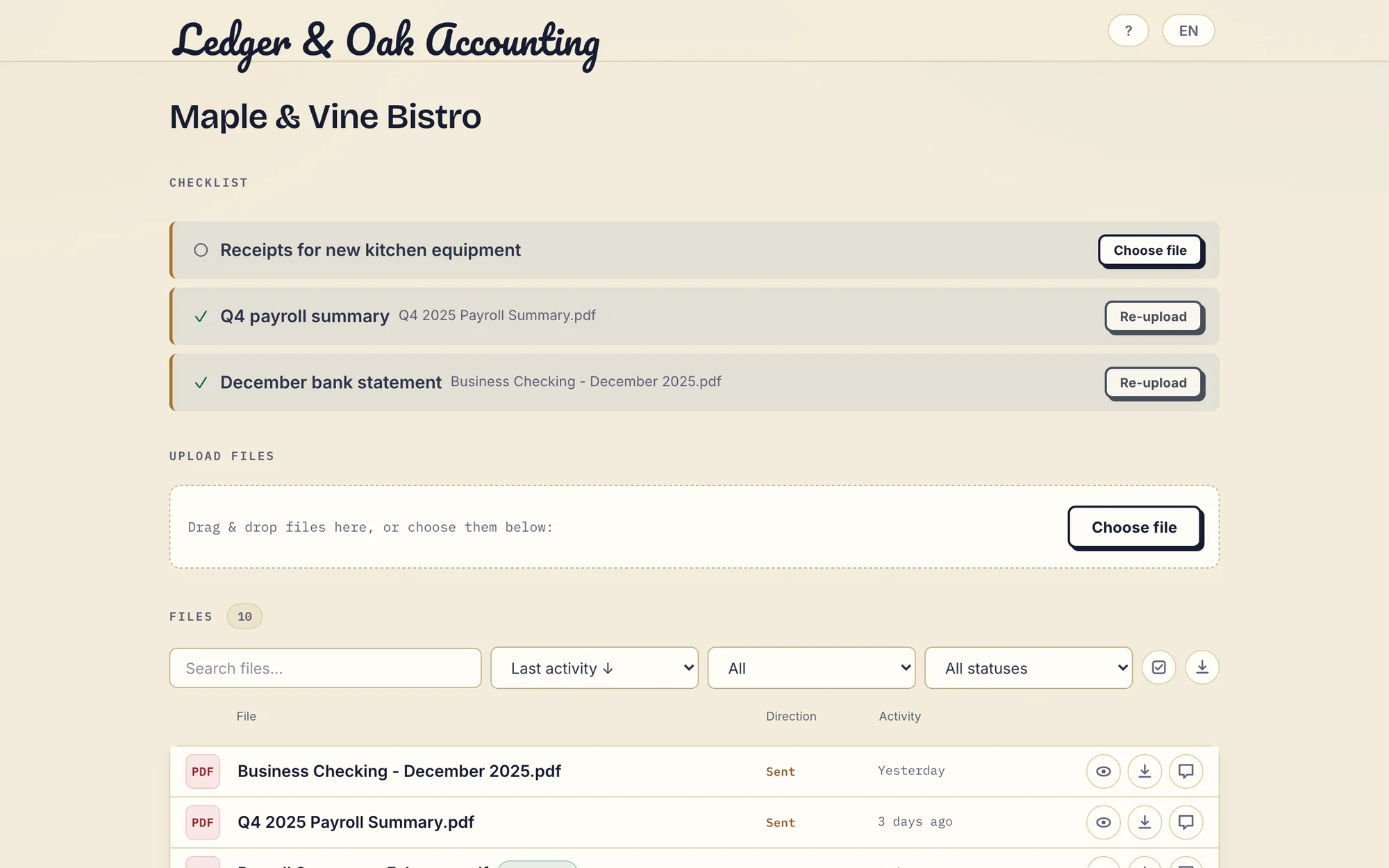
Real desktop portal with fictional Ledger & Oak Accounting and Maple & Vine Bistro data, showing the same request-and-return controls. Two requested files are supplied; the equipment receipts are still missing. Open the full-size portal view.
What Droplana does not do
- It has no CRM, billing, invoicing, payments or contract templates.
- It has no messaging, help centre or forms.
- It has no workflow automation and no native connectors. The only schedules are fixed: an unfinished checklist nudges the client after 7 days of inactivity and escalates to you after 14, and a due-date reminder is prepared two days before and on an item's due date, reaching the client with their next email, which can be later that day or the next day.
- It is not white-label: there is no custom domain or accent colour.
- Every team member can access every client; there are no permission roles.
- Its PDF signing is not a qualified electronic signature.
Who should choose which
Choose Assembly if you want CRM, billing, contracts, messages and files in one branded client experience, you will use most of it, and its plan structure fits your team and contact count.
Choose Droplana if your billing and contracts already work, your main friction is exchanging documents, and you want to add colleagues and clients without moving up a price tier for each. Clients sign PDFs in the browser, and checklists handle the requests.
The consultants page shows the portal in a small firm's daily work, and the client portal guide covers wider buying criteria.
Questions before you choose
Is Copilot the same product as Assembly?
Yes. The client portal product formerly called Copilot is now called Assembly, as the vendor explains in its Copilot-to-Assembly announcement. It is not related to GitHub Copilot or Microsoft Copilot.
What happens to the price when a second person joins the team?
When we checked Assembly's pricing page on 23 September 2026, Starter was 49 USD per month billed monthly (29 USD billed annually) for one internal user and 50 active contacts, and Professional was 149 USD per month billed monthly (90 USD billed annually) for three internal users and 500 active contacts. In Droplana, Solo (19 EUR per month plus tax) has 1 seat and Practice (49 EUR) has 5 seats, owner included, both with unlimited clients.
Does Droplana have billing or contracts like Assembly?
No. Droplana has no CRM, billing, invoicing or contract templates. It has in-browser PDF signing: you upload a PDF and an identified client signs it in the portal. It is not a qualified electronic signature. Keep your existing billing tools alongside it.
Can I run Droplana next to Assembly or another business platform?
Yes, mostly by hand. Droplana has no Assembly connector, so client details live in both tools and files move between them by upload and download. Test that handoff with one representative client before deciding.
Check our simple pricing (or start free)
Free covers 3 clients, 2 GB and files up to 100 MB. Each paid storage add-on costs EUR15/month or EUR150/year plus tax, adds 500 GB and raises the file limit to 5 GB.
The tools you need, on every plan.
Share files, leave comments, request documents with checklists and sign PDFs in your browser. Your logo is included too.
Clients never pay or create an account. EU hosting, encryption and data export included.
Save 2 months with annual billing
Free Start here
For your first 3 clients
€0/monthNo credit card required
- Just you
- 3 clients
- 2 GB storage
- Up to 100 MB per file
- Files kept for 6 months
Solo
For independent professionals
€19/month+ tax
€190/year+ tax
- Just you
- Unlimited clients
- 50 GB storage
- Up to 1 GB per file
- Email support
Practice
For small firms
€49/month+ tax
€490/year+ tax
- Team size: 5
- Unlimited clients
- 250 GB storage
- Up to 2 GB per file
- Priority support
Studio
For growing teams
€99/month+ tax
€990/year+ tax
- Team size: Unlimited
- Unlimited clients
- 1 TB storage
- Up to 5 GB per file
- Priority support
- Personal setup call
On Free, each file expires 180 days after upload. Your clients and their access stay active, so you can keep sharing new files. Active paid plans have no plan-imposed retention limit. Expiry settings, deletion and cancellation rules still apply; a persistent portal address does not guarantee permanent file availability. Team sizes include you. No setup fees or automatic overage charges. Prices exclude applicable tax.
Compare plan details
| Included | Free | Solo | Practice | Studio |
|---|---|---|---|---|
| Team size | Just you | Just you | 5 | Unlimited |
| Clients | 3 | Unlimited | Unlimited | Unlimited |
| Storage | 2 GB | 50 GB | 250 GB | 1 TB |
| Maximum file size | 100 MB | 1 GB | 2 GB | 5 GB |
| File retention | 180 days from upload | No limit | No limit | No limit |
| Your Droplana address | Includes a random suffix | Your chosen name | Your chosen name | Your chosen name |
| Data Processing Agreement | Standard | Standard | Countersigned available | Countersigned available |
| Support | Priority | Priority | ||
| Personal setup call | Not included | Not included | Not included | Included |
Need more storage?
Add 500 GB for €15/month + tax, or €150/year + tax. Each storage add-on also raises your maximum file size to 5 GB.
Available on all paid plans from your billing page. Add more than one for another 500 GB each. Your team size stays the same.
Related comparisons
Other client platforms are compared in Droplana vs SuiteDash, Droplana vs HoneyBook, Droplana vs Taskip and Droplana vs Clinked.