
Deliver work that's still there years later
Clients come back for their files months or years later, and by then the transfer link has expired. Give every client one private portal instead. On a paid plan the final files stay until you delete them, and contracts, shot lists and feedback live there too.
Droplana is a client document portal: each client gets one private, persistent portal for two-way file exchange, with per-file comments and no client account. For photographers and videographers, it is where the brief comes in and where final files stay after delivery.
Files that stay after delivery
On an active paid plan there is no plan-imposed retention limit. A client opens the same portal two years later, and the files are still there unless you deleted them.
Large files
Up to 2 GB per file on Practice and 5 GB on Studio or with a Storage add-on. Enough for full-resolution images, edited masters and most final films.
One portal per client
Each couple, family or brand client gets their own portal. New shoot for the same client? Same portal.
No more "can you resend?"
When a client wants the files again a year later, they don't need to ask. They open the portal they got at delivery.
Feedback on the file
Clients comment on a sneak peek or a draft cut, and mark it Approved or Rejected. No feedback scattered across email and chat.
No client accounts
Each client opens one private link and confirms their email once on a new device. No sign-up, no password, no app.
Why delivery is the hard part
- Files are large. Raw images and 4K video don't fit in email.
- Delivery comes in stages. Sneak peeks, drafts, edited finals, export variants.
- Clients return much later. A couple asks for the album files three years after the wedding. A brand asks for last year's campaign footage.
- Transfer links expire. The client forgot to download in time, so you upload everything again.
What you need is a place that handles large files and keeps them for as long as you and the client need them. The client portal guide covers what to compare.
A client portal for photographers, from brief to delivery
Keep shooting and editing the way you do now, in Lightroom, Capture One, DaVinci Resolve or Premiere. If you use a proofing gallery for picking favourites, keep it. Your public portfolio site stays where it is too.
Droplana is the client-facing layer around the shoot. It starts with the brief: send Product shoot - Delivery guide.pdf to explain what the client will receive and how to download it, and ask for Product shoot - Brief.pdf with the shot list, intended uses and reference material. The returned brief sits in the same portal as your guide.
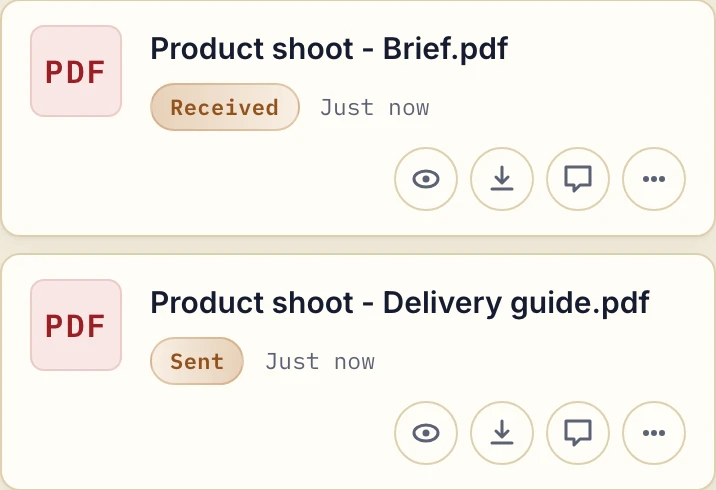
Actual product view with fictional shoot documents.
- Before the shoot. Upload the contract and have the client sign it in the portal. Add a document checklist for what you need from them: a shot list, venue details, reference images.
- During editing. Upload sneak peeks or a draft cut within your plan's file limit. The client comments on the file.
- Delivery. Upload the final files. The client downloads the files they need, or everything at once as a ZIP of up to 2 GB or 2,000 files. Larger sets download as a folder in Chrome or Edge.
- Years later. The client opens the same portal and downloads again.
Commercial clients can come back for another shoot in the same portal. Put dates and shoot names in filenames, because there are no project folders.
Agree how long delivery lasts
Tell clients how long you intend to keep their delivery available. On an active paid plan that is your decision: files stay until you delete them or set an expiry. Free keeps each file for up to 180 days from upload, and a cancelled plan has its own limits. Keep your own archive and backups, because Droplana is not archival storage.
Files are encrypted at rest with a key derived for each file, on servers in Germany. The security page explains how.
Who uses it
- Wedding photographers and videographers: contracts, timelines, edited gallery exports, the final film.
- Commercial and brand photographers: briefs, selects, edited deliverables and alternative crops, shoot after shoot in the same portal.
- Real estate photographers: listing photos, drone shots and walkthrough video per agent. Agents themselves use Droplana too, see the page for real estate.
- Family and portrait photographers: sneak peeks, full-resolution downloads, print files.
- Video editors and production studios: drafts, revisions, final renders in several formats.
When Droplana is not the right fit
- You want a proofing gallery where clients pick favourites visually, or an online print shop.
- You want contracts, invoicing and scheduling in one tool. Droplana has no invoicing or scheduling.
- You regularly deliver single files larger than 5 GB.
- You want a public portfolio. Client portals are private and not indexed.
Check our simple pricing (or start free)
Free covers 3 clients and 2 GB total storage. Solo is €19/month plus tax with unlimited clients and 50 GB; Practice is €49/month plus tax with 250 GB and 5 team members including the owner. Choose storage and per-file limits around your actual deliverables.
The tools you need, on every plan.
Share files, leave comments, request documents with checklists and sign PDFs in your browser. Your logo is included too.
Clients never pay or create an account. EU hosting, encryption and data export included.
Save 2 months with annual billing
Free Start here
For your first 3 clients
€0/monthNo credit card required
- Just you
- 3 clients
- 2 GB storage
- Up to 100 MB per file
- Files kept for 6 months
Solo
For independent professionals
€19/month+ tax
€190/year+ tax
- Just you
- Unlimited clients
- 50 GB storage
- Up to 1 GB per file
- Email support
Practice
For small firms
€49/month+ tax
€490/year+ tax
- Team size: 5
- Unlimited clients
- 250 GB storage
- Up to 2 GB per file
- Priority support
Studio
For growing teams
€99/month+ tax
€990/year+ tax
- Team size: Unlimited
- Unlimited clients
- 1 TB storage
- Up to 5 GB per file
- Priority support
- Personal setup call
On Free, each file expires 180 days after upload. Your clients and their access stay active, so you can keep sharing new files. Active paid plans have no plan-imposed retention limit. Expiry settings, deletion and cancellation rules still apply; a persistent portal address does not guarantee permanent file availability. Team sizes include you. No setup fees or automatic overage charges. Prices exclude applicable tax.
Compare plan details
| Included | Free | Solo | Practice | Studio |
|---|---|---|---|---|
| Team size | Just you | Just you | 5 | Unlimited |
| Clients | 3 | Unlimited | Unlimited | Unlimited |
| Storage | 2 GB | 50 GB | 250 GB | 1 TB |
| Maximum file size | 100 MB | 1 GB | 2 GB | 5 GB |
| File retention | 180 days from upload | No limit | No limit | No limit |
| Your Droplana address | Includes a random suffix | Your chosen name | Your chosen name | Your chosen name |
| Data Processing Agreement | Standard | Standard | Countersigned available | Countersigned available |
| Support | Priority | Priority | ||
| Personal setup call | Not included | Not included | Not included | Included |
Need more storage?
Add 500 GB for €15/month + tax, or €150/year + tax. Each storage add-on also raises your maximum file size to 5 GB.
Available on all paid plans from your billing page. Add more than one for another 500 GB each. Your team size stays the same.
Questions photographers ask
How large can photo and video files be?
Up to 1 GB per file on Solo, 2 GB on Practice and 5 GB on Studio. A Storage add-on on Solo or Practice raises the limit to 5 GB and adds 500 GB of storage. Free allows files up to 100 MB. Single files larger than 5 GB need a smaller export or another delivery method.
Will my clients still have access years later?
On an active Solo, Practice or Studio plan, yes: there is no plan-imposed file retention limit, so files stay until you delete them or set an expiry, and the client uses the same portal address. The Free plan keeps each file for up to 180 days after upload. Keep your own archive too, because a portal is not a backup.
Is there a gallery or proofing view?
No. Droplana is a file portal with per-file comments and Approved or Rejected status, which works for selects, revisions and final delivery. It has no favourites selection, timecoded annotation, public gallery or print shop. Keep your proofing platform for those, and use Droplana for briefs, contracts and final files.
Does Droplana handle contracts and invoicing?
Droplana has no invoicing. A contract can be uploaded as a PDF and signed in the portal with in-browser PDF signing, which records who signed and when, but it is not a qualified electronic signature. Keep your invoicing tool as it is.
Do my clients need an account?
No. Each client opens one private link. Under the default Strict setting they confirm their email on a new device, and the browser is then remembered for 90 days. There is no sign-up, no password and no app.
Check who we compare with
vs. Messaging Apps
Compare WhatsApp, Telegram and Slack with Droplana for client file exchange. See uploads, file comments, retention limits and when keeping chat makes sense.
vs. Google Drive, Dropbox & OneDrive
Compare your cloud-drive workflow with Droplana for client document requests, corrections and delivery. See the app, check the limits and try one client.
vs. Email
Compare email with a Droplana client portal for repeated document requests, corrections and returned work. See the real app and try one client exchange.