
Give client requirements and handover files a home.
Collect approved copy and requirements, clarify files with comments and return the handover guide.
Droplana is a client document portal for developers and small web studios. Each client gets one private portal where you collect requirements, copy and brand assets, and send back specifications and the handover guide. Clients need no account, password or app, and files are hosted in the EU.
The final page copy arrives as a Word file in one email, the logo in another, and a question about the contact form in chat. A client should not have to join your repository or issue tracker to send website copy or review a requirements document. Give those files one place per client and keep the code where it is.
A client portal for developers, from requirements to handover
1. Ask for named client inputs
Request the requirements document, approved page copy, brand assets and a list of hosting contacts in a document checklist. Explain the format and scope you need, such as “final copy for the Home, Services and Contact pages.”
Keep passwords, access tokens and private keys in your approved credential-sharing process. A hosting contact list should identify the service and responsible person, not contain login secrets.
2. Clarify the requirements on the file
Upload a named requirements PDF and ask a precise question in its comments: “In section 2, should the contact form send enquiries to one inbox or two?” Return a new export if the scope changes. Revision numbers are manual; Droplana does not diff requirements or convert comments into development issues.
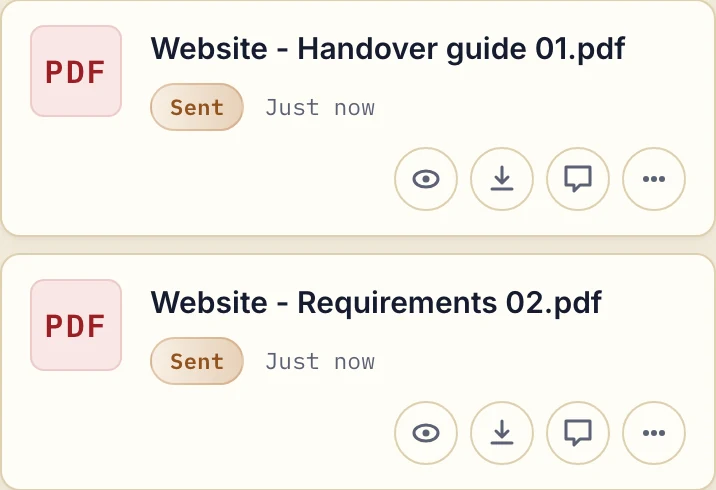
Actual app, fictional documents. The requirements and handover guide are uploaded files; they are not synced from a repository or generated from a deployment.
3. Hand over the documents the client will use
Upload the handover guide, maintenance responsibilities and any agreed exports. Explain who handles hosting, how to request changes and where authorized access is managed. The client can return to the same portal for a later document exchange.
Try this request: “Please upload the approved copy for [pages], brand assets and the name of your hosting contact. Leave questions on [requirements file]. We will use this portal for documents and keep code, issues and deployment in [existing tools].”
Keep the development workflow in your existing tools
Droplana does not host a Git repository, run builds, deploy code, track issues or sync files. Uploads and comments are the client handoff. If you want to automate your side of it, an automation tool can connect through the MCP server, and signed webhooks report uploads, comments and signatures. If the client has several projects, they share one portal; there are no project-specific permissions.
Start with one requirements file and one handover guide. Use the client instructions to explain access, or compare the exchange with email attachments.
Use the client portal buying guide to compare access, storage and document workflows.
Access, storage and a starting plan
Each client sees their own portal. Authorized business team members share access to the business's clients, files and comments. Files, comments and metadata are stored in Germany; read the security details and DPA against your requirements.
Free covers 3 clients, 2 GB total storage and files up to 100 MB. Solo starts at €19/month plus applicable tax, with unlimited clients, 50 GB storage and a 1 GB file limit. Choose a larger plan for bigger files or more team seats.
Free files are kept for up to 180 days after upload; the client portal does not expire with them. Active paid plans have no automatic age-based file expiry, but chosen expiry dates, deletion and subscription rules still apply.
The tools you need, on every plan.
Share files, leave comments, request documents with checklists and sign PDFs in your browser. Your logo is included too.
Clients never pay or create an account. EU hosting, encryption and data export included.
Save 2 months with annual billing
Free Start here
For your first 3 clients
€0/monthNo credit card required
- Just you
- 3 clients
- 2 GB storage
- Up to 100 MB per file
- Files kept for 6 months
Solo
For independent professionals
€19/month+ tax
€190/year+ tax
- Just you
- Unlimited clients
- 50 GB storage
- Up to 1 GB per file
- Email support
Practice
For small firms
€49/month+ tax
€490/year+ tax
- Team size: 5
- Unlimited clients
- 250 GB storage
- Up to 2 GB per file
- Priority support
Studio
For growing teams
€99/month+ tax
€990/year+ tax
- Team size: Unlimited
- Unlimited clients
- 1 TB storage
- Up to 5 GB per file
- Priority support
- Personal setup call
On Free, each file expires 180 days after upload. Your clients and their access stay active, so you can keep sharing new files. Active paid plans have no plan-imposed retention limit. Expiry settings, deletion and cancellation rules still apply; a persistent portal address does not guarantee permanent file availability. Team sizes include you. No setup fees or automatic overage charges. Prices exclude applicable tax.
Compare plan details
| Included | Free | Solo | Practice | Studio |
|---|---|---|---|---|
| Team size | Just you | Just you | 5 | Unlimited |
| Clients | 3 | Unlimited | Unlimited | Unlimited |
| Storage | 2 GB | 50 GB | 250 GB | 1 TB |
| Maximum file size | 100 MB | 1 GB | 2 GB | 5 GB |
| File retention | 180 days from upload | No limit | No limit | No limit |
| Your Droplana address | Includes a random suffix | Your chosen name | Your chosen name | Your chosen name |
| Data Processing Agreement | Standard | Standard | Countersigned available | Countersigned available |
| Support | Priority | Priority | ||
| Personal setup call | Not included | Not included | Not included | Included |
Need more storage?
Add 500 GB for €15/month + tax, or €150/year + tax. Each storage add-on also raises your maximum file size to 5 GB.
Available on all paid plans from your billing page. Add more than one for another 500 GB each. Your team size stays the same.
Questions before the first handoff
Does Droplana connect to a repository or issue tracker?
No. There is no code repository, issue tracking or connector to your development tools, so keep development work where it is.
Can I use it to send passwords and API keys?
Droplana is not a secrets vault. Use your approved credential-sharing process for passwords, tokens and private keys; handover documents can identify systems and responsible contacts.
Does the client need an account to send requirements?
No. Under the default Strict security level, the client confirms their email on a new device and then uploads copy and requirements without creating an account. Several email addresses on one client, such as a marketing lead and an owner, share the same portal and files.
Will the handover guide still be there next year?
On a paid plan, yes, unless you set an expiry date or delete it: paid plans have no plan limit on how long files are kept. On Free, each file is kept for up to 180 days after upload, while the client portal itself stays.