
A shared Notion page, or a client portal for documents?
Notion combines pages, databases and forms for collaborative work. Droplana gives clients a document portal with uploads, file comments and in-browser PDF signing.
Droplana is a client document portal: one private, permanent portal per client for two-way document exchange, with no client account. Droplana vs Notion is a choice between a document exchange and a workspace you shape around client work. Notion can support client pages and intake forms; the useful test is how your client sends a file back and finds the finished work later.
Published by Droplana. Vendor documentation checked 21 September 2026. Examples are fictional, not evidence of faster setup or better client adoption.
Droplana vs Notion for client requests
Notion is a good fit for shared notes, project plans and databases. Its sharing guide distinguishes guest access from public links: visitors must log in to comment on or edit a page. Its forms documentation also supports responses from people without Notion accounts when a form is shared with anyone on the web. So Notion can collect client information; the question is what the exchange looks like after that.
| Document job | Notion | Droplana |
|---|---|---|
| Request information | Build a page, database or form | Name missing documents in a client portal |
| Receive files | Page attachments with suitable permissions; test file fields in your chosen form | Client uploads, including phone photos, when enabled |
| Client access | Page editing/commenting requires login; public form responses can be account-free | No account; new-device email verification by default |
| Track missing work | Tasks, database properties and reminders you configure | Document checklist with due dates and fixed reminders |
| Discuss a document | Page or block comments | Comments attached to the uploaded file |
| File limits | Free: 5 MB per upload; check paid limits for the upload method | 100 MB Free; 1, 2 or 5 GB by paid plan |
| Pricing | Per-member paid plans; account for guest allowances and required features | Flat business plans; numbers below |
| Data location | Default US hosting; eligible Enterprise regional storage options | Files, comments and metadata on Hetzner in Germany |
Notion has reminders for people, tasks and pages. Its data residency policy includes eligible Enterprise EU storage for specified data at rest, with exclusions for other data and processing. Location alone does not decide whether either product meets your obligations.
Where a shared page gets awkward
Notion is built around pages your team designs. Used as a client portal, a few things need care.
- The client sees your structure. A shared page sits inside a workspace built for your team. Clients who do not use Notion often do not know where to click.
- Sharing is set per page. Sharing the wrong page can expose more than you meant, and with many clients someone has to check each one.
- Ending access is per page too. You remove the client from each page you shared. In Droplana you revoke the client's portal access once, effective immediately.
- Files are secondary. Large files, many scanned documents or signed PDFs are not what pages are designed for.
None of this matters much if the relationship is shared planning and a few links. It matters when documents move every month.
Getting a signed proposal back shows the difference. With a Notion page, the client downloads the PDF, signs it elsewhere and sends it back. In Droplana, a verified client signs the PDF in the browser, and the signed copy is saved next to the original.
Test the intake and the return visit
Use a fictional consultancy engagement. Request process documentation, a system access list and a cost breakdown, follow up on the missing cost breakdown, then return a recommendation report.
- In Notion: prepare a client page and an intake form or attachment area. Test the exact file field, login requirement and response-editing permissions. Then return a report through the shared page and check what that client can see.
- In Droplana: add the client, enable uploads and add the three documents as checklist items. The client verifies access and uploads each file, or a phone photo, into the item it belongs to.
- Finish the exchange: comment on a file that needs correcting, receive the corrected copy as a new upload and upload the report. If a PDF needs signing, try it with an identified client session.
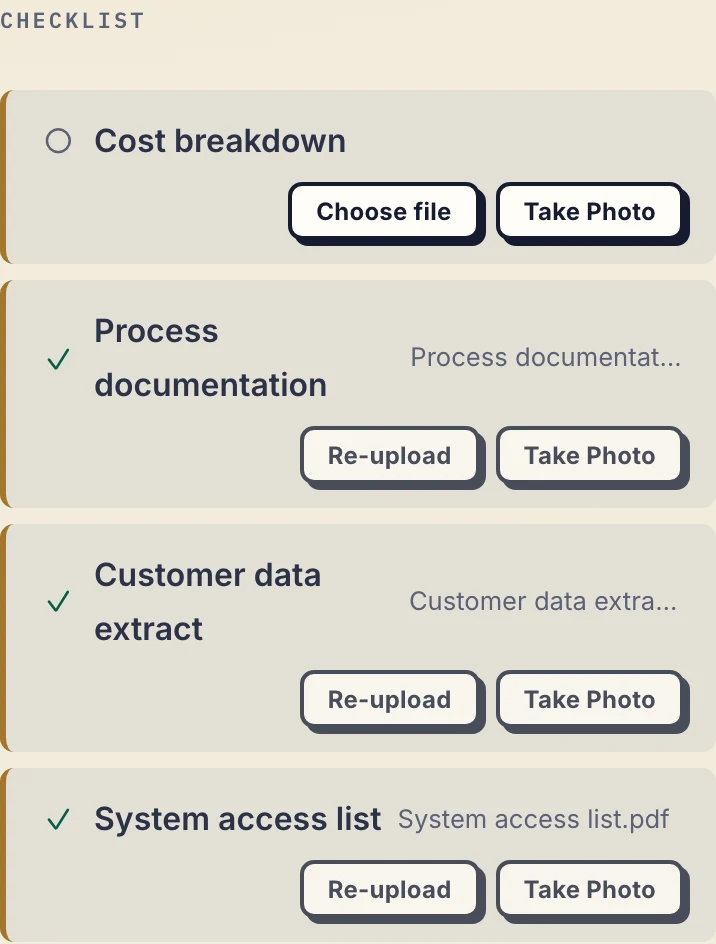
Real Droplana app with fictional consulting data: three documents have arrived and the cost breakdown is still missing. Not a customer result. Open the full-size checklist.
A form submission and a continuing place to exchange files solve related needs. Check both before deciding. This introduction to client portals explains the distinction.
A document checklist can carry optional due dates. A due-date reminder is prepared two days before and on the date, reaches the client with their next email, which can be later that day or the next day, and can be switched off. Separately, enabled inactivity reminders nudge the client after 7 days with missing items and notify the business after 14 days. These fixed schedules do not provide task assignment or branching workflows.
Price the workspace you would use
For a three-person consultancy with 30 clients, use Notion's current pricing to price three members and check whether those clients fit the chosen guest allowance. Include any form, automation or regional-hosting requirements; do not count every client as a paid member by default. Droplana Practice costs EUR49/month or EUR490/year plus tax for up to five team members, unlimited clients and 250 GB. Keeping Notion as well adds a subscription rather than replacing its page and database features.
What Droplana does not do
It has no editable pages, wiki, databases, calendar, project tasks or live document collaboration. It has no Notion connector. Create documents elsewhere, upload them, and copy information between systems manually.
No client signup does not mean no verification. Strict access, the default, verifies the client's email on a new device and remembers that browser for 90 days. PDF signing needs an identified email, Google or Microsoft session; a bare link cannot sign. It saves a new signed PDF and keeps the original. This is not qualified signing, identity verification beyond login or notarisation.
File status is Approved, Rejected or unset, changeable by either side. A rejection does not remove the file. Comments are visible to the business owner, authorised team members and that client. Every business team member can access all its clients; there are no internal permission groups. Revoking portal access cannot recall a downloaded copy.
Who should choose which
Choose Notion when the client needs to contribute to a shared page, plan or database and your configured intake works for them. Choose Droplana when the recurring job is requesting files, commenting on a return and delivering documents without client signup. Compare your actual workflow using the client portal guide.
Droplana prices and limits
All allowances apply to one business; storage is shared across its clients. Team size includes the owner. Paid prices below exclude tax.
| Plan | Monthly / annual price | Clients / team size | Total storage / maximum file |
|---|---|---|---|
| Free | EUR0 | 3 / 1 | 2 GB / 100 MB |
| Solo | EUR19 / EUR190 | Unlimited / 1 | 50 GB / 1 GB |
| Practice | EUR49 / EUR490 | Unlimited / 5 | 250 GB / 2 GB |
| Studio | EUR99 / EUR990 | Unlimited / unlimited | 1 TB / 5 GB |
Free files expire up to 180 days after upload; clients, portal access and the Free account remain active. Active paid plans have no plan-imposed retention limit, but chosen expiry, deletion and cancellation rules still apply. A persistent portal is not a permanent archive. Each paid-plan storage add-on costs EUR15/month or EUR150/year plus tax, adds 500 GB and raises the file ceiling to 5 GB. There is no overage billing: reaching capacity blocks new uploads, not access to existing files.
The tools you need, on every plan.
Share files, leave comments, request documents with checklists and sign PDFs in your browser. Your logo is included too.
Clients never pay or create an account. EU hosting, encryption and data export included.
Save 2 months with annual billing
Free Start here
For your first 3 clients
€0/monthNo credit card required
- Just you
- 3 clients
- 2 GB storage
- Up to 100 MB per file
- Files kept for 6 months
Solo
For independent professionals
€19/month+ tax
€190/year+ tax
- Just you
- Unlimited clients
- 50 GB storage
- Up to 1 GB per file
- Email support
Practice
For small firms
€49/month+ tax
€490/year+ tax
- Team size: 5
- Unlimited clients
- 250 GB storage
- Up to 2 GB per file
- Priority support
Studio
For growing teams
€99/month+ tax
€990/year+ tax
- Team size: Unlimited
- Unlimited clients
- 1 TB storage
- Up to 5 GB per file
- Priority support
- Personal setup call
On Free, each file expires 180 days after upload. Your clients and their access stay active, so you can keep sharing new files. Active paid plans have no plan-imposed retention limit. Expiry settings, deletion and cancellation rules still apply; a persistent portal address does not guarantee permanent file availability. Team sizes include you. No setup fees or automatic overage charges. Prices exclude applicable tax.
Compare plan details
| Included | Free | Solo | Practice | Studio |
|---|---|---|---|---|
| Team size | Just you | Just you | 5 | Unlimited |
| Clients | 3 | Unlimited | Unlimited | Unlimited |
| Storage | 2 GB | 50 GB | 250 GB | 1 TB |
| Maximum file size | 100 MB | 1 GB | 2 GB | 5 GB |
| File retention | 180 days from upload | No limit | No limit | No limit |
| Your Droplana address | Includes a random suffix | Your chosen name | Your chosen name | Your chosen name |
| Data Processing Agreement | Standard | Standard | Countersigned available | Countersigned available |
| Support | Priority | Priority | ||
| Personal setup call | Not included | Not included | Not included | Included |
Need more storage?
Add 500 GB for €15/month + tax, or €150/year + tax. Each storage add-on also raises your maximum file size to 5 GB.
Available on all paid plans from your billing page. Add more than one for another 500 GB each. Your team size stays the same.
Questions before choosing
Can Notion collect information from clients without accounts?
Yes. Notion forms shared with anyone on the web can collect responses from people who do not use Notion. Commenting on or editing a shared Notion page requires login. Test your form's file fields and the client's return access separately.
Does Droplana replace Notion or connect to it?
No. Droplana has no editable pages, wiki, databases, project plans or Notion integration. It handles client documents alongside other tools, with manual handoffs and separate subscriptions.
Do clients need an account to use Droplana?
No. Clients use their portal in a browser with no Droplana account or password. Strict access, the default, verifies their email on a new device and remembers that browser for 90 days. PDF signing requires an identified session, not a bare link.
Is there a file size limit in Notion or Droplana?
Yes, in both. Notion's Free plan allows 5 MB per uploaded file; check its paid limits for the upload method you use. Droplana allows 100 MB per file on Free, 1 GB on Solo, 2 GB on Practice and 5 GB on Studio. A storage add-on on Solo or Practice raises the limit to 5 GB.
Related comparisons
For project collaboration, see Droplana vs Basecamp. For a branded workspace with tasks and chat, see Droplana vs Clinked. For broader client platforms, see SuiteDash alternatives. The consultants page shows a typical document exchange.