
Keep the design revision and the client’s feedback together.
Send concepts, collect brand assets and return the next revision through one portal per client. Keep visual annotation and proofing in your design tools.
Droplana is a client portal for designers to send concepts and final files, receive brand assets and keep feedback on the file being discussed. Each client has one private, persistent portal with no signup.
A Drive link for the files, a Figma link for the prototype, a chat thread for feedback and an email for the logo. By Round 3, nobody is sure which "final" the client approved. One portal per client keeps the concepts, the replies and the returned assets together.
Feedback on the file
Clients comment on the concept they mean, not in a separate email. While a thread is open, replies appear within a few seconds.
Rounds stay findable
Files cannot be overwritten. Round 3 is a new file, and Rounds 1 and 2 are still there if the client wants to go back.
Assets from the client
A checklist asks for the logo files, fonts and copy you need. The client sees what is missing and gets a reminder after 7 quiet days.
Handover in the same place
By the end of the project, the client already knows the portal. Final files and exports go where the concepts went.
A client portal for designers, from brief to revision
Ask the client for their logo, fonts, copy and product photographs. Upload an exported concept as Homepage Concepts - Round 2.pdf and identify the decision you need. The client comments on that PDF; you upload the next round as a new, clearly named file.
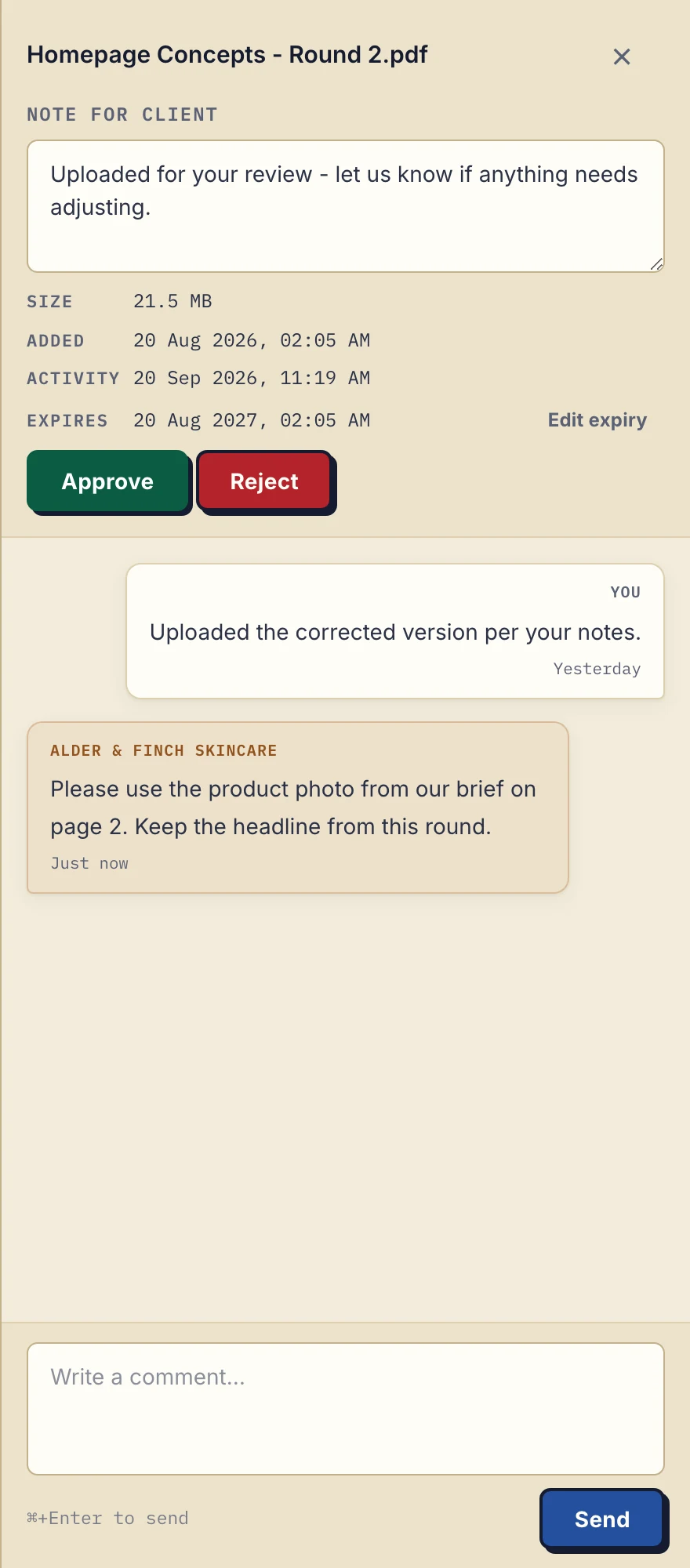
Actual product view with the fictional Alder & Finch Skincare client. The request refers to page 2 in text; it is not an annotation pinned to the design.
In this example, the client asks for a different product photo while keeping the headline. Reply on the file, make the change in your design application, then upload Round 3. Earlier rounds remain separate files. Tell the client which round to review; Droplana does not choose it for them.
From client assets to final delivery
- Collect the brief. Use a document checklist for the copy, brand guidelines and images needed to begin.
- Send concepts. Export from Figma, Adobe or Affinity. A prototype link can go in a comment on a related PDF; the external tool's sharing settings still control access.
- Review the named file. The client leaves comments and can mark it Approved or Rejected. Either side can change or clear the status, so keep any formal review gate in your own process.
- Deliver the agreed files. Upload source files and exports within your plan's limits. ZIP downloads support up to 2 GB or 2,000 files; larger sets need folder download in a Chromium browser.
Brand designers can share discovery documents and final brand systems. Web designers can exchange wireframes and handover specifications. Packaging designers can send dielines and renders. For team delivery, see Droplana for agencies.
Check the fit before moving a project
Feedback is text attached to a file. There are no pinned image annotations, side-by-side comparisons or automatic version stacks, so keep your proofing tool if those are part of your review process. A client with several projects still has one portal, without project folders or project-level permissions. Use filenames to distinguish jobs and rounds. There is no document editing, presentation tool, real-time chat or connector to your design software.
Your logo can appear in the portal on every plan. There is no custom domain or custom accent colour, and a small Droplana footer remains. Files are stored in Germany and encrypted at rest per file; the security page explains the access model.
If briefs and revision exports currently live in shared folders, see the cloud-drive comparison. The client portal guide covers what to check when choosing a client-facing exchange alongside your design tools.
Try one concept and one reply
Send a sample PDF to one client and ask for a comment on it. Free includes 3 clients, 2 GB storage and 100 MB per file. Solo costs €19/month plus tax for unlimited clients, 50 GB and 1 GB per file. Practice supports 5 team members including the owner; Studio has unlimited team size.
Questions before you start
Can clients leave feedback and approve designs?
Yes. Clients leave text comments on individual files, and either side can set, change or clear Approved or Rejected status. There is no visual annotation, side-by-side comparison or enforced review gate.
Can I share Figma links?
Yes. Put a link in a comment on a related file, such as an exported PDF. Figma sharing settings decide whether the client can open the linked design; there is no Figma integration.
How large can source files be?
Free allows 100 MB per file, Solo 1 GB, Practice 2 GB and Studio 5 GB. Studio suits large source files and high-resolution exports. A Storage addon on a paid plan adds 500 GB of storage and raises the file limit to 5 GB.
How long do final files remain available?
On paid plans, final files stay until you set an expiry date or delete them, so a client coming back months later for the logo files finds them in the same portal. Free keeps each file for up to 180 days from upload.
Choose a plan for your document exchange
The tools you need, on every plan.
Share files, leave comments, request documents with checklists and sign PDFs in your browser. Your logo is included too.
Clients never pay or create an account. EU hosting, encryption and data export included.
Save 2 months with annual billing
Free Start here
For your first 3 clients
€0/monthNo credit card required
- Just you
- 3 clients
- 2 GB storage
- Up to 100 MB per file
- Files kept for 6 months
Solo
For independent professionals
€19/month+ tax
€190/year+ tax
- Just you
- Unlimited clients
- 50 GB storage
- Up to 1 GB per file
- Email support
Practice
For small firms
€49/month+ tax
€490/year+ tax
- Team size: 5
- Unlimited clients
- 250 GB storage
- Up to 2 GB per file
- Priority support
Studio
For growing teams
€99/month+ tax
€990/year+ tax
- Team size: Unlimited
- Unlimited clients
- 1 TB storage
- Up to 5 GB per file
- Priority support
- Personal setup call
On Free, each file expires 180 days after upload. Your clients and their access stay active, so you can keep sharing new files. Active paid plans have no plan-imposed retention limit. Expiry settings, deletion and cancellation rules still apply; a persistent portal address does not guarantee permanent file availability. Team sizes include you. No setup fees or automatic overage charges. Prices exclude applicable tax.
Compare plan details
| Included | Free | Solo | Practice | Studio |
|---|---|---|---|---|
| Team size | Just you | Just you | 5 | Unlimited |
| Clients | 3 | Unlimited | Unlimited | Unlimited |
| Storage | 2 GB | 50 GB | 250 GB | 1 TB |
| Maximum file size | 100 MB | 1 GB | 2 GB | 5 GB |
| File retention | 180 days from upload | No limit | No limit | No limit |
| Your Droplana address | Includes a random suffix | Your chosen name | Your chosen name | Your chosen name |
| Data Processing Agreement | Standard | Standard | Countersigned available | Countersigned available |
| Support | Priority | Priority | ||
| Personal setup call | Not included | Not included | Not included | Included |
Need more storage?
Add 500 GB for €15/month + tax, or €150/year + tax. Each storage add-on also raises your maximum file size to 5 GB.
Available on all paid plans from your billing page. Add more than one for another 500 GB each. Your team size stays the same.