
Only the client document portal, not the whole platform
SuiteDash puts a CRM, projects, invoicing, forms and a client portal into one platform you configure for your business. If you will use most of it, that can replace several tools. If you already have tools you like and mainly need a place to send and receive documents, Droplana does that one job: one private portal per client, with no client accounts.
Published by Droplana, one of the products compared. SuiteDash's pricing page checked September 23, 2026; its feature list checked September 21, 2026. The screenshots use fictional data and are not customer results.
Droplana vs SuiteDash is a scope decision. SuiteDash is an all-in-one business platform: CRM, projects, invoicing, forms, file sharing and a branded client portal. Droplana is a client document portal for firms that already have those tools and need one place per client to collect and return documents.
What SuiteDash does well
SuiteDash covers a lot of ground in one subscription. A small business can manage leads, send proposals and invoices, run projects and give clients a branded portal, with the data connected. Its white-label options let the portal carry your own brand, and higher tiers add automation. For a business starting from scratch, or one that wants to replace several subscriptions with one, that breadth is the main reason to choose it.
SuiteDash can cost less
SuiteDash pricing, checked September 23, 2026, lists Start at USD19 a month or USD180 a year with unlimited staff and 100 GB of storage. Thrive is USD480 a year with 500 GB, and Pinnacle is USD960 a year with 2 TB and the full automation toolkit. Every plan lists unlimited staff and unlimited clients.
Droplana Practice is EUR490 a year plus tax for five seats and 250 GB. For a three-person team that only needs the entry tier, SuiteDash Start costs less. These are different currencies and different feature sets, and there is no basis to call Droplana the cheaper option by default. The question is not price. It is whether you want the suite.
Droplana vs SuiteDash side by side
| SuiteDash | Droplana | |
|---|---|---|
| Built for | Running a business in one platform | Exchanging documents with clients |
| CRM, projects, invoicing, scheduling | Included | Not available |
| Client portal | One module among many | The whole product, one private portal per client |
| Client access | Client login to the portal | No account; email confirmation on a new device by default |
| Asking for documents | Forms and other modules you configure | Document checklist with optional due dates and fixed reminders |
| Comments and approval | Available in several modules | Comments on each file, and file status (Approved or Rejected) |
| Automation | Plan-dependent, with FLOW automation on Pinnacle | Fixed checklist reminders only |
| Branding | White-label options | Your logo on every plan; no custom domain or accent colour |
| Integrations | Available | MCP server and signed webhooks; no native connectors |
| Staff | Unlimited on every plan | 1 seat on Solo, 5 on Practice, unlimited on Studio |
| Data location | Check SuiteDash's own documentation | Hetzner, Germany; files encrypted at rest per file |
| Pricing | Start USD180, Thrive USD480, Pinnacle USD960 a year | Free for 3 clients; Solo 19 EUR, Practice 49 EUR, Studio 99 EUR a month plus tax |
SuiteDash's plans and features change. Check suitedash.com for current details.
Try the document task you repeat
Illustrative trial. Take a consulting engagement. Create a fictional client portal and add a checklist for the source documents you need: process documentation, a customer data extract, a system access list and a cost breakdown. Open the portal on a separate device, upload the requested files, then send the report back and leave a comment on it. Check what each side can see before inviting a real client.
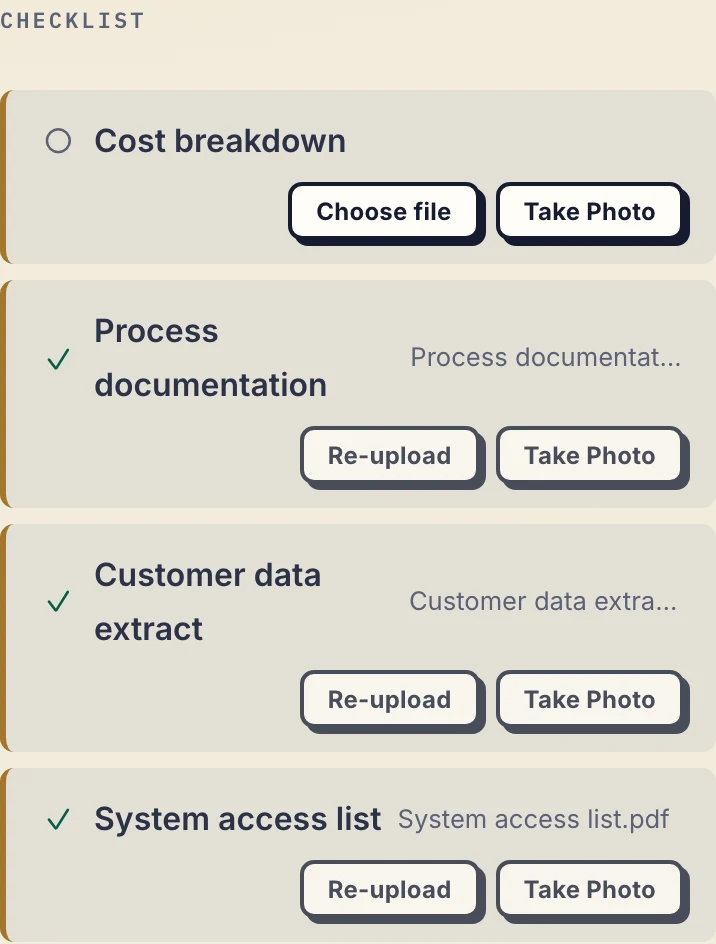
Real Droplana app with fictional client data: the missing cost breakdown stays visible beside the completed inputs.
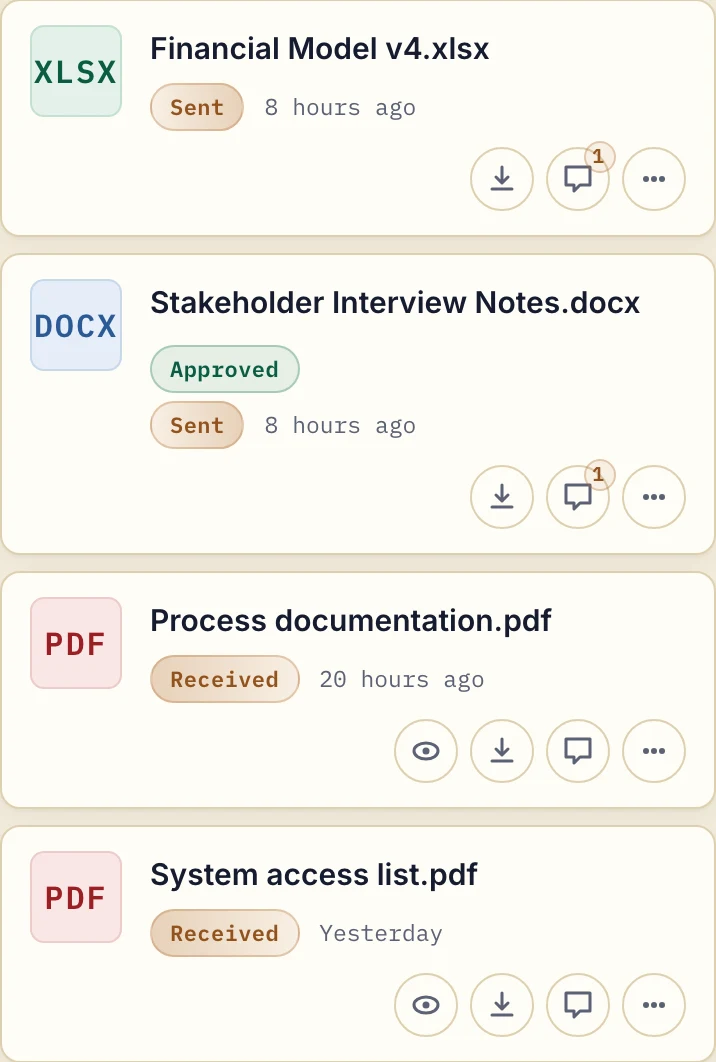
The same fictional engagement from the delivery side: files sent to the client and files received, with comments on each.
If the client does nothing on an incomplete checklist for seven days, they get an email naming the missing items; after fourteen days the reminder comes to you instead. Checklist items can also carry optional due dates. A due-date reminder is prepared two days before and on the date and reaches the client with their next email, which can be later that day or the next day.
Either side can set or clear the Approved or Rejected status on a file. It is not a formal project sign-off chain. Booking, scheduling and invoicing stay in your existing tools.
Keep SuiteDash if the connected modules matter
Test the whole client journey from enquiry to payment. If the CRM record drives your projects, forms and billing, keeping that flow connected may matter more than a simpler portal. Choose Droplana when a separate document exchange fits your process, including manual handoffs and all staff seeing all clients. See SuiteDash alternatives if you want another suite on the shortlist.
What Droplana does not do
- No CRM, invoicing, proposals, scheduling or project management.
- No white label. Your logo appears, but there is no custom domain or accent colour.
- No native connectors and no workflow builder. Beyond the fixed checklist reminders, automation means connecting your own AI assistant or automation tool through the MCP server.
- No forms. Clients send files, not form answers.
- No staff roles. Every team member can access every client.
- Not a qualified e-signature. In-browser signing needs an identified email, Google or Microsoft session. It saves a new signed file and keeps the original; it is not qualified electronic signing or notarisation.
- Not an archive. Free keeps each file for up to 180 days after upload. Active paid plans have no plan-imposed retention limit.
Who should choose which
Choose SuiteDash if you want one platform for most of your business, you will use the CRM, invoicing and project modules, full branding matters, and you have time to set it up.
Choose Droplana if you already have tools for billing, scheduling and projects, your main friction is getting documents to and from clients, and you want clients to open their portal without creating an account. Teams on Practice (5 seats) and Studio (unlimited team members) share one dashboard, and a document checklist handles the chasing. Files, comments and metadata stay on Hetzner infrastructure in Germany, and a DPA is available on every plan.
For a wider view of what to look for, see the client portal guide.
Questions before you choose
Does Droplana have invoicing or CRM features like SuiteDash?
No. Droplana has no CRM, invoicing, scheduling or project management. It is a client document portal with document checklists, per-file comments, file status and in-browser PDF signing. You keep your existing tools for the rest, and nothing syncs between them.
Is SuiteDash cheaper than Droplana?
It can be. SuiteDash's pricing page, checked on 23 September 2026, lists Start at 19 USD a month or 180 USD a year with unlimited staff and 100 GB, Thrive at 480 USD a year and Pinnacle at 960 USD a year. Droplana Practice is 490 EUR a year plus tax for five seats and 250 GB. The currencies and feature sets differ, so there is no basis to call Droplana the cheaper option.
Do clients need to create a Droplana account?
No. Each client opens their own private portal with no account or password. Strict mode, the default, verifies their email on a new device and remembers the browser for 90 days. PDF signing requires an identified session even when a permanent portal link is enabled.
Can Droplana be white-labelled like SuiteDash?
No. You can upload your logo on every plan, including Free, and it replaces the Droplana mark in your dashboard and every client portal. There is no custom domain and no accent colour, and a small Droplana line stays in the footer.
Plans and limits
Paid plans include unlimited clients: Solo EUR19/month or EUR190/year, Practice EUR49/month or EUR490/year, Studio EUR99/month or EUR990/year, plus tax. Storage is 50 GB, 250 GB and 1 TB. Free covers 3 clients, 2 GB and files up to 100 MB. Each paid storage add-on costs EUR15/month or EUR150/year plus tax, adds 500 GB and raises the file limit to 5 GB.
The tools you need, on every plan.
Share files, leave comments, request documents with checklists and sign PDFs in your browser. Your logo is included too.
Clients never pay or create an account. EU hosting, encryption and data export included.
Save 2 months with annual billing
Free Start here
For your first 3 clients
€0/monthNo credit card required
- Just you
- 3 clients
- 2 GB storage
- Up to 100 MB per file
- Files kept for 6 months
Solo
For independent professionals
€19/month+ tax
€190/year+ tax
- Just you
- Unlimited clients
- 50 GB storage
- Up to 1 GB per file
- Email support
Practice
For small firms
€49/month+ tax
€490/year+ tax
- Team size: 5
- Unlimited clients
- 250 GB storage
- Up to 2 GB per file
- Priority support
Studio
For growing teams
€99/month+ tax
€990/year+ tax
- Team size: Unlimited
- Unlimited clients
- 1 TB storage
- Up to 5 GB per file
- Priority support
- Personal setup call
On Free, each file expires 180 days after upload. Your clients and their access stay active, so you can keep sharing new files. Active paid plans have no plan-imposed retention limit. Expiry settings, deletion and cancellation rules still apply; a persistent portal address does not guarantee permanent file availability. Team sizes include you. No setup fees or automatic overage charges. Prices exclude applicable tax.
Compare plan details
| Included | Free | Solo | Practice | Studio |
|---|---|---|---|---|
| Team size | Just you | Just you | 5 | Unlimited |
| Clients | 3 | Unlimited | Unlimited | Unlimited |
| Storage | 2 GB | 50 GB | 250 GB | 1 TB |
| Maximum file size | 100 MB | 1 GB | 2 GB | 5 GB |
| File retention | 180 days from upload | No limit | No limit | No limit |
| Your Droplana address | Includes a random suffix | Your chosen name | Your chosen name | Your chosen name |
| Data Processing Agreement | Standard | Standard | Countersigned available | Countersigned available |
| Support | Priority | Priority | ||
| Personal setup call | Not included | Not included | Not included | Included |
Need more storage?
Add 500 GB for €15/month + tax, or €150/year + tax. Each storage add-on also raises your maximum file size to 5 GB.
Available on all paid plans from your billing page. Add more than one for another 500 GB each. Your team size stays the same.
Related comparisons
Similar platforms are compared in Droplana vs HoneyBook, Droplana vs Assembly and Droplana vs Taskip. The agencies page shows how the portal fits next to the tools an agency already uses.