
A business suite or a document portal?
HoneyBook connects proposals, contracts and billing. Droplana handles recurring file exchange while you keep those business processes elsewhere.
Your proposals, contracts and invoices already run in an accounting or billing tool. What still goes wrong is the files: the client's brief, their photos, the signed form, the draft you send back. Droplana vs HoneyBook starts with that question. Droplana gives each client a private portal for sending documents and receiving files back, with no client account. HoneyBook suits a service business that wants sales and billing in one platform, with a portal inside it.
Published by Droplana, one of the products compared. Vendor scope checked September 21, 2026. Illustrative trials and product captures are not customer results.
What HoneyBook does well
HoneyBook connects the steps of winning and billing a client. A lead books a call, receives a proposal, signs a contract and pays an invoice in one flow, with templates for each step. For photographers, planners, designers and similar businesses that sell projects to individuals, that flow can save a lot of admin. If most of your client work is that sales and billing cycle, HoneyBook is built for you.
When a suite is more than you need
- You already have billing. If invoicing already runs in your accounting software, a second invoicing system adds work instead of removing it.
- Your work is document-heavy. Accounting, legal, financial and mortgage work means receiving IDs, statements and signed forms again and again, not one proposal and one contract per project.
- You work outside HoneyBook's main market. Check whether its payment options, tax handling and data location fit your country before you commit.
- You pay for features you do not use. If you mostly use the portal, most of the subscription goes to the rest.
Droplana vs HoneyBook: what the comparison covers
HoneyBook's US pricing page, checked September 21, 2026, lists Starter at USD29/month billed yearly, with unlimited clients/projects, proposals, contracts, invoices and a portal. Essentials adds scheduling and automations. Confirm country eligibility, payment charges, taxes and the selected billing term before buying.
| Requirement | HoneyBook | Droplana |
|---|---|---|
| Sales and billing | Starter includes proposals, contracts, invoices and payments | No proposals, invoices or payments |
| Scheduling/automation | Essentials adds scheduler and automations | No appointment booking or workflow builder |
| Client documents | Portal within the wider client/project flow | One portal per client; two-way files and checklist |
| Signing | Contracts within the business platform | In-browser signing of your own PDFs; no templates |
| Access | Evaluate the client portal flow with a representative client | No client signup; Strict verifies email on a new device |
| Hosting | Confirm vendor data location and terms | Hetzner, Germany; operated by an EU company in Croatia; DPA on all plans |
Compare costs for the same business
Illustrative scenario: one independent consultant with 20 active clients, annual billing, and an existing invoicing tool. HoneyBook Starter is USD29 × 12 = USD348/year at the checked US list price. Droplana Solo is EUR190/year plus tax, with one seat, unlimited clients, 50 GB and files up to 1 GB. These are different currencies and feature sets, not a percentage saving. If you need HoneyBook scheduling or automation, price Essentials instead; Solo does not replace those functions.
Try the complete document exchange
Keep the accepted proposal and invoice in your business system. Request the client's brief and background files in Droplana, then send a draft PDF back. The client opens the portal, comments on a specific file and receives the revised PDF there. The fictional creative example below shows a request to change an image on page 2. Approved/Rejected is an editable file marker, not payment authorization or a project milestone. File final records back into your business system manually; there is no HoneyBook integration.
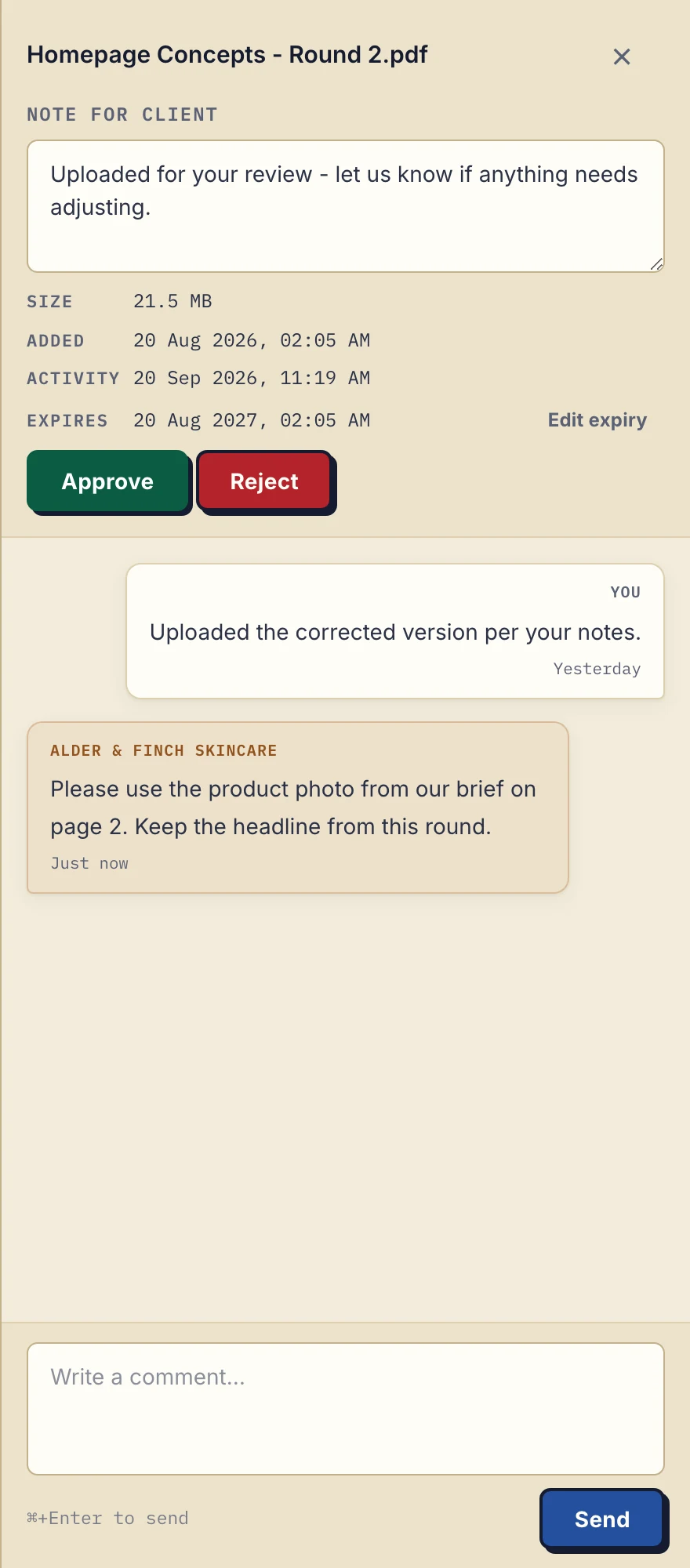
Actual desktop sidebar with fictional Alder & Finch Skincare data. The client's correction stays with the PDF; the agency uploads revisions manually. Open the full-size comment view.
A document checklist lists what you still need from the client, and in-browser PDF signing covers a form that needs a signature.
What Droplana does not do
Droplana has no proposals, invoices, online payments, scheduling, questionnaires or contract templates. It has no CRM, project management or native connectors. Clients send files, not form answers.
Reminders are fixed schedules, not a workflow builder. An unfinished checklist triggers a client nudge after 7 days of inactivity and a note to you after 14. An item with an optional due date gets a reminder prepared two days before and on the date, which reaches the client with their next email. You and the client can switch reminders off.
All team members share access to all clients; there are no granular team roles. Logo support is not white-labelling.
Who should choose which
Choose HoneyBook when the proposal, contract and payment sequence is the main job and its market availability fits your business. Choose Droplana when that sequence already works and recurring file exchange needs its own portal, or when you want an EU company with storage in Germany. Test one complete request, upload, comment and return before moving further clients.
For buying criteria, see the client portal guide. The agencies page shows how the portal fits next to existing billing and project tools.
Questions before you try it
Does Droplana have HoneyBook-style scheduling and invoicing?
No. Keep proposals, invoices, payments and appointment scheduling in your existing tools. Droplana provides document exchange, checklists, per-file comments and in-browser PDF signing, with no native integration.
How does the cost compare with HoneyBook Starter?
At the US list price checked on September 21, 2026, HoneyBook Starter is USD29/month billed yearly, or USD348 a year. Droplana Solo is EUR190 a year plus tax, with unlimited clients, 50 GB and files up to 1 GB. The two buy different things, so this is not a like-for-like saving.
Can a client sign a contract in Droplana?
Yes, if you upload the contract as a PDF. An identified client can type, draw or upload a signature, and Droplana saves a new signed PDF next to the original with a public verification record. There are no contract templates, and it is not a qualified electronic signature.
Can clients send me files without creating an account?
Yes. Clients open their private portal in a browser with no account or password, and can upload from a computer or photograph paper with a phone. Strict mode, the default, verifies their email on a new device and remembers the browser for 90 days.
Plans and limits
Free covers 3 clients, 2 GB and 100 MB per file, and keeps each file for up to 180 days after upload. Paid plans include unlimited clients and are flat per business.
The tools you need, on every plan.
Share files, leave comments, request documents with checklists and sign PDFs in your browser. Your logo is included too.
Clients never pay or create an account. EU hosting, encryption and data export included.
Save 2 months with annual billing
Free Start here
For your first 3 clients
€0/monthNo credit card required
- Just you
- 3 clients
- 2 GB storage
- Up to 100 MB per file
- Files kept for 6 months
Solo
For independent professionals
€19/month+ tax
€190/year+ tax
- Just you
- Unlimited clients
- 50 GB storage
- Up to 1 GB per file
- Email support
Practice
For small firms
€49/month+ tax
€490/year+ tax
- Team size: 5
- Unlimited clients
- 250 GB storage
- Up to 2 GB per file
- Priority support
Studio
For growing teams
€99/month+ tax
€990/year+ tax
- Team size: Unlimited
- Unlimited clients
- 1 TB storage
- Up to 5 GB per file
- Priority support
- Personal setup call
On Free, each file expires 180 days after upload. Your clients and their access stay active, so you can keep sharing new files. Active paid plans have no plan-imposed retention limit. Expiry settings, deletion and cancellation rules still apply; a persistent portal address does not guarantee permanent file availability. Team sizes include you. No setup fees or automatic overage charges. Prices exclude applicable tax.
Compare plan details
| Included | Free | Solo | Practice | Studio |
|---|---|---|---|---|
| Team size | Just you | Just you | 5 | Unlimited |
| Clients | 3 | Unlimited | Unlimited | Unlimited |
| Storage | 2 GB | 50 GB | 250 GB | 1 TB |
| Maximum file size | 100 MB | 1 GB | 2 GB | 5 GB |
| File retention | 180 days from upload | No limit | No limit | No limit |
| Your Droplana address | Includes a random suffix | Your chosen name | Your chosen name | Your chosen name |
| Data Processing Agreement | Standard | Standard | Countersigned available | Countersigned available |
| Support | Priority | Priority | ||
| Personal setup call | Not included | Not included | Not included | Included |
Need more storage?
Add 500 GB for €15/month + tax, or €150/year + tax. Each storage add-on also raises your maximum file size to 5 GB.
Available on all paid plans from your billing page. Add more than one for another 500 GB each. Your team size stays the same.
Related comparisons
Other all-in-one platforms are compared in Droplana vs SuiteDash and Droplana vs Assembly. If you use a project tool with clients, see Droplana vs Basecamp.