
The Complete Guide to Client Portals in 2026
A long guide to client portals: the four kinds, when one is worth it, what to look for, the common mistakes and how to move clients over without disruption.
Product demonstration: Product screenshots use fictional demonstration data; the agency pilot is a constructed example, not a reported customer outcome.

Every freelancer, agency, consultant and small firm eventually hits the same moment.
You are trying to find the file a client sent in March. You search your inbox. You search Drive. You scroll through three Slack channels. Eventually you find it, in a WhatsApp message from someone's holiday phone, and you think: there has to be a better way to do client work.
There is. The category is called client portals, and it has been maturing for the last decade. This guide explains what a client portal is, when you need one, how to pick a tool that fits your work, and how to test it with one client before you commit.
We make Droplana, one of the tools in this category, so read our take with that in mind. We have tried to be honest about which tools suit which situations, including ones that are not ours.
A client portal in one paragraph
Strip away the marketing and a client portal is simple: a dedicated, ongoing space where you and one client exchange files, feedback on those files and decisions.
The key word is ongoing. A WeTransfer link is not a portal; it is a one-off delivery. An email thread is not a portal; it is a log that gets harder to navigate the longer it runs. A Drive folder is closer, but it is organised around folders and permissions rather than around the client, and nothing in it shows what is still missing.
A client portal has four properties:
- One space per client. Each client has their own space and cannot see other clients.
- Persistent context. The space outlives a single project. Comments stay with their files, and months later the client opens the same address and finds what they need.
- Files and comments together. Feedback sits on the file it is about, not in a separate thread.
- A clear inside and outside. You see your operational view: many clients, controls and status. The client sees a calm view of their own work with you.
Everything else, such as branding, automation and payments, is a feature, not the definition. The short definition covers the basics with one example. If you are unsure whether you need this or a self-service portal for product customers, read client portal vs customer portal first.
When a client portal is worth it
A client portal is not a requirement. Plenty of freelancers and small firms run on email and Drive folders for years. The real question is whether the friction of not having one costs more than switching.
Here is how to tell.
You lose time to "where is that file?" Fifteen minutes a week of searching for things you already sent or received adds up to 12.5 hours over 50 weeks. That is a rough illustration, not a promise of what a portal saves, but it shows the size of the problem.
Your clients are unsure where to send things. "Should I email it to you? Upload it to Drive? Send it on WhatsApp?" If clients ask this, your process has too many entry points. A portal gives them one.
You look smaller than you are. A five-person agency working out of shared Slack channels and Drive folders looks, from the outside, like one freelancer on the same setup. A dedicated place per client shows that there is a process behind the work.
You lose files at project end. You wrap up a project, move on, and six months later the client asks you to resend the final logo. Sometimes you find it. Sometimes you do not.
You are growing past a handful of clients. With one or two clients, anything works. With ten, you need structure. Where the change comes depends on how many documents move, so watch for the signals above rather than a client count.
If none of these apply, keep using what works. Tools should solve real problems.
The four categories of client portal
Not every product called a client portal does the same job. The market roughly splits into four groups.
1. All-in-one business platforms
These bundle a portal with CRM, invoicing, contracts, scheduling and sometimes more: run your whole client business in one app.
Examples: SuiteDash, HoneyBook, Dubsado, 17hats.
Strengths: one login, connected workflow, no switching between tools.
Weaknesses: a steeper learning curve, features you pay for and do not use, and a harder move out. Some are designed around one type of business, such as creative businesses in the US.
Right for: established small businesses that will use most of the features and want to consolidate.
If the tool you want to consolidate is your project manager, the trade-offs are different. See how teams combine project management with a client portal.
2. Premium focused portals
These concentrate on being a polished client portal, often with billing and contracts built in, without trying to be a CRM or a scheduling system.
Examples: Assembly (formerly Copilot), Moxie, ClientPortal.io.
Strengths: polished design and strong client-facing branding. More focused than an all-in-one.
Weaknesses: higher prices, and billing or contract features some users do not need. Setup takes real time.
Right for: established service businesses that want a high-end client experience and are ready to pay for it.
3. Lightweight focused portals
These do one job: give each client a clear place for files, with comments on each file. They leave billing, contracts and CRM to the tools you already use.
Examples: Droplana and a few smaller products.
Strengths: quick to set up, lower cost, and little to learn for you or the client. They sit next to the billing and contract tools you already have.
Weaknesses: not a single-platform solution. You connect the rest of your stack yourself, or keep it separate.
Right for: freelancers, small agencies, consultants and firms that want a focused tool and already have invoicing and contracts handled.
4. DIY: existing tools as a portal
The free option: shared Drive folders, Notion pages, Slack channels or email. Most people start here.
Strengths: free, familiar, nothing new to learn.
Weaknesses: permissions get messy as you grow, personal and client work mix, and ending a client relationship cleanly is hard.
Right for: new freelancers with one or two clients, short projects, or anyone happy with their current setup.
What to look for when you choose
If you have decided you need one, these are the criteria that matter, in rough order of priority. The client portal software guide turns them into a checklist you can run against any product.
1. Does the client need to create an account? This matters more than most buyers expect. Every sign-up screen is a place where a client can stop. Access to a private portal, with an email check on a new device, asks far less of a client than an account and a password.
2. How fast can you add a new client? Some platforms take an hour to set up a client. Others take a minute. If you add clients often, this adds up.
3. Do comments sit next to the files? A portal that only stores files moves the storage but not the conversation. The ones that replace email keep files and the feedback on each file in the same view.
4. Is each client separate? Some portals are one large workspace with permission rules. That works until a rule is set wrong. A separate space per client leaves less to get wrong.
5. Can the client see what is still missing? A file dump answers "what did I send?". It does not answer "what do I still owe you?". Tools that cut down the back-and-forth show the client a checklist of outstanding documents, not only a folder to browse.
6. What happens at the end of a relationship? Can you revoke a client's access in one step, or are there many places where they still have it?
7. What is the pricing pattern? Watch for per-client fees, per-seat fees, "contact us" tiers and hidden storage limits. Predictable pricing matters more than the lowest headline price.
8. Can you leave? Can you export your files and records and move on? Check before you commit, not when you want to go.
9. Does it connect to what you already run? Few small businesses need this on day one, but check what the tool offers, such as webhooks, an API or an AI connection, and what is only a directory listing or a promise.
10. Is it pleasant to use, for you and the client? You will open it every day. Your client may open it for years. Spend an afternoon with a real exchange before committing. Light branding, such as your logo, helps on the client side; rebuilding the whole interface rarely pays off.
Common mistakes when picking a portal
Choosing from a feature checklist. Feature checklists make every tool look good. A real exchange shows which features matter. Run one client's request from start to finish before committing.
Ignoring the client's experience. You choose the tool, but your client uses it. A tool that is good for you and awkward for the client is worse than the reverse, because clients who avoid the portal send files by email again.
Over-buying for where you are now. A freelancer with three clients does not need an enterprise platform. An all-in-one can sit half-configured for years. Buy for where you are.
Under-buying for where you are going. The opposite trap is a tool that will not last through the next year of growth. Every move between tools costs days.
Confusing "I like this tool" with "my clients will like it." You are a power user. Your clients are not. Tools built for power users, such as Notion or Slack, can be hard work on the client side.
Not testing the exit. Every vendor polishes the start. Try exporting your data and check what cancelling involves before you commit.
Run a pilot with one client
Before you move anyone, map one real exchange and run it through the tool. Here is a constructed example with a small agency and its client, Alder & Finch.
Write one sentence describing the client's job: "Send the approved brief and product photos, then review our homepage PDF." That tells you more than a feature list. Then write the request the client will see:
Please upload the approved brief and the product photos we may use. Use the original files where available. We will check the inputs, then share a PDF of the homepage concepts here. Leave feedback on that PDF and name the page you want changed.
Create the client with the right name and email, allow uploads and send the portal link. Ask the client to open it and send one input. If they get stuck, help them and note where. No sign-up does not guarantee that every client finds their way on the first try.
When the inputs arrive, check them; a supplied item is not a checked one. Then share the deliverable and ask for feedback on the file:
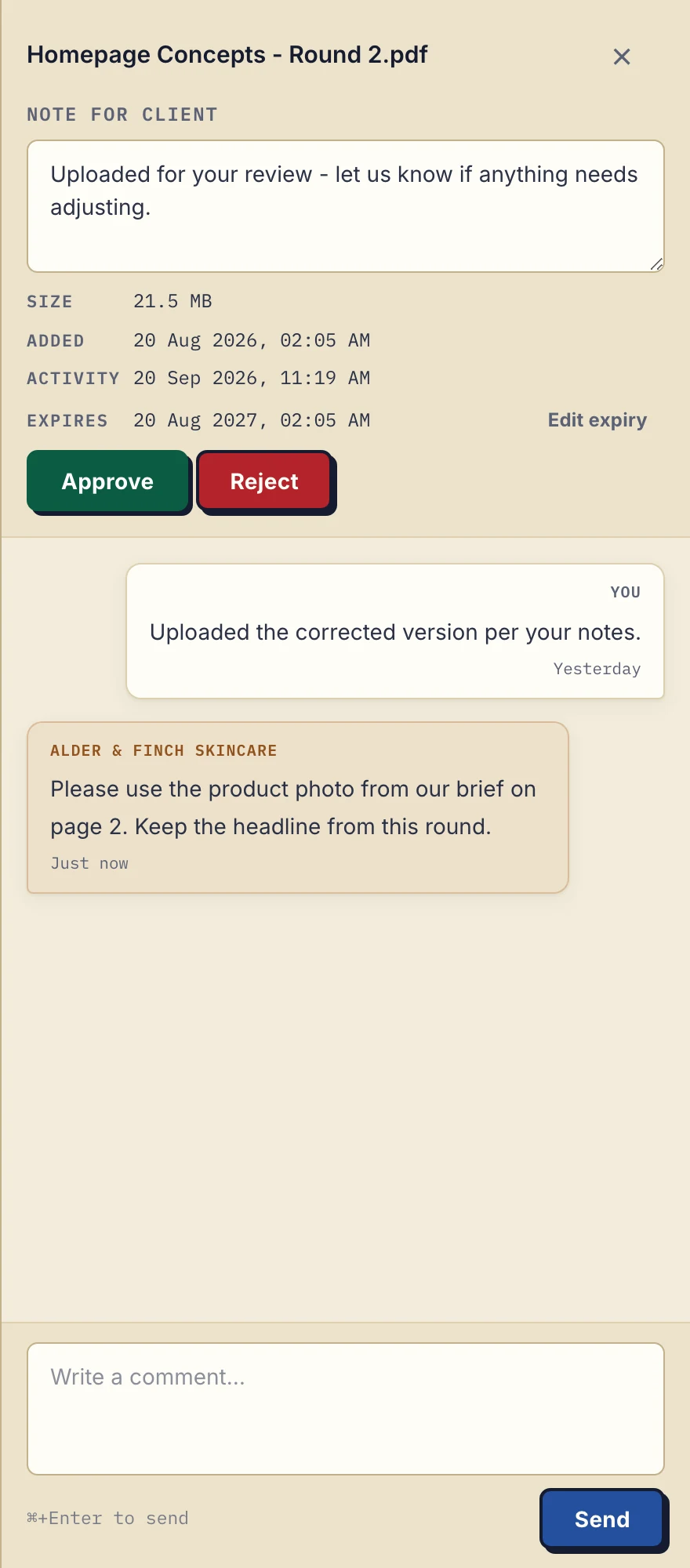
Product demonstration with fictional data: the business-side desktop sidebar for Alder & Finch Skincare. The client asks for a different photo on page 2, and the reply stays with that PDF. Open the full-size capture.
In the example, the client asks for a different photo on page 2. The agency edits the source outside the portal, uploads a new PDF with a clear name and points the client to it. The earlier file stays as it was.
At the end of the cycle, write down what help the client needed, what went missing, how long it took to find files and what you had to update twice. Compare that with your current process, and continue only if the pilot beats it.
How to move without disrupting active clients
If you pass the pilot and are moving from email, Drive or Slack to a portal, go step by step.
Start with new clients. Bring them into the portal from day one. They have no old habits to break.
Then move two or three friendly existing clients. Explain it briefly: "I'm moving our documents into a dedicated portal; here's the link. Files and feedback will live here from now on. The previous Drive folder stays as it is for reference."
Leave finished projects where they are. Your archive is your archive. The portal is for active work, and a persistent portal address is not a promise to keep files forever.
Give it a few weeks before judging. The first week feels odd because you are switching context. After a month you will know whether it fits.
Plan the exit. Whatever you pick, find out how to export everything before you commit. If the tool works, you will not need the export. If it does not, you will be glad you checked.
Honest takes on specific tools
We make Droplana, so take this with appropriate scepticism. These are our views from comparing the products, not measured results; the linked comparisons have the details.
HoneyBook suits a US-based creative business, such as a photographer, planner or designer, that wants the whole bundle. It is a heavier choice if you work outside its main market or only need the portal part.
SuiteDash can replace several tools and asks the most learning in return. It suits you if you want one platform for everything, less so if you already have tools you like.
Assembly (formerly Copilot) is well designed and priced as a premium product. It suits businesses that want that polish and can pay for it, less so solo freelancers.
Notion (DIY) is strong for internal team work and weaker as a client portal. It can work for short, light engagements with clients who already use Notion; it is harder for ongoing, file-heavy relationships. See the Notion comparison.
Drive folders (DIY) are fine for one or two clients and get messy beyond that. See the cloud drive comparison.
Email and WeTransfer (DIY) work until the number of clients and files makes things hard to find. See the email comparison.
Droplana is built for the focused-portal case: one private, persistent portal per client for sending documents and receiving files back, including phone photos of paper. Document checklists show the client what is still outstanding, comments sit on each file, and PDFs can be signed in the browser. Clients need no account; in the default Strict mode they confirm their email on a new device, or sign in with Google or Microsoft. It is operated by Ubique d.o.o. in Croatia, stores files in Germany and offers a DPA on every plan. Behind the simple exchange, every plan also has signed webhooks and an MCP server for an AI assistant or automation tool, which works on metadata, not document contents. It is not the right choice if you want an all-in-one platform, a CRM or built-in scheduling.
Questions before you start
Do clients actually use portals, or do they just keep emailing?
Friction decides most of it. A portal that asks every client to create an account and a password adds a step where many will give up and go back to email. A portal the client opens without an account removes that step, but it does not guarantee adoption, so test it with one real client first.
Should I use one portal for all clients or one portal per client?
One per client. A workspace shared across several clients depends on permission rules to keep them apart, and a single mistake can show one client's files or names to another. A separate portal per client keeps that boundary simple.
What about security and GDPR for client portals?
For EU-based businesses or anyone working with European clients, check where the tool stores data and whether a Data Processing Agreement is available, because GDPR requires one with any processor handling personal data on your behalf. For regulated work, also check the tool's certifications against your own obligations.
How much should I pay for a client portal?
It depends more on scale than on the category. A solo operator sharing modest file volumes can often start for nothing. Costs rise with storage, large files and seats for colleagues. All-in-one platforms price differently because you are also buying a CRM and invoicing.
Can I use a client portal alongside email?
Yes, and most people do. Email stays good for first contact, scheduling and quick questions. The portal handles the documents: files, revisions and feedback on each file.
For the data protection side, read what GDPR-aligned file sharing requires; for what to budget, see what a client portal should cost. To run the pilot above with the lightweight approach, Droplana's Free plan covers three clients at no cost.