
Stop Running Client Work Out of Email
Email is the default for client work and a poor home for files and requests. Where it breaks, what better looks like, and how to switch one client at a time.
Illustrative example: The thread, the time arithmetic and the invitation are illustrative. The product capture uses fictional demonstration data, not a customer result.

Look at your inbox right now and count the threads with active clients. If most of them are about files, versions and documents you are still waiting for, your client work has outgrown email. Move that recurring document exchange to one place per client, and keep email for introductions, scheduling and conversation.
Read the subject lines. If you run a freelance business, an agency or a consultancy, you will probably see something like this:
- "RE: RE: RE: project update"
- "Quick question (sorry)"
- "Re-sending the file - I think the last one bounced"
- "Could you forward me the contract again?"
- "checking in"
- "FW: FW: brief from accounting"
This is what running a business out of email looks like. Most of us got here gradually, never decided to do it on purpose, and only see what it costs in time and goodwill when we step back and look.
How we all ended up here
Email is not a villain. It is one of the most widely used business tools there is. For some things (quick replies, scheduling, formal records, talking to people you do not work with closely) it is still excellent.
The problem is that email became the default for everything, including work it was never designed for. The first client emailed us. We replied. The second client emailed us. We replied. Twenty clients later, we are running a small business out of a tool that was designed for people to send each other messages.
Where email breaks for client work
These are the failure modes most freelancers and agencies meet, in roughly the order they appear.
The "did you get my message?" tax. Email gives no useful sign of whether your client has seen or acted on a message. So you wait, then follow up. Sometimes the client follows up at the same time, and now there are two threads.
The version chaos. You send v1. They request changes. You send v2. They send notes. You send v3 in a separate thread because that one was about pricing. Three weeks later the client asks: "Use the latest version, right?" Neither of you is sure which one that is.
The attachment failures. Large files bounce or land in spam. The client opens the email on a phone and the PDF does not render well. You send a 12 MB file at 11pm and only learn the next afternoon that it never arrived.
The thread fork. A client replies to an old email instead of starting a new one, so their question about December's work lives inside the thread for August's project. You do not notice anything new until days later.
The "can you resend?" cycle. A few weeks after you sent something, the client cannot find it. They ask you to resend. You hunt for it and resend it. Multiply that by every client and every month.
The off-boarding failure. The project ends. Six months later the client writes: "Can you send me the final files? I lost them." You either find them and send them again, or you cannot, and you look disorganised.
The search problem. Email search is fine for "the message from this person with this word". It struggles once you have several clients with similar projects and similar filenames.
None of these is serious on its own. The cost is their combined weight, every day, across every client.
The costs nobody adds up
Try the arithmetic with your own numbers. As an illustration, if email-driven searching, re-sending and untangling costs you 30 minutes a day, 5 days a week for 50 weeks, that is 125 hours a year, about three working weeks. At an hourly rate of €50, that is €6,250 of your time. These are not measured Droplana savings, and no tool guarantees you get that time back, but it shows why the question is worth an afternoon.
The other costs are harder to count: things you miss, evenings spent catching up, and clients who see a messy exchange and quietly assume the work behind it is messy too.
Replace one attachment thread
Here is a single illustrative thread. A consultant sends a September review and asks for a cost breakdown. The client replies to last month's email with process notes, then asks which review version to read. The consultant now has to match two threads and three files.
In a client portal, the same exchange looks like this:
| In the thread | In the client portal |
|---|---|
| "Here is the latest review" | September-review-r02.pdf, with a comment naming what to review |
| "Please send costs and process notes" | Two named checklist items |
| A question mixed with another topic | A comment beside the file it concerns |
| "Is this approved?" | An explicit review, then Approved, Rejected or no status |
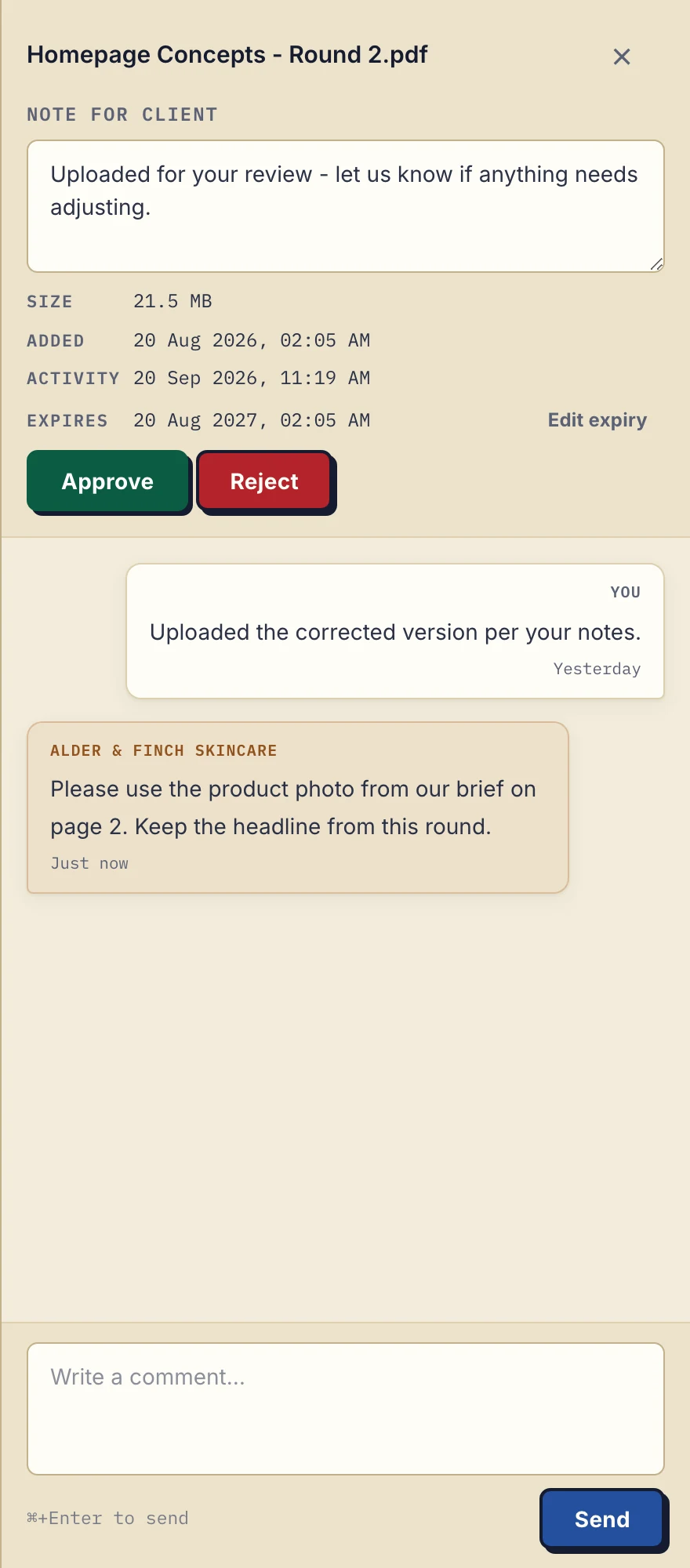
Product demonstration with fictional data: the desktop sidebar for Alder & Finch Skincare keeps a comment beside the named PDF. Open the full-size capture.
The portal does not make the decision for you. Either side can set or clear a file's status, and Approved does not prove that someone read every page. When the document changes, upload a separately named revision and say which one is current.
What better looks like
Better does not mean deleting email. The question is what to do with the parts email handles badly. Client communication for small businesses looks at where to draw that line. Whatever tool you choose, better has this shape:
- One persistent place per client. Not a thread that scrolls forever, but a space you both come back to.
- Files that stay available as long as you agree. You decide how long each copy stays, instead of a transfer link that expires in a week.
- Versions that stay clear. Each revision has its own name, and older ones are still findable.
- Comments on files. A question lives with the file it is about.
- A document checklist, not a memory test. You list what you need; the client sees what is still outstanding and what they already sent.
- No new account for the client, but still a check that the right person is opening it.
That is not specific to Droplana. Several tools deliver it.
Your options
Lightweight client portals. Files, requests and per-file comments for each client, and little else. Quick to set up, low price, little to learn. The trade-off: billing, contracts and scheduling stay in the tools you already use. Droplana is in this group.
Portals with more bundled. The same idea with billing, contracts and other features included, such as Assembly (formerly Copilot) or Moxie. The trade-off: a higher price and more setup.
All-in-one business platforms. A portal plus CRM, invoicing, scheduling and contracts, such as HoneyBook, Dubsado or SuiteDash. The trade-off: more to learn, features you may not use, and more of your business inside one vendor.
Repurposed general tools. Notion, chat apps with guest access, shared cloud folders. The trade-off: permissions and naming take ongoing care, and the requests often still travel by email.
For most freelancers and small agencies leaving email, a lightweight portal is the smallest change that fixes the file problem. The complete guide to client portals covers every category, including the ones that are not ours.
How to switch without disrupting clients
If you have worked this way for years, your clients are used to emailing you. Changing that takes some intention, but it is not hard.
Start with new clients. The next client you take on gets a portal instead of an email with attachments. They have no habit to break.
Send existing clients a specific note. Name the file and the request rather than announcing a new system:
Your September review is ready in your client portal at [portal address]. Please read r02 and upload the cost breakdown and process notes to the two named requests. Verify your email if asked; no account is needed. Keep emailing me about meeting times or if you need help opening it.
Clients do not create an account. In Strict mode, the default, they verify their email on a new device, or sign in with Google or a Microsoft account they connected once. The portal address is a destination, not a credential anyone can use, so add the right client email and check that the first exchange reaches that person.
Do not be strict about it. A client who emails "running 5 minutes late" is fine. The portal is for the work; the casual messages stay casual. If a client emails a file anyway, upload it to their portal and reply with the location.
Check the first return. Can the client find the file? Can you see what is still missing? Do both sides know which revision is current? If yes, try the next client.
Leave finished projects where they are. Droplana does not import a mailbox, and a wholesale migration is not needed. Keep the context you need from the old thread in your records.
What email is still good for
Email remains the right tool for:
- first contact with new prospects
- scheduling and confirmations
- quick logistical messages
- formal correspondence you need on record
- people who are not your clients, such as suppliers and partners
The point is not to abandon email. It is to stop using it for what it does badly: files, requests, versions and long-running client relationships.
Where Droplana fits and what it costs
Droplana is a client document portal: each client gets a private space for the files you send, the documents they return and the comments on each file. Files, comments and metadata are hosted in Germany, and a DPA is available on every plan. It does not replace your inbox, project management, live editing or permanent archive storage.
Free costs €0 and supports 3 clients, 2 GB total storage, 100 MB per file and 1 business seat; each file is kept for up to 180 days after upload, while clients and their portal access remain. Solo costs €19/month or €190/year plus tax, with unlimited clients, 50 GB, 1 GB per file and 1 seat, and no plan-imposed retention limit while active. For colleagues, see Practice and Studio on the pricing page.
If you later want more than the portal, it is there on every plan: an AI assistant or automation tool can connect through the Droplana MCP server, and outgoing webhooks can tell another system when a document arrives. You need neither to start.
Questions before you start
Should I move every client conversation into Droplana?
No. Use Droplana for document exchange, requested uploads and comments about individual files. Keep email or other suitable tools for general conversation, scheduling and correspondence records.
Does the portal choose the latest version automatically?
No. Uploading a revision creates a separate file. Name revisions clearly and tell the client which one to review; a file status does not link or replace versions.
Can I bring my old email threads into the portal?
No. Droplana does not import a mailbox or turn past messages into file comments. Upload the files the current exchange needs, copy the instructions that still matter and leave finished work in your existing records.
Try Droplana free with the next document exchange for one client: one file out, one named request back.