
Secure Client Portal: What to Check Before You Choose
Judge a secure client portal by evidence: what encryption protects, who can open a file, where data is hosted and how long it is kept. With an example exchange.
Illustrative example: Examples use fictional data; product captures demonstrate controls, not customer results or independent assurance.
Judge a secure client portal by asking what each control protects and where its evidence is. A private link, Germany hosting or an encryption label alone cannot tell you whether a tool fits your document process.
Droplana is a client document portal for sending files, receiving documents and keeping comments in each client's space. The table below distinguishes its product capabilities from independent assurance and from the responsibilities that remain with your firm.
Secure client portal: evidence and boundaries
| Control | Droplana capability | Boundary and evidence |
|---|---|---|
| Storage location | Files, comments and metadata on Hetzner infrastructure in Germany | Recipient downloads are separate. See storage documentation. |
| Encryption | TLS in transit; files encrypted at rest with AES-256, using a key derived for each file | Not end-to-end encryption. An app-host compromise can reach the master key. |
| Client access | Strict by default: email verification on a new device, or Google or Microsoft sign-in | Verified browsers are remembered for 90 days. Mailbox and device protection still matter. |
| Permissions | Separate portals for separate clients | Team members share business-wide client access; contacts on one client share its portal. See isolation. |
| Connected tools | An AI assistant or automation tool can connect through the MCP server, with permissions chosen per token | Works on metadata: filenames, client names and comment text reach the assistant, and no tool returns a document's contents. No token reaches billing, team management or account deletion. |
| Revocation | Client access can stop immediately | Cannot remove downloaded copies or replace a retention process. |
| Activity | Owner can export activity as CSV | A download does not prove reading; a status marker can be changed. |
| Independent certification | No current SOC 2 or ISO 27001 certification | Published certification limits; provider infrastructure evidence is not a Droplana audit. |
Check your current tool before replacing it
An existing shared drive may already meet your needs if its settings, client experience and records fit your process. Compare the actual arrangement, not an assumption that shared folders have no permissions or audit features. The cloud-drive comparison separates general storage from recurring client exchange.
For a portal trial, identify the intended people and try both directions: send a sample document, collect a replacement and discuss a correction. Check access on a new browser, on a remembered browser and after revocation. Use fictional data until your firm has accepted the arrangement.
Illustrative accounting exchange
An accountant sends draft statements, receives a missing schedule and asks the client to review one detail. The accounting portal guide describes the workflow. A download event is evidence of an event, not proof the client read the statements. Either side can change the approval marker.
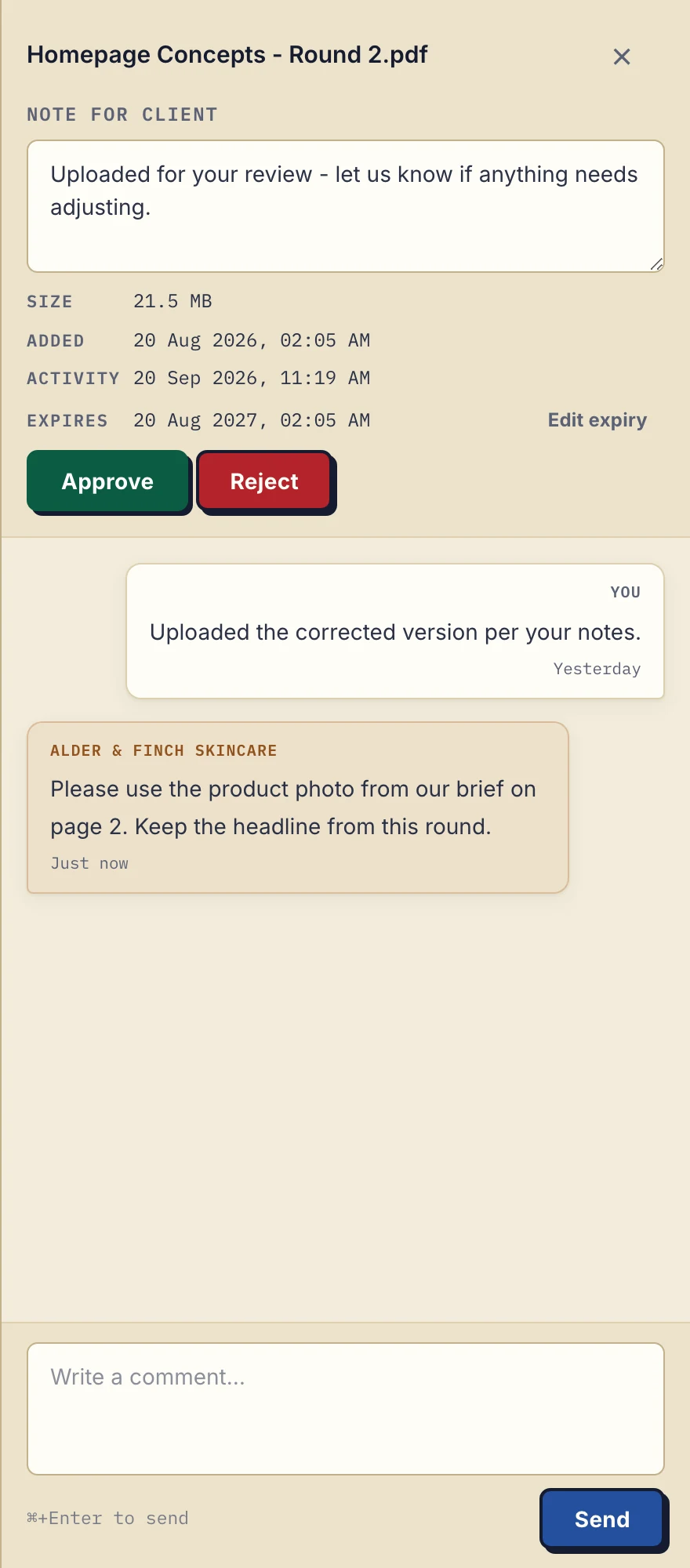
Product demonstration with fictional Alder & Finch Skincare data. This desktop panel shows file expiry and comments, not an independent security assessment. View the full-size capture.
Authorized business staff can see this client exchange. If the practice needs some team members excluded from particular clients, a separate portal per client is not sufficient: Droplana does not provide ethical walls or assigned client teams.
Hosting, contracts and document categories
Review the GDPR file-sharing assessment alongside your required controls. Hosting and a DPA do not establish compliance on their own. Droplana's DPA excludes HIPAA-regulated protected health information and uses requiring certifications it does not hold.
Read the three security levels before enabling bearer links. Controlled one-time access does not verify the holder's email; Relaxed permanent access can be used by anyone holding an active link. The product FAQ covers further capabilities and limits.
Where Droplana fits
It suits recurring document exchange when shared business-team access and one portal per client fit the work. For legal work, check requirements for confidentiality boundaries, retention and signing before uploading. Droplana is not DRM, a certified archive, an enterprise compliance platform or an end-to-end encrypted service.
Solo is €19/month plus tax for unlimited clients, 50 GB and 1 GB per file, with one business seat. Practice is €49/month plus tax with 5 seats including the owner, 250 GB and 2 GB per file. Studio is €99/month plus tax with unlimited seats, 1 TB and 5 GB per file. Paid plans have no plan-imposed file expiry; they are not a certified archive. See plans and limits.
Questions before you start
Does encryption at rest mean end-to-end encryption?
No. Droplana derives an encryption key for each file, but the app host holds the master key. The protection covers a breach of the storage platform, not an app-host compromise.
Can business team members be restricted to selected clients?
No. Business team members share access to the business’s clients. Droplana does not provide assigned client teams, ethical walls or per-file permissions.
How much can I try on Free?
Free supports 3 clients, 2 GB total storage and 100 MB per file. Each file is kept for up to 180 days from upload; the client portal and account remain active.
Start free with fictional documents to check the exchange before using client files.