
GDPR-Compliant File Transfer and Sharing With Clients
GDPR-compliant file transfer and sharing with clients: the DPA, EU storage, access control, and whether recipients need an account. With a checklist.
Product demonstration: Product screenshots use fictional demonstration data; the accounting review is an illustrative example, not a customer result.
GDPR-compliant file transfer and file sharing with clients comes down to a few checks: a Data Processing Agreement with the tool, a known storage location, access that only the right client has, and a clear point when the files are deleted. A tool can support those checks, but the assessment is yours: EU hosting and a DPA help, and neither makes the whole workflow compliant on its own.
This guide explains each requirement in plain language, compares the common tools, and ends with a checklist you can use before you choose one. It is general guidance, not legal advice.
Quick answer
- A tool that stores or sends files with personal data for you is your processor under GDPR, and you need a DPA with it (Article 28)
- Storage location matters: data in the EU needs no transfer mechanism, data outside it does
- Access control matters as much as encryption: only the right client should open the files, and you should be able to stop that access
- Recipients don't need an account for sharing to be compliant, but they do need to be identified in a sensible way
What counts as personal data in client files
GDPR defines personal data broadly: any information about an identifiable person. Almost every client file qualifies:
- Contracts and engagement letters: names, addresses, signatures
- Invoices: client name, address, tax ID
- Financial documents: bank statements, payslips, tax returns
- ID documents: passports, ID cards, proof of address
- Intake forms: contact details, and sometimes health or legal information
Some data gets extra protection. Health data is a special category under Article 9, and data about criminal convictions has its own rules under Article 10. Financial documents are not a special category, but a leaked bank statement or ID card can still cause real harm, so they deserve the same care.
GDPR-compliant file transfer vs file sharing
Search results mix these two terms, but they describe different situations.
File transfer is a one-off send: you upload a file, the service creates a link, and the recipient downloads it. WeTransfer-style services and email attachments work this way. The file usually stays in the service until the link expires, and copies end up in inboxes and download folders.
File sharing is ongoing: the files stay in one place, and the client comes back to them over months or years. Shared drive folders and client portals work this way.
GDPR asks the same questions of both, but the weak points differ:
| File transfer | File sharing | |
|---|---|---|
| DPA | Needed with the transfer service | Needed with the storage or portal provider |
| Storage location | Where the service keeps files until the link expires | Where the files stay for the whole relationship |
| Access control | Anyone with the link, until it expires | Depends on sharing settings or portal access |
| Retention | Short by design, then copies live on elsewhere | As long as you keep the files, so you need a deletion rule |
| Stopping access | Often not possible once downloaded | Possible, if the tool lets you revoke access |
For regular exchange with the same clients, sharing from one controlled place is usually easier to keep compliant than many separate transfers.
The requirements most people miss
1. The Data Processing Agreement
When a third-party tool stores or sends client files for you, it processes personal data on your behalf. Under GDPR Article 28, you as the controller need a contract with that processor. That contract is the DPA. It covers:
- What data is processed and why
- The security measures the processor applies
- Which sub-processors it uses
- What happens to the data when the contract ends
Many tools include their DPA in their terms, and some offer it only on business plans. Check which plan you are on.
2. Where the data is stored
GDPR restricts transfers of personal data outside the EU unless there is a legal basis, such as an adequacy decision or Standard Contractual Clauses. Large US providers use these mechanisms, and they are legally valid. They still add work: you need to know which mechanism applies, and some regulators and professional bodies take a stricter view for sensitive client data.
When data is stored in the EU by an EU provider, there is no international transfer to assess.
3. Who can open the files, and for how long
GDPR requires "appropriate technical and organisational measures" (Article 32). For client files, the practical questions are: can only the right person open this file, can I stop that access when the work ends, and is there a record of who opened what?
Do recipients need an account?
No. GDPR does not require an account. It requires that access is limited to the right person. A long random link that anyone can forward is weak control. An account the client never remembers the password for leads to workarounds. A middle ground is a private link combined with email confirmation.
In Droplana, clients need no account. Each client opens their own private portal. On the default security level, a client confirms their email address with a link on each new device, and the browser is then remembered for 90 days. Signing a PDF always requires a confirmed email identity, so a forwarded link alone is not enough to sign.
What the common tools look like under GDPR
Plans and terms change, so check each vendor's own privacy and business pages before you decide. The table shows where to look, not a verdict.
| Email (Gmail, Outlook) | Google Drive, Dropbox | WeTransfer | Droplana | ||
|---|---|---|---|---|---|
| DPA | Business plans; check your plan | Business plans; check your plan | Check plan terms | Check Meta's business terms | Applies on every plan |
| Storage location | Depends on provider and plan | Region options on some plans | Check vendor | Check vendor | Germany (Hetzner) |
| Recipient needs an account | No | Depends on sharing settings | No | Yes, a WhatsApp account | No |
| Link or access expiry | None, attachments stay in inboxes | Set per link on some plans | Links expire | None | You set file expiry dates, and can revoke access at any time |
A few notes:
- Email copies every attachment into at least two mailboxes, and you cannot take it back once it is sent.
- Cloud drives can be compliant with the right plan and settings, but sharing settings drift over time. See Droplana vs Google Drive and Dropbox.
- Transfer services are designed for one-off sends. See Droplana vs WeTransfer.
- Chat apps mix client documents with private messages on personal phones. See Droplana vs messaging apps.
What to check before you sign up
- Is there a DPA under Article 28 for the plan you will use? It should be in place before you upload client data.
- Where are files stored? Get a country, not only "the EU" or "global infrastructure".
- Who are the sub-processors? The provider should list them and say what each one does.
- Are files encrypted in transit and at rest? Ask what the encryption protects against, and what it doesn't.
- Is access limited to the right client? Check how clients get in, and whether you can revoke access immediately.
- Is there an access log? You should be able to see who uploaded, downloaded or deleted what.
- How are retention and deletion handled? Check whether you can set expiry dates and delete a client's data completely.
Record the assessment
Write down what you decided, so a colleague or a client can see why this tool was acceptable for this work:
| Check | Record before using the service |
|---|---|
| Purpose and role | Why you need each document; whether your firm acts as controller or processor for this work |
| Contract | The applicable processing agreement, instructions and responsibilities |
| Access | Authorised people, verification method, business-team access and removal process |
| Data flows | Storage, backups, support access, sub-processors and recipient downloads |
| Retention | Your required retention period, service limits, export and deletion steps |
| Evidence | Source, date checked, responsible person and open questions |
The EDPB guide to controllers and processors explains the two roles and the contract needed when a processor handles personal data for a controller. Do not assume every recipient or software provider has the same role.
An illustrative client-file review
An accounting practice needs bank statements for an agreed reporting period. It records the purpose, names the people who need access and asks only for the relevant files. Before the first upload, it checks whether every team member may see every client, and where the finished record will be kept outside the exchange portal.
When the statements arrive, it checks their contents, asks for corrections on the file concerned and follows its own retention process when the work closes. An uploaded file or an Approved marker does not show that the practice has finished its professional review.
Where Droplana fits
Droplana is a client document portal: one private, persistent portal per client for two-way document exchange, with no client account. Here is how it answers the checklist:
- DPA: a Data Processing Agreement applies on every plan, the free plan included.
- Storage: files, comments and metadata are stored only on Hetzner infrastructure in Germany. Droplana is operated by Ubique d.o.o., a company registered in Croatia.
- Sub-processors: Hetzner (servers, database, storage, Germany), Brevo (email, France, no customer files) and Creem (payments, Estonia, subscription data only). All are in the EU.
- Encryption: TLS in transit, and files encrypted at rest (AES-256) with a key derived for each file. This is not end-to-end encryption: it protects against a breach of the storage alone, not a compromise of the application server. The security page explains the details.
- Access: each client sees only their own portal. You choose a security level, and you can revoke a client's access at any time, effective immediately; copies already downloaded cannot be recalled. Business team members share access to all of the business's clients, and contacts added to one client share its portal, with no per-file permissions or ethical walls.
- Access log: the account owner can view and export an activity trail of logins, portal visits, uploads, downloads, deletions, comments and approvals.
- Retention: you can set expiry dates on files and delete a client with all their files. On the free plan, each file is kept for up to 180 days after upload. Deleting the account removes active data at once, while audit-log entries and disaster-recovery backups follow their own deletion paths.
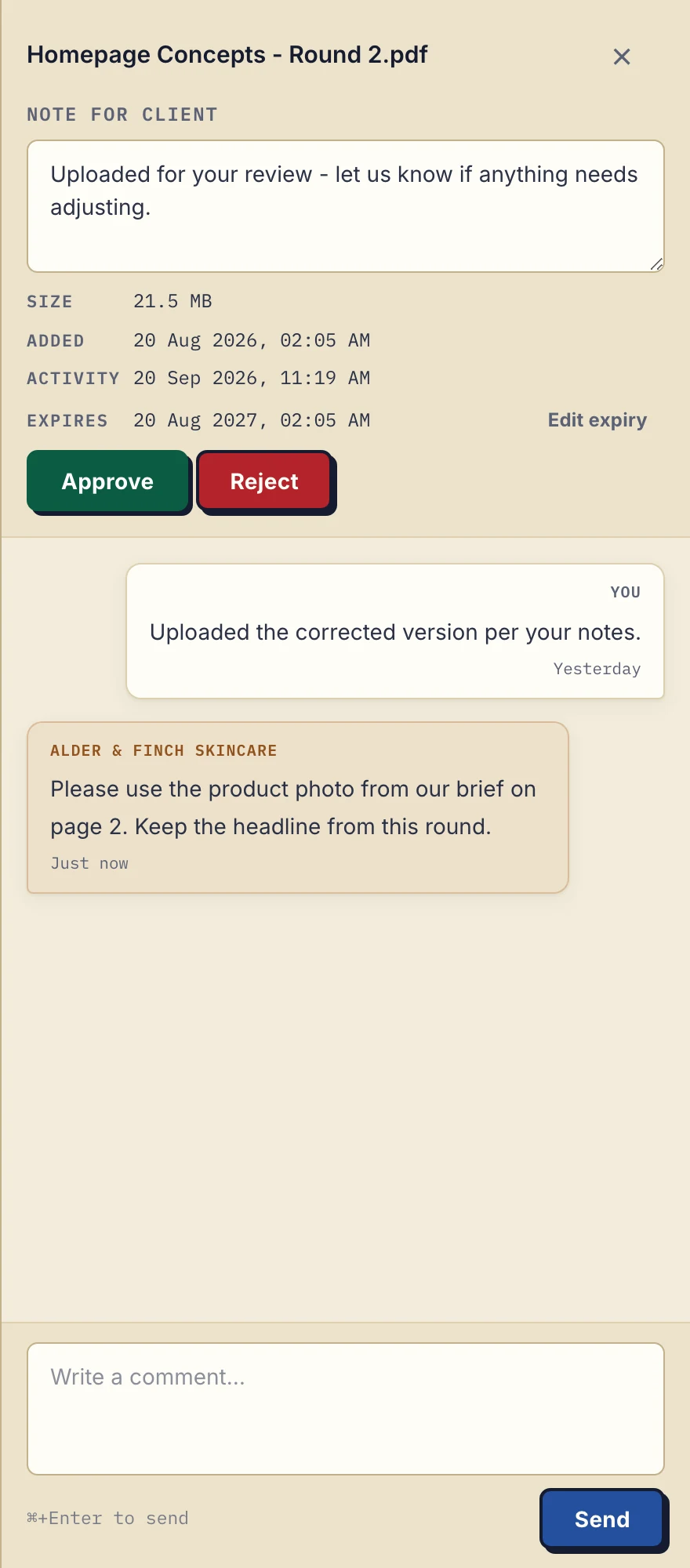
Product demonstration with fictional Alder & Finch Skincare data. The panel shows a file's expiry date and its comments; it is not a security assessment.
If you connect an AI assistant or automation tool through Droplana's MCP server, include it in your assessment as another recipient. It works on metadata: filenames, client names, dates, checklist state and comment text reach the assistant, while no tool returns a document's contents. On the default Strict level, it is given no link to open a file.
The limits: Droplana is not an archive, it does not sync files into your other systems, and it cannot make your process compliant on its own. The DPA excludes protected health information regulated under HIPAA and uses that need certifications Droplana does not hold. You still decide what you collect, why, and how long you keep it.
If you run a law firm or an accounting practice, where clients send the most sensitive documents, see how the exchange works for your kind of practice.
Questions before you start
What is GDPR-compliant file transfer?
It means sending files that contain personal data with a tool you have a Data Processing Agreement with, where you know where the data is stored, who can open it and how long it is kept. The files should be encrypted in transit, and you should be able to stop access and delete the data when it is no longer needed.
Does GDPR apply to sharing files with clients?
Yes, if the files contain personal data, and most client files do: names, addresses, contracts, payslips, bank statements and ID documents. A third-party tool that stores or sends those files for you acts as your processor, and GDPR Article 28 requires a data processing contract with it.
Can clients sign in with Google or Microsoft instead of an email link?
Yes. A client can sign in with Google, matched against an email you already added for them, or with a Microsoft account they connected once with an emailed code. Signing in never creates a new client and never widens what the client can open.
Does data have to be stored in the EU to be GDPR compliant?
No. GDPR allows transfers outside the EU with a legal basis such as an adequacy decision or Standard Contractual Clauses. Storing data in the EU is simpler, because there is no international transfer to assess.
Is WeTransfer GDPR compliant?
It depends on the plan and on how you use it. WeTransfer is a Dutch company, and the data processing terms, storage location and link expiry differ between its plans. Check WeTransfer's own privacy and business pages for the plan you use before you send personal data with it.
Try the checklist on a real exchange: start with fictional documents and three clients on the free plan.