
How to Collect Files From Clients: Request to Review
Collect files from clients with a clear request list, accepted examples and a review of missing items, plus checklist reminders when items stay open.
Product demonstration: Product screenshots use fictional demonstration data; sample requests are illustrative, not measured customer results.

To collect files from clients, name what you need, show what counts as a usable response and give the client one place to upload it. Review supplied files and follow up on the missing or incorrect item, rather than asking for “everything” again.
Design a request to collect files from clients
An effective list states the purpose, period or version, accepted formats and completeness rule for each item. Ask for the files the agreed work needs. Identify anything held by another person before it blocks the rest.
Illustrative consulting request:
Please send these to [portal link] for [review purpose] by [date]:
- Cost breakdown: [period], as the agreed spreadsheet with [required columns].
- Process documentation: the current PDF or document, with its revision date.
- Customer data extract: [period and required fields] in [agreed format].
Tell [contact] if an input is unavailable. Arrange access separately; do not upload passwords or access codes. We will check each file before confirming the request is complete.
Give examples of acceptable submissions
“Cost breakdown” could mean a screenshot or a spreadsheet. If you need formulas or rows for analysis, ask for the source spreadsheet rather than a picture of it. For a paper receipt, state whether a clear photo is acceptable. Describe the requirement, without implying that the portal checks the file's contents for you.
The consulting workflow shows where this fits alongside project and editing tools.
Make the outstanding item visible
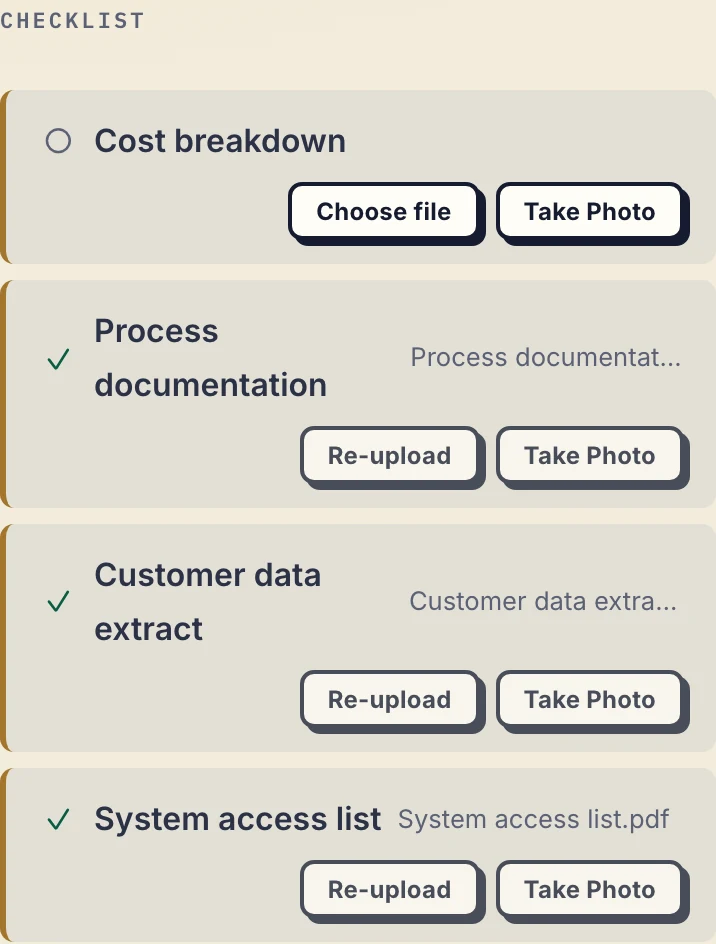
Product demonstration with fictional data. The system access list describes required access; it is not a place to send credentials.
This fictional client has supplied three checklist items, with the cost breakdown still missing. A checked item means a file has been supplied, not that its contents are complete or correct.
Droplana gives each client a private portal for sending and receiving files. No client signup is required. Strict mode, the default, requires email verification on a new device; a verified browser is remembered for 90 days. The business must enable client uploads.
Review and correct in the same place
Open the uploaded files. Check their period, version and required content. If a file is wrong, leave a specific comment: “This export ends in July; please upload the agreed August period.” A new upload is a separate file, so make clear which file should be used.
The document checklist feature keeps the requested uploads visible. It does not perform validation, conditional routing or recurring monthly collection for you.
Use the reminders that match the request
Checklist inactivity reminders are on by default and can be disabled by the business: after 7 days of client inactivity with unfulfilled items, the client gets a nudge naming what is missing; after 14 days the business is notified instead. This is one notification at each stage per stall, reset by client activity. Optional item due dates have their own reminder, prepared two days before and on the date. It is not sent once the item is supplied, and it reaches the client with their next email, which can be later that day or the following day. The business or the client can switch it off. These are upload-checklist reminders, not approval chasing or automatic recurring requests.
Do not confuse these with reminders for a client to approve or download your outgoing report. If an input cannot be supplied, agree the next action directly.
Check capacity before inviting the client
Droplana stores files, comments and metadata on Hetzner infrastructure in Germany. A DPA is available on every plan. EU hosting does not replace your own document-handling responsibilities.
Free costs €0 and supports 3 clients, 2 GB total storage, files up to 100 MB and one business owner. Each Free file expires 180 days after upload; the client and portal remain. Solo is €19/month or €190/year plus tax, with unlimited clients, 50 GB total storage, 1 GB files and one business seat. Active paid plans have no plan-imposed retention limit, subject to expiry settings, deletion and cancellation.
Compare plans and limits, then test one request with one client. There is no ready-made connector that imports the files into your work system, but signed webhooks can tell it when a file arrives, and an automation tool can connect through the MCP server.
Questions before you start
Does a checklist validate uploaded files?
No. It tracks supplied and outstanding items. The professional checks each file’s contents, period, legibility and completeness.
Can clients upload without creating an account?
Yes, if the business enables uploads. Strict mode, the default, requires email verification on a new device; no client signup or app is needed.
Do reminders create recurring document requests?
No. Checklist inactivity reminders and optional due-date reminders use fixed schedules. The business creates the next period’s request manually.