
How to Share Reports With Consulting Clients
Share reports, decks and engagement letters with consulting clients in one private place per client, and collect the data behind them. Setup steps included.
Product demonstration: Product screenshots use fictional demonstration data; sample requests are illustrative, not measured customer results.
To share reports with consulting clients without losing them in email, give each client one private place where every report, deck and engagement letter lands, and where the client sends back the data behind them. Consultants have their own version of the file chaos problem: sensitive material, often with more than one stakeholder at the client.
Most of it still runs through email, with the usual problems: attachments forwarded internally, three versions of the same deck, and "can you resend the February report?".
This guide covers what that place needs to do, what you can leave in other tools, and how to set it up without overbuilding your stack. If you are already comparing tools, see how Droplana works as a client portal for consultants. For the wider landscape first, read the complete guide to client portals.
Quick answer
- A consultant needs one persistent space per client, not a new link per deliverable.
- Clients should open files without creating accounts, because senior stakeholders will not go through a setup.
- Sensitive documents need to stay private and non-indexable.
- Project management, invoicing and a CRM can stay in the tools you already use.
What you need to share reports with consulting clients
Persistent, per-client access
Most consultants work with a client over months or years: a monthly report, a quarterly review, a post-project summary. Each should land in the same place, reachable by the same people, without a new link or a new email thread.
When a client asks for the Q1 report again, the answer should be: "It's in your portal, same link as always."
No friction for the client
Your clients are executives, finance managers and senior directors. They will not create an account to open a file you sent them.
The access has to be short: open a link, confirm who you are if needed, see the files. No account and no password to remember.
Privacy and data security
Engagement letters, strategy documents and financial analyses are not public. Your portal should be private by default: not indexed by search engines, not discoverable, and open only to the people you added.
EU hosting matters if your clients are in Europe, both for GDPR-aligned file sharing and for being able to tell a client where their data is stored.
Context and comments on each file
A document without context is noise. When you share a deliverable, add a short note next to it: what it covers, what you need from the client, and by when. That note belongs with the file, not in a separate email thread that gets buried.
What can stay in your other tools
Project management. Task boards, milestones and Gantt charts are internal work management, not client communication.
Invoicing and contracts. Useful, but separate problems. Bundling them into the portal adds complexity for your client.
Real-time chat. Consultants talk to clients by phone, email and in meetings. What is usually missing is file delivery with feedback on the specific file, not a live chat window.
A long list of integrations. Your client does not care what the portal connects to. They need to open a link and see their files. If you want the portal to report into your own tools later, check what connects without making it a condition of the first engagement.
How to share reports and collect inputs, step by step
1. Create one portal per client and request the inputs
When an engagement begins, create the client's portal and share the link in your kick-off message. Then list what you need before the real work starts in a document checklist, so the client sees what they still owe you.
An illustrative process review needs a cost breakdown, existing process documentation and an agreed customer data extract:
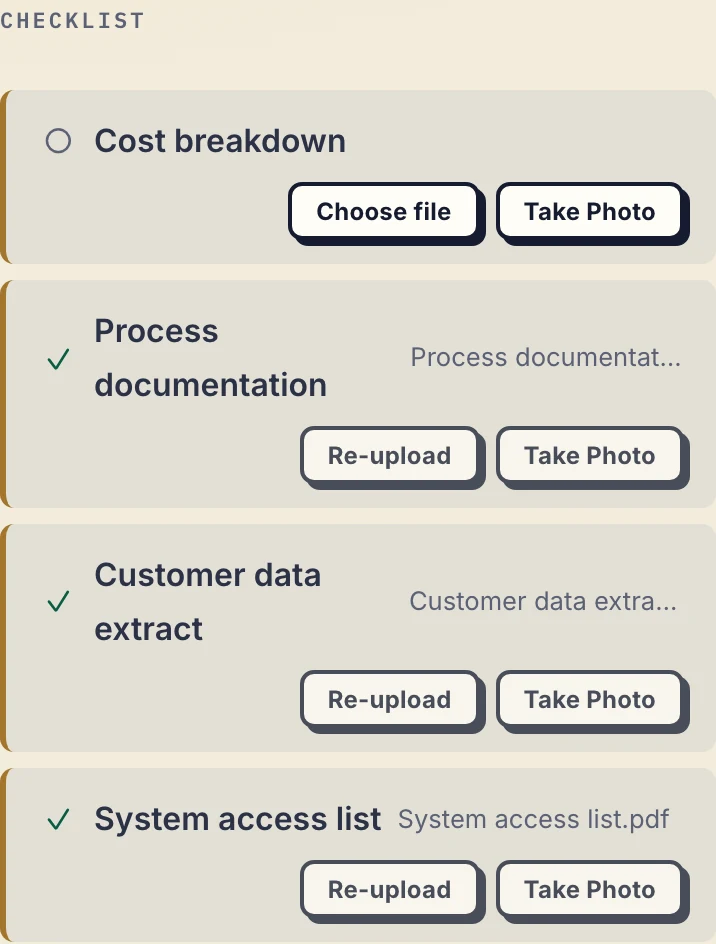
Product demonstration with fictional data. The cost breakdown is still missing. The system access item describes the access needed; it is not a place to send credentials.
Start from the editable consulting input request, or copy this:
Engagement: [name]. First decision or deliverable: [purpose].
- Brief: [problem, scope and exclusions].
- Existing report: [date or revision].
- Data export: [period, required fields and format].
- Process document: [name and version].
Please send these to [portal link] by [date] and tell [contact] what is unavailable. Arrange system access through the agreed access process; do not upload passwords, keys or access codes.
A check mark means an item was supplied, not that it is accurate. Review each input before you rely on it.
2. Upload named deliverables, not working drafts
The portal is not your internal drive. Upload the report, the deck or the letter when a version is ready, and keep drafts in your own storage until then.
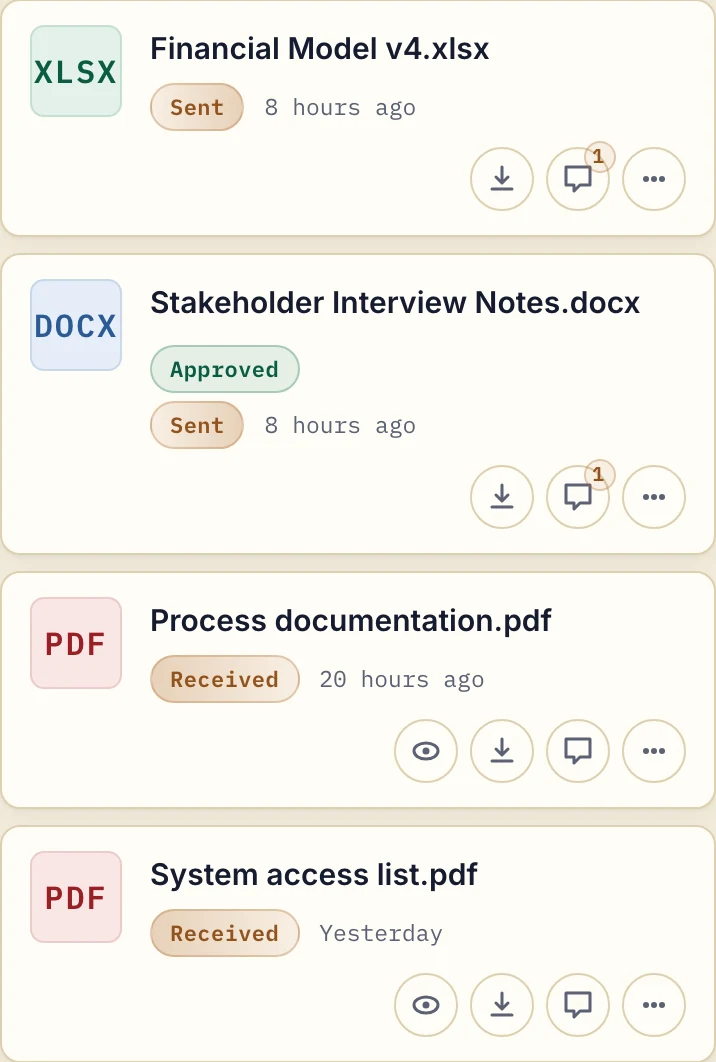
Product demonstration with fictional data. The client can download the sent files. Approved is a reversible file marker, not proof of acceptance.
Add a comment that asks for one response: "Please review financial-model-v4.xlsx, especially the churn assumption. Leave a comment on this file if it needs correcting." Give each revision a distinct filename and say which one replaces the earlier file. Droplana keeps both uploads; it does not edit spreadsheets or carry comments across versions.
3. Use the same portal for the whole relationship
Do not create a new link for each document. When an engagement runs for 18 months, the client can scroll back and find every report you delivered, without digging through email.
One portal belongs to one client, not to one project. Several engagements for the same client share it, and every contact you add to that client sees all of its files. Keep workstreams that need different readers in a separate system.
4. Close the engagement deliberately
When an engagement ends, keep your own archive copies and tell the client to download what they need. Then decide whether the client keeps access through the same link or you revoke it; revoking takes effect immediately and your files stay on your side. A persistent portal address is not an archive, so do not promise the client permanent retention.
Where Droplana fits
Droplana is a client document portal operated by Ubique d.o.o., an EU company in Croatia. Each client gets one private, persistent portal for sending documents and receiving files back, with per-file comments, document checklists and in-browser PDF signing. Files, comments and metadata are stored on Hetzner infrastructure in Germany, and a DPA is available on every plan.
Clients do not create accounts or install an app. Strict mode, the default, asks for email verification on a new device, and a verified browser is remembered for 90 days. Clients can also sign in with Google, or with a Microsoft account they connected once. An engagement letter can be signed in the browser by a verified client: the signed copy is saved as a new file next to the original, and the signature is recorded on the server. It is not a qualified or certified electronic signature.
It does not handle invoicing, a CRM or project management; keep those in separate tools. If you want the portal to feed them, every plan includes signed webhooks and an MCP server for an AI assistant or automation tool, which works on metadata such as filenames and comments, not on document contents.
Free supports 3 clients, 2 GB storage and files up to 100 MB, and keeps each file for up to 180 days after upload. Solo is €19/month or €190/year plus tax for one consultant with unlimited clients, 50 GB and 1 GB files. A second consultant needs Practice, with a team of 5 including the owner, or Studio. See pricing for the full plans.
Pick one active engagement and move its next deliverable into a portal: try Droplana free with up to three clients.