
File Sharing for Professional Services: A Practical Guide
Choose file sharing for professional services by workflow: client intake, draft review or document delivery. Compare team limits, access and trust documents.
File sharing for professional services should match the exchange: collecting client evidence, reviewing a draft or delivering completed work. Decide what must come back, who needs access and where the final record belongs before choosing a tool.
Droplana is a client document portal for recurring two-way exchange. Each client gets a private space for files, document checklists and comments. It sits alongside your practice, accounting or consulting systems.
File sharing for professional services: a decision matrix
| Workflow | Pilot check and fit |
|---|---|
| Intake evidence | Can the client identify each missing item and return it? Named document checklist with client uploads. |
| Draft review | Can both sides identify the revision and discuss it? Separate uploaded revisions, per-file comments and Approved or Rejected statuses. |
| Completed work | Can the client download it and find it again while retained? Persistent portal address with explicit retention limits. |
| Joint document editing | Do people need to edit the same source document? Use a document editor; upload an export for exchange. |
| Restricted internal matters | Must each employee see only assigned clients? Droplana team members share business-wide client access; choose a different permission model if required. |
| Long-term case record | Must documents remain under a formal records policy? Keep a separate records system; Droplana is not an archive. |
An exchange from request to reviewed document
Illustrative accounting example: you send Northbank-September-review-r01.pdf and request a bank statement and receipt bundle. The client downloads the review, uploads the two requested documents and leaves a comment beside the PDF about one transaction. You check the supplied evidence and upload r02 if the report changes.
A completed upload means a file arrived. It does not establish that a statement covers the right period or that a receipt is acceptable. Check those details before treating the request as satisfied in your professional work.
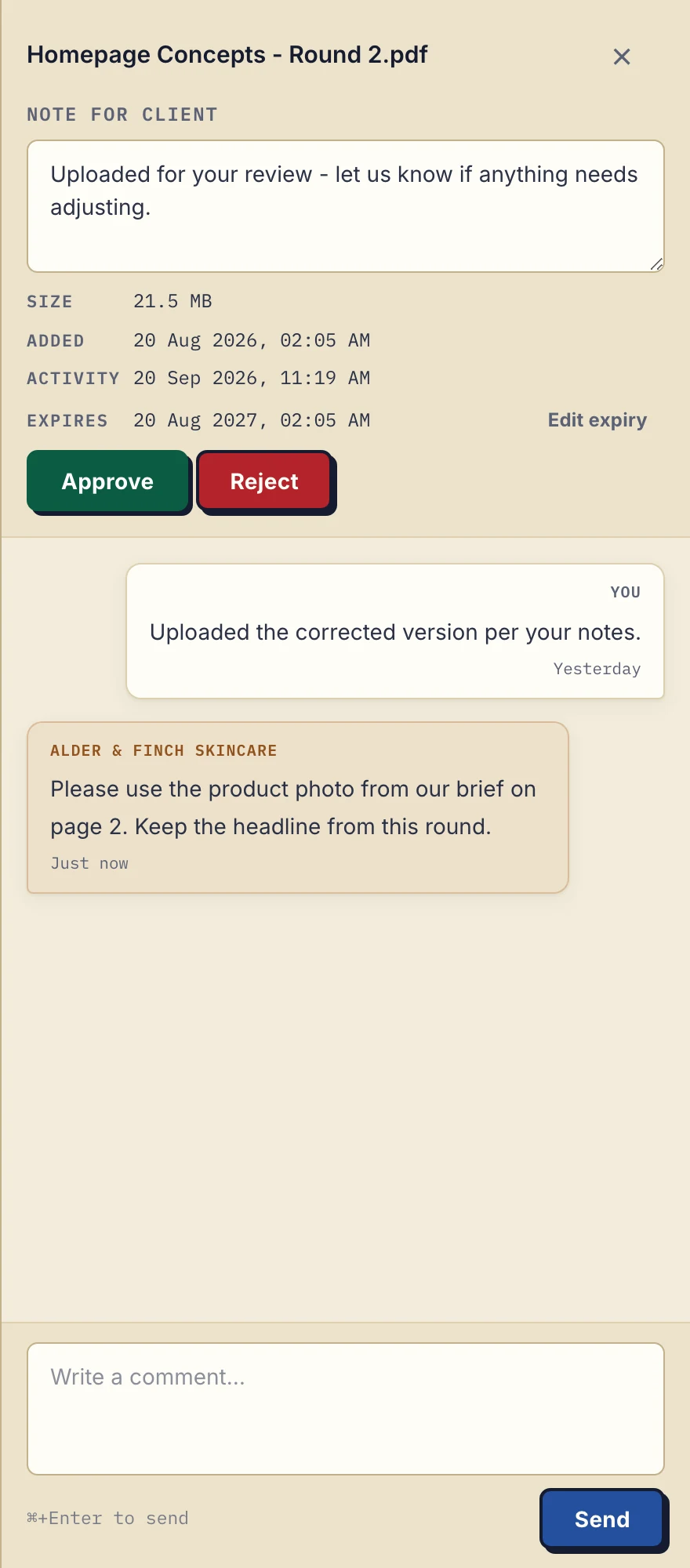
Product demonstration with fictional data: the desktop sidebar for Alder & Finch Skincare keeps a comment beside the named PDF. This is a file discussion, not a project chat or document editor. Open the full-size capture.
This capture shows the file-comment controls using a fictional agency PDF. It does not demonstrate accounting review, legal approval or identity checks beyond portal login.
Match the demonstration to your profession
- Accounting: use the accountant intake guide to plan statements, receipts and returned reports.
- Legal: the legal practice page shows client intake and draft exchange. Droplana is not a legal document management system.
- Consulting: the consultant page shows requests for business inputs and delivery of reports.
For a document requiring a signature, review the in-browser PDF signing workflow. It marks a document as signed and records the action; it does not provide a qualified or certified signature or verify identity beyond login.
Check access and the documents behind trust claims
Clients do not create an account. With Strict mode, the default, they verify their email on a new device. The persistent portal address is a destination, not permission to bypass verification. The security-level guide explains the alternatives. Email verification establishes access to that mailbox, not independent proof of the person's legal identity.
Files, comments and metadata are stored on Hetzner infrastructure in Germany. Files are encrypted in transit and at rest. Read the security explanation and Data Processing Agreement against your firm's requirements. Hosting location and a DPA do not decide every professional or regulatory obligation for you.
The owner can inspect and export an activity trail including visits, uploads, downloads, comments and approvals. A visit or download does not prove someone read or understood the document. Revoking portal access also cannot recall a copy already downloaded.
Keep other channels where they fit
Use messaging for agreed quick conversation, and assess a transfer service when the job is a single delivery. Neither a familiar brand nor the word “portal” removes the need to check recipients, access and retention. The file-sharing privacy guide provides related questions to discuss within your firm. If your practice system should hear about new uploads, every plan includes signed webhooks and an MCP server for an AI assistant or automation tool; there is no ready-made connector to a named practice system.
Costs and team fit
Free costs €0 and supports 3 clients, 2 GB total storage, 100 MB per file and 1 business seat. Free keeps each file for up to 180 days after upload; clients and their portal access remain. It suits a small exchange pilot, not a test of team invitations.
Solo costs €19/month or €190/year plus tax, with unlimited clients, 50 GB total storage, 1 GB per file and 1 business seat. Active paid plans have no plan-imposed retention limit, but expiry settings, deletion and cancellation rules still apply. Practice costs €49/month or €490/year plus tax for 5 seats including the owner, 250 GB total storage and 2 GB per file. Studio costs €99/month or €990/year plus tax for unlimited team size, 1 TB total storage and 5 GB per file. Both support unlimited clients. Review pricing before choosing the plan for your team.
Questions before you start
Can I restrict a team member to selected client matters?
Droplana team members share access to the business’s clients, files, comments and statuses. It is not a per-employee assignment or restricted-matter permission system.
Do clients need a Droplana account?
No client signup is required. Strict mode, the default, requires email verification on a new device; knowing a portal address alone does not bypass verification.
Which plans support a business team?
Practice supports 5 seats including the owner; Studio supports unlimited team size. Free and Solo have 1 seat each and cannot invite colleagues.
Start a Free pilot with one client request and one returned document before deciding whether the workflow fits your firm.