
Sign and Return: Get Signed Contracts Back From Clients
Get signed contracts back from clients in one place: they sign the PDF in the browser or return a paper copy by phone photo, filed next to the original.
Product demonstration: Screenshots show the actual product with fictional data. Sample messages and scenarios are illustrative, not customer results.

To get signed contracts back from clients, give them one place to sign and return the document. The client signs the PDF in the browser, or uploads a copy they already signed on paper, and it lands next to the original. No printing, no scanner and no email attachment to lose.
You sent the contract a week ago. The client says they signed it. It is not in your inbox, not in the shared folder, and the last message in the thread is "will send shortly." Getting a signed contract back is rarely about the signature. It is about the return trip.
Quick answer
- Send the contract into the client's own private portal, not as an email attachment that gets buried.
- A verified client opens the PDF, chooses Sign, and types, draws or uploads a signature on the page. There is no separate e-signature tool to set up.
- Already signed on paper? The client uploads the file or photographs the signed pages with a phone. No scanner needed.
- Either way the signed copy sits under that client's name, next to the original. A copy signed in the browser also carries a verification ID and a QR code that anyone can check.
Why signed documents get stuck on the way back
Sending a contract is easy. Getting the signed copy back is where it stalls, and almost always for the same reasons:
- The contract is buried in an email thread, so the client signs an old version.
- The client is asked to print, sign, scan and email it back. Often there is no scanner, so it arrives as a blurry phone photo, or never arrives at all.
- The signed copy comes back as one attachment on one email, apart from every other document, with no record of when it arrived.
The signature takes ten seconds. The friction is in the round trip: which document, which version, and how the client gets a signed copy back to you without printing anything.
Get signed contracts back from clients in the same portal
The fix is to stop treating each signed document as a loose attachment and give it one place to land. Droplana gives each client a private, persistent portal for sending documents and receiving files back. Clients do not create accounts. Strict mode, the default, verifies their email on a new device, and a verified browser is remembered for 90 days.
Upload the current PDF there and leave a note on the file that names the revision and the pages that need attention. The client can ask questions in that file's comments before signing, so the discussion stays with the contract instead of in a separate thread. An illustrative request:
Please review Service agreement - r02.pdf, including the scope on page 2. If you have questions, leave them on this file. Use Sign in the PDF preview when you are ready, place the signature where requested and save. If you sign through our agreed external method, upload that completed copy here instead.
This is the same mechanic that makes it easy to collect documents from clients without a scanner. A signed contract is the case where the record matters most.
Open, sign and save the PDF
The client opens the PDF preview and chooses Sign. Signing needs an identified client: one who verified by email, or signed in with Google or Microsoft, including on a remembered browser. A permanent or one-time link on its own lets a client view, comment and upload, but not sign.
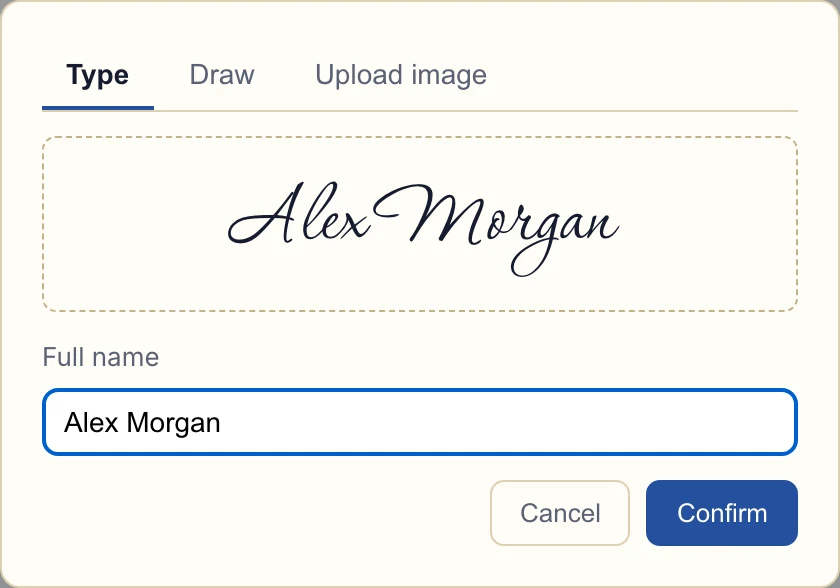
Product demonstration with fictional data. This is the signature capture dialog. Typing a name is not independent identity verification. View the full-size signature dialog.
The client types a name, draws a signature or uploads an image of one, then positions and resizes it on the page.
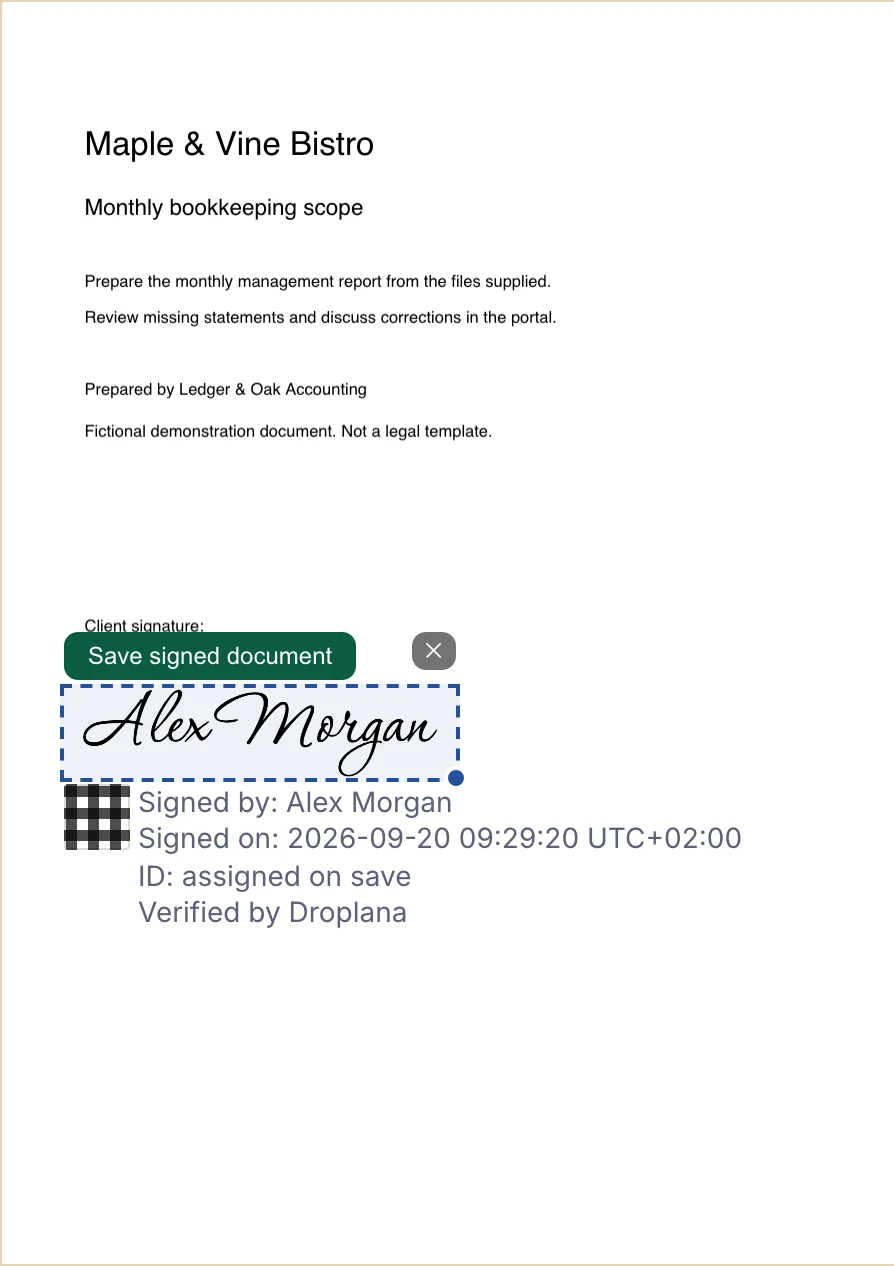
Product demonstration with fictional data. The client positions the mark before saving. The verification ID is assigned on save. View the full-size placement preview.
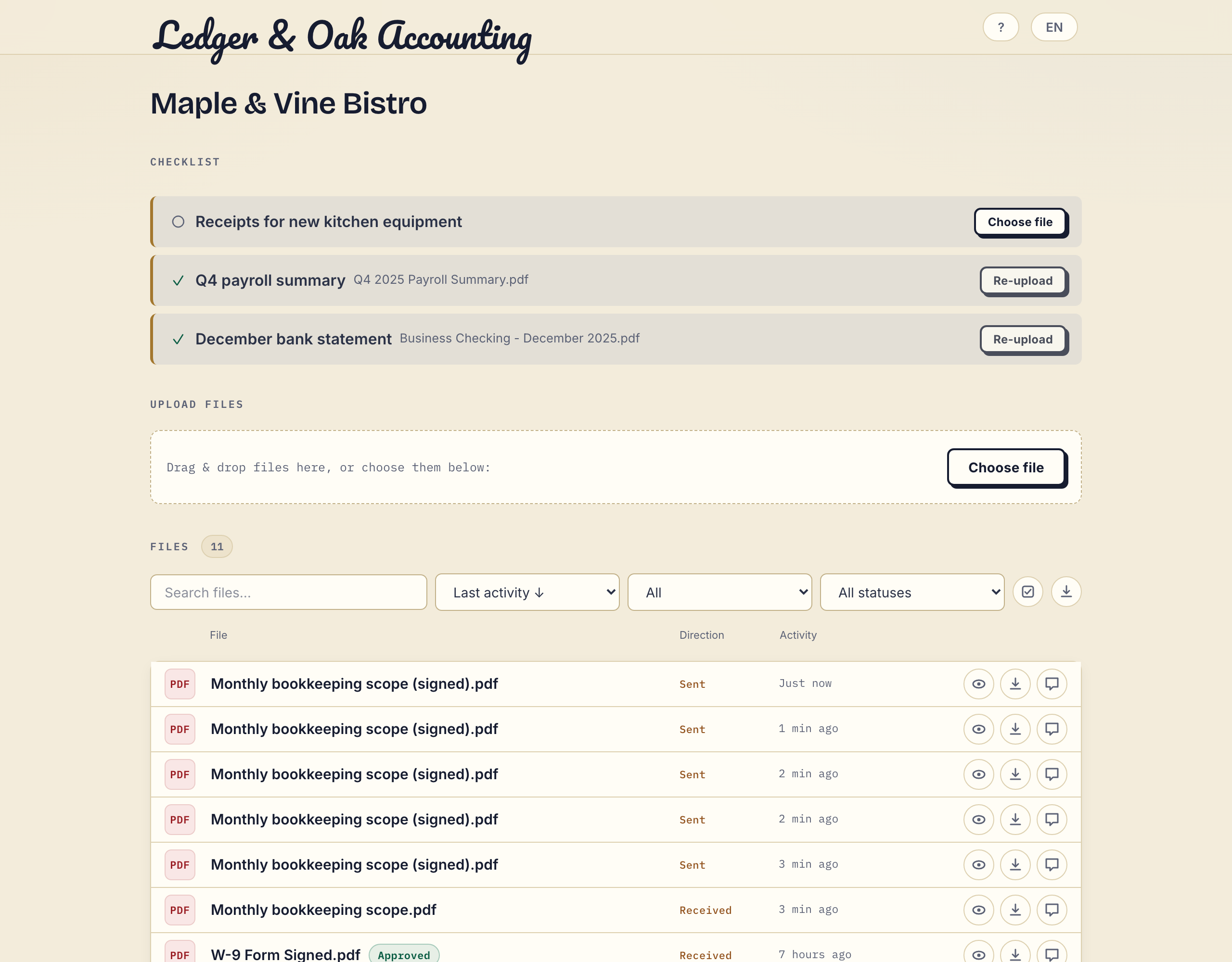
Saving creates {original name} (signed).pdf next to the original, which stays unchanged. The signed file carries a caption and a QR code linked to its verification record. Open a capture of the saved files to see an original next to its signed copies; the business, client and documents are fictional.
What in-browser signing records, and what it does not
When someone signs in the browser, Droplana does not only stamp a picture onto the PDF. The server records the entered name, the login email, the signing time, the IP address and a hash of the signed file. The QR code leads to a public page at droplana.com/verify/{id} that shows the signer name, business, time and verification ID, without exposing the PDF, the login email or the IP address. Anyone holding a copy, such as the signer, an auditor or the client's own lawyer months later, can select the PDF there and check in the browser, without uploading it, whether its bytes match what was signed.
What it is not: a qualified or certified electronic signature. There is no digital certificate, no identity verification beyond the login, and no notarisation. A document is marked as signed, and a hash match proves matching file bytes, not the signer's real-world identity, authority or the contract's legal effect.
For many documents a recorded, checkable signed copy is what professionals have always relied on: an engagement letter, a service agreement, a consent form, an intake declaration. If a document has a legal requirement for a qualified electronic signature, as defined under the EU's eIDAS regulation, use a dedicated e-signature product for that one document and the portal for the rest. The PDF signing page explains the technical boundary. Keep in mind that deleting the account also deletes its signature records, so save what your process requires outside the portal.
How to return a signed document without a scanner
If you are the one who has to sign and return a document, you have three options, from least to most effort:
- Sign it in the browser. If the sender uses a portal with PDF signing, open the document, add your signature and save. There is nothing to print or send back.
- Photograph the signed page. If you signed on paper, put the page on a flat, dark surface in good light and take the photo from straight above, so all four corners are visible. Many phone camera and notes apps also have a document scan mode that crops and straightens the page. Photograph every required page and check that the text and signature are readable.
- Scan and email it. This works, but it is the slowest route, and the copy ends up as one attachment in a long thread.
To return a signed copy by email, reply to the original message, attach the complete signed file and say which document and version it is ("Signed service agreement, revision 2"). In a Droplana portal, the client uploads the file or chooses Take Photo on a phone, when the business has client uploads switched on.
An uploaded scan or photo is stored as a file. It does not gain a Droplana signing record by being uploaded, and marking it Approved does not sign it either: either side can change or clear that marker.
A real example
A law office sends a client an engagement letter and a data-consent form, after deciding that a recorded browser signature suits both. In the old flow, the client would print both, sign them, hit the scanner problem, and a paralegal would spend two days chasing the copy that never arrived.
With a portal, the client verifies their email, opens each PDF, chooses Sign and saves. Both signed copies sit under that client's name the same day, each with its own verification ID. When the matter is reviewed months later, the signed forms are in the client's file, not in someone's inbox. The paralegal still opens each one to check it is the right revision with every page.
A mortgage broker collecting signed disclosures alongside payslips and bank statements works the same way: every signed document returns to the portal that holds the rest of the application.
When there is more than one document, a document checklist tracks what is still missing. List everything you need signed or returned and watch the list clear as each file comes back. A checked item means a file arrived, not that it was signed correctly. By default, if the client does nothing for 7 days while items are missing, Droplana emails them a reminder naming those items, and after 14 days the reminder comes to you instead.
Where Droplana fits
Droplana gives each client a private portal with no account and no app. You upload the contract, the client signs it in the browser or returns a copy signed elsewhere, and the result is filed under their name next to the original, with per-file comments if a page is unreadable or the wrong version comes back. If your practice system should know when a contract comes back, a signed webhook can report each document signed in Droplana.
Signing is included on every plan. Free costs €0 for 3 clients, 2 GB total storage, files up to 100 MB and one business seat, and keeps each file for up to 180 days after upload. Solo costs €19/month or €190/year plus tax, with unlimited clients, 50 GB total storage, files up to 1 GB and no plan-imposed retention limit.
If you are still running this over email threads, try the flow with one real contract and one client, and check the separate signed copy before you move everyone.
Questions before you start
Can a client sign with only a private link?
No. Signing requires an email-identified client session through an email magic link, Google or Microsoft, including a remembered verified device. An unverified permanent or one-time link alone does not allow signing.
What does the public verification page establish?
It displays the entered signer name, business, signing time and verification ID. A hash check runs in the browser without uploading the PDF and checks whether its bytes match the recorded signed file. It does not establish real-world identity, authority to sign or legal effect. Account deletion also deletes signature records.
Does uploading a signed scan create a Droplana signing record?
No. A scan or externally signed file is stored as an uploaded file. Droplana creates its own signing record when an identified user completes the in-browser PDF signing flow. An Approved marker does not sign a document.