
Wedding Planning Documents Without the Email Chaos
Organise wedding planning documents in a private client pack, collect the couple’s updates and keep vendor handoffs separate from shared portal access.
Illustrative example: Sample requests are illustrative. Product screenshots use fictional demonstration data, not customer results.
Wedding planning documents need a clear home for the couple and a separate handoff for vendors. Send a named planning pack, ask the couple to return specific updates and explain which version is current before anyone relies on it.
Droplana is a client document portal for two-way file exchange. The couple gets one private portal that holds their documents and the files they send back. Vendors get their own handoff copies instead, as the section on vendors explains.
Wedding planning documents: a client-facing pack
Illustrative pack for a fictional couple, Maya and Rowan. These are suggested filenames and responsibilities, not a captured customer engagement.
| Planner sends | Couple returns | Review needed |
|---|---|---|
| Timeline, Rev 2 | Comments on specific times or omissions | Planner confirms the revised timeline |
| Seating worksheet | Completed seating worksheet | Check names and table assignments |
| Vendor contacts | Corrections to agreed contacts | Planner updates the source list |
| Reference request | Selected reference photos | Confirm which references guide the work |
Name each file clearly, for example Timeline - Rev 2.pdf, Seating worksheet - Rev 1.xlsx and Vendor contacts - Client copy.pdf. Prepare files in your existing editing tools. The portal exchanges them; it does not edit a seating chart or assign work to suppliers. If the pack previously travelled by email, explain the new return destination in the same message.
Ask for one return at a time, with a clear list
Enable client uploads and put the agreed returns in a checklist. The couple can send reference photos or completed files through the browser. Review the returned file before treating the request as complete.
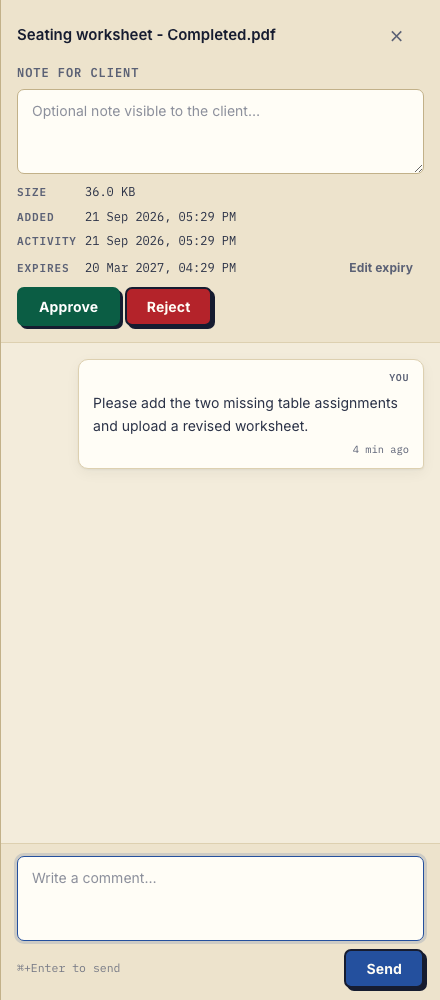
Product demonstration: fictional Clearpath Studio sends a timeline PDF, and Maya and Rowan return a seating worksheet through the actual client upload input. The planner saves a comment asking for missing assignments. This demonstrates receipt and a correction request, not a completed wedding plan.
Keep vendor handoffs separate
Do not tell the couple to forward their portal access to the wedding party or vendors. Contacts attached to the same client share that client's portal; there are no separate per-file permissions for a caterer, venue or photographer inside it.
Decide which people should have full client access. Send each vendor only the approved information they need through your agreed vendor channel. Remove unnecessary personal details from those handoff copies.
For the day itself, agree an urgent contact channel and prepare the necessary handoff copies ahead of time. A document portal does not replace day-of coordination.
Label revisions and explain the invitation
Upload Timeline - Rev 3.pdf as a separate file and tell the couple it supersedes Rev 2. New uploads do not automatically replace older ones, and a downloaded copy will not update itself.
Hello [names], your planning pack is at [portal address]. Please return [worksheet] by [agreed date] and comment on [timeline filename] with any corrections. No signup is needed; verify your email when prompted. This portal contains your client documents, so do not forward access to vendors. We will send their agreed handoff copies separately.
Clients do not create an account or choose a password. Strict mode, the default, requires email verification on a new device. Enable client uploads when you want files back. The business owner, authorised team members and contacts attached to that client can access the client's portal; other clients cannot.
Plan for the whole engagement
A persistent portal address is not permanent storage. Agree how long the couple can retrieve files and keep your own required records separately.
Free includes 3 clients, 2 GB shared storage, a 100 MB file limit and files kept for up to 180 days from upload. Solo costs €19/month or €190/year plus tax, with unlimited clients, 50 GB storage and a 1 GB file limit. Both have one business seat; teams need Practice or Studio. Active paid plans have no plan-imposed retention limit, subject to expiry settings, deletion and cancellation. See plans and limits.
Questions before you start
Can the couple share portal access with every vendor?
Do not use the client portal that way. Contacts attached to one client share that portal, without separate per-file vendor permissions. Send vendors only their approved handoff documents through your agreed channel.
Can the couple return a completed seating worksheet?
Yes, when client uploads are enabled. They complete it in their usual document tool and upload the file through the browser. The planner still needs to review it.
Can the couple sign the planning contract in the portal?
Yes, if you upload the contract as a PDF and the couple has signed in with an email link, Google or Microsoft. With in-browser PDF signing they type, draw or upload a signature and place it on the page; the signed copy is saved as a new file and the original is kept. Droplana records who signed and when, but this is not a qualified electronic signature.
Try Droplana free with one client exchange before choosing a plan.