
A Client Portal Without a CRM
Use a client portal without a CRM: keep contacts and deals in the records you already have, and give each client one private place to exchange documents.
A client portal without a CRM lets you exchange documents without adopting a sales pipeline. You still maintain a client name and contact details for portal access. The useful separation is between relationship records and the files sent to or received from that client.
Droplana is a client document portal for that exchange: one private, persistent portal per client for sending documents and receiving files back. Contact details are not synced from your CRM, so if you keep both systems, someone maintains the details in each.
A client portal without a CRM: what stays where
- CRM or spreadsheet: contacts, deal value, relationship notes, next sales action and the person responsible for follow-up.
- Droplana: the client's portal details, shared deliverables, returned documents, checklists, per-file comments and file status.
- Billing system: invoices, payment records and collection work. Uploading an invoice PDF does not connect its payment status to Droplana.
A portal does not remove the need for accurate contact records. When an address changes, verify the intended recipient and update each system manually. A portal comment is visible to the client; it is not a private sales note.
Illustrative example: one branding client
A studio records Alder & Finch's accepted proposal and project contact in its CRM. It creates a separate Droplana client using the verified name and email. A staff member records the portal address in the existing relationship notes, without treating it as an integration.
The studio requests the approved brief and product photos in a document checklist. The client sends those files back. The studio uploads Homepage Concepts - Round 2.pdf and asks for feedback in a comment. The client requests a replacement photo on page 2.
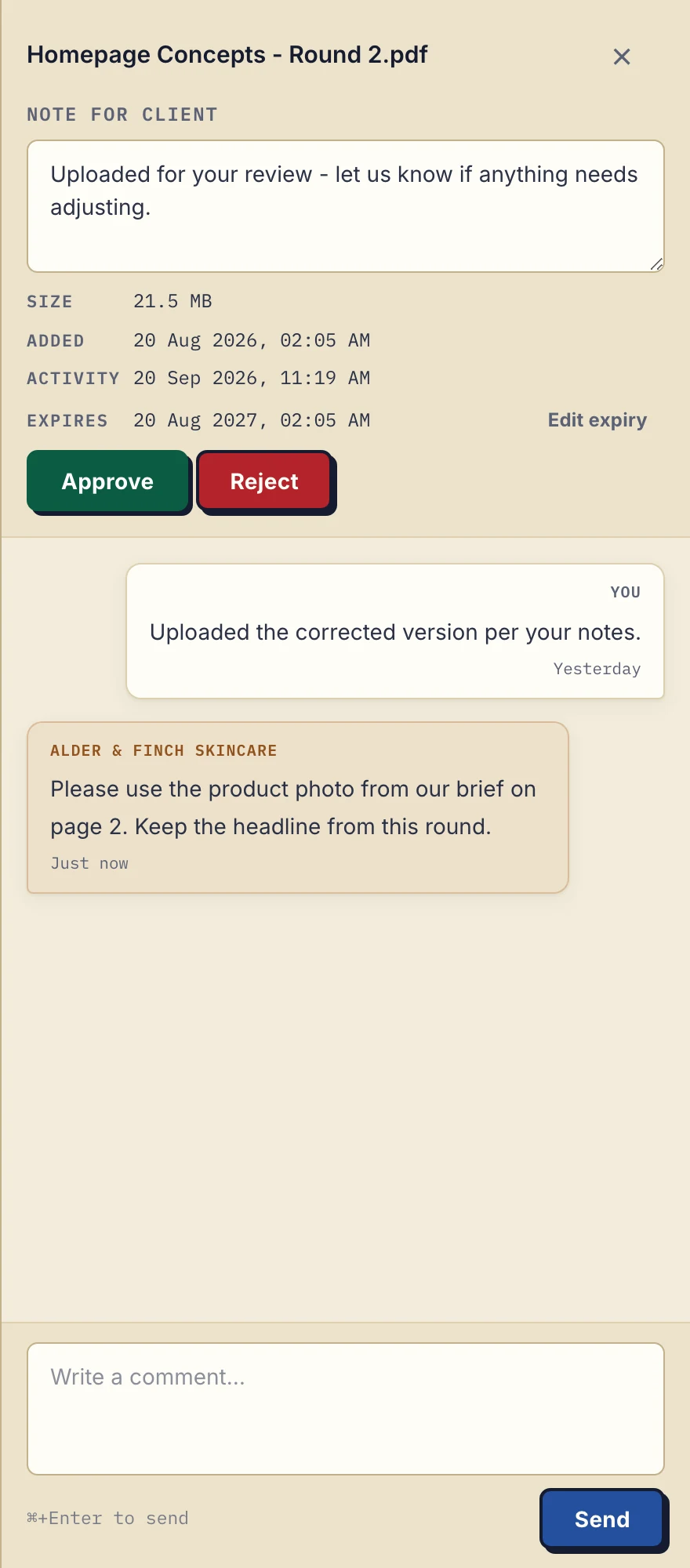
Product demonstration with fictional data: the business-side desktop sidebar for Alder & Finch Skincare. The client asks for a different photo on page 2; the reply stays with that PDF. Open the full-size capture.
The studio's project owner reads the feedback, records the next action in the existing work tool, and uploads a corrected file when ready. Re-uploading creates a new file; it does not overwrite the earlier one. Either side can mark a file Approved or Rejected, or clear the status. The document approval guide explains that limit.
Copyable internal note for this illustrative workflow:
Client record: Alder & Finch. Document exchange: the verified client's portal. Next action: replace the page 2 photo after review. Owner: the project lead. Update this note manually when the document changes.
Keep private internal notes in the CRM or work tool, not in the client-facing comment field.
When keeping one system makes more sense
If your existing CRM already handles the exchange well, adding a portal creates another place to maintain. If you need deal stages to trigger file requests, Droplana does not meet that requirement: it has no ready-made CRM connector and no configurable workflow. What it has on every plan is signed webhooks, which can tell your own systems when a client is created, uploads a file or comments, and an MCP server that lets an AI assistant or automation tool read and update the exchange. Connecting those to a CRM is setup you do yourself. Review the dedicated HoneyBook comparison or Assembly comparison when one of those products is in your shortlist; this article makes no claim about their current features.
Access and costs
Clients do not create an account. In the default Strict mode, they verify their email on a new device; the verified browser is remembered for 90 days. A persistent portal address does not promise permanent file retention.
Free includes 3 clients, 2 GB total storage, a 100 MB per-file limit and 1 business seat. Files are kept for up to 180 days after upload; the clients, their portal access and the Free account do not expire with those files.
Solo costs €19/month or €190/year plus tax, with unlimited clients, 50 GB total storage, a 1 GB file limit and 1 seat. Paid plans have no plan-imposed file-retention limit, subject to expiry settings and account status. A studio needing colleague access must use Practice or Studio. The cost guide and pricing explain the buying questions and full plans.
For the broader client portal definition or the practical document-collection process, continue with those guides.
Questions before you start
Does a portal without a CRM mean no client records?
No. Droplana still needs client details for portal access. Contacts, deals and relationship notes remain in your CRM or spreadsheet and are maintained separately.
Does Droplana sync with my CRM?
No. There is no ready-made CRM connector, so adding or correcting a contact in one system does not update the other. An automation tool you set up can react to Droplana's signed webhooks or connect through its MCP server.
Can I invite a colleague on Solo?
No. Free and Solo each include 1 seat, the owner. Practice includes 5 seats including the owner; Studio has unlimited seats.
Follow the setup instructions for a first-client exchange, then use Free if the workflow and limits fit.