
A Client Portal Without Project Management
Use a client portal without project management: exchange documents and feedback in one place per client, with checklist reminders and a simple handoff.
A client portal without project management gives clients a place to receive deliverables and send documents back while your team runs tasks elsewhere. Droplana is a client document portal with checklists and per-file feedback. It has no boards, assignees or project dependencies.
If clients need to work on shared tasks and timelines, start with project management with a client portal. That requirement is broader than document exchange.
A client portal without project management: the handoff
An illustrative web studio keeps its tasks and owners on an internal board. Its client needs to supply copy and logos, then review a PDF of the proposed homepage. The studio asks for those inputs in Droplana and shares the PDF when it is ready.
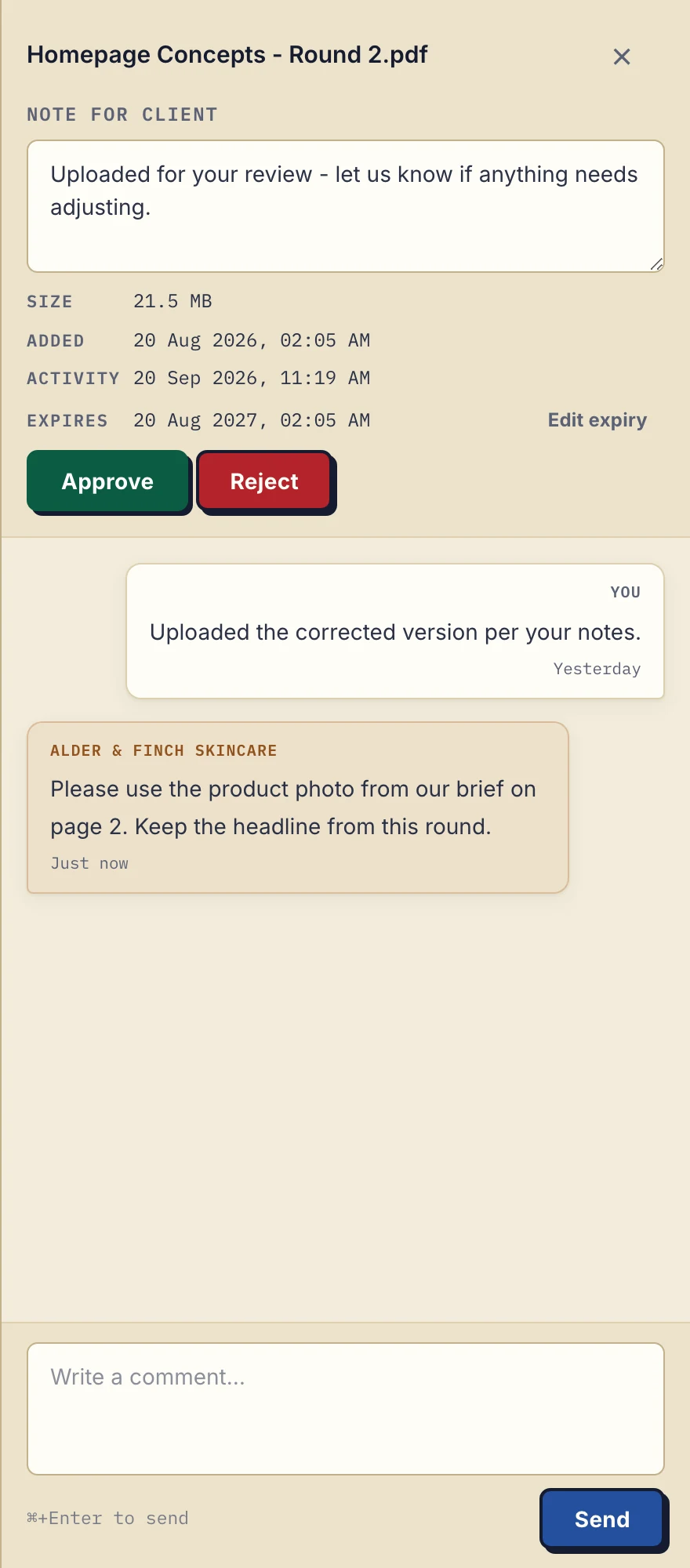
Product demonstration with fictional data: the business-side desktop sidebar for Alder & Finch Skincare. The client asks for a different photo on page 2; the reply stays with that PDF. Open the full-size capture.
The project lead reads the client's page 2 comment and manually adds the correction to the internal board. When the designer finishes, the lead uploads a new PDF and posts a note naming the new file. Nothing in Droplana automatically creates, moves or completes the board's task.
A useful working note is:
Internal task: revise the page 2 product photo. Client-facing file: Homepage Concepts - Round 2.pdf. After review: upload the corrected PDF, ask for feedback there, then update this task manually.
That note belongs in the internal tool. Client-facing comments should contain only information intended for the client. The approval guide covers how to ask for review on the right file.
What a checklist and file status can tell you
A document checklist lists the inputs still requested from a client. Supplied does not mean checked, correct or accepted. A business must review the returned file.
File status is Approved, Rejected or unset. Either side can change or clear it; it is not a locked project milestone or a multi-stage approval process. Use comments to explain what needs correction.
Checklist items can have optional due dates. A due-date reminder is prepared two days before and on the date, is not sent once the item is supplied, and reaches the client with their next email, which can be later that day or the following day. The business and the client can turn it off. Separately, the fixed inactivity ladder nudges the client after 7 days without activity while items are missing, then escalates to the business after 14 days. Inactivity reminders are on by default and can be disabled. Neither schedule supplies branching, task assignment or dependencies.
A due date on a document request does not create a project timeline. Keep work allocation, scheduling and dependency tracking in your existing tool.
When the two-tool approach does not fit
Choose a system that supports shared project work if clients must assign tasks, change deadlines, inspect dependencies or see a live project schedule. Droplana has no ready-made connector to project tools. Signed webhooks can tell your board's automation when a client uploads a file, comments or completes a checklist, and an automation tool can connect through the MCP server, but that link is setup you build and maintain.
If you already use Notion or are evaluating SuiteDash, those comparison pages address their separate buying questions. Keep a working system if document exchange there already meets your needs. The file organisation guide considers an existing shared-folder process.
Access and plan fit
Clients do not create an account. In the default Strict mode, they verify their email on a new device; the verified browser is remembered for 90 days. A persistent portal address does not promise permanent file retention.
Free includes 3 clients, 2 GB total storage, a 100 MB per-file limit and 1 business seat. Files are kept for up to 180 days after upload; the clients, their portal access and the Free account do not expire with those files.
Solo costs €19/month or €190/year plus tax, with unlimited clients, 50 GB total storage, a 1 GB file limit and 1 seat. Paid plans have no plan-imposed file-retention limit, subject to expiry settings and account status.
Practice costs €49/month or €490/year plus tax, with 250 GB, a 2 GB file limit and 5 seats including the owner. Studio costs €99/month or €990/year plus tax, with 1 TB, a 5 GB file limit and unlimited seats. Both include unlimited clients. Check pricing before giving colleagues access. The cost guide explains what to count beyond a subscription.
If relationship records are the adjacent concern, read about a portal without a CRM. The category definition explains the narrower document role.
Questions before you start
Does Droplana update my project board?
Not on its own. There is no ready-made connector to project tools, so by default a person copies relevant client feedback into the project tool. An automation tool you set up can react to Droplana's signed webhooks or connect through its MCP server.
Can document requests have due dates?
Yes. Checklist items can have optional due dates. A reminder is prepared two days before and on the date, is not sent once the item is supplied, and reaches the client with their next email. The business and client can turn those reminders off. There are no task assignees or dependencies.
Is a file approval a completed project milestone?
No. File status is Approved, Rejected or unset, and either side can change or clear it. Project progress must be maintained separately.
Follow the setup instructions for a first-client exchange, then use Free if the workflow and limits fit.