
When to Upgrade From Email to a Client Portal
Not every business needs a client portal yet. An honest way to decide whether you have outgrown email: five signs you are ready, three signs to wait, one pilot.
Illustrative example: The time arithmetic, the sample day and the invitation are illustrative. The product capture uses fictional demonstration data, not a customer result.
Marketers want you to believe you need every tool, immediately, today.
We don't.
Upgrade from email to a client portal when finding files, tracking missing documents and matching feedback to versions costs you time every week, and a tidier inbox has not fixed it. Not every freelancer or small business is there yet. The hard part is knowing which side of that line you are on right now.
This post gives you a practical way to decide. Not a feature checklist, and not a pitch built on fear. If you want a general introduction to client portals, the complete guide to client portals covers that. This post is about the decision.
Why this is a decision, not an obvious upgrade
There is a popular idea that every freelancer needs a client portal. It is not quite right.
Running client work out of email is fine up to a certain scale and complexity. It is free, everyone knows how it works, and there is nothing to learn. Below that point, a portal adds more friction than it removes.
Above it, the balance turns. Email starts costing you more than a portal would, in time, in client experience and in things that fall through the cracks. Most people cross that point without noticing. They keep going in their inbox and pay the cost in small daily friction.
Five signs you have outgrown email for client work
Do not tally these like a quiz. If even one is consistently true for you, take it seriously.
1. You spend more than 15 minutes a week looking for things you already sent
This is the clearest signal. Think about the last week. How many times did you search for "that file from October" or "the brief Sarah sent"?
A couple of minutes a week is nothing. At 15 minutes a week over 50 weeks, it adds up to 12.5 hours a year spent on retrieval alone. Write your own number down; it is a record of today's effort, not a prediction of savings.
2. You keep asking "did you get my last email?"
Email gives you no useful sign that a message was seen. So you wait, wonder, follow up and sometimes follow up again.
Often the real question underneath is not "did they see my email" but "did they send everything I asked for". A document checklist answers that with a visible list of what is still outstanding and what already arrived, so you are not re-reading old threads to remember what you asked for.
3. You have more than three active client threads with double-digit message counts
Open your inbox, sort by client and count the threads with 10 or more messages. Up to about three, you can hold the context in your head. Past that, every new client message means scrolling back and rebuilding what was agreed.
4. You recently sent "sorry, resending, the previous link expired"
This is the transfer-link tell. Whenever you re-send something a client should already have, the tooling is failing you. In a portal the file stays in the client's place for as long as you decide to keep it there, and the client knows where to look.
5. You feel quietly embarrassed about your client communication
This is the soft signal, and often the most honest one. Do you describe a process that involves three tools and hope nobody asks a follow-up question? If your work is careful but the way documents move around is improvised, you probably already feel the gap.
Three signs you should not switch yet
The reverse case. Save yourself the effort if any of these is true.
1. You have one or two clients
With one or two clients, anything works. Setting up a new tool costs more time than it saves. Do not rebuild your setup for a problem you do not have.
2. Your projects are short and one-off
If a typical job is "deliver one logo, get paid, move on", you do not need an ongoing portal. A transfer link for the deliverable and an invoice can be a complete workflow.
3. Your current setup is working
If you think "my email is messy, but it does not slow me down", believe yourself. Clear requests, a named reviewer and consistent filing solve a lot. You will know when it stops working.
The middle ground: upgrade some clients, not all
You do not have to flip a switch and migrate everything. The most sensible pattern is usually:
- Use a portal for new clients from day one. They have no habit to break.
- Move existing long-running clients where the ongoing exchange matters.
- Leave finished and one-off work where it is. There is nothing to gain from moving it.
After a few months, the portal is your default for documents and email handles everything else. No migration project needed.
What ready looks like in your day
Set the framework aside for a moment and picture an illustrative day.
With email:
- 8:30: 14 new messages, 9 of them client work. You start triaging, reattaching files and digging through old threads.
- 11:00: a client writes: "Do you still have the V2 mockup? I can't find it." Eight minutes later you have found it and sent it again.
- 14:00: you finish a deliverable, write the email, attach it, find it is too big, upload it to a transfer service and paste the link.
- 17:30: the client opens the email after the link has expired and writes back.
With a portal:
- 8:30: each client's files, comments and outstanding requests are in their own place, so you see what changed without reading every thread.
- 11:00: the client opens their portal and finds the V2 mockup themselves.
- 14:00: you upload the deliverable to that client's portal with a short note.
- 17:30: the client opens it when they are ready. The file is still there.
No single moment is dramatic. The difference is the friction that stops happening.
Run a one-client pilot
If you have decided yes, keep the test small.
Week 1: try one tool, free, with one client. Choose a new client or a willing existing one with an active request. Use a small set of files that fits the plan.
Weeks 2 to 4: complete both directions. Request the inputs, check what arrives, share the deliverable and ask for feedback on the file. Note where the client or your team needed help.
Week 4: decide. Keep a simple record: what you requested and what arrived, the time spent finding files and missing items, and any help the client needed. Compare it with the old process, including the setup effort. Expand if the exchange is clearer; stop if the client cannot use it or the second location is more work than it saves.
A copyable invitation for the pilot client:
For this request, please upload the listed documents to your portal. We will return the review copy there and leave any file-specific questions beside it. Reply to this email if you have trouble opening the link.
What kind of portal to consider
Roughly, four options:
- Lightweight client portals: files, requests and per-file comments, low price and little to learn. Best if billing and contracts are handled elsewhere. Droplana is in this group.
- Portals with more bundled: billing and contracts included, such as Assembly (formerly Copilot) or Moxie. Best if you want those in the same place and accept a higher price.
- All-in-one platforms: CRM, invoicing, portal and scheduling, such as HoneyBook, SuiteDash or Dubsado. Best if you are rebuilding your whole setup at once.
- Do it yourself: a shared folder, Notion or chat with guest access. Fine if your needs are small, but permissions and naming take ongoing care.
For most freelancers and small agencies making the jump for the first time, the lightweight option is the right start: the lowest switching cost, and the easiest to undo.
What Droplana adds, and what it leaves to you
Droplana is a client document portal: each client gets a private portal for the files you send, the documents they return, checklists and per-file comments. Clients do not create an account. In the default Strict mode they verify their email on a new device, or sign in with Google or a Microsoft account they connected once, and the browser is remembered for 90 days. Files, comments and metadata are hosted in Germany, with a DPA available.
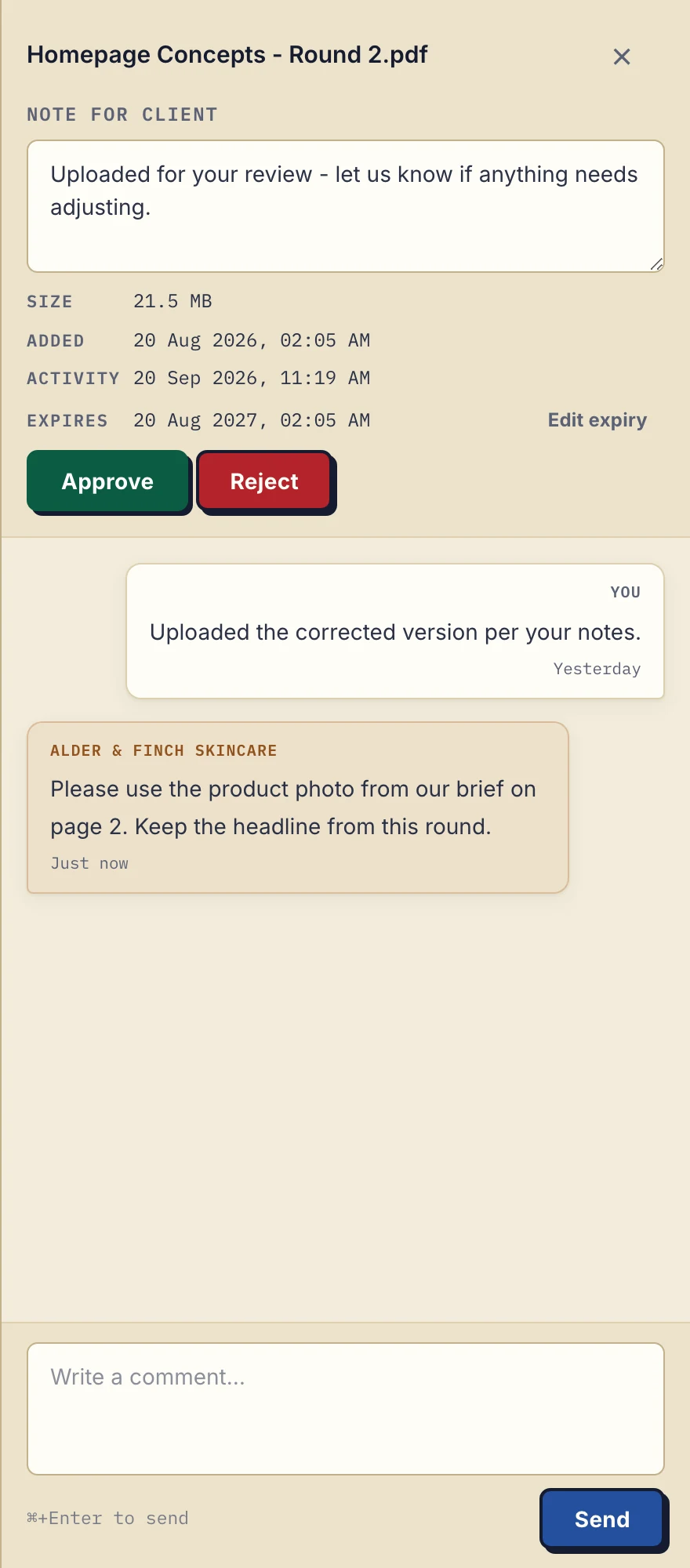
Product demonstration with fictional data: the business-side desktop sidebar for Alder & Finch Skincare. The client asks for a different photo on page 2, and the reply stays with that PDF. Open the full-size capture.
Editing the file, reviewing the change and updating your other tools are still your work. Droplana is not a CRM or project management, and it has no native connector to either. If you want more later, an AI assistant or automation tool can connect through its MCP server, and outgoing webhooks can tell another system when a document arrives, on every plan.
Free includes 3 clients, 2 GB total storage, a 100 MB per-file limit and 1 business seat; each file is kept for up to 180 days after upload, while the clients and their portal access stay active. Solo costs €19/month or €190/year plus tax, with unlimited clients, 50 GB, a 1 GB file limit and no plan-imposed retention limit. For colleagues, Practice includes 5 seats including the owner and Studio unlimited seats. Check pricing against your pilot files, and the FAQ for access and limits.
Questions before you start
When should I switch from email to a client portal?
When finding files, tracking which documents are still missing or matching feedback to versions keeps costing you time after you have tidied up your email process. There is no universal client-count threshold; a one-client pilot tells you more than any rule.
Do I have to migrate all my clients at once?
No. Start with one new or willing client. Leave finished work in its existing archive, and move other clients only if the pilot works for both sides.
Can I take my files out if the pilot does not work?
Yes. Download the files you need before you stop. Account data exports as JSON and activity logs as CSV; bulk ZIP downloads support up to 2 GB or 2,000 files, and larger exports use folder download in a Chromium browser.
If you recognised yourself in two or more of the five signs and none of the three reasons to wait, try Droplana free on one client in the next two weeks. Either way, you will have answered the question instead of carrying it.