
What Freelancers Actually Need in a Client Portal
Find what freelancers need in a client portal through one document exchange: setup, client uploads, feedback, Free limits and the point at which to upgrade.
What freelancers need in a client portal depends on the exchange: send a draft, collect source material and keep feedback on the right file. Judge simplicity by completing those tasks as both freelancer and client. A short feature list is not proof that a tool is the simplest or the right fit.
Droplana is a client document portal with one private portal per client, uploads in both directions, document checklists and per-file comments. Your CRM, project and billing work remain in your existing tools.
What freelancers need in a client portal: try five actions
- Create the client. Add the intended client's name and email, check the address and decide which documents to share. There is a client record to maintain even without a CRM.
- Open the client journey. Send the portal link. In default Strict mode, the client verifies email on a new device; the browser is remembered for 90 days. No account or password creation is required.
- Share one draft. Upload a clearly named PDF and leave a comment explaining what to review. Keep private working notes outside the portal.
- Receive an input. Enable client uploads and request the specific file in a checklist. The client can choose a file or photograph paper with a phone. Inspect the result for legibility and completeness.
- Close the feedback loop. Read the comment on the draft, make the change in your editing tool and upload a new file. Either side can set Approved or Rejected, or clear the status; it is not a locked acceptance record.
The setup instructions explain the controls. Do not treat the number of steps as a measured setup time.
The client's phone view
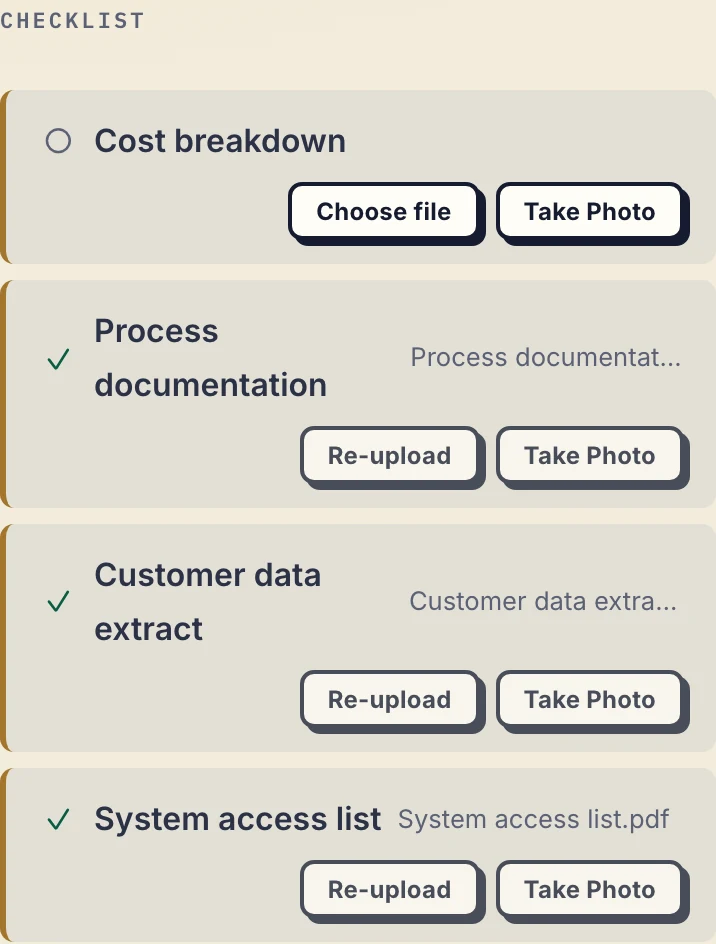
Product demonstration with fictional consulting data: a crop of the client mobile checklist. Cost breakdown is still missing; three other inputs are supplied. This phone view illustrates the upload step, not a completed review. Open the full-size capture.
A client can use the original file when available instead of photographing a printout. Check the image before relying on it. The document-collection guide explains the return path.
Illustrative example: one copywriting client
A copywriter requests the approved brief and existing product information. The client uploads both. The copywriter returns Landing-page-copy-v1.pdf, asks for feedback and receives a note identifying a sentence to change. The revised text is edited outside Droplana and uploaded as Landing-page-copy-v2.pdf.
The client record, requested inputs and review documents stay together. The copywriter still maintains invoices, deadlines and the current-version note. The file organisation guide explains naming and review habits; a portal does not remove them.
Free limits and the first upgrade
Free includes 3 clients, 2 GB total storage, a 100 MB per-file limit and 1 business seat. Each file is kept for up to 180 days after upload.
Solo costs €19/month or €190/year plus tax, with unlimited clients, 50 GB total storage, a 1 GB file limit and 1 seat. Paid plans have no plan-imposed file-retention limit, subject to expiry settings and account status.
Use pricing to check your largest file and total storage before trying the exchange.
If you work with another business user, Solo's single seat will not cover that colleague. Practice has 5 seats including the owner; Studio has unlimited seats. The cost guide explains that broader decision.
When a different setup fits
Freelancers can need a CRM, a project tool or both. Keep one if it manages real work. Read about a portal without a CRM, a portal without project management, or combining both kinds of tool according to your situation.
Droplana does not edit documents, generate invoices, schedule projects or serve as long-term archival storage, and it has no native connector to a CRM or project tool. If you later want one, an AI assistant can connect through its MCP server and an automation tool can receive its webhooks; you need neither to use the portal. If your current file-sharing process already works, another subscription may add little. The freelancers page shows the audience-specific fit.
Questions before you start
How can I judge whether a client portal is simple enough?
Try creating one client, sending a draft, receiving an input and responding to feedback. Check the client journey as well as your own setup; there is no universal simplest tool.
Does a Free portal expire?
No. The clients, their portal access and the Free account stay active. Each file is kept for up to 180 days after upload, so download anything you need to keep before then.
Do freelancers have to give up their CRM or project tool?
No. Keep tools that handle your relationship records, tasks or billing. Droplana exchanges documents alongside them. Nothing syncs automatically, but an automation tool you already use can receive Droplana webhooks, for example when a client uploads a document.
Follow the setup instructions to try a Free exchange within the limits above.