
The PDF is ready. Your client can sign it here.
Open the document, place a signature and save a new copy in the same client portal. No printing, scanning or separate signing app.
Droplana is a client document portal with in-browser PDF signing. Each client has one private portal where you send documents and they upload files back, with no account to create. Send the PDF there, let the client sign it in the browser, and keep the signed copy beside the original. It suits businesses that need a signature placed on a PDF and a record of the event, after checking that this method fits the document.
How in-browser PDF signing works
- Open the PDF. You or your client opens its preview in the portal. A client must be identified by email before signing; having the private link alone is not enough.
- Make the signature. Choose Sign, then type a name, draw with a mouse or finger, or upload a signature image.
- Place and save. Position and resize the signature on the page. Save creates a separate signed PDF with a caption and verification QR code.
- Keep the exchange together. The original and signed copy appear in the same client's files. Use a per-file comment if you need to discuss the document.
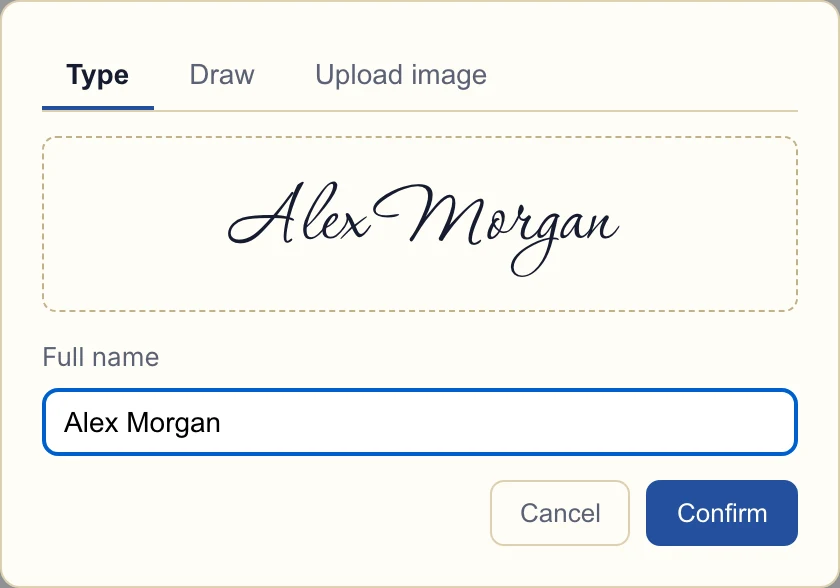
Actual app, fictional client and demonstration document. Inspect the signing dialog.
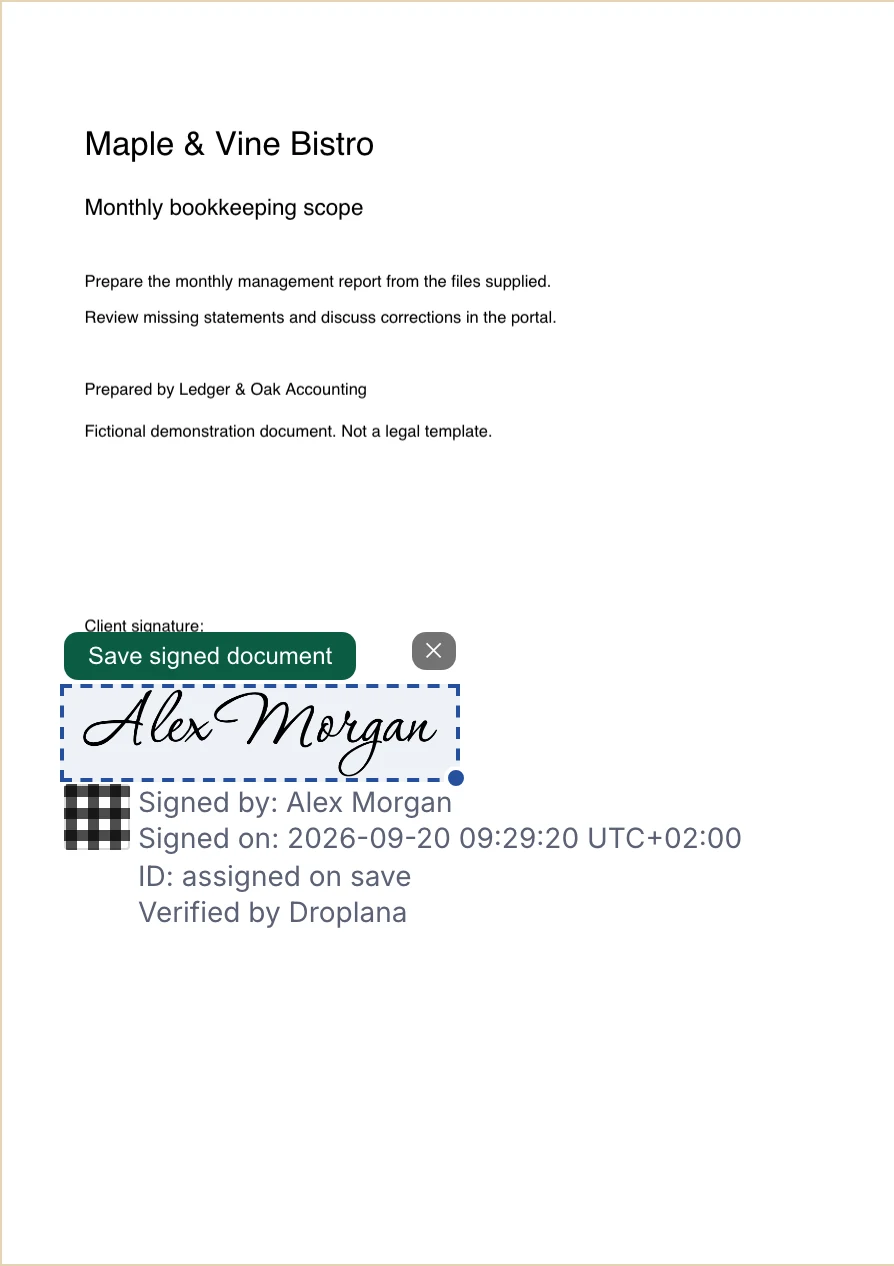
The client positions the signature before saving a new copy. Inspect the PDF placement.
What you receive, and what it means
| Result | What it tells you |
|---|---|
| A new signed PDF | A signature was placed on this copy. The source PDF remains unchanged. |
| Signing record | Droplana records the entered name, login email, time and IP address for the signing event. An entered name is not independent identity verification. |
| Verification ID and QR code | They lead to a public record with the entered signer name, business and signing time. Anyone with that link can view those details. |
| File-hash check | A reader can check whether their PDF matches the recorded signed file, without uploading it. Matching bytes do not establish a document's legal effect. |
The public page does not expose the full PDF, login email or IP address. Treat its link and the details it does display as part of your document-sharing decision. Verification is available while the record exists; deleting the business account deletes its signature records. Keep your own copies for the retention obligations that apply to your work.
Signing a PDF is different from approving a file
An approval marker records feedback on a file in the portal. It does not place a signature on the PDF. PDF signing creates a separate signed copy and a signing record. Neither feature is a qualified electronic signature, a digital certificate or notarisation.
For a document that needs a particular signature standard or identity check, use a provider that meets that requirement. You can upload the resulting document to the client's portal yourself. Droplana does not route documents to an external signing provider or decide whether a document is legally sufficient.
Try it on an ordinary client exchange
An accountant might return a scope document to the same portal used to collect statements. A consultant might share a revised brief beside the client's comments. In either case, check the document's requirements before asking the client to sign. There is no need to make every document a signing task: a comment or approval marker may be enough to collect ordinary feedback.
See the broader client document exchange, or use document checklists to collect the files you need before preparing the PDF.
Included on every plan
Free
€0/month
Just you
3 clients
2 GB storage
Up to 100 MB per file
Solo
€19/month
€190/year
Just you
Unlimited clients
50 GB storage
Up to 1 GB per file
Practice
€49/month
€490/year
Team size: 5
Unlimited clients
250 GB storage
Up to 2 GB per file
Studio
€99/month
€990/year
Team size: Unlimited
Unlimited clients
1 TB storage
Up to 5 GB per file
On Free, each file expires 180 days after upload. Your clients and their access stay active, so you can keep sharing new files. Active paid plans have no plan-imposed retention limit. Expiry settings, deletion and cancellation rules still apply; a persistent portal address does not guarantee permanent file availability. Team sizes include you. No setup fees or automatic overage charges. Prices exclude applicable tax.
Compare plan detailsPDF signing questions
Can clients sign without creating an account?
Yes. Clients do not create a Droplana account, but signing requires an email-identified session: an email magic link, Google or Microsoft. A permanent or one-time portal link alone does not authorize signing. A remembered verified device can retain that identity for 90 days.
What happens to the original PDF?
Signing creates a new file named "{original name} (signed).pdf" alongside the original. The original is not changed. The signed copy is a stored file and remains subject to the plan and file-retention rules.
What does the public verification page prove?
It displays the entered signer name, business name, signing time and verification ID. You can select a PDF to compare its hash with the recorded signed file; that check runs in your browser without uploading the PDF. A match confirms matching file bytes, not the signer's real-world identity or the document's legal effect.
Is this a qualified electronic signature?
No. Droplana places a signature on a PDF and records the signing event against the signer's login. It does not provide a qualified signature, digital certificate, notarisation or identity verification beyond login. Assess the requirements for your particular document before using it.
Which plans include PDF signing?
Every plan includes PDF signing. Free supports up to 3 clients, 2 GB of total storage and files up to 100 MB. Free files are kept for up to 180 days after upload. Verification is not a permanent archive: deleting the business account also deletes its signature records.