
A transfer is an event. A client relationship is not.
WeTransfer is good at getting a big file from you to someone else, right now, with almost no setup, and it can request files back. The trouble starts afterwards: the transfer expires, and three months later the client asks for it again. Droplana is a client document portal: one private portal per client, with no account to create, where files go out, documents come back, and the address stays the same.
Published by Droplana, one of the products compared. WeTransfer's help centre and plan pages checked September 21, 2026; plans and terms change. The screenshot uses fictional data and is not a customer result.
The address does not change
A private portal per client that stays put. It works next week and next year, so clients return to the same place and stop asking you to resend things.
Files come back, not only out
Clients upload into the same portal, or photograph a paper document with their phone. Signed forms and receipts land in one place instead of an email reply.
Organised per client, not per transfer
Everything for one client lives in their portal, with per-file comments and status. No hunting through old transfer confirmations.
Sign without leaving the portal
A PDF can be signed in the browser: type, draw or upload a signature. The signed copy is filed next to the original, with a public verification page.
The difference in one sentence
WeTransfer is built around the transfer. Droplana is built around the client.
That is the whole practical difference. In WeTransfer, the unit of work is a single send or a single request: you pick files or ask for them, it happens, and the job is done. In Droplana, the unit of work is a client who has a space that persists, so the fifth thing you send them sits next to the first four, and the documents they send back sit there too. For the fuller picture on what a client portal is and how to evaluate one, see our client portal guide.
Where WeTransfer wins
For some jobs it is the better answer.
- Zero setup for a one-off. No client to create, nothing to configure. You want to get a file to someone once and never think about them again, and that is exactly what it is for.
- Sending to someone who is not a client. A journalist, a printer, a venue, a one-time collaborator.
- Very large handoffs. WeTransfer's Ultimate plan advertises up to 1 TB per transfer. Droplana's ceiling is 5 GB per file. If one file is bigger than that, do not buy a client portal to solve it.
- Asking once for files back. Its file requests let a client send files to you; uploaders verify their email, and a Free account is created if needed.
- Familiarity. Almost everyone has received a WeTransfer link before.
If your work is a series of unrelated one-off sends, you do not need a portal, and we would rather say so.
Where it stops working
The complaints that push people to look for something else are consistent.
The transfer expires. How long depends on the plan and the flow. Its transfer availability page and request-upload guide describe up to 3 days on Free and Starter, 30 days for requested transfers on Ultimate and Teams, and Ultimate direct transfers that can stay active while you subscribe. The client comes back a month later, clicks the old email and gets nothing. You upload the same files again.
There is no place for a client. Ten transfers and requests to the same client over six months leave ten unrelated links in ten emails. Nobody can answer "where is everything for this project?"
A request is not a checklist. A file request asks for files; it does not say which documents a client still owes you. In Droplana you set the documents a client needs to send, and the client sees exactly what is outstanding in their own portal. If nothing happens for seven days, they get an email naming the missing items; after fourteen days the reminder comes to you.
No comments, no status on the file. Feedback happens in a separate email thread, detached from the file it is about, and there is no record that the client approved anything.
A concrete example
A bookkeeper handles monthly reconciliation for a dozen small-business clients. Each month the practice needs bank statements, receipts and a signed summary back from every client, and sends finished reports out the other way.
With WeTransfer, that is two dozen separate transfers and requests a month, and some of them turn into "can you resend the link, I can't find last month's email". With a portal, each client has one address for the whole relationship. The finished report goes there, and the client uploads their documents into the same place, including a phone photo of a receipt if that is easier than scanning it.
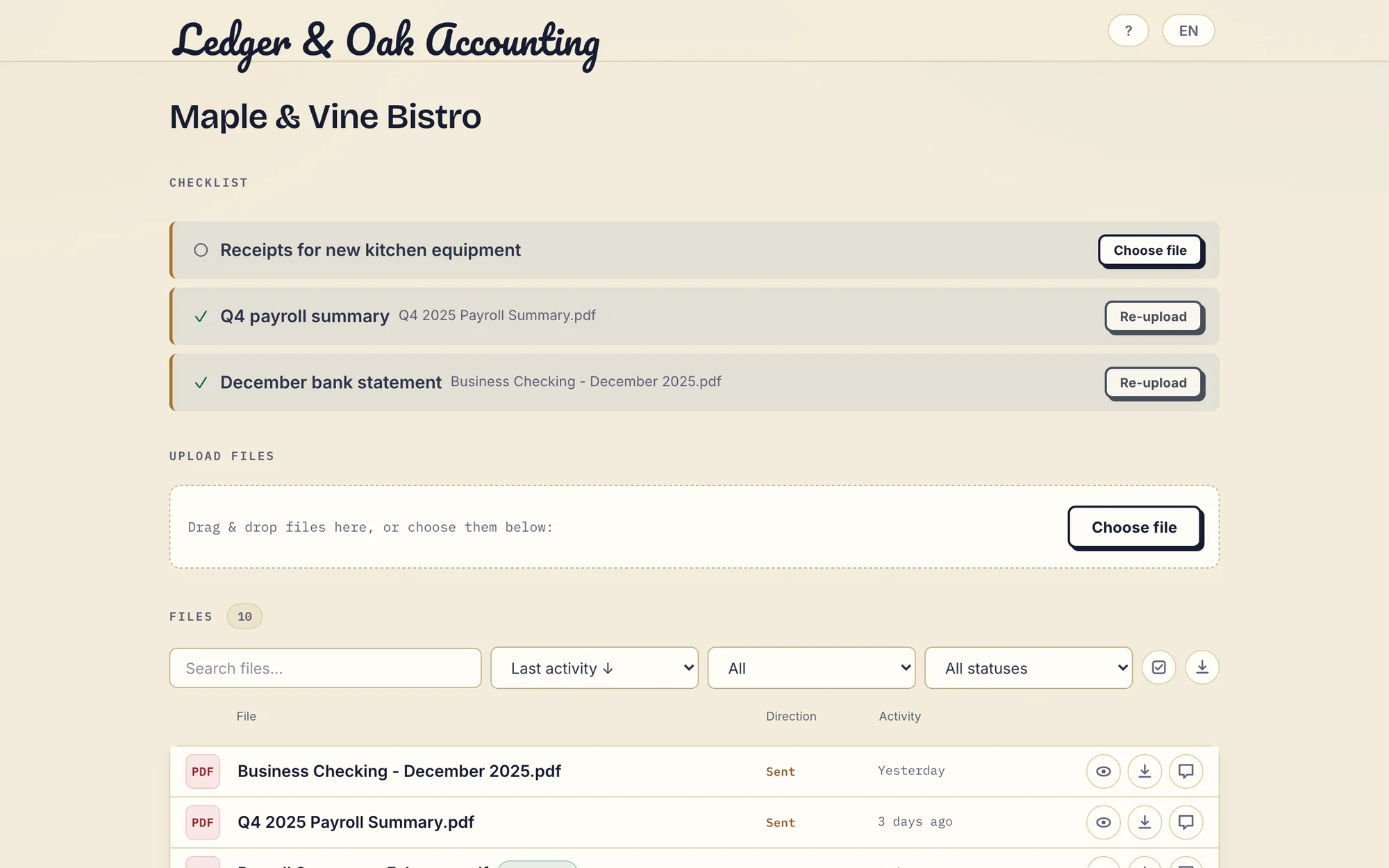
Real Droplana app with fictional data: the client has supplied two documents and can upload the missing equipment receipt. Open the full-size portal image.
Droplana vs WeTransfer side by side
| WeTransfer | Droplana | |
|---|---|---|
| Unit of work | One transfer or request | One client |
| Link lifetime | Plan and flow dependent: from 3 days on Free | Portal address persists; revocable any time |
| Receiving files | File requests; uploader verifies email | Client uploads, phone photos and a visible checklist |
| Per-file comments and status | Not part of a transfer | Yes |
| PDF signing | Not part of a transfer | In the browser, with public verification |
| Recipient account | Not needed to download; uploaders verify email | None; Strict verifies email on a new device |
| Largest file | Up to 1 TB per transfer on Ultimate | 5 GB on Studio or with the storage add-on |
| Free allowance | Up to 10 transfers or 3 GB in a rolling 30 days | 3 clients, 2 GB stored, 100 MB per file |
| Data location | EU and US servers; check placement for your account | Hetzner, Germany |
WeTransfer's plan limits separate a transfer allowance from stored capacity, so its Free quota is not directly comparable with Droplana's storage. Check its current pricing for your region and volume.
The numbers, plainly
| Plan | Clients | Storage | Max file | Retention |
|---|---|---|---|---|
| Free | 3 | 2 GB | 100 MB | Up to 180 days from upload |
| Solo | Unlimited | 50 GB | 1 GB | No plan limit while active |
| Practice | Unlimited | 250 GB | 2 GB | No plan limit while active |
| Studio | Unlimited | 1 TB | 5 GB | No plan limit while active |
A storage add-on on a paid plan adds 500 GB and raises the per-file limit to 5 GB, and add-ons stack; current prices are in the table below. Team seats scale by plan: 1 on Solo, 5 on Practice, unlimited on Studio, owner included. In-browser PDF signing, encryption at rest and data export are on every plan, including Free. A stable portal address is not a promise that every old file stays available: you can set a file expiry or delete a document, and paid retention depends on the subscription staying active.
What Droplana does not do
- No one-off transfer links. Every recipient is a client with a portal.
- 5 GB per file at most, on Studio or with the storage add-on. Transfer services go much higher.
- No desktop sync and no native connectors.
- Not an archive. Storage is capped per plan, and on Free each file is kept for up to 180 days after upload.
- Not a qualified e-signature. In-browser signing needs an identified signer and records who signed, when and from what IP. It is not certificate-based or qualified.
Who should choose which
Stay with WeTransfer if most of your sending is one-off, to people you will not deal with again, or the files are larger than 5 GB.
Move to Droplana if you have clients rather than recipients: the same people, over months, who need to find things again and send you documents in return. Accountants and legal practices collecting paperwork, agencies delivering rounds of work, photographers whose delivered files should still be there next year on an active paid plan.
Plenty of people keep both: a transfer tool for the occasional stranger or the oversized file, Droplana for the client list. Moving files between them is manual.
If you are weighing this up more broadly, how to share files with clients covers sending, and how to collect files from clients covers getting documents back.
Questions before you choose
Can WeTransfer receive files from clients?
Yes. WeTransfer supports file requests. Uploaders verify their email, and a Free account is created if they do not have one. Requested transfers follow the request owner's plan: the documented expiry is 3 days on Free or Starter and 30 days on Ultimate or Teams. What it does not give you is a list of what each client still owes you.
Do Droplana links expire like WeTransfer links?
The portal address does not expire. It is still there months or years later, and clients return to the same place. File retention is separate: each Free file is kept for up to 180 days after upload, and paid plans have no plan-imposed retention limit while active. You can set an expiry date on a file, delete it, or revoke a client's access at any time.
Do clients need an account to use Droplana?
No. Clients never create an account or set a password. On the default Strict level they confirm their email on a new device, and the browser is then remembered for 90 days. The Relaxed level also allows a permanent link they can bookmark. Clients never pay anything.
Can Droplana accept a file larger than 5 GB?
No. The maximum is 5 GB per file, on Studio or with a paid storage add-on. Free allows 100 MB, Solo 1 GB and Practice 2 GB without the add-on. WeTransfer's Ultimate plan advertises up to 1 TB per transfer, so for a single very large handoff a transfer service is the better fit.
Plans and limits
The tools you need, on every plan.
Share files, leave comments, request documents with checklists and sign PDFs in your browser. Your logo is included too.
Clients never pay or create an account. EU hosting, encryption and data export included.
Save 2 months with annual billing
Free Start here
For your first 3 clients
€0/monthNo credit card required
- Just you
- 3 clients
- 2 GB storage
- Up to 100 MB per file
- Files kept for 6 months
Solo
For independent professionals
€19/month+ tax
€190/year+ tax
- Just you
- Unlimited clients
- 50 GB storage
- Up to 1 GB per file
- Email support
Practice
For small firms
€49/month+ tax
€490/year+ tax
- Team size: 5
- Unlimited clients
- 250 GB storage
- Up to 2 GB per file
- Priority support
Studio
For growing teams
€99/month+ tax
€990/year+ tax
- Team size: Unlimited
- Unlimited clients
- 1 TB storage
- Up to 5 GB per file
- Priority support
- Personal setup call
On Free, each file expires 180 days after upload. Your clients and their access stay active, so you can keep sharing new files. Active paid plans have no plan-imposed retention limit. Expiry settings, deletion and cancellation rules still apply; a persistent portal address does not guarantee permanent file availability. Team sizes include you. No setup fees or automatic overage charges. Prices exclude applicable tax.
Compare plan details
| Included | Free | Solo | Practice | Studio |
|---|---|---|---|---|
| Team size | Just you | Just you | 5 | Unlimited |
| Clients | 3 | Unlimited | Unlimited | Unlimited |
| Storage | 2 GB | 50 GB | 250 GB | 1 TB |
| Maximum file size | 100 MB | 1 GB | 2 GB | 5 GB |
| File retention | 180 days from upload | No limit | No limit | No limit |
| Your Droplana address | Includes a random suffix | Your chosen name | Your chosen name | Your chosen name |
| Data Processing Agreement | Standard | Standard | Countersigned available | Countersigned available |
| Support | Priority | Priority | ||
| Personal setup call | Not included | Not included | Not included | Included |
Need more storage?
Add 500 GB for €15/month + tax, or €150/year + tax. Each storage add-on also raises your maximum file size to 5 GB.
Available on all paid plans from your billing page. Add more than one for another 500 GB each. Your team size stays the same.
Related comparisons
For other ways to send large files, see Hightail alternatives. If you share proposals and want to track views, see Droplana vs DocSend. If files currently travel as attachments, see Droplana vs email.