
How to Collect Tax Documents from Clients Without Email
A step-by-step guide for accountants to collect tax documents from clients without email: secure upload, no lost attachments, no wrong-address mistakes.
Product demonstration: Product screenshots use fictional demonstration data; sample requests are illustrative, not measured customer results.
It is the week before your VAT or tax deadline. Your inbox holds dozens of emails from clients sending invoices, bank statements, payroll records and receipts, and some of them went to a colleague who is on holiday. To collect tax documents from clients without email, give each client one private place to upload them, with a list that shows what is still missing.
Quick answer
- Give each client their own private upload portal instead of an email address.
- Ask for each document by name, period and pages, in a checklist the client can see.
- Let clients upload files or photograph paper with their phone, with no account.
- Check each document when it arrives, and return the finished work through the same portal.
Why email fails for tax document collection
VAT and tax returns, payroll records, bank statements and financial statements are some of the most sensitive data a client holds. Email was not designed with this in mind. A bank statement forwarded to an accountant passes through several mail servers, stays in both inboxes with no expiry or access control, and may be copied into personal cloud backups.
The practical problems are just as costly. Clients do not know exactly what to send or where. Nothing confirms that a specific document arrived. Files collect across email, chat and whatever the client found easiest, and returning the finished work is the same mess in the other direction.
How to collect tax documents from clients without email
1. Give each client their own portal and a request for the period
When you onboard a client, send them their portal link once. At the start of every VAT or tax period, they upload to the same place. Add a document checklist for that period, so the client sees what is still outstanding and you see the same list from your side.
Start from the editable accounting document request. It is a manual template, not an official tax checklist, so adapt it to the engagement and replace every bracketed field. An illustrative request:
Please upload the following to [portal link] for [period] by [date]:
- Statements for [agreed accounts], including every page.
- Sales invoices or the agreed sales report for this period.
- Purchase invoices and receipts, with readable totals and dates.
- Payroll inputs for [period], if included in our work.
Tell [contact] if an item is unavailable. We will review what arrives and ask for any correction on the relevant file. Use the email address we have recorded for you to verify access on a new device. No client account or app is needed.
Create the next period's checklist yourself. Reusing the portal does not generate a monthly request or import transactions.
2. Verify the client, not a password
Clients with low tech comfort will not set up another login, and in Droplana they do not need one. On a new device the client confirms their email with a link, and the browser is then remembered for 90 days. They can also sign in with Google, or with a Microsoft account they connected once with an emailed code.
3. Accept uploads and phone photos
The client uploads bank statements, payroll records or receipts directly, or photographs a paper document with their phone. Ask for good light, readable text, every page and all four edges, and say where you need the original PDF instead of a photo.
4. Check what arrived, not only that it arrived
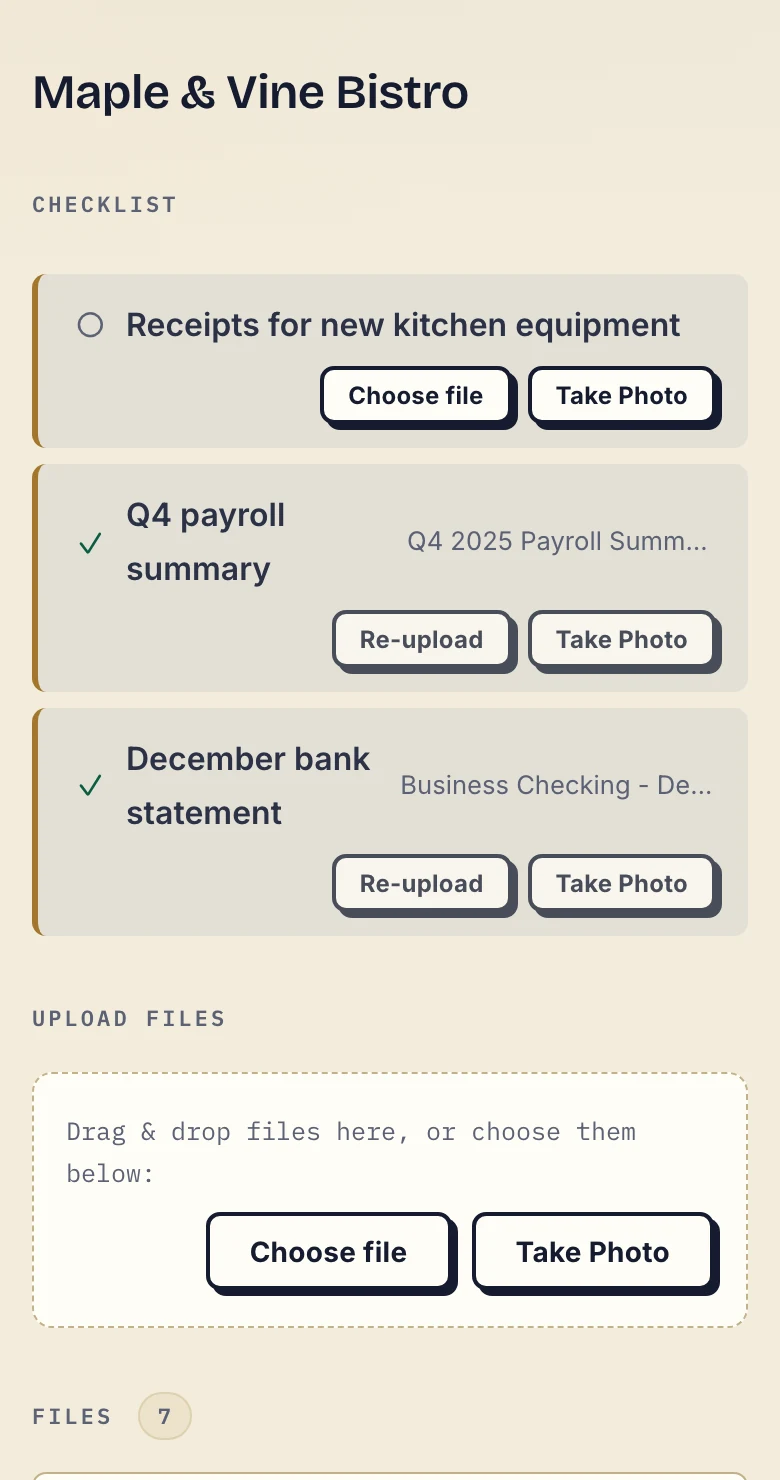
Product demonstration with fictional data. The fictional Maple & Vine Bistro client can see two supplied documents and the receipt request still outstanding.
Every upload is visible to you as soon as it lands, so nobody has to ask "did you get it?". A supplied item can still cover the wrong period or miss a page. Open it, check it, and ask for the specific correction in that file's comments, where the client will see it next to the document.
5. Follow up on what is still missing
Checklist reminders are on by default. After 7 days without client activity while items are missing, the client gets an email naming them; after 14 days the reminder goes to you instead. If you give an item a due date, a separate reminder is prepared two days before and on the date. It is not sent once the item is supplied, and it reaches the client with their next email, which can be later that day or the following day.
A reminder cannot obtain a statement held by another adviser. Agree a contact route for documents the client cannot get.
6. Return completed work the same way
Upload the finished VAT or tax return or annual accounts to the client's portal and say which response you need. The client can download it, comment or mark it Approved. That marker is reversible and is not a signature. For an engagement letter, the client can sign the PDF in the browser: the signed copy is saved as a new file and the server records who signed, when and from what IP address.
7. Revoke access when the engagement ends
Revoking access takes effect immediately, and the files stay available to the practice for its records. It cannot recall copies the client already downloaded.
What to look for in a tool for this
A private space per client. Each client's documents should be separate from every other client's, with no shared folder to misconfigure.
Two-way exchange. Accountants receive documents (intake) and send them (deliverables). The tool should handle both directions in the same place.
EU hosting with a DPA. For EU clients you are processing personal data under GDPR. Look for storage in the EU and a Data Processing Agreement.
A record of responses. A client writing "yes, that looks right" in an email is hard to find later. A status on the specific file, with a log of uploads, downloads and approvals, is easier to check if questions come up.
Where Droplana fits
Droplana is a client document portal operated by Ubique d.o.o., an EU company in Croatia. Each client gets one private, persistent portal for sending documents and receiving files back, with document checklists, per-file comments and in-browser PDF signing. Files, comments and metadata are stored on Hetzner infrastructure in Germany and encrypted at rest, and a DPA is available on every plan.
It is not practice management or tax software. It sits next to your accounting software and handles the client-facing exchange those tools leave to email. There is no ready-made connector to your accounting package, but every plan includes signed webhooks, for example when a checklist is completed, and an MCP server that lets an AI assistant or automation tool find missing checklist items or remind clients. The assistant works on metadata such as filenames and checklist state; no tool returns a document's contents.
Free supports 3 clients, 2 GB storage and files up to 100 MB, and keeps each file for up to 180 days after upload. Solo is €19/month or €190/year plus tax, with unlimited clients, 50 GB and 1 GB files for one person. A practice with several staff needs Practice, at €49/month or €490/year plus tax for a team of 5 including the owner, 250 GB and 2 GB files. Team members share access to all clients; there are no per-engagement staff permissions. Compare all plans, and see Droplana for accounting for the full picture for practices.
Try one period with one client on the Free plan at droplana.com.