
Send the drawing revision. Keep the client’s reply with it.
Put drawings, specifications and returned site documents in one private portal per client. Name each revision yourself so the client knows which file to review.
Droplana is a client portal for architects to send drawing exports and collect documents back. Each client gets one private, persistent portal with file comments and no client signup.
Your client is holding five emails with PDF attachments and is not sure which drawing is current. They have a question about one section but do not know where to ask. A portal gives them one place to look, and their question lands on the drawing it is about.
One portal per client
Each client opens their own private link. Their drawings live there and nowhere else, so the wrong set does not reach the wrong client.
Revisions stay side by side
Upload each revision as a new file. Nothing is overwritten, so Rev A stays for reference when you send Rev B.
Comments on the drawing
The client leaves a question on the file it concerns and can mark it Approved or Rejected. No guessing which attachment an email meant.
Site documents back from the client
A checklist asks for the survey, title plan and planning letters. The client sees what is missing and gets a reminder after 7 quiet days.
A client portal for architects, with named revisions
Send Courtyard - Ground floor - Rev A.pdf. When the design changes, upload Courtyard - Ground floor - Rev B.pdf as a separate file and tell the client which revision to review. Ask them to put questions on that file and return their survey or site photographs through the same portal.
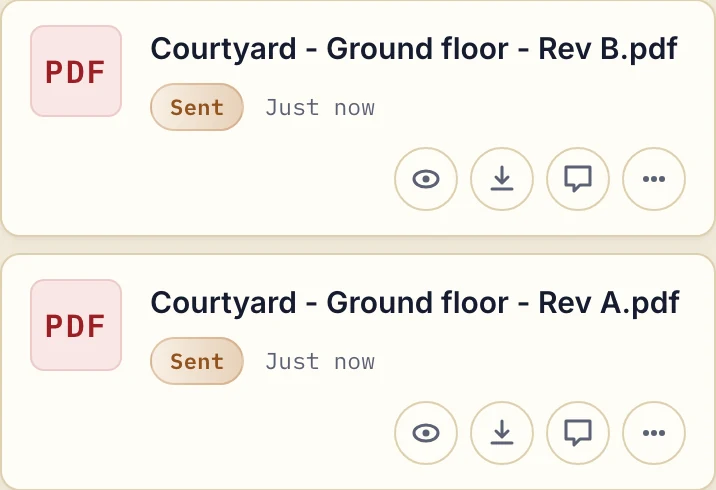
Actual product view with fictional demonstration sheets.
The client can comment and mark the file Approved or Rejected. Either side can change or clear that status; it is not an immutable stage sign-off. Keep any formal approval process your project requires. Our document approval guide explains the file-level exchange.
From site documents to handover
- Before design: request the survey, title plan and planning correspondence with a document checklist. Clients can upload files or photograph paper with a phone.
- At a design milestone: send the relevant drawings, renders and specifications. Ask for comments on the named revision before preparing the next set.
- During construction: share client-facing progress photographs, reports and relevant RFI responses. Keep contractor coordination in your project system.
- At handover: send as-built exports, manuals and warranties. Agree how long files will remain available and keep your required archive separately.
Organise by client, not by project permissions
Droplana is the client-facing layer for PDFs and images. Keep CAD and BIM models, drawing markup and contractor coordination in your design and project tools. One portal belongs to one client. There are no project folders or project-specific access roles inside it. For several jobs with that client, include the project, phase, revision and date in filenames. Separate client entries can provide separate portals, but they do not create a shared project room for contractors and consultants.
Files are stored in Germany and encrypted at rest per file. Review the security and access model before deciding who should receive access.
If you currently deliver drawing exports through shared folders, compare a client portal with a cloud drive. The client portal guide helps you assess client access and document exchange separately from CAD and project coordination.
Try one drawing exchange
Start with a sample export and ask one client to return a site document and comment on the drawing. Free includes 3 clients, 2 GB total storage and 100 MB per file. Solo costs €19/month plus tax for unlimited clients, 50 GB and 1 GB per file. Practice supports 5 team members including the owner; Studio supports unlimited team size.
Questions before you start
How large can drawing exports be?
Free allows 100 MB per file, Solo 1 GB, Practice 2 GB and Studio 5 GB. A large drawing set can go up as several PDFs. A Storage addon on a paid plan adds 500 GB of storage and raises the file limit to 5 GB.
Does Droplana manage drawing versions?
No. Upload revisions as separate files and name them clearly. Comments and Approved or Rejected status belong to a file; Droplana does not select the current revision, compare drawings or manage CAD and BIM models.
Can a homeowner open the drawings without an account?
Yes. Clients open their portal without creating a Droplana account or installing an app. Strict mode is the default and asks for email verification on a new device; the browser is then remembered for 90 days. They can view drawings, comment on them and return site documents.
How long are handover documents available?
Free keeps each file for up to 180 days from upload. Paid plans have no plan limit on how long files are kept, unless you set an expiry date or delete them, and cancellation rules apply. Keep your own project archive as well, because the portal is not an archival backup.
Choose a plan for your document exchange
The tools you need, on every plan.
Share files, leave comments, request documents with checklists and sign PDFs in your browser. Your logo is included too.
Clients never pay or create an account. EU hosting, encryption and data export included.
Save 2 months with annual billing
Free Start here
For your first 3 clients
€0/monthNo credit card required
- Just you
- 3 clients
- 2 GB storage
- Up to 100 MB per file
- Files kept for 6 months
Solo
For independent professionals
€19/month+ tax
€190/year+ tax
- Just you
- Unlimited clients
- 50 GB storage
- Up to 1 GB per file
- Email support
Practice
For small firms
€49/month+ tax
€490/year+ tax
- Team size: 5
- Unlimited clients
- 250 GB storage
- Up to 2 GB per file
- Priority support
Studio
For growing teams
€99/month+ tax
€990/year+ tax
- Team size: Unlimited
- Unlimited clients
- 1 TB storage
- Up to 5 GB per file
- Priority support
- Personal setup call
On Free, each file expires 180 days after upload. Your clients and their access stay active, so you can keep sharing new files. Active paid plans have no plan-imposed retention limit. Expiry settings, deletion and cancellation rules still apply; a persistent portal address does not guarantee permanent file availability. Team sizes include you. No setup fees or automatic overage charges. Prices exclude applicable tax.
Compare plan details
| Included | Free | Solo | Practice | Studio |
|---|---|---|---|---|
| Team size | Just you | Just you | 5 | Unlimited |
| Clients | 3 | Unlimited | Unlimited | Unlimited |
| Storage | 2 GB | 50 GB | 250 GB | 1 TB |
| Maximum file size | 100 MB | 1 GB | 2 GB | 5 GB |
| File retention | 180 days from upload | No limit | No limit | No limit |
| Your Droplana address | Includes a random suffix | Your chosen name | Your chosen name | Your chosen name |
| Data Processing Agreement | Standard | Standard | Countersigned available | Countersigned available |
| Support | Priority | Priority | ||
| Personal setup call | Not included | Not included | Not included | Included |
Need more storage?
Add 500 GB for €15/month + tax, or €150/year + tax. Each storage add-on also raises your maximum file size to 5 GB.
Available on all paid plans from your billing page. Add more than one for another 500 GB each. Your team size stays the same.