
The placement is agreed. The compliance pack is not
Right-to-work evidence, certificates, references, a signed contract. Every placement needs the same pack, from a candidate who is busy and on their phone. Give each one a private portal with a checklist they can see, nothing to sign up for, and a Take Photo button instead of a scanner.
Droplana is a client document portal for recruitment and staffing agencies. Each candidate, and each hiring company, gets one private, persistent portal: candidates send their compliance documents in, and you send contracts and forms back. Neither side needs an account.
A checklist the candidate can see
Passport, proof of address, qualification certificate, references, signed contract. The candidate sees what is still missing, and gets an email naming it if nothing happens for 7 days.
The phone is the scanner
Candidates are between jobs, on the move, and using a phone. The Take Photo button opens the camera inside the portal, for a passport page, a certificate or a signed sheet, with nothing to install.
Documents land under one name
Not thirty attachments called IMG_2231.jpg in a shared inbox. Everything a candidate sends arrives in their own portal, in date order, with a status you set per file.
Contracts signed in the browser
Send the contract and the candidate signs it in the portal: type, draw or upload a signature. The signed copy carries a caption and a QR code that links to a public verification page.
Access ends when the placement does
Revoke a candidate's portal access and it takes effect immediately. The documents stay with you until you delete them.
Stored in Germany, run from the EU
Files, comments and metadata are stored on Hetzner infrastructure in Germany, with files encrypted at rest per file. Operated by an EU company, with a DPA on every plan.
Why compliance packs are the bottleneck
Recruitment has an unusual shape: the document collection happens at the worst possible moment, from the least available person, under the tightest deadline.
The candidate has accepted an offer. They are working out a notice period, arranging childcare, possibly moving. They are checking messages on a phone between other things. And you need six or seven documents from them before a start date that is already agreed.
Three things make it harder than it looks:
The documents are physical. A passport, a degree certificate, a professional registration card. These are objects in a drawer, not files on a laptop.
The candidate has no reason to build a habit. They will interact with your process once. Anything requiring an account, a password or an installed app has an adoption cost that will never be repaid, and they will resist it accordingly.
Deadlines are external. The start date was agreed with the client. Missing it is not an administrative inconvenience: it is a placement at risk and a damaged relationship with the employer.
Email handles this badly. A list of seven items in a message read on a phone becomes a task the candidate intends to do later and then cannot find. What arrives, arrives out of order, and nobody can see at a glance which two items are still missing without reading the whole thread.
A per-candidate portal with a visible checklist fixes the shape of the problem rather than the speed of the chasing. The candidate sees five ticked and two outstanding, and deals with the two whenever they have the documents in front of them. For the general version of that argument, see our client portal guide.
A client portal for recruiters, from request to returned document
Send Candidate - Document request.pdf to the candidate's portal. The candidate returns Candidate - Sample CV.pdf to that same place. If a document needs correcting, comment on the file and ask for a new complete upload.
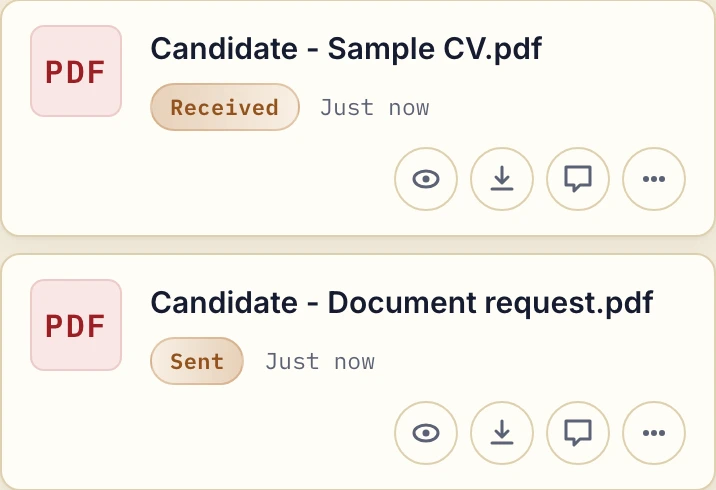
Actual product view with fictional candidate documents.
For paper documents, the candidate chooses a file or taps Take Photo on a phone. You still decide which evidence is needed and carry out the checks your process requires.
Two portals: the candidate and the hiring company
Create one client for the candidate and another for the hiring company. The candidate's portal holds requests, certificates and returned forms. The employer's portal holds terms of business, invoices and the candidate documents you have deliberately chosen to share with that employer.
Do not add the employer as a contact on the candidate's portal: contacts on one client share everything in that portal. The two portals are not linked by a job or placement record, so choosing and moving documents between them is part of your work.
Each entry counts as a client. Free allows 3; every paid plan allows unlimited clients, with storage shared across the business.
Why agencies use Droplana
The checklist does the chasing
Set the pack once as a document checklist template and apply it to each candidate. They see their progress without asking. If a candidate does nothing for 7 days while items are missing, they get one email naming those items. After 14 days, the reminder comes to you, so you call the candidates who are stuck. Reminders are on by default.
Due dates tied to the start date
Give a checklist item an optional due date a few days before the start. Reminders are prepared two days before and on the date, and reach the candidate with their next email, which can be later that day or the next day. You or the candidate can switch them off.
Feedback lands on the document
"This certificate is cut off at the bottom" attaches to that file, not to a general email the candidate has to interpret. Mark it Rejected and it stays in the portal with your comment, which saves a round trip when the start date is Monday.
A clean ending
When a placement completes, revoke access. When a consultant leaves, remove them from the team, and no candidate passports stay behind in a personal mailbox. The account owner can also export (CSV) an activity trail of logins, uploads, downloads and deletions.
Candidate documents and retention
A compliance pack is a dense set of personal data belonging to someone who is not your employee and may never become your client: identity documents, address history, qualifications, and in some sectors health or criminal record information. Here is what Droplana provides, so you can check it against your own obligations:
- Storage in Germany. Files, comments and metadata sit on Hetzner infrastructure in Germany, under opaque randomly generated identifiers, never exposed on the public internet.
- Encrypted at rest, per file. Every file is encrypted with a key derived specifically for that file. This protects against a breach of the storage platform. It does not protect against a compromise of the application host, where the master key sits alongside the storage credentials, and we state that rather than implying more.
- Immediate revocation. Access ends when you say it does.
- DPA on every plan, countersigned on Practice and Studio. It leaves the decision on special-category data to your agency.
- Per-file expiry. You can set an expiration date on a file, so documents you have no reason to keep after a placement closes are removed on schedule.
Retention deserves a decision in recruitment specifically, because agencies collect identity documents from candidates who are never placed. On paid plans nothing is deleted automatically unless you set an expiry. That is deliberate, but it means the retention policy is yours to apply. Our security page covers storage and encryption in full, and GDPR-compliant file sharing with clients covers the questions to ask of any tool.
Where Droplana is not the answer
- It is not an ATS. No pipeline, no job records, no CV parsing, no scheduling, no candidate search. Keep your ATS.
- No ATS connector. Documents come out of the portal by hand; an AI assistant connected through the MCP server works on metadata, not on the documents' contents.
- It is not an identity verification service. It collects a photograph of a passport; it does not check whether the passport is genuine or run a right-to-work check for you. Where a statutory verification process applies, that process still applies.
- No per-recruiter access. Team members on Practice and Studio can open every client in the business. There are no caseload or desk permissions.
- In-browser signing is not a qualified signature. It records who signed, when, from what IP and with which login, with a public verification page. For a contract with a hard legal signing requirement, use a dedicated provider.
- It is not archival storage. Storage is capped per plan with no overage billing.
Recruitment firms that also run consulting engagements can use the same per-client structure for both.
Check our simple pricing (or start free)
Droplana is priced per business, not per candidate. Free includes 3 clients, 2 GB storage, 100 MB per file and one seat. Solo costs €19/month plus tax for unlimited clients, 50 GB and 1 GB per file. Practice is €49/month plus tax with 250 GB and 5 team members including the owner; Studio has unlimited team size.
The tools you need, on every plan.
Share files, leave comments, request documents with checklists and sign PDFs in your browser. Your logo is included too.
Clients never pay or create an account. EU hosting, encryption and data export included.
Save 2 months with annual billing
Free Start here
For your first 3 clients
€0/monthNo credit card required
- Just you
- 3 clients
- 2 GB storage
- Up to 100 MB per file
- Files kept for 6 months
Solo
For independent professionals
€19/month+ tax
€190/year+ tax
- Just you
- Unlimited clients
- 50 GB storage
- Up to 1 GB per file
- Email support
Practice
For small firms
€49/month+ tax
€490/year+ tax
- Team size: 5
- Unlimited clients
- 250 GB storage
- Up to 2 GB per file
- Priority support
Studio
For growing teams
€99/month+ tax
€990/year+ tax
- Team size: Unlimited
- Unlimited clients
- 1 TB storage
- Up to 5 GB per file
- Priority support
- Personal setup call
On Free, each file expires 180 days after upload. Your clients and their access stay active, so you can keep sharing new files. Active paid plans have no plan-imposed retention limit. Expiry settings, deletion and cancellation rules still apply; a persistent portal address does not guarantee permanent file availability. Team sizes include you. No setup fees or automatic overage charges. Prices exclude applicable tax.
Compare plan details
| Included | Free | Solo | Practice | Studio |
|---|---|---|---|---|
| Team size | Just you | Just you | 5 | Unlimited |
| Clients | 3 | Unlimited | Unlimited | Unlimited |
| Storage | 2 GB | 50 GB | 250 GB | 1 TB |
| Maximum file size | 100 MB | 1 GB | 2 GB | 5 GB |
| File retention | 180 days from upload | No limit | No limit | No limit |
| Your Droplana address | Includes a random suffix | Your chosen name | Your chosen name | Your chosen name |
| Data Processing Agreement | Standard | Standard | Countersigned available | Countersigned available |
| Support | Priority | Priority | ||
| Personal setup call | Not included | Not included | Not included | Included |
Need more storage?
Add 500 GB for €15/month + tax, or €150/year + tax. Each storage add-on also raises your maximum file size to 5 GB.
Available on all paid plans from your billing page. Add more than one for another 500 GB each. Your team size stays the same.
Questions before you start
Can candidates upload right-to-work documents without an account?
Yes. There is no candidate account and no password. They open a link to their own portal and, under the default Strict setting, confirm their email on a new device by magic link or by signing in with Google or Microsoft. The browser is then remembered for 90 days. Candidates can photograph a passport or certificate with the portal's Take Photo button.
Can I show a candidate exactly which documents are still missing?
Yes. You set a document checklist for each candidate, and they see it in their own portal with received items marked off. If the candidate does nothing for 7 days while items are missing, they get an email naming those items, and after 14 days the reminder comes to you instead.
Can the hiring company see the candidate's documents?
Only the documents you choose to give it. Create one client for the candidate and another for the hiring company, and upload the selected documents to the employer's portal. Do not add the employer as a contact on the candidate's portal, because contacts on one client share everything in that portal.
Is Droplana an applicant tracking system?
No. There is no pipeline, no job record, no CV parsing, no interview scheduling and no candidate database. Droplana has no ATS connector, so nothing syncs to your ATS automatically. It is the document collection layer beside your ATS, not a replacement for it.
Can I delete a candidate's documents when the placement ends?
Yes. Delete the files or the client, or set an expiry date on individual files. Revoking access alone does not delete anything. On paid plans nothing is deleted automatically unless you set an expiry; Free keeps each file for up to 180 days from upload.
Compared with what recruiters use now
- Droplana vs Content Snare: another document collection tool with reminders, compared on direction and where data lives.
- Droplana vs FileInvite: request-based collection that syncs to cloud storage, compared with a portal per candidate.
- Droplana vs Clustdoc: an onboarding platform with forms and workflows, compared with a narrow two-way portal.
- Droplana vs email: what changes when compliance packs stop arriving as attachments.