
A document platform, or a client portal - pick the problem first
ShareFile is a broad document platform: sync and share, requests, workflows, e-signature and integrations, priced per employee user. Droplana is a client document portal for professional service businesses: each client gets their own private, persistent portal for two-way document exchange, with no account to create and one flat price per business. Which one fits depends on how much machinery you need around a file.
Published by Droplana, one of the products compared. ShareFile's plans page checked September 23, 2026; other vendor scope checked September 21, 2026. The screenshot uses fictional data and is not a customer result.
The honest framing
ShareFile is a long-established document platform, widely used in accounting and professional services. It does a lot: sync and share, client users, file-drop links, document requests, tasks and forms, workflow automation, its own e-signature, connectors for email and other tools, and industry-focused plans for regulated work.
Droplana does one thing. Each of your clients gets their own private, persistent portal for two-way document exchange. You put documents in, they put documents back, you comment on individual files, you set a status, and either side can sign a PDF in the browser. There is no sync client, no app marketplace and no workflow builder.
If you are comparing them, you are usually deciding one of two things: whether you need the platform or only the portal, and whether per-seat pricing makes sense at your size.
Droplana vs ShareFile side by side
| ShareFile | Droplana | |
|---|---|---|
| Category | Document platform: sync, share, requests, workflows, e-signature | Client document portal, two-way |
| Pricing model | Per employee user, minimum of three, several tiers | Flat per business, unlimited clients on paid plans |
| Client access | Client users, plus file-drop links for uploads | No client accounts; Strict verifies email on a new device |
| Request process | Premium: requests, tasks and forms, workflow automation | Per-client checklist, optional due dates, fixed reminders |
| Desktop sync | Yes, with versioning | No |
| Integrations and API | Connectors and email integrations | MCP server and signed webhooks; no email or storage connectors |
| E-signature | Included from Premium | In-browser PDF signing with a public verification page |
| Staff access | Configurable permissions | Every team member can access every client |
| Data location | Confirm regional storage terms for your plan | Hetzner, Germany |
| DPA | Check your contract | Available on all plans, countersigned on Practice and Studio |
| Best for | Firms that want one platform for documents, signing and workflow | Firms that want a clear client-facing portal and nothing else |
ShareFile's tiers, limits and pricing change. Check sharefile.com rather than relying on any comparison page, including this one.
The seat-pricing question
This is usually the deciding factor, so here it is with numbers.
ShareFile is priced per employee user, with a minimum of three. Clients are not paid seats: its plans list unlimited client users. That model is sensible for a platform your whole team works in every day: everyone gets a licence, everyone syncs, everyone signs. The cost tracks the size of your team.
Take a three-person practice on annual billing that wants requests and workflows. ShareFile's plans page, checked September 23, 2026, lists Premium at USD26 per employee user per month billed annually: USD26 × 3 × 12 = USD936 a year. Premium is the tier that includes requests, workflows and e-signing; the cheaper Advanced tier, at USD16.50, has file-drop links but no requests. Droplana Practice is EUR490 a year plus tax for five seats, unlimited clients, 250 GB and files up to 2 GB. The currencies differ and the products do different amounts of work, so read this as the shape of the cost, not a saving.
Droplana is priced per business. Free covers 3 clients and 2 GB. Solo is 19 EUR per month plus tax with unlimited clients and 50 GB. Practice is 49 EUR with 250 GB and 5 seats including the owner. Studio is 99 EUR with 1 TB and unlimited team members. Annual billing costs ten months. There is no per-client charge and no overage billing: at the storage limit new uploads stop and existing files stay accessible.
The comparison flips depending on who does the work. If you are a three-partner firm where all three need full document tooling, per-seat pricing is fair and you should price it properly. If you are one bookkeeper with ninety clients, you are paying for the small side of your problem.
The client-side experience
ShareFile gives you two routes for clients: client users who sign in to their area, and file-drop links for sending files in without one. For a client who works with you constantly, a proper client user with its own controls is fine.
Droplana clients have no account at all. There is nothing to create, no password to reset, no credential to lose. The client opens their portal, and what they confirm depends on the security level you choose. New Droplana accounts default to Strict: email verification when a client arrives on a new device, with the browser remembered for 90 days. Controlled allows one-time or email magic links only. Relaxed also allows permanent links, for less sensitive work. Clients can also sign in with a Google or Microsoft account linked to their email.
Whether this is better depends on your clients. A client who logs in weekly will not mind an account. A client you need one signed form from, once a quarter, may well mind, and that is where the "I never got the invite" and "I can't remember my password" emails come from. Small accounting and legal practices feel this most, because the least technical client sets the pace for everyone. Test it rather than assuming either way.
Try one month-end exchange
Illustrative pilot. Invite one representative client. Request payroll, the bank statement and equipment receipts; ask them to verify their email, upload each file and photograph a paper receipt if needed. Review the files, leave a comment on an unreadable page and return the month-end report. Ask the client to download it and reply on that file. Note where they needed help.
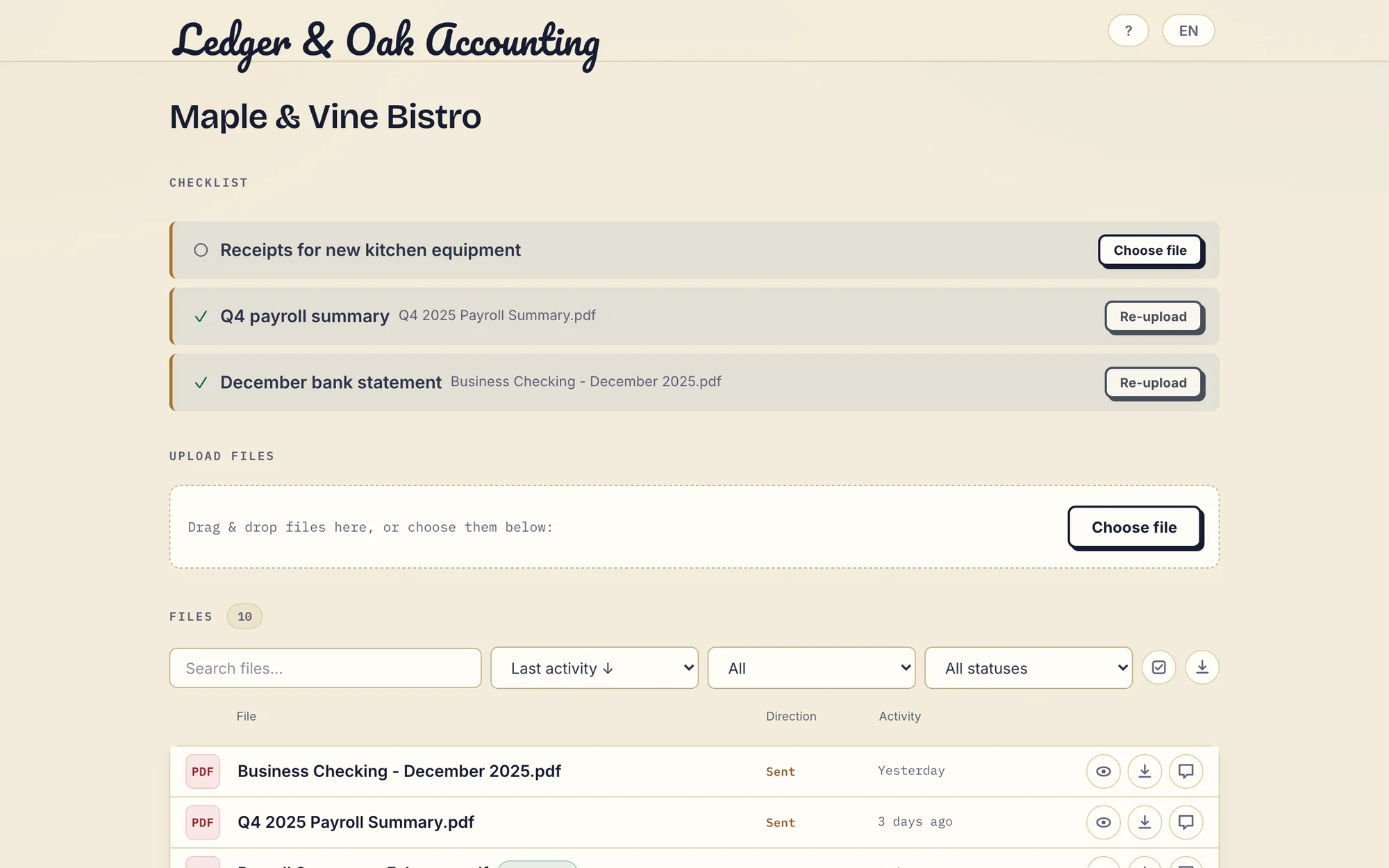
Real Droplana app with fictional Ledger & Oak Accounting and Maple & Vine Bistro data: two requested files are supplied and the equipment receipts are still missing. Open the full-size portal view.
If the client does nothing on an incomplete checklist for seven days, they get an email naming the missing items; after fourteen days the reminder comes to you instead. Checklist items can also carry optional due dates. A due-date reminder is prepared two days before and on the date and reaches the client with their next email, which can be later that day or the next day.
What ShareFile does that Droplana does not
Being direct about this is more useful than pretending otherwise.
- Desktop sync. ShareFile has sync and versioning. Droplana does not. If you want files mirrored to a folder on your laptop, Droplana is the wrong tool.
- Connectors. ShareFile connects to email and other tools. Droplana has no ready-made connectors; an AI assistant or automation tool can connect through its MCP server, and webhooks can notify your own systems.
- Workflow automation. ShareFile Premium can build approval and routing flows. Droplana has document checklists and per-file statuses, which are useful but are not a workflow engine.
- E-signature as a product. ShareFile includes its own e-signing from Premium. Droplana marks a document as signed and records who signed it, when and from what IP, with a public verification page anyone can check against the file hash. That is a real, auditable record, but it is not a qualified or certificate-based signature.
- Staff permissions. ShareFile lets you control what each employee sees. In Droplana every team member can access every client.
- Industry plans. ShareFile sells plans aimed at regulated industries. Droplana offers EU hosting, encryption at rest and a DPA on every plan, which covers a lot of European professional services work, but it is not a packaged compliance programme.
If any two of those matter to you, this comparison is already over and ShareFile is your answer.
Where Droplana is the better fit
- You are a small or mid-size practice and the platform costs more than the problem.
- Your clients are not technical, and every account you ask them to create costs you emails.
- You care where the data physically sits. Files, comments and metadata stay on Hetzner infrastructure in Germany, under opaque random identifiers, encrypted at rest with a key derived per file.
- Most of your pain is inbound. You are chasing bank statements, signed forms, ID scans and receipts, and you want a checklist the client can see and work through rather than a fourth follow-up email. Clients photograph paper documents with their phone straight into the portal, with no scanner and no app.
- You want the client-facing side to be plain and obvious, and you are happy running everything else in the tools you already have.
Accounting and bookkeeping firms, legal practices, consultants and mortgage brokers are the core of this. The accounting practices page and the legal page go into the specific workflows. The client portal guide is the broader buying guide, and the list of ShareFile alternatives covers options beyond these two.
What Droplana does not do
- No staff roles. Every team member can access every client.
- No sync or native connectors. There is no migration connector either.
- No white label. A logo appears in the portal on every plan, but there is no custom domain or accent colour.
- Not project management, a CRM or billing.
- Not an archive. Free keeps each file for up to 180 days after upload. Active paid plans have no plan-imposed retention limit, but a portal is not long-term archival storage.
Migrating without a big-bang cutover
If you decide to move, do not move everyone at once.
Pick two or three clients you have a good relationship with and set up their portals. Tell them plainly: this is where our documents live now, here is your link, the old system stays as it is for the archive. Run both for a month. If the number of "where do I send this?" emails goes down, move the rest in batches over the following weeks.
The uncomfortable part of any migration is the archive, not the live work. Historic files in ShareFile can stay there under your existing retention policy until the contract ends. Export what you must keep before you cancel anything. Five years of old returns do not need to move on day one.
Questions before you choose
What is the difference between ShareFile and Droplana?
ShareFile is a broad document platform: sync and share, client users, file-drop links, requests, workflow automation, e-signature and integrations. Droplana is narrower on purpose: one private, persistent portal per client for two-way document exchange, with document checklists, per-file comments, file status and in-browser PDF signing. ShareFile is priced per employee user. Droplana is priced flat per business, with unlimited clients on every paid plan.
How much does ShareFile cost for three staff compared with Droplana?
ShareFile's plans page, checked on 23 September 2026, lists Premium, the tier with requests, workflows and e-signature, at 26 USD per employee user per month on annual billing with a minimum of three, so three staff pay 936 USD a year. Droplana Practice is 490 EUR a year plus tax for five seats and unlimited clients. The currencies and capabilities differ, so this is not a calculated saving.
Do clients need an account with Droplana?
No. Clients open their private portal without creating an account or password. Strict mode, the default, verifies their email on a new device, and a verified browser is remembered for 90 days. Controlled allows one-time or email magic links, and Relaxed also allows permanent links. PDF signing needs an email-identified session, not a link alone.
Where is data stored, and is there a DPA?
Droplana stores files, comments and metadata on Hetzner infrastructure in Germany. The service is operated by Ubique d.o.o., a company registered in Croatia, EU. A Data Processing Agreement is available on all plans, and Practice and Studio include a countersigned DPA. For ShareFile, confirm the regional storage and processing terms for your plan.
What does ShareFile do that Droplana does not?
Quite a lot. ShareFile offers desktop sync and versioning, connectors and email integrations, workflow automation, its own e-signature and industry-focused plans. Droplana has no native connectors, no sync client and no workflow builder, and its in-browser PDF signing records who signed, when and from where rather than issuing a certificate-based signature.
Plans and limits
Paid plans include unlimited clients: Solo EUR19/month or EUR190/year, Practice EUR49/month or EUR490/year, Studio EUR99/month or EUR990/year, plus tax. Each paid storage add-on costs EUR15/month or EUR150/year plus tax, adds 500 GB and raises the file limit to 5 GB.
The tools you need, on every plan.
Share files, leave comments, request documents with checklists and sign PDFs in your browser. Your logo is included too.
Clients never pay or create an account. EU hosting, encryption and data export included.
Save 2 months with annual billing
Free Start here
For your first 3 clients
€0/monthNo credit card required
- Just you
- 3 clients
- 2 GB storage
- Up to 100 MB per file
- Files kept for 6 months
Solo
For independent professionals
€19/month+ tax
€190/year+ tax
- Just you
- Unlimited clients
- 50 GB storage
- Up to 1 GB per file
- Email support
Practice
For small firms
€49/month+ tax
€490/year+ tax
- Team size: 5
- Unlimited clients
- 250 GB storage
- Up to 2 GB per file
- Priority support
Studio
For growing teams
€99/month+ tax
€990/year+ tax
- Team size: Unlimited
- Unlimited clients
- 1 TB storage
- Up to 5 GB per file
- Priority support
- Personal setup call
On Free, each file expires 180 days after upload. Your clients and their access stay active, so you can keep sharing new files. Active paid plans have no plan-imposed retention limit. Expiry settings, deletion and cancellation rules still apply; a persistent portal address does not guarantee permanent file availability. Team sizes include you. No setup fees or automatic overage charges. Prices exclude applicable tax.
Compare plan details
| Included | Free | Solo | Practice | Studio |
|---|---|---|---|---|
| Team size | Just you | Just you | 5 | Unlimited |
| Clients | 3 | Unlimited | Unlimited | Unlimited |
| Storage | 2 GB | 50 GB | 250 GB | 1 TB |
| Maximum file size | 100 MB | 1 GB | 2 GB | 5 GB |
| File retention | 180 days from upload | No limit | No limit | No limit |
| Your Droplana address | Includes a random suffix | Your chosen name | Your chosen name | Your chosen name |
| Data Processing Agreement | Standard | Standard | Countersigned available | Countersigned available |
| Support | Priority | Priority | ||
| Personal setup call | Not included | Not included | Not included | Included |
Need more storage?
Add 500 GB for €15/month + tax, or €150/year + tax. Each storage add-on also raises your maximum file size to 5 GB.
Available on all paid plans from your billing page. Add more than one for another 500 GB each. Your team size stays the same.
Related comparisons
If you are also weighing SmartVault, see Droplana vs SmartVault. Firms on Microsoft 365 can read Droplana vs SharePoint, and for workspace-style portals there is Droplana vs Onehub.