
Hightail alternatives for sending client files
Hightail is built for delivering large creative files and collecting feedback on them. If you work with the same clients again and again, you may need a permanent place per client instead. Droplana is one of six options below: a client document portal where each client gets a private portal for two-way document exchange, with no client signup.
Hightail (formerly YouSendIt) has been around since the time when emailing large files was painful. It solved a real problem: sending a 4 GB video file to a client when email would reject it at 25 MB.
It still does that well, and it adds review and approval tools on top. But once you manage several ongoing client relationships, a few limits show:
- Every delivery is organised around a file or a project, not around a client you work with every month
- Clients who are not comfortable in another tool still have to learn one
- Outside creative work, the review feature set can feel heavy
Published by Droplana, one of the products listed. Hightail and Frame.io pricing checked September 21, 2026; Onehub pricing checked September 23, 2026; plans and terms change. Vendor prices are public USD list prices, Droplana prices are in EUR plus tax. The screenshot uses fictional data and is not a customer result.
Here are six realistic options, depending on what you need to solve.
1. Frame.io
Best for: video and image review with exact, on-frame feedback
Frame.io is built for creative review. Clients watch a video and leave comments tied to the exact frame, and its review tools include annotations and version comparison. Frame.io's pricing page, checked September 21, 2026, lists Pro at 15 USD per member per month on monthly billing, for up to five members.
Trade-off: it is a review workspace. It is less suited to collecting briefs, contracts or invoices from a client, and trial it with your real media format and an external reviewer before you move.
2. WeTransfer
Best for: simple one-off large file sends
WeTransfer is the lowest-friction option for a one-off send. Its transfer availability page describes transfers that stay up to 3 days on the Free and Starter plans, with longer availability on higher plans. It can also request files from a client once.
Trade-off: there is no persistent client space. Every transfer is a new link, and there is no comment thread on a file and no history of what you sent and received per client.
3. Filemail
Best for: large, multi-file deliveries
Filemail is a transfer service built for large files. It is simpler than Hightail: you send files, recipients download them, and the link expires. Check its plan page for the current size limits.
Trade-off: no comments, no approval status and no persistent client space. It is a delivery tool for when raw transfer size is the main constraint.
4. Droplana
Best for: ongoing client relationships where each client needs their own permanent space
Droplana is not a large-file delivery tool. It is a client document portal, and the difference matters when you do repeat work with the same clients. Each client gets a private portal they can always return to. You upload deliverables there, the client downloads them, comments on a specific file and marks it Approved or Rejected. The client can send files back too, from a computer or as phone photos, with no account. A document checklist shows the client which files you still need from them.
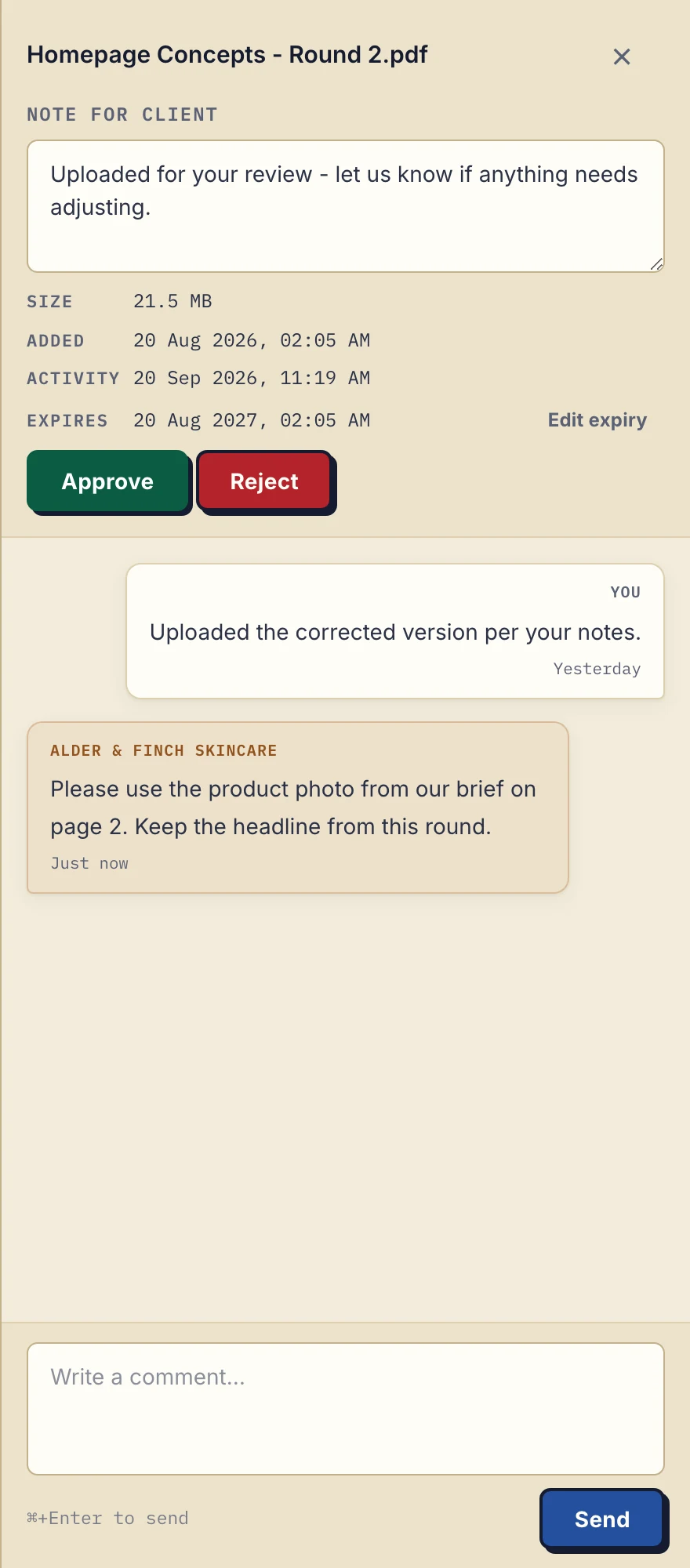
Fictional agency example in the product: the client describes a page change in a file comment. There is no annotation drawn on the PDF.
A revised upload is a separate file, so name your rounds. Approved and Rejected are statuses either side can change or clear, not a locked approval chain. The file limit is 100 MB on Free, 1 GB on Solo, 2 GB on Practice, and 5 GB on Studio or with a paid storage add-on. Paid plans start at 19 EUR per month plus tax with unlimited clients, and files are stored only in Germany.
Trade-off: for multi-gigabyte video masters, Hightail and the transfer tools above have much higher limits. There are no frame annotations, proofing gallery or side-by-side comparison.
5. Google Drive
Best for: teams already in Google Workspace that do not mind managing folders by hand
Sharing through Google Drive is familiar to most clients. You share a link, and they preview or download the file.
Trade-off: the same as any general cloud drive: no per-client isolation, no approval status and no permanent client address. Managing many clients in Drive means keeping a folder structure by hand and not sharing the wrong one.
6. Onehub
Best for: controlled folder sharing with different permissions per person
Onehub combines workspaces with permission roles and supports guest links without an account. Onehub's pricing page, checked September 23, 2026, lists Standard at 12.50 USD per paid user per month billed annually, or 15 USD monthly, with a three-user minimum.
Trade-off: it is built around folders and roles, not creative review. See the Onehub alternatives for that side of the market.
Who should stay on Hightail
Stay if you deliver large video masters or run formal creative rounds. Hightail's pricing page, checked September 21, 2026, lists Pro at 12 USD per month billed annually with 25 GB files, and Teams at 24 USD per user per month billed annually with 50 GB files, version comparison and approval routing. Droplana cannot match those file sizes.
For the bill: one person on Hightail Pro pays 144 USD a year, and Droplana Solo is 190 EUR a year plus tax. Three staff on Hightail Teams pay 864 USD a year, and Droplana Practice is 490 EUR a year plus tax with five seats. These buy different capabilities in different currencies, so this is not a saving.
Hightail alternatives compared
| Frame.io | WeTransfer | Filemail | Droplana | Google Drive | Hightail | |
|---|---|---|---|---|---|---|
| Persistent client space | Per project | No | No | Yes, one portal per client | Manual folders | Per project |
| Largest file | Check vendor | Depends on plan | Check vendor | 100 MB Free, 1 GB Solo, 2 GB Practice, 5 GB Studio | Check vendor | 25 GB Pro, 50 GB Teams |
| On-frame review | Yes | No | No | No, file comments only | No | Yes |
| List of files still needed | No | No | No | Yes, checklist | No | No |
| Client account needed | Check vendor | No for sending | No | No | Often | Check vendor |
| Data location | Check vendor | Check vendor | Check vendor | Germany only | Region options on some plans | Check vendor |
| Primary use | Video review | One-off sends | Large transfers | Ongoing client portals | Storage | Creative delivery |
Which one fits your situation
If you are a freelance designer or video editor who delivers to the same clients regularly, you may need two tools: a portal like Droplana for the ongoing relationship, and WeTransfer or Filemail for the project whose files exceed the portal's limit.
If you are a video production company where client review is the whole job, Frame.io or Hightail fits better than Droplana.
If you only need to send one file quickly, WeTransfer is the simplest option.
For how agencies manage client file exchange, the pattern is similar across creative, design and video work: one permanent client space plus a delivery method for the largest files. If you are comparing enterprise tools instead, see the best ShareFile alternatives. For the wider picture on choosing a portal, see the client portal guide.
Check our simple pricing (or start free)
The tools you need, on every plan.
Share files, leave comments, request documents with checklists and sign PDFs in your browser. Your logo is included too.
Clients never pay or create an account. EU hosting, encryption and data export included.
Save 2 months with annual billing
Free Start here
For your first 3 clients
€0/monthNo credit card required
- Just you
- 3 clients
- 2 GB storage
- Up to 100 MB per file
- Files kept for 6 months
Solo
For independent professionals
€19/month+ tax
€190/year+ tax
- Just you
- Unlimited clients
- 50 GB storage
- Up to 1 GB per file
- Email support
Practice
For small firms
€49/month+ tax
€490/year+ tax
- Team size: 5
- Unlimited clients
- 250 GB storage
- Up to 2 GB per file
- Priority support
Studio
For growing teams
€99/month+ tax
€990/year+ tax
- Team size: Unlimited
- Unlimited clients
- 1 TB storage
- Up to 5 GB per file
- Priority support
- Personal setup call
On Free, each file expires 180 days after upload. Your clients and their access stay active, so you can keep sharing new files. Active paid plans have no plan-imposed retention limit. Expiry settings, deletion and cancellation rules still apply; a persistent portal address does not guarantee permanent file availability. Team sizes include you. No setup fees or automatic overage charges. Prices exclude applicable tax.
Compare plan details
| Included | Free | Solo | Practice | Studio |
|---|---|---|---|---|
| Team size | Just you | Just you | 5 | Unlimited |
| Clients | 3 | Unlimited | Unlimited | Unlimited |
| Storage | 2 GB | 50 GB | 250 GB | 1 TB |
| Maximum file size | 100 MB | 1 GB | 2 GB | 5 GB |
| File retention | 180 days from upload | No limit | No limit | No limit |
| Your Droplana address | Includes a random suffix | Your chosen name | Your chosen name | Your chosen name |
| Data Processing Agreement | Standard | Standard | Countersigned available | Countersigned available |
| Support | Priority | Priority | ||
| Personal setup call | Not included | Not included | Not included | Included |
Need more storage?
Add 500 GB for €15/month + tax, or €150/year + tax. Each storage add-on also raises your maximum file size to 5 GB.
Available on all paid plans from your billing page. Add more than one for another 500 GB each. Your team size stays the same.
Questions before choosing
What is a good alternative to Hightail for sending files to clients?
It depends on the job. Frame.io fits detailed video and image review. WeTransfer and Filemail fit one-off large transfers. Droplana fits recurring work with the same clients, with one private portal per client and no client account. Keep Hightail when its large-file limits and proofing tools are what you use.
Can Droplana handle large video masters?
Only up to its file limit: 100 MB on Free, 1 GB on Solo, 2 GB on Practice, and 5 GB on Studio or with a paid storage add-on. It has no frame annotations, proofing gallery or side-by-side version comparison. For larger masters, keep a transfer tool beside the portal.
Do clients need an account to use Droplana?
No. Each client opens a private link to their own portal. With the default Strict security level they confirm their email on each new device, and the browser is then remembered for 90 days.
Who should stay on Hightail?
Teams that deliver large video masters or run formal creative review rounds. Hightail's plans allow much larger files than Droplana, and its Teams plan adds version comparison and approval routing.