
Onehub alternatives for client file portals
Onehub combines shared workspaces, permission roles and a separate data room plan. Many service businesses need less than that. Droplana is one of five options below: a client document portal where each client gets a private portal for two-way document exchange, with no client signup.
Onehub is a file sharing platform with workspaces, permission roles, activity tracking and branding, plus a separate Data Room plan with NDA, watermarking and stealth controls for due diligence.
If you are a three-person consulting firm or an accounting practice, you may use only part of that. What you need is a private place to exchange files with each client, and a clear view of what they still owe you.
When Onehub is the right tool:
- Due diligence and deal rooms that need NDAs, watermarking and strict access control
- Teams where different staff must see different folders
- Sharing that needs guest links and invited users with roles side by side
When it is more than you need:
- Small firms and agencies with dozens of ongoing clients
- Teams that want a portal per client, not a workspace per deal
- Firms whose main question is "which documents are still missing?"
Published by Droplana, one of the products listed. Onehub pricing checked September 23, 2026; ShareFile data room pricing and Google Drive documentation checked September 21, 2026; plans and terms change. Vendor prices are public USD list prices, Droplana prices are in EUR plus tax. The screenshots use fictional data and are not customer results.
Here are five Onehub alternatives, depending on the controls you use.
1. ShareFile
Best for: firms that still need a data room, from a larger document platform
ShareFile offers a dedicated virtual data room plan as well as its standard plans with requests, workflows and e-signing. ShareFile's plans page, checked September 21, 2026, lists its data room from 69.30 USD per user per month billed annually, with a five-user minimum.
Trade-off: it is a broad platform priced per user. Check the NDA and watermark controls on the plan you would buy, and test them with your real reviewer roles. The list of ShareFile alternatives covers the smaller end of that field.
2. Google Drive
Best for: teams already on Google Workspace that want sharing inside tools they know
Drive supports restricted sharing with viewer, commenter and editor permissions, and formal approvals on eligible editions. The cost depends on the Workspace edition you already pay for.
Trade-off: there is no per-client portal. Folder permissions are inherited, so separating many clients needs care, and there is no list of documents a client still has to send. See Droplana vs Google Drive and Dropbox.
3. Droplana
Best for: service businesses that need a portal per client, not a data room per deal
Droplana is built around one portal per client. Each client gets a private portal, and files there are visible only to that client and your team. The client can download, upload, comment on a file and mark it Approved or Rejected without creating an account. A document checklist shows the client what is still missing and what they already sent.
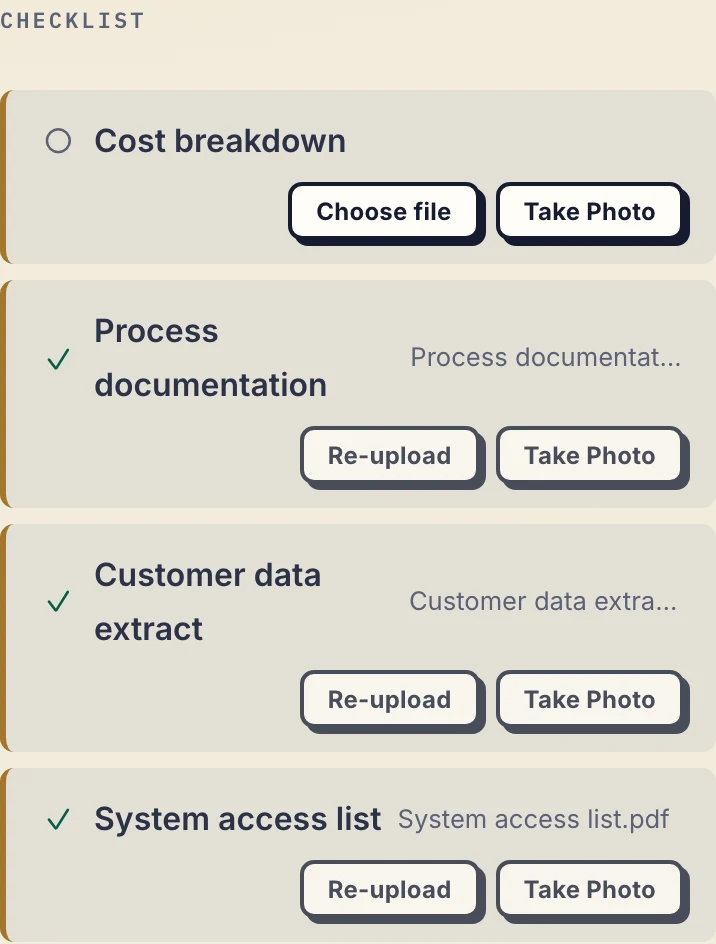
Product capture with fictional client data: the missing cost breakdown stays visible beside the inputs already received.
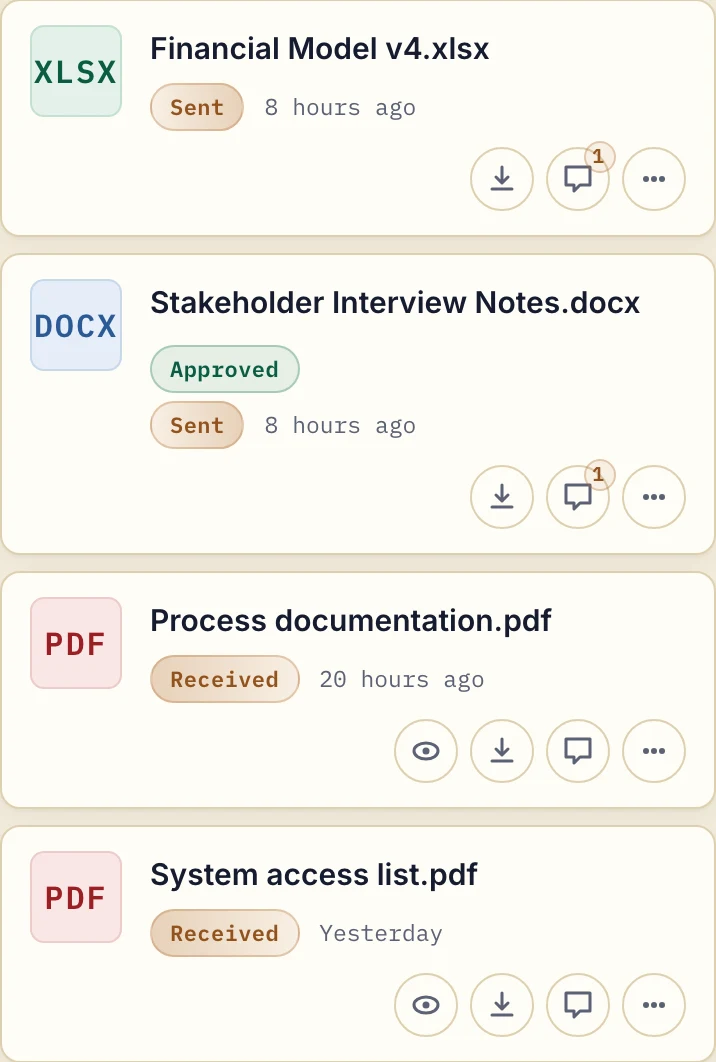
The same fictional client's portal separates deliverables sent to the client from documents received.
There are no roles to configure. You add a client, send their link, and the portal is live. Files, comments and metadata are hosted only in Germany, with a DPA on every plan. Paid plans cover unlimited clients from 19 EUR per month plus tax; three staff need Practice at 490 EUR a year plus tax, which includes five seats.
Trade-off: Droplana has no data room features, watermarking, NDA gates or staff permissions by client: every team member can open every client. If you need those, Onehub or ShareFile fits better. For the direct comparison, see Droplana vs Onehub.
4. Box
Best for: larger organisations that need content management and governance
Box is a content management platform with detailed permissions, compliance features, many integrations and workflow tools.
Trade-off: like Onehub and ShareFile, it is more than a small service business needs, and it is set up for an organisation with IT support.
5. Dropbox
Best for: teams already in Dropbox that want to share with clients
Dropbox lets teams share folders with clients, and its file requests let people upload without seeing your folders. It is familiar to most users and needs little setup.
Trade-off: it is general file sync, not a client portal. There is no per-client isolation, no approval status and no address the client thinks of as their own space.
Who should stay on Onehub
If you run real deal rooms, where NDAs, watermarking and audit trails are requirements, stay on Onehub. Onehub's pricing page, checked September 23, 2026, lists Standard at 12.50 USD per paid user per month billed annually, or 15 USD monthly, with a three-user minimum: 450 USD a year for three staff. The Data Room plan, with the NDA and watermark controls, is priced separately, so do not assume Standard includes them.
Stay too if staff must be limited to certain clients or folders. Onehub's permission roles do that, and its secure guest links already let clients open files without an account.
If you are an agency or consultancy with 10 to 100 ongoing clients who send you documents and review your work, a focused client portal is usually the closer fit. For consultants, see how Droplana works for consulting practices.
Onehub alternatives compared
| ShareFile | Google Drive | Droplana | Box | Dropbox | Onehub | |
|---|---|---|---|---|---|---|
| Per-client portal | Yes | Manual folders | Yes, one per client | Manual folders | Manual folders | Workspaces |
| Client account needed | Check vendor | Often | No | Often | Depends on sharing method | No for guest links |
| Staff permissions by client | Check vendor | Yes | No, all staff see all clients | Yes | Yes | Yes |
| List of documents still missing | Requests | No | Yes, checklist | No | No | No |
| Data room controls | Separate plan | No | No | Check vendor | No | Separate plan |
| Data location | Confirm with vendor | Region options on some plans | Germany only | Region options on some plans | Region options on some plans | Confirm with vendor |
| Pricing model | Per user | Per user | Flat per business | Per user | Per user | Per user |
Vendor plans and features change. Check each vendor's own pages before you decide.
For the wider picture on choosing a portal, see the client portal guide.
Check our simple pricing (or start free)
The tools you need, on every plan.
Share files, leave comments, request documents with checklists and sign PDFs in your browser. Your logo is included too.
Clients never pay or create an account. EU hosting, encryption and data export included.
Save 2 months with annual billing
Free Start here
For your first 3 clients
€0/monthNo credit card required
- Just you
- 3 clients
- 2 GB storage
- Up to 100 MB per file
- Files kept for 6 months
Solo
For independent professionals
€19/month+ tax
€190/year+ tax
- Just you
- Unlimited clients
- 50 GB storage
- Up to 1 GB per file
- Email support
Practice
For small firms
€49/month+ tax
€490/year+ tax
- Team size: 5
- Unlimited clients
- 250 GB storage
- Up to 2 GB per file
- Priority support
Studio
For growing teams
€99/month+ tax
€990/year+ tax
- Team size: Unlimited
- Unlimited clients
- 1 TB storage
- Up to 5 GB per file
- Priority support
- Personal setup call
On Free, each file expires 180 days after upload. Your clients and their access stay active, so you can keep sharing new files. Active paid plans have no plan-imposed retention limit. Expiry settings, deletion and cancellation rules still apply; a persistent portal address does not guarantee permanent file availability. Team sizes include you. No setup fees or automatic overage charges. Prices exclude applicable tax.
Compare plan details
| Included | Free | Solo | Practice | Studio |
|---|---|---|---|---|
| Team size | Just you | Just you | 5 | Unlimited |
| Clients | 3 | Unlimited | Unlimited | Unlimited |
| Storage | 2 GB | 50 GB | 250 GB | 1 TB |
| Maximum file size | 100 MB | 1 GB | 2 GB | 5 GB |
| File retention | 180 days from upload | No limit | No limit | No limit |
| Your Droplana address | Includes a random suffix | Your chosen name | Your chosen name | Your chosen name |
| Data Processing Agreement | Standard | Standard | Countersigned available | Countersigned available |
| Support | Priority | Priority | ||
| Personal setup call | Not included | Not included | Not included | Included |
Need more storage?
Add 500 GB for €15/month + tax, or €150/year + tax. Each storage add-on also raises your maximum file size to 5 GB.
Available on all paid plans from your billing page. Add more than one for another 500 GB each. Your team size stays the same.
Questions before choosing
What is a good alternative to Onehub?
It depends on the controls you use. For deal rooms with NDA and watermark controls, ShareFile has a dedicated data room plan. For sharing inside an existing Google Workspace, Google Drive is the obvious option. For routine document exchange with many clients, Droplana gives each client a private portal with a checklist of what is still missing.
Does Onehub require every recipient to create an account?
No. Onehub supports secure guest links that open files or folders without an account. Invited users with permission roles are another access path. Choose the method that matches the identity and control each document needs.
Can Droplana restrict staff to selected clients?
No. Every team member in a Droplana business can open every client. If staff must be separated by client, folder or engagement, choose a product with internal permission roles, such as Onehub.
Do clients need to create a Droplana account?
No. Clients do not sign up, but access can require verification. The default Strict mode verifies the client's email on a new device and remembers that device for 90 days. PDF signing always needs an identified session.