
ShareFile alternatives for small firms
ShareFile is a broad document platform with requests, workflows, e-signing and per-user pricing. Small firms often need less. Droplana is one of six options below: a client document portal where each client gets a private portal for two-way document exchange, with no client signup.
ShareFile has served accounting and professional services firms for many years. It covers a lot: client portals, file requests, workflows, its own e-signing, integrations and compliance options. For a firm that uses most of that, it is a reasonable platform.
Small firms usually look elsewhere for one of four reasons:
- Pricing grows with the team. ShareFile's plans page, checked September 23, 2026, lists Premium, the tier with requests, workflows and e-signing, at 26 USD per employee user per month on annual billing, with a three-user minimum. Three staff pay 936 USD a year. Unlimited client users do not remove the staff minimum.
- More platform than needed. Workflow building and integrations add setup and training that a five-person firm may not use.
- Clients struggle with access. Account-based portals lead to "I never got the invite" and "I forgot my password" emails, especially from clients you hear from once a quarter.
- Data location. Some European firms want storage only in the EU, under an EU company.
For a direct feature-by-feature view, see Droplana vs ShareFile. This page covers the wider field.
Published by Droplana, one of the products listed. Vendor pricing pages checked September 23, 2026; plans and terms change. Vendor prices are public USD list prices, Droplana prices are in EUR plus tax, so the figures show the shape of each bill, not a saving. The screenshots use fictional data and are not customer results.
What to check in any alternative:
- Each client sees only their own documents
- Clients can send documents back without creating an account
- Pricing that fits a small team with many clients
- Where files are stored, and whether a DPA is available
1. SmartVault
Best for: accounting and tax practices that want a document system connected to their tax software
SmartVault combines document management with a client portal. Its integration directory lists tax and accounting products that file documents into structured client folders, and internal files live in the same system.
SmartVault's pricing page, checked September 23, 2026, lists Accounting Pro, the first plan with tax integrations, at 65 USD per user per month billed annually with a two-user minimum. Three staff pay 2,340 USD a year.
Trade-off: it is a larger system than a portal, priced per user, and built around US tax software. Confirm support for your exact software and version. See Droplana vs SmartVault for the detail.
2. Droplana
Best for: small firms whose main friction is exchanging documents with clients
Droplana is a client document portal: one private, persistent portal per client for two-way document exchange, with no client account. A document checklist shows each client what is still missing. If a checklist has stalled for 7 days, Droplana emails the client a reminder that names the missing items; this is on by default and can be switched off. Clients upload from a computer or photograph paper with a phone. You comment on individual files, mark them Approved or Rejected, and send finished work back through the same portal.
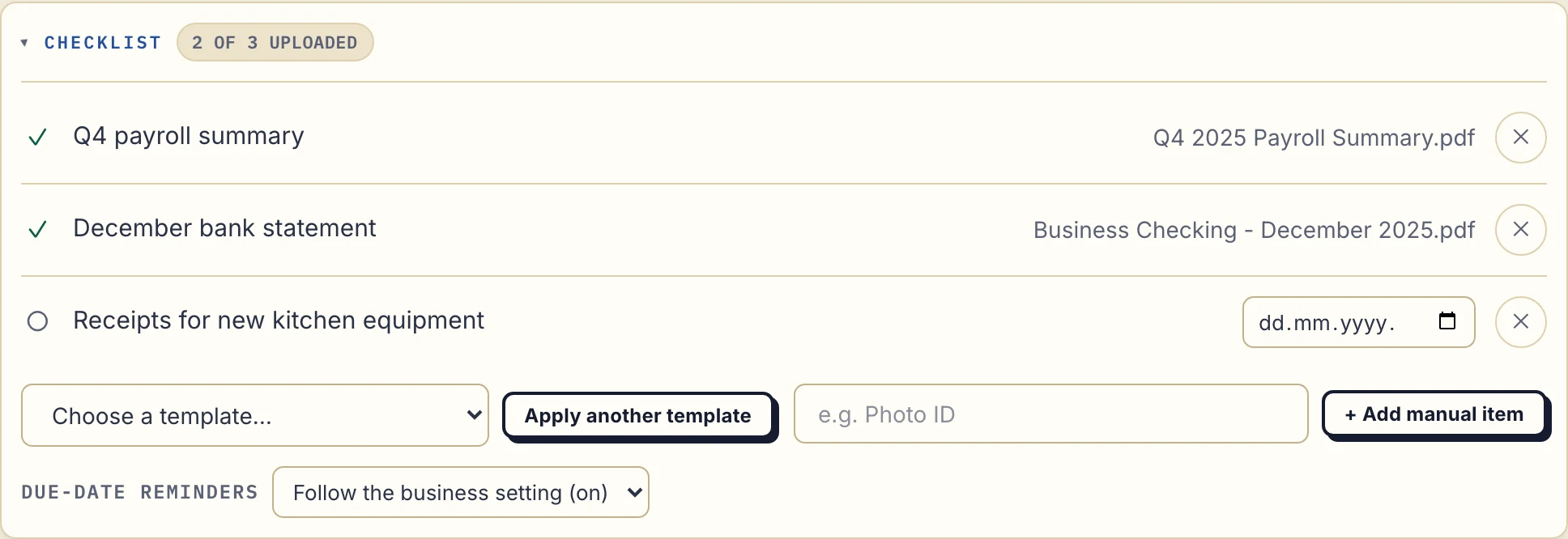
Product capture with fictional data: the business sees the payroll summary and statement received, with equipment receipts still missing.
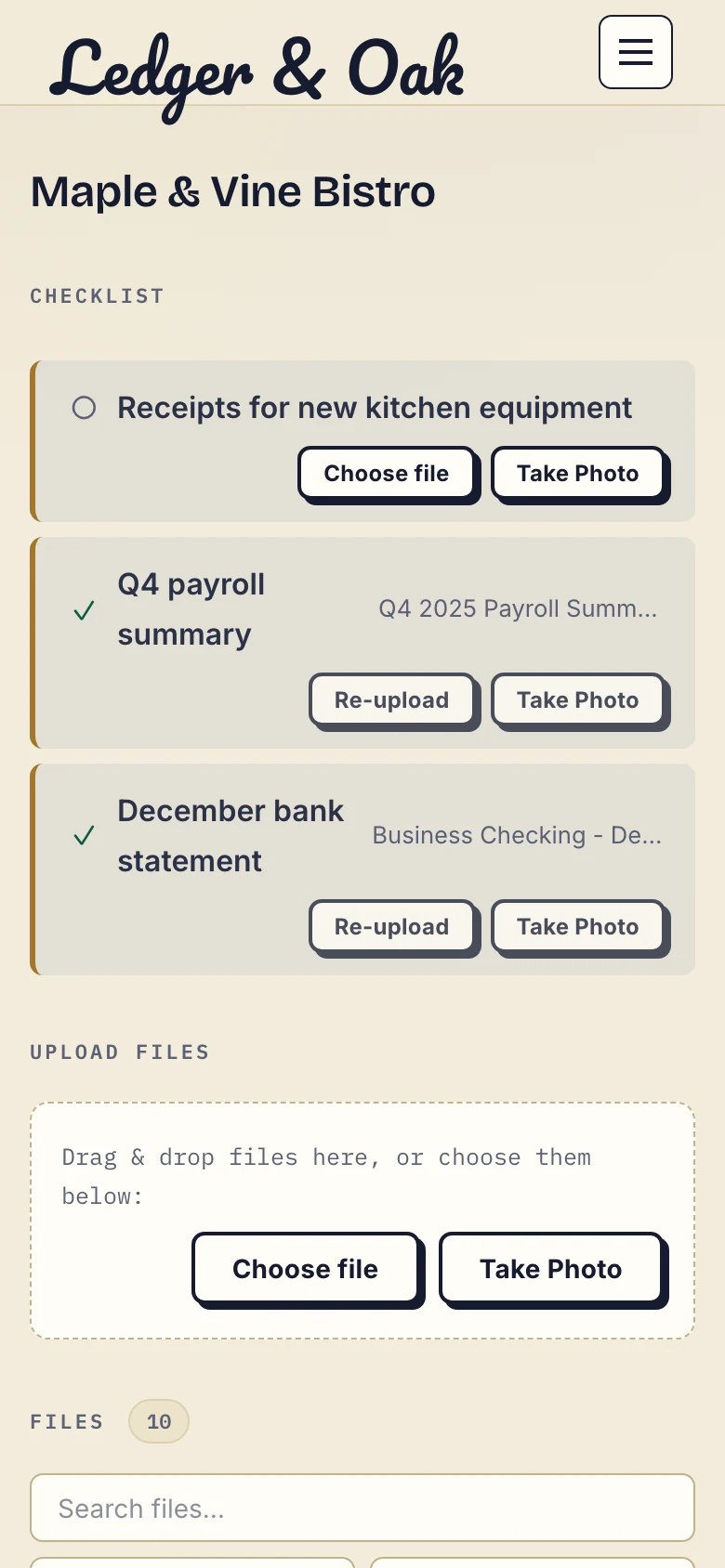
The fictional client's phone view offers a file upload or a photo for the missing receipts.
Files, comments and metadata are stored only on Hetzner infrastructure in Germany, encrypted at rest. Droplana is operated by Ubique d.o.o., an EU company in Croatia, and a DPA is available on every plan. Pricing is flat per business: free for 3 clients, then 19, 49 or 99 EUR per month plus tax with unlimited clients. For three staff, Practice costs 490 EUR a year plus tax and includes five seats.
Trade-off: it is not a document management system. There is no sync client and no native connector to other products, so received documents are downloaded and filed in your other tools by hand. An AI assistant or automation tool can connect through the MCP server to track and upload documents, but no tool returns a document's contents. Every team member can open every client. In-browser PDF signing marks a document as signed and records who signed and when; it is not a qualified electronic signature. Check the plan limits before you move large files.
3. Onehub
Best for: firms that need different file access for different people
Onehub organises sharing into workspaces with permission roles, and supports guest links that open files without an account. Onehub's pricing page, checked September 23, 2026, lists Standard at 12.50 USD per paid user per month billed annually with a three-user minimum, so three staff pay 450 USD a year. Data-room controls such as NDAs and watermarking sit on a separate Data Room plan.
Trade-off: it is organised around workspaces and folders, not a list of what each client still owes you. See Droplana vs Onehub.
4. SuiteDash
Best for: firms that want CRM, projects and invoicing next to the client portal
SuiteDash is a business suite with a client portal inside it. SuiteDash's pricing page, checked September 23, 2026, lists Start at 180 USD a year with unlimited staff and 100 GB of storage.
Trade-off: the entry plan is cheap, but the modules you need may sit on a higher tier or an add-on, and a suite takes longer to set up than a portal. Map the modules you would use before comparing prices.
5. Google Drive or Dropbox
Best for: firms already on Google Workspace or Dropbox that need a low-cost start
Shared drives give a team folders that do not depend on one person's account, and you can share a folder with a client. Dropbox's file requests let people upload without seeing your folders.
Trade-off: there is no per-client portal. Each client folder is set up and shared by hand, clients may be asked to sign in, and there is no checklist or approval status. Keeping many client folders and permissions consistent is manual work. See Droplana vs Google Drive and Dropbox.
6. Box
Best for: larger firms with compliance requirements and IT support
Box is a content management platform with detailed permissions, governance options and many integrations.
Trade-off: it is built for mid-size and larger organisations. Setup and pricing are closer to ShareFile than to a small-firm tool.
Who should stay on ShareFile
Stay if you use its requests, workflows or integrations every day, if your team needs one platform for internal and client documents, or if you rely on its compliance packages. Moving a working system has a cost, and the archive of past years rarely needs to move at all.
If you do switch, list your request templates, signing steps, staff permissions and retention rules first. Pilot one low-risk client exchange and keep the old system available until your records are accounted for.
ShareFile alternatives compared
| SmartVault | Droplana | Onehub | SuiteDash | Google Drive / Dropbox | Box | |
|---|---|---|---|---|---|---|
| Type | Document management with portal | Client document portal | Permission-led sharing | Business suite with portal | Cloud storage | Content management |
| Per-client portal | Yes | Yes, one per client | Workspaces | Yes | No, shared folders | No, shared folders |
| Client account needed | Check vendor | No | No for guest links | Check vendor | Often | Often |
| List of missing documents | Request lists | Checklist with reminders | No | Check vendor | No | No |
| Tax software integration | Yes | No | Check vendor | Check vendor | No | Check vendor |
| Staff permissions by client | Check vendor | No, all staff see all clients | Yes | Check vendor | Yes | Yes |
| Pricing model | Per user | Flat per business | Per user | Per plan | Per user | Per user |
| Data location | Confirm with vendor | Germany only | Confirm with vendor | Confirm with vendor | Region options on some plans | Region options on some plans |
Vendor plans and features change. Check each vendor's own pages before you decide.
For firms in accounting or legal work, those pages show the portal in daily use. For how to judge any portal, see the client portal guide.
Check our simple pricing (or start free)
The tools you need, on every plan.
Share files, leave comments, request documents with checklists and sign PDFs in your browser. Your logo is included too.
Clients never pay or create an account. EU hosting, encryption and data export included.
Save 2 months with annual billing
Free Start here
For your first 3 clients
€0/monthNo credit card required
- Just you
- 3 clients
- 2 GB storage
- Up to 100 MB per file
- Files kept for 6 months
Solo
For independent professionals
€19/month+ tax
€190/year+ tax
- Just you
- Unlimited clients
- 50 GB storage
- Up to 1 GB per file
- Email support
Practice
For small firms
€49/month+ tax
€490/year+ tax
- Team size: 5
- Unlimited clients
- 250 GB storage
- Up to 2 GB per file
- Priority support
Studio
For growing teams
€99/month+ tax
€990/year+ tax
- Team size: Unlimited
- Unlimited clients
- 1 TB storage
- Up to 5 GB per file
- Priority support
- Personal setup call
On Free, each file expires 180 days after upload. Your clients and their access stay active, so you can keep sharing new files. Active paid plans have no plan-imposed retention limit. Expiry settings, deletion and cancellation rules still apply; a persistent portal address does not guarantee permanent file availability. Team sizes include you. No setup fees or automatic overage charges. Prices exclude applicable tax.
Compare plan details
| Included | Free | Solo | Practice | Studio |
|---|---|---|---|---|
| Team size | Just you | Just you | 5 | Unlimited |
| Clients | 3 | Unlimited | Unlimited | Unlimited |
| Storage | 2 GB | 50 GB | 250 GB | 1 TB |
| Maximum file size | 100 MB | 1 GB | 2 GB | 5 GB |
| File retention | 180 days from upload | No limit | No limit | No limit |
| Your Droplana address | Includes a random suffix | Your chosen name | Your chosen name | Your chosen name |
| Data Processing Agreement | Standard | Standard | Countersigned available | Countersigned available |
| Support | Priority | Priority | ||
| Personal setup call | Not included | Not included | Not included | Included |
Need more storage?
Add 500 GB for €15/month + tax, or €150/year + tax. Each storage add-on also raises your maximum file size to 5 GB.
Available on all paid plans from your billing page. Add more than one for another 500 GB each. Your team size stays the same.
Questions before choosing
What is a good ShareFile alternative for a small firm?
It depends on the job you need to keep. SmartVault is closer if you want document management connected to tax software. Droplana fits if the main work is collecting documents from clients and sending work back. Onehub fits permission-led sharing, and SuiteDash fits a firm that also wants CRM and invoicing in one tool.
Why do firms look for ShareFile alternatives?
The usual reasons are per-user pricing with a staff minimum, more platform than a small firm uses, clients who find account-based access hard, and firms in Europe that want storage in the EU under an EU company.
Do clients need an account with Droplana?
No. Each client opens a private link to their own portal. With the default Strict security level they confirm their email on each new device, and the browser is then remembered for 90 days. PDF signing needs that identified session.
Can Droplana restrict staff to selected clients?
No. Every team member in a Droplana business can open every client. If staff must be separated by client or engagement, choose a product with internal permission roles.
How much does Droplana cost?
The Free plan covers 3 clients and 2 GB. Paid plans have unlimited clients: Solo is 19 EUR per month plus tax with 50 GB and 1 seat, Practice 49 EUR with 250 GB and 5 seats, and Studio 99 EUR with 1 TB and unlimited team members. Annual billing costs ten months.