
Your client can see what is still missing.
Ask for the documents you need in the same portal where clients send files and receive your work. Both sides see which requests have been filled.
Product demonstration: Screenshots show the actual app with fictional client data. They are not customer results.
Droplana puts document checklists inside a private client document portal. Ask for the files you need, receive them against the list, and return your finished work to the same client. Your client opens the portal without creating an account. A check mark tells you a file arrived; you decide whether it is the right one.
See the client checklist
The payroll summary and bank statement are provided. The equipment receipts are still missing. Your client can send that item from its own upload button instead of finding your original email.
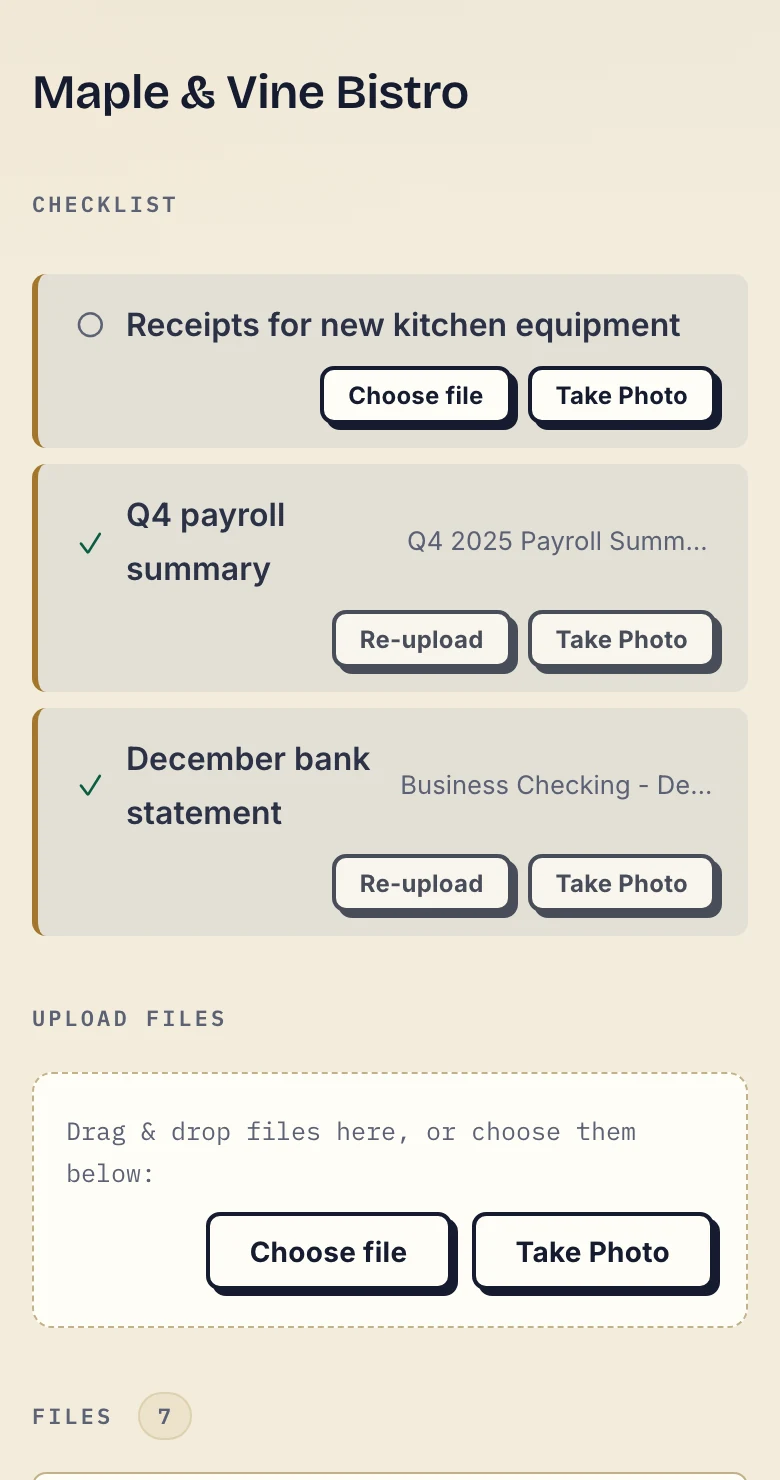
Real phone view, cropped below the app header, with fictional Maple & Vine Bistro data. Inspect the client screenshot at full size.
Set the request in your business view
Use a saved template or add individual requests. Each client has their own list. Applying another template appends its items to the existing list; it does not replace the earlier requests. Remove items you no longer need yourself.
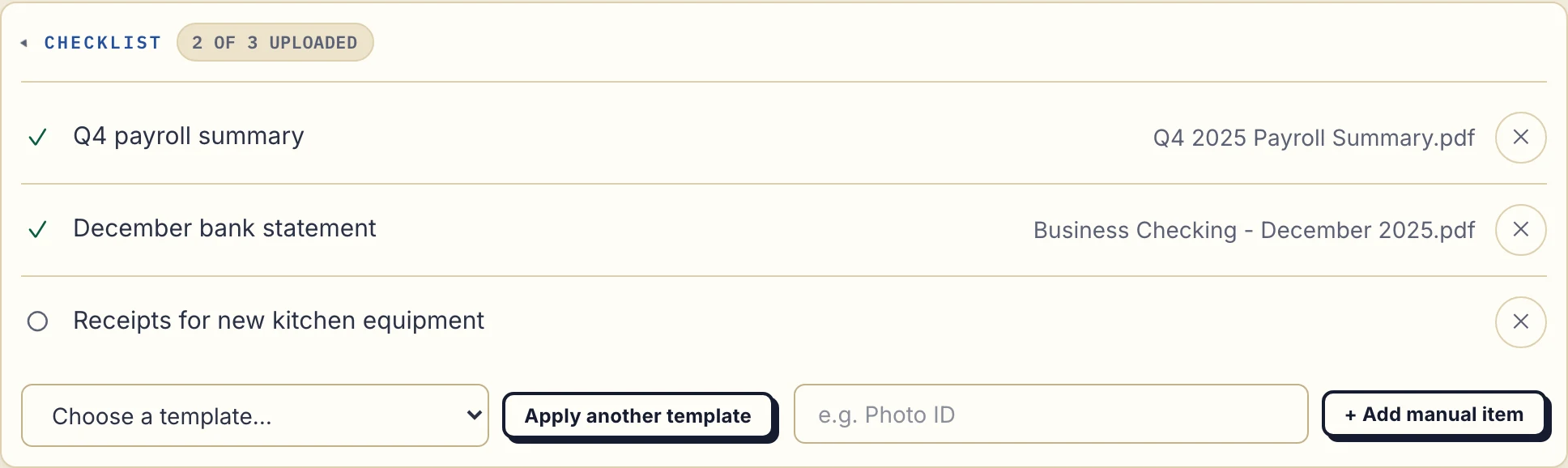
Real desktop business view, cropped to the checklist, with fictional data. Inspect the business screenshot at full size.
- Name the document and period. “September bank statement, all pages” is clearer than “Bank documents”.
- Give the client access. Share their portal and explain email verification on a new device. Clients do not create an account or install an app.
- Review each arrival. The upload against a request marks that item as provided. Check its contents, and leave a per-file comment if a page or period is wrong.
- Send work back. Upload the finished report or accounts to the same portal. The checklist supports the exchange; it does not move files into your accounting or other business software.
What happens when a client goes quiet?
Reminders are on by default. You can turn them off for your business while keeping the checklist visible.
| Client inactivity with items still missing | Reminder |
|---|---|
| After 7 days | An email to the client names the missing items. |
| After 14 days | The reminder comes to you instead, so you can follow up. |
Each stage sends once for that stall, rather than sending the client another email every day. Uploading another requested file allows a new reminder sequence if the list still has missing items. This is a fixed reminder schedule, not configurable workflow automation or a promise that the client will respond.
Set a due date when the request has a deadline
Add an optional due date to an item. Both sides see the date; an open item past it shows overdue. A due-date reminder is prepared two days before the date and on the date, and it is not sent once the item is fulfilled. It reaches the client with their next Droplana email, which can be later that day or the following day. The separate inactivity reminders follow their own rules.
The business can turn due-date reminders off for the whole business or one client. Clients can opt out from the reminder email or their portal. Reminders also stop when the portal is revoked or the subscription is inactive. A reminder is not proof of receipt or a guarantee that a deadline will be met.
A month-end list you can adapt
For an accounting engagement, replace the period and keep only the items you need:
- Bank statement for [period], all pages including the closing balance
- Sales invoices or agreed sales report for [period]
- Purchase invoices and receipts for [period]
- Payroll summary for [period], if required for this engagement
Download the editable accounting request, or use the client onboarding checklist guide for a printable list and other profession examples. These are templates to adapt manually, not automatic imports or professional document requirements.
For recurring work, update the client's requests yourself. There is no automatic monthly checklist or accounting integration. See the accounting client portal example for the wider exchange.
What the checklist leaves to you
- Document review. A provided file might be incomplete, out of date or for the wrong period. Neither a completed checklist nor an Approved marker verifies it.
- Corrections. Explain what is wrong on the file and ask for another upload. Uploaded files are not edited in place.
- Workflow decisions. There is no branching, routing, task assignment or conditional request logic. The checklist collects files, not form-field answers.
- File preparation. Droplana does not merge photographs into a PDF or extract their contents. Decide what format your process needs.
Per-file comments and in-browser PDF signing are available in the same portal. Signing is not a qualified electronic signature. For the broader product and its limits, read the client portal guide.
Included on every plan
Checklists and their stall reminders are included on Free and paid plans. Free covers 3 clients; its files expire 180 days after upload while the clients and their access stay active.
Free
€0/month
Just you
3 clients
2 GB storage
Up to 100 MB per file
Solo
€19/month
€190/year
Just you
Unlimited clients
50 GB storage
Up to 1 GB per file
Practice
€49/month
€490/year
Team size: 5
Unlimited clients
250 GB storage
Up to 2 GB per file
Studio
€99/month
€990/year
Team size: Unlimited
Unlimited clients
1 TB storage
Up to 5 GB per file
On Free, each file expires 180 days after upload. Your clients and their access stay active, so you can keep sharing new files. Active paid plans have no plan-imposed retention limit. Expiry settings, deletion and cancellation rules still apply; a persistent portal address does not guarantee permanent file availability. Team sizes include you. No setup fees or automatic overage charges. Prices exclude applicable tax.
Compare plan detailsQuestions about client document checklists
What is a document checklist in Droplana?
A list of documents requested from one client, visible in that client’s private portal. You add items manually or apply a saved template. Clients upload against each request, so both sides can see which items have been provided and which are still missing.
Does the client need an account to see the checklist?
No client signup, password or app is required. In the default Strict access mode, the client verifies their email on a new device. That browser is remembered for 90 days. This access period is separate from file retention.
When does Droplana remind clients about missing documents?
Reminders are on by default and can be switched off for your business. After 7 days of client inactivity while items are missing, the client gets an email naming those items. After 14 days, the reminder goes to you instead. Each stage sends once for that stall, not every day. Uploading another requested file lets the reminder sequence start again if items remain missing.
Does a completed checklist mean the documents are correct?
No. An item is marked provided when a file is uploaded against it. You still check the period, missing pages and whether the document is acceptable. Leave a comment on the file if it needs correcting. Checklist completion, an Approved status and a signature are different things.
Can a client upload a photograph instead of a scan?
Yes, if your process accepts photographs. On a phone, Take Photo opens the camera from the checklist. Ask the client to include every page and check that the text is readable. Droplana does not verify the document or decide whether a photograph meets your professional requirements.