
The software is free. The operations are not.
Nextcloud is capable, open source and costs nothing to license. You can run it yourself or pay a managed provider. Droplana is a hosted client document portal: each client gets one private portal to send and receive documents, with no account to create. The choice is mostly about who configures, patches and supports the system that holds your clients' documents.
Published by Droplana, one of the products compared. Nextcloud documentation checked September 21, 2026; provider offers and terms can change. The screenshot uses fictional data and is not a customer result.
What is being compared
Nextcloud is open source software for files, sync, sharing, calendars, contacts, chat, collaborative editing through an office integration, and a large app catalogue. There is no licence fee for the community software. You can install it on a server you control, or use one of the managed Nextcloud providers. There is an enterprise subscription if you want vendor support.
Droplana is a hosted client document portal. Each of your clients gets their own private, persistent portal for two-way document exchange, with document checklists, per-file comments, file status and in-browser PDF signing. Clients do not create an account. Files, comments and metadata stay on Hetzner infrastructure in Germany.
One does far more and costs nothing to license. The other does much less and takes the operations off your hands. That trade is most of the comparison, and it resolves differently depending on facts about you rather than facts about the software.
Droplana vs Nextcloud side by side
| Nextcloud | Droplana | |
|---|---|---|
| Licence cost | None for the community software | Free plan; paid plans from 19 EUR/month + tax |
| Who operates it | You, or a managed provider under its contract | Droplana |
| Scope | Files, sync, calendars, chat, editing, apps | Client document exchange |
| Organising unit | Folders, users, groups and share links | One persistent portal per client |
| Client uploads without an account | Yes, with public File Drop | Yes, clients have no accounts |
| Client downloads your report | Needs a share that allows viewing, or an account | Same portal as the uploads |
| Document checklist the client sees | Not out of the box; depends on apps | Yes, with optional due dates |
| Per-file comments and status | File comments; no per-client request status out of the box | Yes, per file |
| PDF signing | Depends on installed apps | In the browser, with a public verification page |
| Storage and file limits | What you or your provider configure | Free: 2 GB, 100 MB per file; up to 5 GB per file on paid plans |
| Data location | Wherever you or your provider run it | Hetzner, Germany |
| Updates, backups, patching | You, or the provider if the contract says so | Droplana |
The honest case for Nextcloud
It is strong, and it is not only about money.
You control everything. Location, retention, access, encryption, who can reach the server. For a firm with a strict data policy or a client contract that names the infrastructure, that control is the answer, and no hosted vendor can match it.
Fewer parties, if you run it yourself. A server you operate in your own premises or data centre can keep other companies out of the processing chain. Rented hosting, offsite backups and outside support usually bring some back, so check the actual chain rather than the label "self-hosted".
It does far more. Sync, collaborative editing, calendars, group chat, an app catalogue. If you were going to buy three tools, Nextcloud may replace all three.
Costs scale differently. Two hundred clients and eight hundred clients may cost much the same disk and effort. At some volume, running it yourself can be the cheaper answer.
You can leave when you want. Open source, standard formats, your own server or a provider you can change.
If you have someone competent who already runs infrastructure, this is a defensible choice and you should take it seriously.
The honest case against it
Also real, and usually underestimated at the point of decision.
Someone has to run it, or you pay someone to. Security updates. PHP and database upgrades that sometimes break things. TLS certificates. Backups that are tested rather than assumed. Monitoring that tells you the disk filled up before a client does. A managed provider can take on much of this, and its contract says which parts. Without one, it is a few hours a month when things go well and a bad weekend when they do not.
"Free" is a licence, not a cost. A server with meaningful storage, offsite backups and the hours, or a managed provider's fee: price it honestly against a flat monthly fee before deciding. For a two-person practice the numbers are often closer than expected.
Uptime is your problem, or your provider's. If the server is down on the day a filing is due, you want to know in advance who answers the phone.
The client experience needs building. Nextcloud can take files from clients without accounts: public File Drop does that well, and it hides the files already in the folder. What it does not give you out of the box is the per-client model: one permanent address that is the client's whole experience, a checklist they can see and work through, status per document, and the relationship history in one place. You can approach it with folder structures, apps and naming conventions. You then maintain that arrangement.
Configuration is a surface. A public link with broader permissions than intended, an app that stops being maintained, a share nobody remembers creating. Self-hosting moves these risks to you rather than removing them.
Try a request, a correction and the returned report
Illustrative trial. A two-person accounting practice requests a bank statement and an equipment receipt, asks for a clearer copy of the receipt, then returns a reconciliation report.
In Nextcloud, create a client folder and choose the sharing permissions for incoming documents and outgoing reports. Nextcloud's sharing guide separates upload-only File Drop from shares that allow viewing, uploads and editing. Test the links in a separate browser: can the client upload without seeing another client's files, and can they find the returned report? Decide where the list of missing documents and the correction request will live. If apps provide those steps, include their setup and upkeep in the evaluation.
In Droplana, create the client portal, enable uploads and add the two checklist items. The client sees what is missing and uploads a file or a phone photo. Comment on the receipt to ask for a clearer copy, then upload the finished report to the same portal. Return later from a new device to test access.
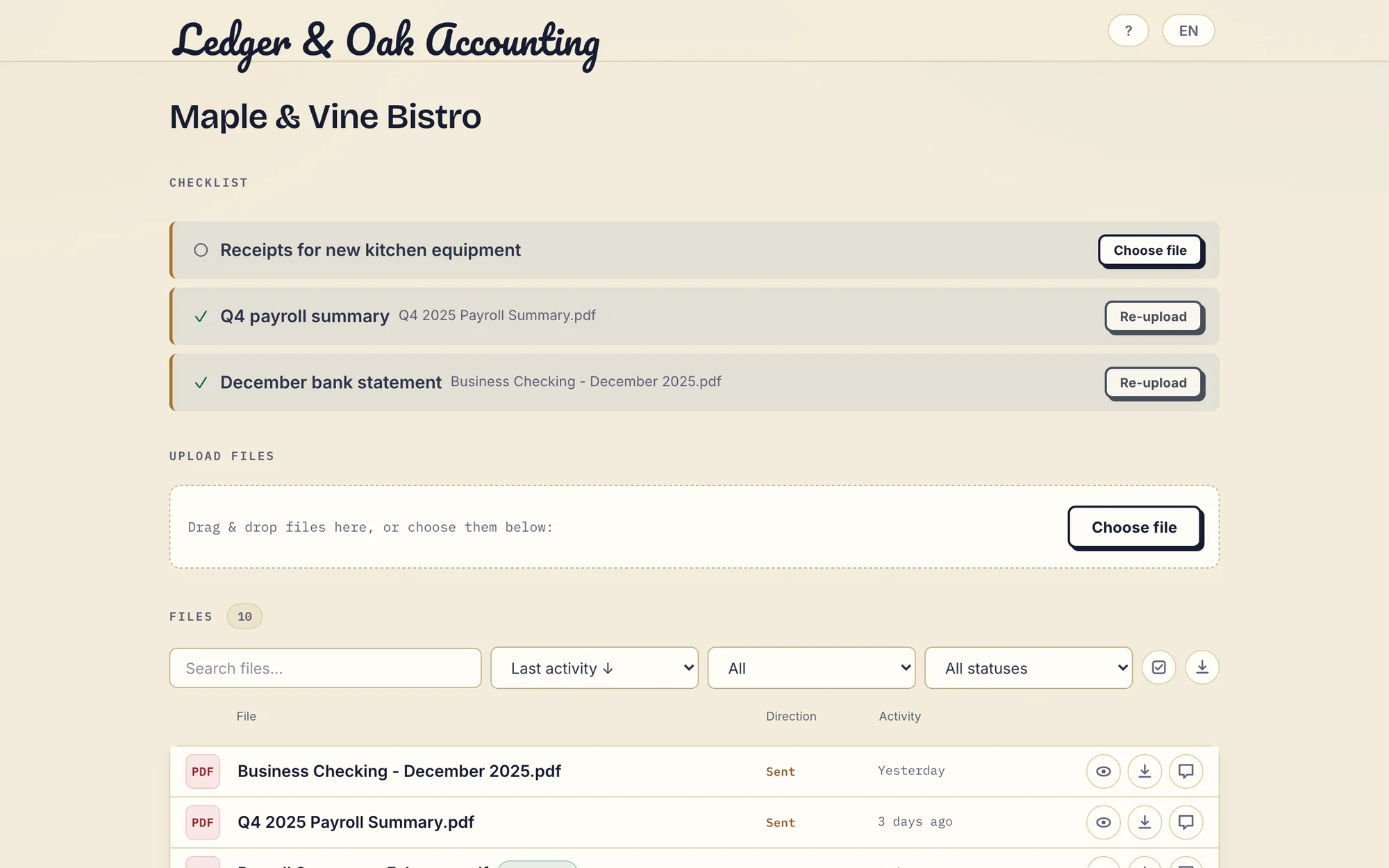
Real Droplana app with fictional data: the client has supplied two documents and can upload the missing equipment receipt. Open the full-size portal image.
Price the service you intend to run
Take the same two-person practice with 100 client exchanges and 100 GB of stored documents. Ask a managed provider to quote staff accounts, storage, backup retention, restore help, update responsibility and support hours. For a server you run yourself, add infrastructure, backups and the time of a named person. Neither route has one universal price or a guaranteed cost advantage.
Droplana Practice covers that storage and team at EUR49/month or EUR490/year plus tax, with 250 GB and 5 seats. Solo has 1 seat and 50 GB, so it would not cover the same setup.
The question that decides it
Not "which is better software". This one:
Who, specifically, patches the server?
If you can name that person, they have time, and they will still be there in two years, Nextcloud is a good answer and possibly the cheaper one at scale. If you can name a managed provider and its contract covers updates, backups and restores, that works too, and you still own the client configuration.
If the honest answer is "me, in the evenings, when I remember", then self-hosting is a liability that looks like a saving. That is not a criticism of the software. It is an observation about what an unmaintained server holding client documents turns into after eighteen months.
What Droplana does not do
- No self-hosting. Droplana processes your data under a DPA, on Hetzner infrastructure in Germany.
- No sync, document editing, calendar or chat.
- No app catalogue and no Nextcloud connector. Files move between Nextcloud and Droplana by hand.
- No folders. The client is the only level of organisation.
- Not a qualified e-signature. In-browser signing needs an identified signer. It keeps the original, saves a signed copy, records who signed, when and from what IP, and gives each signature a public verification page with a file-hash check. It is not certificate-based or qualified. See PDF signing.
- Not an archive. Free keeps each file for up to 180 days after upload. Active paid plans have no plan-imposed retention limit, but a portal is not long-term archival storage.
Who should choose which
Choose Nextcloud if you need sync, editing or its wider platform; you want to choose the infrastructure yourself; or you have a named operator or a managed provider whose contract covers the work.
Choose Droplana if the client-facing document exchange is the job, you want the per-client structure already built, and you do not want to run anything. Clients open one private portal whose address does not change. You set a checklist so they see what is outstanding, files come back under the client's name, including paper photographed on a phone, and each file carries comments and a status. Files are stored under opaque random identifiers and encrypted at rest with a key derived per file. A Data Processing Agreement is available on all plans; Practice and Studio include a countersigned one.
Some firms run both: Nextcloud internally where the team works, Droplana as the client-facing layer where documents arrive and leave. See the accounting practices page or the consultants page for the client layer in daily use, and the client portal guide for how to evaluate the category.
Questions before you choose
Is Nextcloud cheaper than Droplana?
The community software has no licence fee. The real cost is hosting, backups, monitoring, updates and the time of whoever handles them, or the fee of a managed provider that takes some of that on. Neither route has one universal price. Droplana is 19 EUR per month for Solo, 49 EUR for Practice and 99 EUR for Studio, plus tax, with unlimited clients on all three and a Free plan for 3 clients.
Do I have to maintain a server to use Nextcloud?
No. Nextcloud can be self-managed or supplied by a managed hosting provider. Check the provider contract for updates, backups, restores and support. Your business still decides the client permissions and how document requests work.
Can Nextcloud collect files without client accounts?
Yes. Public File Drop lets clients upload without an account and without seeing files already in the folder. A client who must also download your report needs a share that allows viewing. Test both the incoming request and the outgoing report in your configuration.
Do clients need a Droplana account?
No. Clients do not create an account or a password. Strict mode, the default, verifies their email on a new device, and a verified browser is remembered for 90 days. They can also sign in with a Google or Microsoft account linked to their email. The portal address stays the same, but that does not promise permanent file retention.
Which one is better for GDPR?
Both can be. Self-hosting gives you control over location and access, which is a strong position if you operate it well. It does not remove every third party: a hosting, backup or support provider may still process data. Droplana stores files, comments and metadata on Hetzner infrastructure in Germany, is operated by an EU company registered in Croatia, and offers a Data Processing Agreement on all plans.
Plans and limits
Paid plans include unlimited clients: Solo EUR19/month or EUR190/year, Practice EUR49/month or EUR490/year, Studio EUR99/month or EUR990/year, plus tax. Free covers 3 clients, 2 GB and files up to 100 MB. Each paid storage add-on costs EUR15/month or EUR150/year plus tax, adds 500 GB and raises the file limit to 5 GB. At capacity, new uploads stop and existing files stay accessible, with no overage billing.
The tools you need, on every plan.
Share files, leave comments, request documents with checklists and sign PDFs in your browser. Your logo is included too.
Clients never pay or create an account. EU hosting, encryption and data export included.
Save 2 months with annual billing
Free Start here
For your first 3 clients
€0/monthNo credit card required
- Just you
- 3 clients
- 2 GB storage
- Up to 100 MB per file
- Files kept for 6 months
Solo
For independent professionals
€19/month+ tax
€190/year+ tax
- Just you
- Unlimited clients
- 50 GB storage
- Up to 1 GB per file
- Email support
Practice
For small firms
€49/month+ tax
€490/year+ tax
- Team size: 5
- Unlimited clients
- 250 GB storage
- Up to 2 GB per file
- Priority support
Studio
For growing teams
€99/month+ tax
€990/year+ tax
- Team size: Unlimited
- Unlimited clients
- 1 TB storage
- Up to 5 GB per file
- Priority support
- Personal setup call
On Free, each file expires 180 days after upload. Your clients and their access stay active, so you can keep sharing new files. Active paid plans have no plan-imposed retention limit. Expiry settings, deletion and cancellation rules still apply; a persistent portal address does not guarantee permanent file availability. Team sizes include you. No setup fees or automatic overage charges. Prices exclude applicable tax.
Compare plan details
| Included | Free | Solo | Practice | Studio |
|---|---|---|---|---|
| Team size | Just you | Just you | 5 | Unlimited |
| Clients | 3 | Unlimited | Unlimited | Unlimited |
| Storage | 2 GB | 50 GB | 250 GB | 1 TB |
| Maximum file size | 100 MB | 1 GB | 2 GB | 5 GB |
| File retention | 180 days from upload | No limit | No limit | No limit |
| Your Droplana address | Includes a random suffix | Your chosen name | Your chosen name | Your chosen name |
| Data Processing Agreement | Standard | Standard | Countersigned available | Countersigned available |
| Support | Priority | Priority | ||
| Personal setup call | Not included | Not included | Not included | Included |
Need more storage?
Add 500 GB for €15/month + tax, or €150/year + tax. Each storage add-on also raises your maximum file size to 5 GB.
Available on all paid plans from your billing page. Add more than one for another 500 GB each. Your team size stays the same.
Related comparisons
If encryption is the main question, see Droplana vs Proton Drive and Droplana vs Tresorit. Firms already on Microsoft 365 can read Droplana vs SharePoint.