
Onboarding paperwork is the slow part, not the advice
Collect onboarding and review documents, then share reports and statements through the same private client portal. Clients can upload files or photograph paper from their phone.
Droplana is a client document portal for financial advisors and planners. Each client gets one private portal where they send KYC and review documents and you send back reports, statements and recommendations. Clients need no account and no password, and files are hosted in Germany.
Onboarding stalls on the passport scan that arrives blurred, the proof of address in a separate email and the signed questionnaire that is "on its way". Give every client one place to send them, and one list that shows what is still missing.
Show the client what this review needs
Cornerstone Wealth Planning's fictional annual-review checklist asks the Sinclair Household for three updates. None has been supplied yet. Each request has its own upload control, so the client can send what they have and return for the rest.
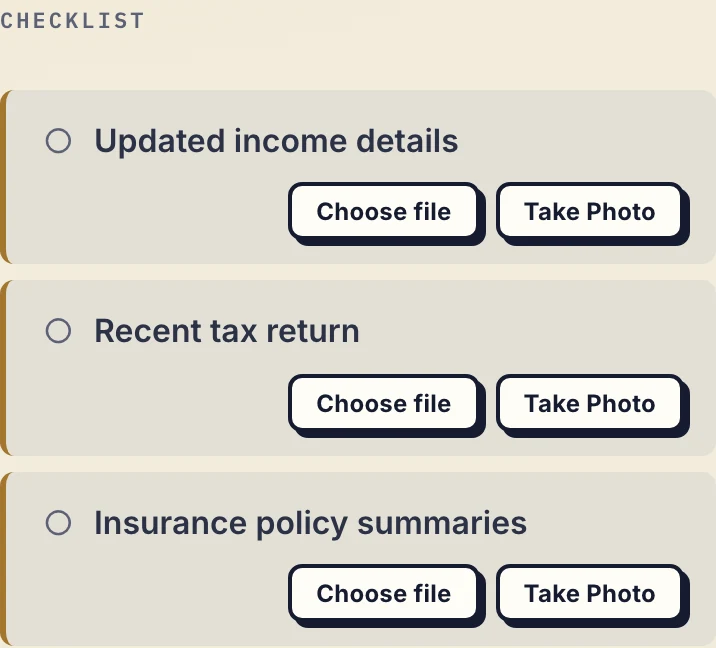
Actual client phone checklist for a fictional annual review, cropped to the requests. Inspect the client view.
A checklist the client can see
Set the onboarding list once per client: ID, proof of address, source of funds, signed questionnaire. They open their portal and see what is still missing. If nothing happens for 7 days, Droplana emails them the list.
Photographed from a phone
Many clients do not own a scanner. The portal has a Take Photo button that opens the phone camera, so a passport page, a utility bill or a signed sheet goes straight in.
The portal outlives the onboarding
Use the same portal for later reviews and updated documents. Paid plans have no file retention limit; Free keeps each file for up to 180 days after upload.
Isolated per client
Every client has a separate portal and sees only their own documents. There is no folder permission somebody has to maintain.
A client portal for financial advisors, from onboarding to annual review
- Request the onboarding documents. Add a document checklist for ID, proof of address, source-of-funds evidence and signed forms. Name the statement date or period so an old statement does not look like the right answer.
- Review and respond. Check each upload and ask about missing pages in its comments. A supplied item means a file arrived; checking its contents stays with you.
- Send the report back. Upload reports, statements and recommendations to the same portal. The client can comment on a file instead of starting another attachment thread.
- Prepare the next review. Reuse the portal and update the checklist for this year's documents. Droplana does not create an annual review cycle for you. You can revoke client access at any time.
Clients can use in-browser PDF signing after verifying their email, or upload a paper-signed form.
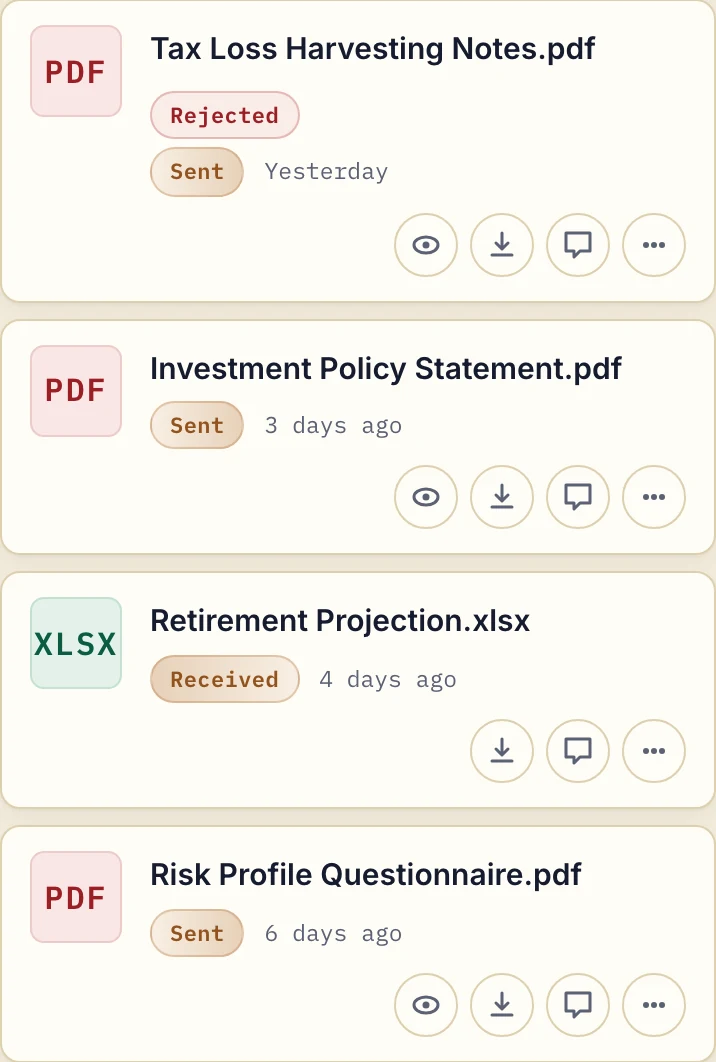
Actual phone-width business view, cropped to four files, with fictional Cornerstone Wealth Planning data. Inspect the document exchange.
Does it fit your existing tools?
Keep your CRM, back-office system and compliance checks. Droplana collects the documents; it does not run KYC, AML, identity or suitability checks, and it has no connector to your CRM or back office and no regulated archive. Its PDF signing is not a qualified electronic signature.
Contacts added to one client, such as two members of a household, share that portal. Your team members share access to the business's clients. There are no per-file or per-adviser permissions.
For help comparing options, see the client portal guide.
Security and data protection
Each client sees only their own portal. Files, comments and metadata are stored in Germany, with files encrypted in transit and at rest per file. Droplana is operated by Ubique d.o.o. in Croatia, and a DPA is available on every plan. Read the security details, including the limits of the protection, before deciding whether it meets your firm's requirements.
The account owner can export an activity log as CSV, including uploads, downloads, comments and approvals. See the activity and export instructions.
Pricing
The tools you need, on every plan.
Share files, leave comments, request documents with checklists and sign PDFs in your browser. Your logo is included too.
Clients never pay or create an account. EU hosting, encryption and data export included.
Save 2 months with annual billing
Free Start here
For your first 3 clients
€0/monthNo credit card required
- Just you
- 3 clients
- 2 GB storage
- Up to 100 MB per file
- Files kept for 6 months
Solo
For independent professionals
€19/month+ tax
€190/year+ tax
- Just you
- Unlimited clients
- 50 GB storage
- Up to 1 GB per file
- Email support
Practice
For small firms
€49/month+ tax
€490/year+ tax
- Team size: 5
- Unlimited clients
- 250 GB storage
- Up to 2 GB per file
- Priority support
Studio
For growing teams
€99/month+ tax
€990/year+ tax
- Team size: Unlimited
- Unlimited clients
- 1 TB storage
- Up to 5 GB per file
- Priority support
- Personal setup call
On Free, each file expires 180 days after upload. Your clients and their access stay active, so you can keep sharing new files. Active paid plans have no plan-imposed retention limit. Expiry settings, deletion and cancellation rules still apply; a persistent portal address does not guarantee permanent file availability. Team sizes include you. No setup fees or automatic overage charges. Prices exclude applicable tax.
Compare plan details
| Included | Free | Solo | Practice | Studio |
|---|---|---|---|---|
| Team size | Just you | Just you | 5 | Unlimited |
| Clients | 3 | Unlimited | Unlimited | Unlimited |
| Storage | 2 GB | 50 GB | 250 GB | 1 TB |
| Maximum file size | 100 MB | 1 GB | 2 GB | 5 GB |
| File retention | 180 days from upload | No limit | No limit | No limit |
| Your Droplana address | Includes a random suffix | Your chosen name | Your chosen name | Your chosen name |
| Data Processing Agreement | Standard | Standard | Countersigned available | Countersigned available |
| Support | Priority | Priority | ||
| Personal setup call | Not included | Not included | Not included | Included |
Need more storage?
Add 500 GB for €15/month + tax, or €150/year + tax. Each storage add-on also raises your maximum file size to 5 GB.
Available on all paid plans from your billing page. Add more than one for another 500 GB each. Your team size stays the same.
Questions before you start
Can advisory clients upload KYC documents themselves?
Yes. Each client gets a private portal and uploads proof of ID, proof of address, source-of-funds evidence and signed forms directly. You can set a document checklist per client so they see exactly which items are still outstanding rather than waiting for you to chase them.
Does receiving KYC documents complete KYC checks?
No. Droplana lets clients send documents and lets you see what arrived. It does not verify identity, run AML checks, assess suitability or decide whether your regulatory obligations have been met. Those checks stay in your own process.
Do clients need to create an account or remember a password?
No. There is no client account and no password. They open a link to their own portal and confirm access with an email magic link, or by signing in with a Google or Microsoft account. Their device is then remembered for 90 days.
Can a client sign a suitability form or declaration in the portal?
Yes, with in-browser PDF signing: the client types, draws or uploads a signature and places it on the page. The signed file is saved as a new item with the original preserved, and the signature is recorded with who signed, when and from what IP, plus a public verification page. It is not a qualified or certificate-based electronic signature, so pair it with a dedicated e-signature provider where a hard legal signing requirement applies. A client can also upload or photograph a paper document they signed by hand. Signing requires an email-identified client: an email magic link, Google or Microsoft login.
What does it cost for a book of a hundred clients?
The same as for ten. Droplana is priced flat per business with unlimited clients on every paid plan: Solo at 19 EUR per month with 50 GB, Practice at 49 EUR with 250 GB and 5 seats, Studio at 99 EUR with 1 TB and unlimited team members, all plus tax. Annual billing costs ten months. There is no per-client fee and no overage billing.
Compared with what advisory firms use now
- Droplana vs SmartVault: a document management system built around US tax software, compared with a flat-priced EU portal.
- Droplana vs ShareFile: a broad document platform priced per employee seat, compared with a narrow client portal.
- Droplana vs Tresorit: end-to-end encrypted storage priced per user, compared with a portal clients open without an account.
- Droplana vs email: what changes when KYC documents stop arriving as attachments.