
You already pay for SharePoint. That is the real question
Microsoft publishes guidance for running a business-to-business extranet on SharePoint, and it works. You design the sites and sharing policy, govern external access, and configure approvals, request lists and signing. Droplana is the narrow version: each client gets one private portal to send and receive documents, with no account and no directory entry, checklists and signing built in, hosted in Germany.
Published by Droplana, one of the products compared. Microsoft documentation checked September 21, 2026; limits, licensing and services change. The screenshot uses fictional data and is not a customer result.
Start with the honest part
If your firm is on Microsoft 365, you already pay for SharePoint, and any tool you add is a cost on top of something you own. That argument is real and it deserves a straight answer.
SharePoint can do this. Microsoft publishes guidance for using SharePoint as a business-to-business extranet, where partners connect to a members-only site, guests are restricted to the site they were invited to, and activity is audited. That is a supported pattern, not a workaround.
It also has more of the pieces than people assume. File requests let a client upload into a folder without seeing the other files in it. Library content approval gives documents an approval state, and Power Automate can add routing and notifications. Microsoft 365 eSignature and supported signature providers can be configured for signing. External clients do not need a paid Microsoft 365 licence to open what you share with them.
So the case against SharePoint is not licence cost or missing features. It is what you have to design, configure and govern, and one decision about identity.
Droplana vs SharePoint side by side
| SharePoint Online | Droplana | |
|---|---|---|
| Category | Content platform with external sharing | Client document portal, two-way |
| Client identity | Depends on policy; Specific people sharing can create a guest in your directory | No account and no directory entry |
| Client authentication | One-time passcode or an existing Microsoft or federated account | Strict email verification on a new device by default; Google or Microsoft sign-in; device remembered 90 days |
| Unauthenticated option | Anyone links: no authentication, can be forwarded | Relaxed level allows permanent links; Strict is the default |
| Per-client structure | A site or folder per client, if you build it that way | One portal per client |
| Receiving documents | File requests, where Anyone links are allowed | Portal uploads, including phone photos |
| List of documents the client still owes | Build it with Lists or Power Automate | Built-in checklist, with optional due dates |
| Approval and status | Library content approval; routing with Power Automate | Per-file status and comments; no routing engine |
| PDF signing | Microsoft 365 eSignature or a supported provider, with setup and billing | In the browser, with a public verification page |
| Storage | Many plans: 1 TB + 10 GB per licence; 250 GB per file | 2 GB on Free to 1 TB on Studio; 500 GB add-ons |
| Admin controls | Extensive: domain lists, link expiry, conditional access, tenant audit | Three portal security levels and an exportable activity trail |
| API and integrations | Extensive | MCP server and signed webhooks; no Microsoft 365 connector |
| Data location | EU Data Boundary (EU and EFTA) if your tenant qualifies | Hetzner, Germany only |
Microsoft's limits, licensing and boundary terms change. Check learn.microsoft.com rather than relying on this page.
The identity difference
This is the sharpest distinction, and it is a design decision rather than a gap.
Microsoft separates Anyone and Specific people links. With a Specific people link, the recipient outside your organisation verifies, often with a one-time passcode sent to their email. With SharePoint's Entra B2B integration, that creates a guest user in your tenant directory. The guest persists. It can be added to groups, audited and managed like any other directory object.
For many organisations that is exactly right. Auditability and lifecycle management are the point of having identities.
For a small practice with four hundred clients, it can mean four hundred guest objects, each of which is something to govern: who reviews them, who removes them when an engagement ends, what happens to the ones that go quiet. Guest lifecycle is a real administrative discipline, and small firms often adopt it in principle and drop it in practice.
Droplana takes the other approach. Clients have no account and appear in no directory. There is a client record inside your business account and nothing else: no credential to provision, no object to govern, and offboarding is revoking that client's access, which takes effect immediately. You still add the right client, choose the security level and revoke access when an engagement ends.
The other route inside SharePoint is an Anyone link, which needs no authentication and creates no guest. File requests depend on Anyone links being allowed. Microsoft's own documentation notes that Anyone links can be forwarded, which is a weaker position for client documents. If your organisation prohibits them, evaluate its approved authenticated collection flow instead.
What you would have to build
The extranet pattern gives you a site guests can reach, plus pieces you can configure. The per-client portal is yours to assemble.
- A per-client structure. A site per client, or one site with folders and carefully maintained permissions. Both work, and both are yours to design and keep correct.
- A list the client can see of what is still missing. Microsoft Lists or Power Automate.
- Approvals. Library content approval is there; routing and notifications come from Power Automate.
- Signing. Microsoft 365 eSignature or a supported provider, with administration, an Azure subscription for pay-as-you-go billing, and guest-access requirements for external signers.
- External sharing policy. Tenant and site settings: domain allow or block lists, Anyone link expiry, whether Anyone links exist at all. The most restrictive setting wins, which is good design and means someone has to understand how the settings interact.
None of this is hard for a competent Microsoft 365 administrator. All of it is a project, and the honest question is not whether it can be done but whether it will be. A half-built extranet with inconsistent permissions is worse than either finished alternative.
If you have that administrator and they have time, build it. You will end up with something more capable than we sell.
Where Droplana is the better fit
You want the client layer working this week. One portal per client, a checklist they can see, per-file comments and status, and in-browser signing, already assembled. No Lists, no flows, no site design decisions.
You do not want hundreds of guests in your directory. If guest governance is a discipline your firm will not keep up, not creating the identities is a defensible answer.
Your clients will not manage a Microsoft sign-in. A one-time passcode is a decent experience, and it is still an authentication flow inside someone else's identity system. Droplana clients open their private portal and, on the default Strict level, confirm their email on a new device; the browser is then remembered for 90 days. They can also sign in with a Google or Microsoft account linked to their email.
You want one country, not a boundary. The EU Data Boundary is a real commitment covering EU and EFTA countries, and it is the right answer for many firms. It is also multi-country and depends on your tenant. Droplana stores files, comments and metadata only on Hetzner infrastructure in Germany, under Ubique d.o.o., registered in Croatia. Whether "Germany, full stop" is worth more to you than "EU and EFTA" is a real question; our post on what EU-hosted actually means sets out how to compare claims like these.
Try one client exchange in both
Illustrative trial. A three-person consultancy asks one fictional client for two source PDFs, requests a corrected page and returns a report for review.
In SharePoint, use the external-sharing flow your administrator permits. Confirm the client can upload only where intended, find the returned report and give feedback. Decide how you will show the documents still missing.
In Droplana, create the client portal, enable uploads and add the two checklist items. The client uploads the PDFs or photographs paper. Comment on the incomplete file, receive the corrected copy and upload the report to the same portal. The client can reply beside that file.
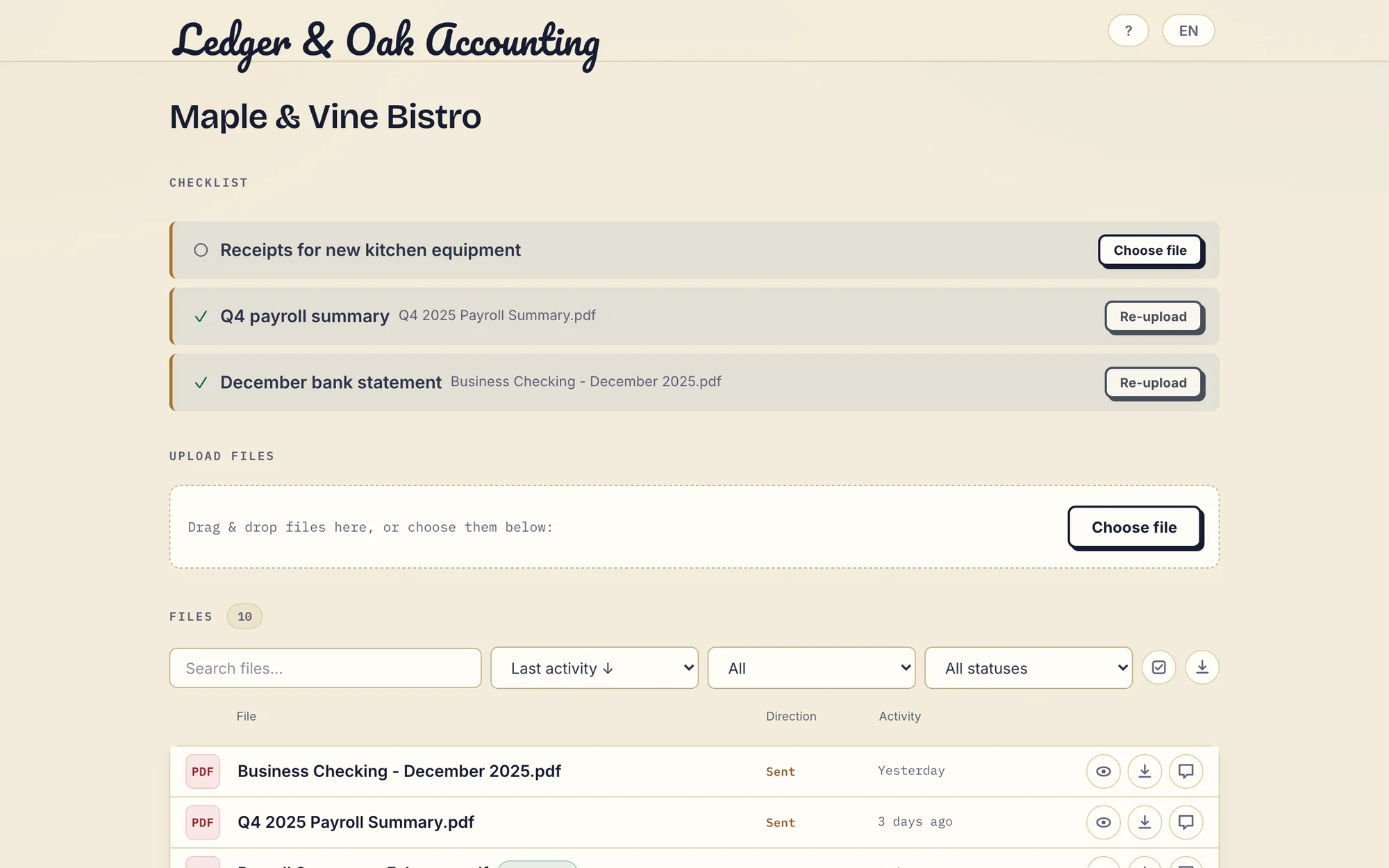
Real Droplana app with fictional data: the client has supplied two documents and can upload the missing equipment receipt. Open the full-size portal image.
When you compare cost, list the licences you already hold, any extra automation or signature services and the administrator's time. Do not count the Microsoft 365 suite you already pay for as a new portal cost, and do not assume every extra service is free. Droplana Practice covers three staff with 5 seats at EUR49/month or EUR490/year plus tax, as a separate subscription with no connection to Microsoft 365.
Where SharePoint wins outright
- Storage. 1 TB plus 10 GB per licence on many plans, and 250 GB per file. We are not in the same range.
- Everything else it does. Intranet, search, co-authoring, Teams, retention labels, DLP, eDiscovery. Droplana holds client documents and nothing else.
- Integrations and API. Extensive on one side, absent on ours.
- Administrative control. Domain restrictions, link expiry, conditional access, audit logs across the tenant. Our controls are three portal security levels plus an activity trail the owner can export.
- You already own it. The strongest argument, and the reason to try the extranet pattern before buying anything.
What Droplana does not do
- No editing or co-authoring, and no intranet, search or Teams features.
- No tenant-wide controls such as conditional access, retention labels or DLP.
- No workflow routing. Checklists, statuses and fixed reminder schedules only.
- No Microsoft 365 connector, so files move between SharePoint and Droplana by hand. Microsoft sign-in is supported for businesses and clients.
- Storage tops out at 1 TB on Studio, plus 500 GB per storage add-on, and files at 5 GB.
- Not a qualified e-signature. In-browser signing needs an identified signer, keeps the original, saves a signed copy and gives each signature a public verification page with a file-hash check. It is not certificate-based or qualified.
The realistic recommendation
If you have Microsoft 365 and an administrator with capacity, follow Microsoft's extranet guidance first. It is documented, supported and mostly free at the margin. Give it a month with a few real clients.
Two things tend to decide it after that. Whether the per-client structure and the list of missing documents get built, or stay on a list of intentions. And whether anyone governs the external access that builds up.
If both hold up, stay where you are. If either does not, a dedicated portal is the smaller answer: much less capable, and already assembled.
The accounting practices page and the legal page show the per-client layer in use, and the client portal guide is the broader buying guide. There is also a comparison with general cloud drives, which covers the simpler "share a OneDrive folder" version of this question.
Questions before you choose
Can SharePoint be used as a client portal?
Yes. Microsoft documents a business-to-business extranet pattern, with guests restricted to the site they were invited to. External sharing, file requests, library approval, workflows and signing depend on your configuration, permissions and services. What you design yourself is the per-client structure and a list the client can see of documents still to upload.
Do external clients need a Microsoft licence?
No paid Microsoft 365 licence is needed to open files shared with them. How they are identified depends on your sharing policy. Specific people links verify the recipient, and with Entra B2B integration this can create a guest in your directory that someone then has to govern. Anyone links do not authenticate the recipient and can be forwarded.
Does SharePoint support PDF signing?
Yes, through configuration. Microsoft 365 eSignature can be set up for SharePoint, alongside supported signature providers. Setup needs administration and an Azure subscription for pay-as-you-go billing, and external signers have guest-access requirements. Droplana's in-browser PDF signing is built in and records who signed, when and from what IP, but it is not a qualified or certificate-based signature.
Is SharePoint data stored only in the EU?
It can be within the EU Data Boundary, which covers EU and EFTA countries, if your tenant qualifies. The boundary is multi-country rather than a commitment to one country, so verify your tenant's commitments. Droplana stores files, comments and metadata only on Hetzner infrastructure in Germany, with no other region available.
Does SharePoint have more storage than Droplana?
Yes, by a wide margin. Many business plans get 1 TB plus 10 GB per licence, with a 250 GB per-file upload limit; the 25 TB site maximum is a ceiling, not included storage. Droplana caps storage per plan from 2 GB on Free to 1 TB on Studio, with 500 GB add-ons. If storage volume is the requirement, this comparison is over.
Plans and limits
Paid plans include unlimited clients: Solo EUR19/month or EUR190/year, Practice EUR49/month or EUR490/year, Studio EUR99/month or EUR990/year, plus tax. Free covers 3 clients, 2 GB and files up to 100 MB. Each paid storage add-on costs EUR15/month or EUR150/year plus tax, adds 500 GB and raises the file limit to 5 GB.
The tools you need, on every plan.
Share files, leave comments, request documents with checklists and sign PDFs in your browser. Your logo is included too.
Clients never pay or create an account. EU hosting, encryption and data export included.
Save 2 months with annual billing
Free Start here
For your first 3 clients
€0/monthNo credit card required
- Just you
- 3 clients
- 2 GB storage
- Up to 100 MB per file
- Files kept for 6 months
Solo
For independent professionals
€19/month+ tax
€190/year+ tax
- Just you
- Unlimited clients
- 50 GB storage
- Up to 1 GB per file
- Email support
Practice
For small firms
€49/month+ tax
€490/year+ tax
- Team size: 5
- Unlimited clients
- 250 GB storage
- Up to 2 GB per file
- Priority support
Studio
For growing teams
€99/month+ tax
€990/year+ tax
- Team size: Unlimited
- Unlimited clients
- 1 TB storage
- Up to 5 GB per file
- Priority support
- Personal setup call
On Free, each file expires 180 days after upload. Your clients and their access stay active, so you can keep sharing new files. Active paid plans have no plan-imposed retention limit. Expiry settings, deletion and cancellation rules still apply; a persistent portal address does not guarantee permanent file availability. Team sizes include you. No setup fees or automatic overage charges. Prices exclude applicable tax.
Compare plan details
| Included | Free | Solo | Practice | Studio |
|---|---|---|---|---|
| Team size | Just you | Just you | 5 | Unlimited |
| Clients | 3 | Unlimited | Unlimited | Unlimited |
| Storage | 2 GB | 50 GB | 250 GB | 1 TB |
| Maximum file size | 100 MB | 1 GB | 2 GB | 5 GB |
| File retention | 180 days from upload | No limit | No limit | No limit |
| Your Droplana address | Includes a random suffix | Your chosen name | Your chosen name | Your chosen name |
| Data Processing Agreement | Standard | Standard | Countersigned available | Countersigned available |
| Support | Priority | Priority | ||
| Personal setup call | Not included | Not included | Not included | Included |
Need more storage?
Add 500 GB for €15/month + tax, or €150/year + tax. Each storage add-on also raises your maximum file size to 5 GB.
Available on all paid plans from your billing page. Add more than one for another 500 GB each. Your team size stays the same.
Related comparisons
Firms comparing hosted document platforms can read Droplana vs ShareFile and Droplana vs Onehub. If you would rather host storage yourself, see Droplana vs Nextcloud.