
Client portal software, explained
A client portal gives you and each client one private place to share documents, collect files back and keep feedback together. Here is how to decide whether you need one and what to check before choosing.
Client portal software gives your business and each client one private place to exchange documents: you send files out, the client sends documents back, and comments stay next to the file they are about. Clients use it without creating an account. If you need to share files, collect documents or get a PDF signed, a simple portal can handle that exchange alongside the tools you already use.
This guide explains what the category is, when a shared folder is enough, what to check before choosing any product, and where Droplana fits. For a practical starting point, see how to share files with clients.
What client portal software actually is
Client portal software gives each client a private space to exchange files and feedback with your business. It serves an ongoing relationship. A customer portal is something else: it usually handles self-service tasks such as viewing orders or managing a subscription. See client portal vs customer portal for the difference.
For example, an accountant requests bank statements and receipts, then sends the finished accounts back. The client needs somewhere to upload the documents and find the finished work. A checklist and comments on individual files keep the request and its context together.
A real client portal, as distinct from a folder you happen to share, has four properties:
Per-client isolation
Each client sees their own documents. Your business controls who can open that portal.
Persistent context
Documents and their comments stay together across exchanges, month after month, instead of being spread over threads.
Two-way exchange in one place
The client does not only download. They upload back, or photograph a paper document with their phone. Comments and status sit next to the file.
A clear line between inside and outside
Your team sees the operational view: many clients, a dashboard, controls. The client sees a calm view of only their own work with you.
Everything past those four properties, such as branding, invoicing, scheduling or e-signatures, is a feature some products bundle in. It is not what makes something a client portal. Keep that in mind while you compare: many "client portal" pages describe a whole business-management platform with a portal as one module inside it.
When you need one, and when a shared folder is fine
Email or a shared folder may be enough when:
- You have one or two active clients and can keep the state of each relationship in your head.
- Projects are short, a few weeks rather than a standing relationship, so there is little risk of losing something from three months ago.
- You and the client already share a tool well (you both work in the same Drive, for instance) and neither side is confused about where things live.
A dedicated client portal starts to earn its place once one or more of these shows up:
You lose real time to "where is that file?" If you or your client spend 15 minutes a week looking for something that was already sent, that is about a day and a half a year for each of you.
Clients ask where to send things. "Should I email it, upload it to Drive, or text you the photo?" If a client asks this, your intake has too many entry points. A portal reduces them to one.
Each client uses a different channel. One sends attachments, another shares a folder, a third texts photos. One place for every client makes the exchange easier to run.
Documents go missing after a project ends. A client emails eight months later asking for something you sent, or something they sent you, and neither of you can find it. That is a structural problem, not a one-off mistake.
Colleagues need the same context. Someone else needs to see the documents and feedback without asking you to forward the conversation.
If none of these sounds familiar, keep what you have. If several do, the next question is which portal.
An evaluation checklist for choosing client portal software
Most products in this category look similar on their marketing pages. The differences appear once you use them. Check these in the order they tend to matter, whichever product you are looking at.
1. Client access. Can your clients open, upload and find files without help? Try it on a phone. Ask whether clients must create an account, and what "no account" means for security: an open link anyone can forward, or a check of the client's email on a new device.
2. Isolation and who shares a portal. Is each client walled off, or is it one shared workspace with permission rules on top? Permission rules get misconfigured sooner or later. Also check the other direction: can you restrict a file or a matter to selected colleagues, or does everyone on your team see every client?
3. Two-way exchange and what is missing. Can the client send documents back into the same place, including photos of paper? Can they see which requested documents are still outstanding? And does the product follow up when a client goes quiet, with a reminder that names the missing documents rather than a generic "please log in"?
4. Receipt versus review. A request marked as supplied means a file arrived, not that it is complete or correct. A download record means a file was downloaded, not that someone read it. Know what each status in the product proves.
5. Data location and contracts. Check where files, comments and backups are stored, who the provider's sub-processors are, and whether a data processing agreement is available on the plan you would buy.
6. Signing. Can the client sign a document inside the portal, or do you still export it to a separate e-signature tool? Equally important: what does "signed" mean there? Some tools provide a qualified or certified e-signature with identity verification. Others record who signed, when and from where, without claiming a certified signature. Know which one you are buying.
7. Retention and leaving. What happens to files after a project ends, on a free tier, and when you cancel? Many free tiers keep files only for a fixed window. Check how you would export your data before you depend on the tool.
8. Pricing structure. Some platforms charge per client, per seat or both: fine at five clients, painful at fifty. Others charge a flat monthly fee however many clients you add. If you expect your client list to grow, a flat price is usually the safer bet.
9. What connects, and what it can reach. If you want the portal to report into other tools or an AI assistant, ask what connects, which permissions a connection gets, and whether it can read document contents. Treat this as a bonus, not an entry condition: the portal has to work for a client who has never heard of it.
Go through these before you look at logo options or mobile apps. They decide whether the tool still fits you in a year.
Where Droplana fits
Droplana is a client document portal for professional service businesses, operated by Ubique d.o.o., an EU company in Croatia. Each client gets their own private, persistent portal for two-way document exchange. It suits firms, practices and agencies with recurring client documents that do not want an all-in-one business platform. Here is what the exchange looks like from both sides:
A missing document. A clear request. A reply in the right place.
Follow a month-end exchange between Ledger & Oak Accounting and Maple & Vine Bistro. These are real app screens with fictional demo data.
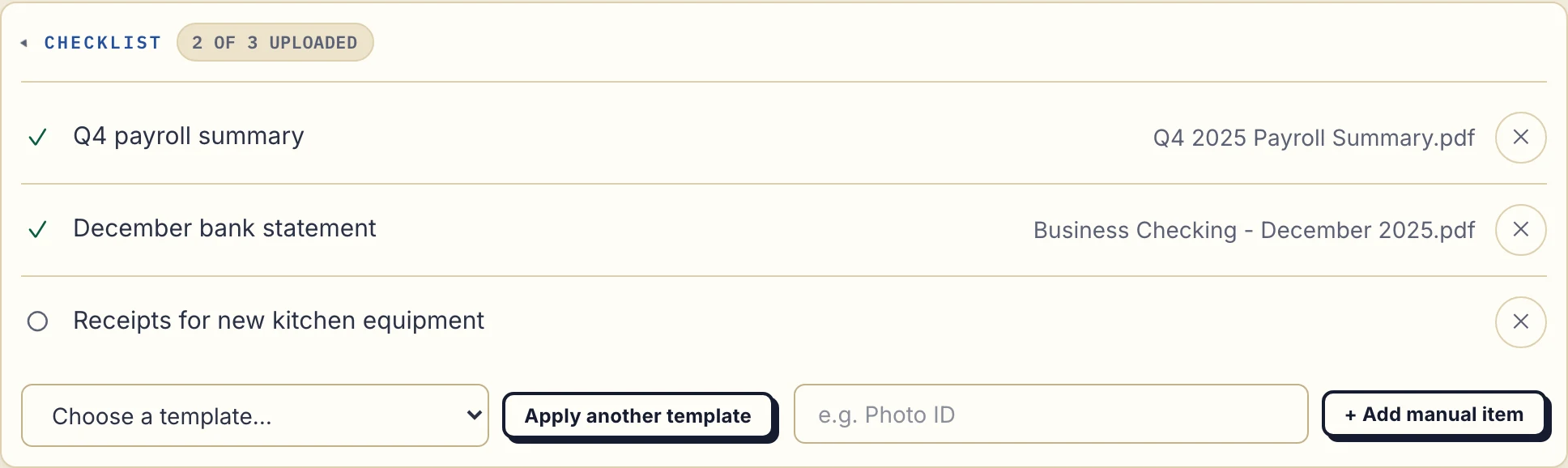
1. Ask for the documents you need
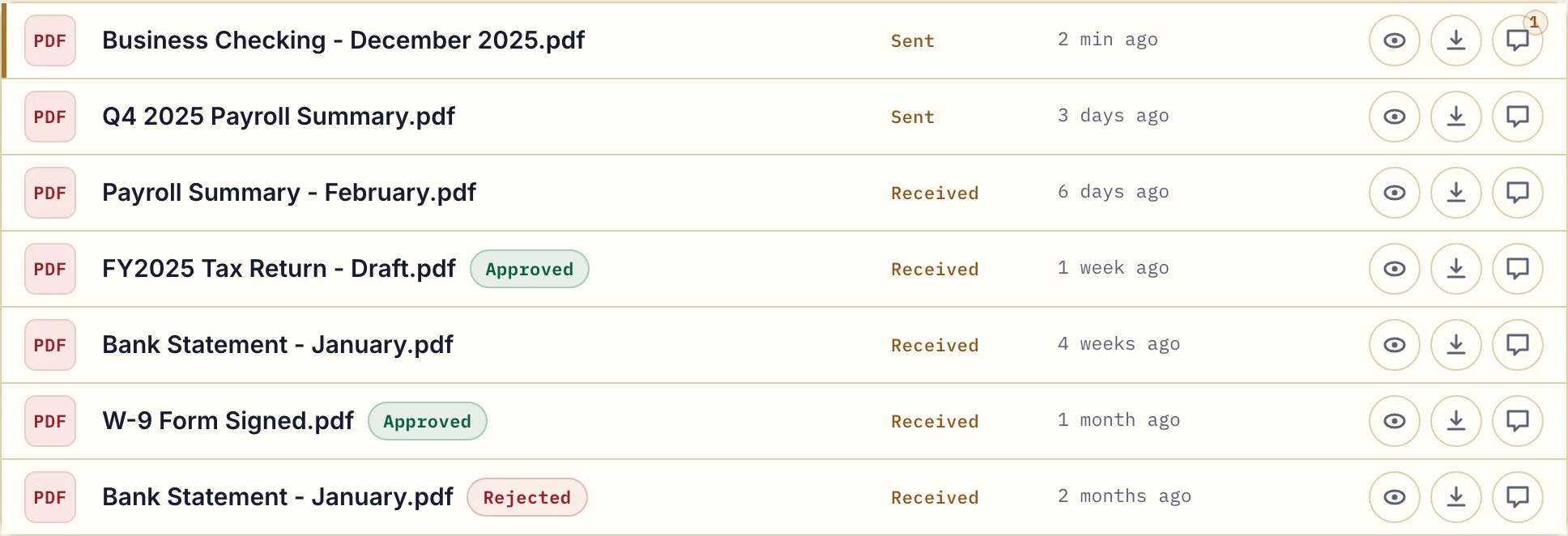
The payroll summary and bank statement have arrived. The equipment receipts are still missing. Your client sees the same request list in their own portal.
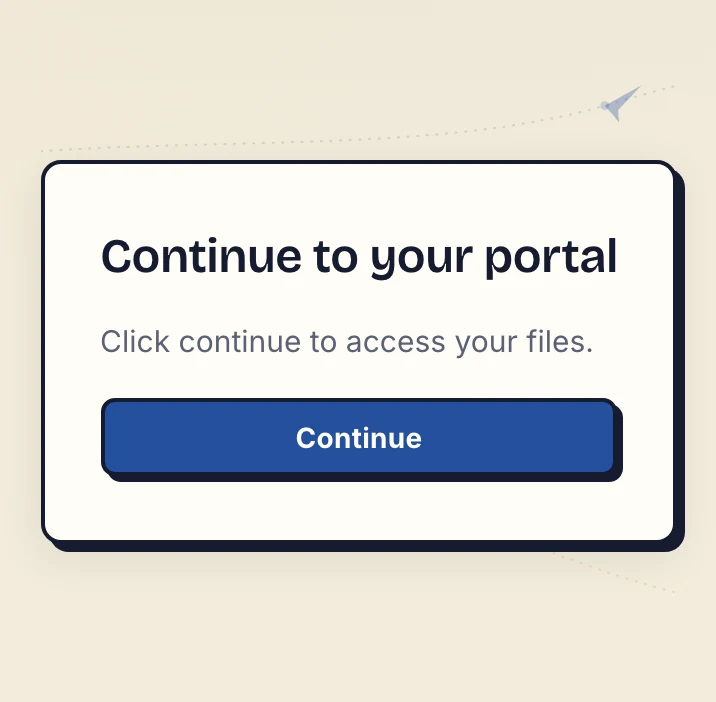
2. Your client opens the emailed link
On a new device, the default Strict access mode verifies the client's email. They open the link sent to that address and select Continue. There is no client account, password or app to create.
The verified browser is remembered for 90 days. That access period is separate from how long a file is kept.
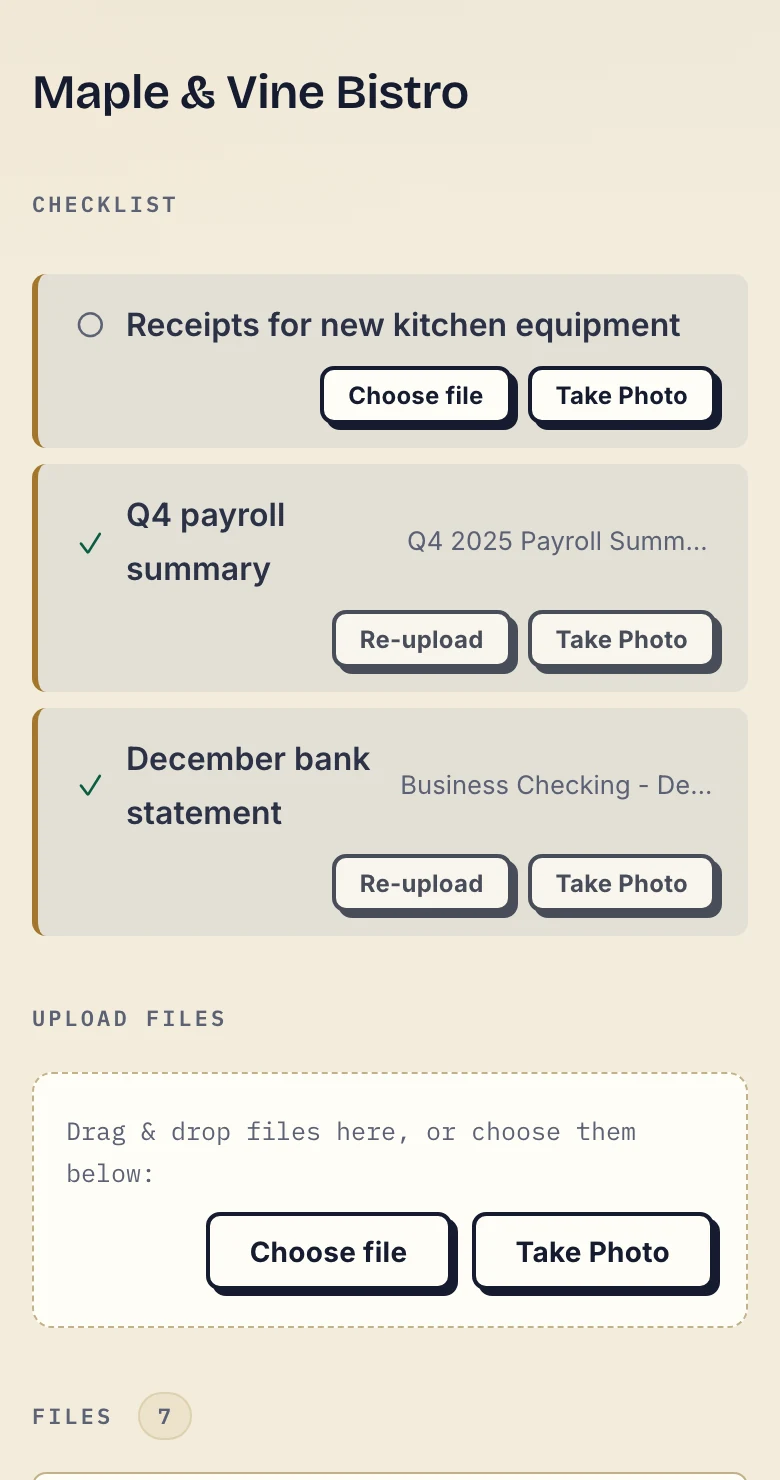
3. They upload a file or photograph the paper
The missing receipt has a Choose file button and, on a phone, Take Photo. Your client can respond where the request appears instead of starting another email thread.
Ask for every page and a readable image. A successful upload tells you a file arrived; you still review whether it is the right document.
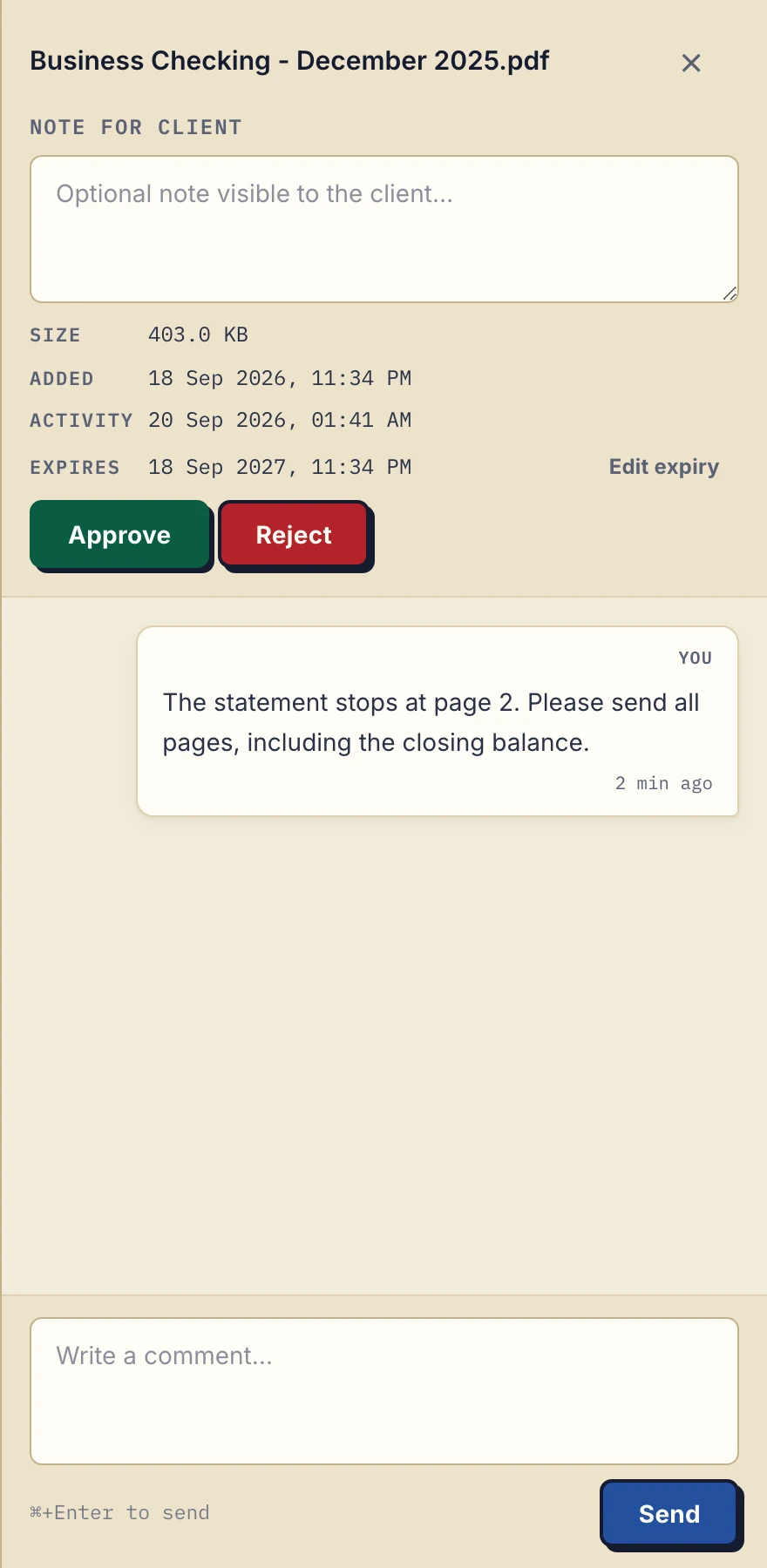
4. Explain a correction and send work back
A statement is incomplete. Leave the correction on that file: “Please send all pages, including the closing balance.” The client can find the request beside the document.
When your work is ready, upload the report or return to the same portal. Files go both ways. Either side can mark a file Approved or Rejected; that status is not proof of reading or a signature.
Against the checklist above, this is what you get:
- Access. Email verification on a new device by default, as above, with no password. Clients can also sign in with Google, or with a Microsoft account they connected once; your team signs in with an emailed link, Google or Microsoft.
- Follow-up. By default, a client who does nothing on a checklist for 7 days gets an email naming the missing items, and after 14 days the reminder comes to you instead.
- In-browser PDF signing. The business and a verified client can type, draw or upload a signature and place it on the page. The signed PDF is saved as a new file next to the original, and every signature is recorded on the server (who, when, from what IP), with a public verification page anyone can check. It marks a document as signed; it is not a qualified or certified signature.
- Languages. The app, its error messages and its emails are available in English, German, French, Spanish and Italian, so a client reads their own language.
- Data location. Files, comments and metadata are stored on Hetzner infrastructure in Germany, files are encrypted at rest with a key derived for each file, and a data processing agreement is available on every plan.
- Flat pricing. Paid plans have unlimited clients; you pay for storage, file size and team seats.
- Your logo in the dashboard and in every client portal, on every plan. It is not white-label: there is no custom domain.
Behind the simple exchange there is more for businesses that want it. An AI assistant or automation tool can connect to your account through Droplana's MCP server, to find which clients still owe documents, add a comment or send a reminder. Outgoing webhooks, signed with HMAC-SHA256, can tell up to 5 of your HTTPS endpoints when a document is uploaded, a comment is added, a checklist is completed, a document is signed or a client is created. Both are on every plan, and you need neither to use the portal. The product guide lists the page that explains each feature in detail.
Where Droplana does not fit
Check these boundaries before choosing:
- It is not full cloud storage, and not a long-term archive. It is built for active client exchange, not as the drive for your whole business or a records archive once a relationship ends. A stable portal address is not a promise of permanent storage, and Free keeps each file for up to 180 days; export and download shows how to take your files with you, and the instructions cover each step.
- It does not run your projects or your practice. There is no CRM, invoicing, project management or internal team collaboration. The document checklist is the one exception, and it only tracks which documents you still need. There is no native connector that files documents into your other software, and no listing in an app store or directory.
- Access is per client, not per document. Contacts added to one client share that client's files, and your team members share access to all of your clients. There are no per-document permissions, ethical walls or restricted matter teams.
- Signing has a ceiling. Droplana's PDF signer records the signing event against the login used. It does not provide a digital certificate, a qualified signature or notarisation, and it does not verify identity beyond that login.
- Encryption at rest has a scope. It protects against a breach of the storage alone, not against a compromise of the application server. Review the security explanation and the DPA for the documents you plan to exchange.
Pricing
Try Droplana free with up to 3 clients. The paid price is per business, with unlimited clients, and every plan includes document checklists, comments, in-browser PDF signing, the MCP server and webhooks. Compare the whole allowance rather than dividing a price by a guessed client count.
The tools you need, on every plan.
Share files, leave comments, request documents with checklists and sign PDFs in your browser. Your logo is included too.
Clients never pay or create an account. EU hosting, encryption and data export included.
Save 2 months with annual billing
Free Start here
For your first 3 clients
€0/monthNo credit card required
- Just you
- 3 clients
- 2 GB storage
- Up to 100 MB per file
- Files kept for 6 months
Solo
For independent professionals
€19/month+ tax
€190/year+ tax
- Just you
- Unlimited clients
- 50 GB storage
- Up to 1 GB per file
- Email support
Practice
For small firms
€49/month+ tax
€490/year+ tax
- Team size: 5
- Unlimited clients
- 250 GB storage
- Up to 2 GB per file
- Priority support
Studio
For growing teams
€99/month+ tax
€990/year+ tax
- Team size: Unlimited
- Unlimited clients
- 1 TB storage
- Up to 5 GB per file
- Priority support
- Personal setup call
On Free, each file expires 180 days after upload. Your clients and their access stay active, so you can keep sharing new files. Active paid plans have no plan-imposed retention limit. Expiry settings, deletion and cancellation rules still apply; a persistent portal address does not guarantee permanent file availability. Team sizes include you. No setup fees or automatic overage charges. Prices exclude applicable tax.
Compare plan details
| Included | Free | Solo | Practice | Studio |
|---|---|---|---|---|
| Team size | Just you | Just you | 5 | Unlimited |
| Clients | 3 | Unlimited | Unlimited | Unlimited |
| Storage | 2 GB | 50 GB | 250 GB | 1 TB |
| Maximum file size | 100 MB | 1 GB | 2 GB | 5 GB |
| File retention | 180 days from upload | No limit | No limit | No limit |
| Your Droplana address | Includes a random suffix | Your chosen name | Your chosen name | Your chosen name |
| Data Processing Agreement | Standard | Standard | Countersigned available | Countersigned available |
| Support | Priority | Priority | ||
| Personal setup call | Not included | Not included | Not included | Included |
Need more storage?
Add 500 GB for €15/month + tax, or €150/year + tax. Each storage add-on also raises your maximum file size to 5 GB.
Available on all paid plans from your billing page. Add more than one for another 500 GB each. Your team size stays the same.
Buying questions
What is client portal software?
Client portal software gives your business and each client a private, ongoing place to exchange documents and feedback, instead of email attachments, shared folders or chat links. Droplana is one kind: a client document portal for sending files, collecting documents back, per-file comments, document checklists and in-browser PDF signing.
What can a connected AI assistant see?
It connects with a token the business creates, or by signing in and approving a consent screen, and you choose its permissions per token. It works on metadata: filenames, client names, dates, checklist state and comment text reach it, but no tool returns a document's contents. No token reaches billing, team management, the business address or account deletion.
How much does client portal software cost?
Droplana Free supports up to 3 clients, 2 GB total storage and files up to 100 MB, kept for up to 180 days after upload. Paid plans have unlimited clients: Solo is 19 EUR a month, Practice 49 EUR and Studio 99 EUR, plus tax, with more storage, larger files and more team seats at each step. Annual billing costs 10 months' price.
When should I choose a different kind of portal?
Choose another tool if you need a CRM, project management or invoicing in the same product, per-document permissions or restricted matter teams, a regulated archive, or a qualified electronic signature. Droplana is a focused client document portal and does not provide those.
Client portal software by profession
The exchange looks different in every trade. Each page shows it with that profession's documents. If your trade is not listed, the use cases by profession help you pick the closest one by how documents move in your work.
Find your profession
Accounting
Give each accounting client their own private portal. EU-hosted in Germany, DPA available. Tax returns, annual accounts, and source documents in one place.
Legal
Request intake documents and return drafts through one private portal per client, with no client account. EU-hosted in Germany, with a DPA on every plan.
Consultants
Collect the brief and missing inputs, discuss drafts and return the final report in one client portal. Keep your project tools. Try it free with 3 clients.
Mortgage Brokers
Collect payslips, statements and missing pages in one client portal. Applicants upload from their phone; you review and return documents. Try 3 clients free.
Financial Advisors
Collect KYC documents, signed suitability forms and ID from advisory clients in one private portal each. EU-hosted in Germany, DPA available, no client signup.
Agencies
Collect client briefs and assets, send deliverables and keep feedback on each file. One private portal per agency client, no client signup, hosted in the EU.
Insurance Brokers
Collect proposal forms, no-claims proof, damage photos and signed mandates in one private portal per client. EU-hosted in Germany, DPA available, no signup.
Architects
Share named drawing revisions, collect site documents and keep client comments on each file. One private portal per architecture client, with no client signup.
Real Estate
Send buyer packs and get preferences, questions and documents back in one private portal per client. Buyers and sellers open it without creating an account.
Contractors
Stop texting job photos. Give every client a private portal for progress shots, estimates and approvals. They verify by email once, with no app or account.
Coaches
Send session worksheets and collect completed reflections in one private portal per coaching client. Phone uploads, file comments and no client signup.
Designers
Share design revisions and collect client assets in one private portal. Keep text feedback on each file, from the first concept to the final handover files.
Photographers
Stop sending transfer links that expire after a few days. Give every client a lasting portal for edits, final files and video, with no client accounts.
Developers
A client portal for developers to collect requirements and share handover files. Keep code in your repository and client documents together. No client signup.
Freelancers
Send briefs, collect client answers and deliver drafts through one private portal. Clients need no account, and Free covers 3 clients with 2 GB storage.
Client portal software compared with other tools
Each comparison names what the other tool is for and when it fits better than Droplana. If you are weighing a portal against your current habit, the comparisons with email and shared cloud folders are at the end of the list. The comparisons overview groups them by how you work today, and the alternatives pages start from the product you want to replace.
Browse the comparisons
vs. ShareFile
ShareFile is a full document platform priced per employee user. Droplana is a flat-rate EU client document portal with no client accounts. When each one fits.
vs. WeTransfer
WeTransfer sends large one-off transfers and can request files back. Droplana gives each client a persistent portal for ongoing two-way document exchange.
vs. SharePoint
SharePoint can be a client extranet, and Microsoft documents how. What it takes to set up and govern, and when a separate client document portal is simpler.
vs. Notion
Compare Notion pages, forms and guest access with Droplana client document exchange. Check file limits, costs and a request-and-return trial before choosing.
vs. Nextcloud
Nextcloud is free software you run yourself or through a managed provider. Droplana is a hosted client document portal. The real question is who runs it.
vs. Proton Drive
Proton Drive is end-to-end encrypted storage from a Swiss company. Droplana is an EU client document portal: one private space per client, with files both ways.
vs. Liscio
Liscio moves accounting firms' client communication out of email with messaging and apps. Droplana is a document-first client portal with no client account.
vs. TaxDome
TaxDome runs a whole accounting practice: CRM, workflow, billing and a portal. Droplana is only the client document portal, set up without a migration project.
vs. Suralink
Suralink runs request lists and review for audit engagements. Droplana is a flat-rate EU client document portal that uses the same list thinking for practices.
vs. SafeSend Returns
SafeSend Returns assembles, delivers and signs US tax returns. Droplana is a client document portal for year-round exchange. They rarely compete, so check both.
vs. MyDocSafe
MyDocSafe bundles client portals, forms, signing and identity services from the UK. Droplana is a simple client document portal from an EU company.
vs. Clustdoc
Clustdoc is a French onboarding platform with forms, workflows and approvals. Droplana is a simple two-way client document portal. Both are EU companies.
vs. File Request Pro
File Request Pro collects uploads into the cloud drive you already use. Droplana is a two-way client portal hosted in Germany, with checklists and comments.
vs. FileInvite
Compare FileInvite's lending document collection with Droplana's client document portal: persistent portals, integrations, annual cost and EU hosting.
vs. Content Snare
Content Snare collects documents from clients and chases them for you. Droplana does that too, in both directions, from an EU company with files in Germany.
vs. Onehub
Onehub is cloud storage with data rooms, priced per user by a US company. Droplana is an EU client document portal with flat pricing and no client accounts.
vs. SmartVault
SmartVault is document management tied to US tax software, priced per user. Droplana is an EU-hosted client document portal with flat pricing. Which fits you.
vs. Clinked
Clinked is a white-label collaboration workspace with tasks, chat and branded apps. Droplana is a flat-priced client document portal with no client accounts.
vs. Tresorit
Tresorit is end-to-end encrypted storage with file requests and client rooms. Droplana is a flat-rate client document portal with one private space per client.
vs. Basecamp
Compare Droplana and Basecamp for requesting files, returning documents and client access. See file limits, project tools and a practical document trial.
vs. Taskip
Taskip runs your whole agency: CRM, projects, invoicing and a portal. Droplana is only the client document portal, EU-hosted, with no client accounts to create.
vs. DocSend
Compare Droplana vs DocSend for client file exchange: document analytics, inbound requests, portal access, pricing and a practical trial using sample files.
vs. Assembly (Copilot)
Assembly, formerly Copilot, goes from $49 to $149 a month when a second person joins. Droplana goes from 19 to 49 EUR, with unlimited clients. Checked Sep 2026.
vs. HoneyBook
Compare Droplana vs HoneyBook for one service business: annual costs, contract and billing boundaries, client access and a practical document exchange.
vs. SuiteDash
SuiteDash bundles CRM, projects, invoicing and a client portal. Droplana is only the document portal: one private portal per client, with no client account.
vs. Messaging Apps
Compare WhatsApp, Telegram and Slack with Droplana for client file exchange. See uploads, file comments, retention limits and when keeping chat makes sense.
vs. Google Drive, Dropbox & OneDrive
Compare your cloud-drive workflow with Droplana for client document requests, corrections and delivery. See the app, check the limits and try one client.
vs. Email
Compare email with a Droplana client portal for repeated document requests, corrections and returned work. See the real app and try one client exchange.
Test one exchange before moving everyone
Create one client, request an ordinary document and open the portal as that client on a phone. Upload the file, leave a clarification on it and return a sample deliverable. That shows whether the access and the exchange make sense before you move a larger client list. You can adapt the client invitation template for your first message.