
Client documents inside a project, or in their own portal?
Basecamp brings clients into project work. Droplana gives each client a document portal for sending files, uploading replies and keeping comments with each file.
Your team already runs a client's work in Basecamp. Now the client has to send a signed brief, a logo file and last year's report, and you have to send a proposal back. Droplana vs Basecamp is the question of where that exchange should live. Droplana is a client document portal: one private, permanent portal per client for two-way document exchange, with no client account. Basecamp fits shared projects; Droplana fits recurring document exchange.
Published by Droplana, one of the products compared. Vendor documentation checked 21 September 2026. The trial below is illustrative, not a measured customer outcome.
Droplana vs Basecamp for the same document job
Basecamp can serve clients well. Its client access documentation describes projects where work is private to the team until shared with clients. Clients can comment and complete to-dos. Removing a client ends project access immediately. Privacy and document requests are not unique to Droplana.
| Document job | Basecamp | Droplana |
|---|---|---|
| Request and receive files | Share project to-dos and Docs & Files with invited clients | Enable uploads in a private client portal and name missing documents |
| Discuss the return | Project comments and conversations | Comments attached to each file |
| Client access | Invited project participation; public links can show individual files | No client account; new-device email verification by default |
| Track work | To-dos, schedules, message boards and chat | Document checklist and fixed reminders; no project tasks |
| File limits | Standalone uploads up to 5 GB; document attachments up to 10 GB | 100 MB Free; 1, 2 or 5 GB by paid plan |
| Cost basis | Fixed plans with project, storage and user allowances | Flat business plans with client, storage and team limits |
| Data location | Confirm the offered hosting and contract with Basecamp | Files, comments and metadata on Hetzner in Germany; operated by an EU company in Croatia; DPA on every plan |
Basecamp's Docs & Files guide covers uploads, folders, versions and public viewing links. A public download link is a different test from a client returning documents inside a project. If a formal approval or signing process matters, test that exact process in the product and plan you intend to buy.
The account question
A Basecamp client is a person invited into your projects who signs in to see them. For a company client with a project lead, that is normal. For an individual who only needs to send three files, any sign-in step is friction.
A Droplana client opens a link. With the default security level, Strict, they confirm their email once on a new device, and the browser is remembered for 90 days. There is no password to create or reset. No client signup does not mean no verification.
Try one request and return
Use a fictional agency engagement: ask for a brand brief and logo, receive a corrected brief, then return a proposal PDF.
- In Basecamp: create a client project, make the relevant request and files visible, and invite the client. Ask them to return the brief through that project. Review which conversations and files the client can see.
- In Droplana: add the client, enable uploads and send a sample brief template. The client verifies access, downloads it and uploads a completed copy into the same portal.
- Review and return: comment on the brief asking for the missing audience detail. The client uploads a corrected file; you return the proposal. Try a file approval step, remembering that a status is not a signed contract.
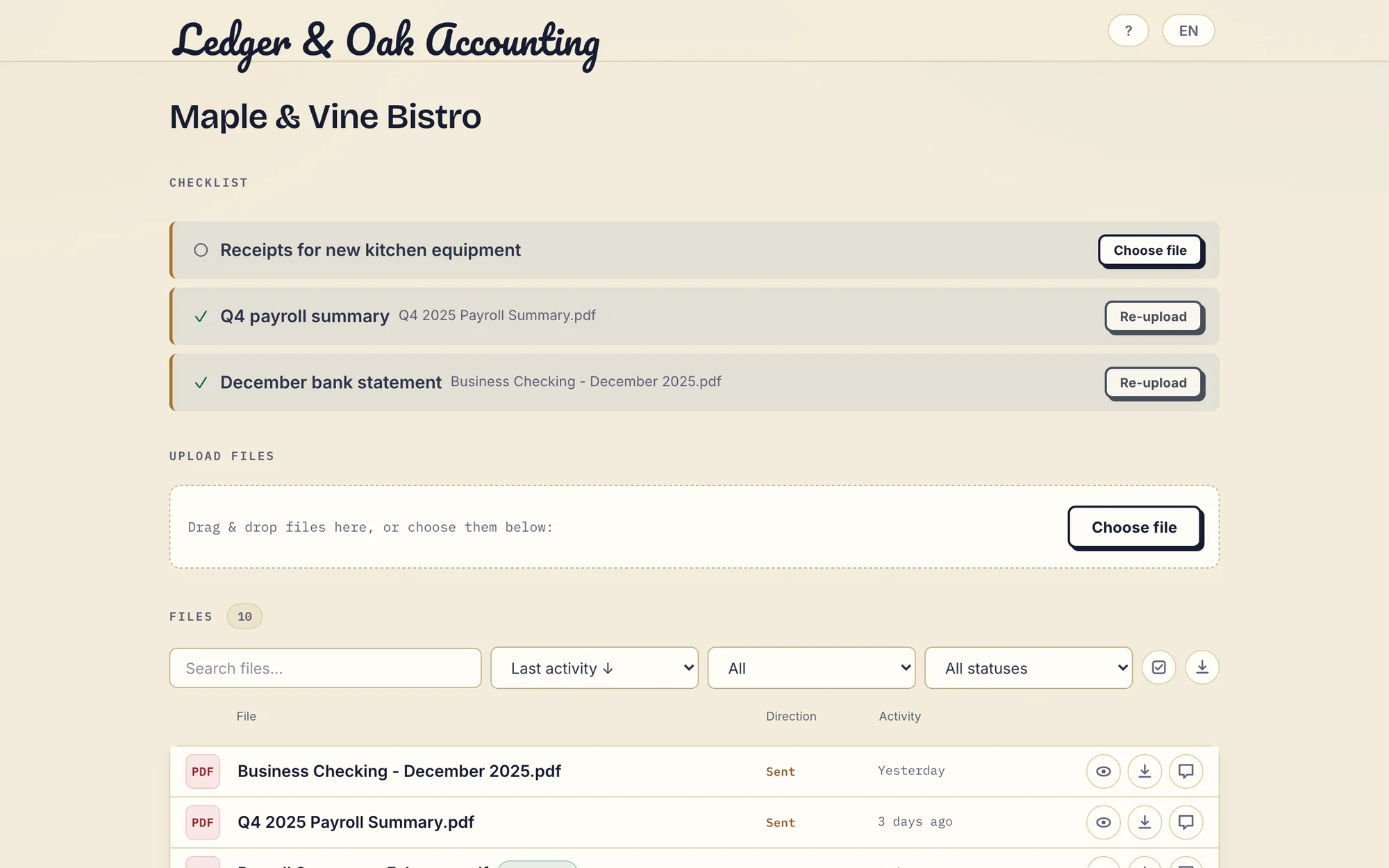
Real product demonstration from an accounting example, with fictional Ledger & Oak Accounting and Maple & Vine Bistro data. An agency client sees the same checklist and upload controls. Open the full-size portal image.
A document checklist names what is still missing. An item can carry an optional due date: a reminder is prepared two days before and on the date, and reaches the client with their next email. Separately, enabled inactivity reminders nudge the client after 7 days with missing items and notify you after 14 days. These fixed schedules do not provide task assignment or branching workflows.
Compare the cost for your actual projects
For five staff and ten active client projects, Basecamp's pricing page displays Studio at USD59/month with ten active projects, 25 GB and unlimited users. Confirm the selected billing term, annual total and tax before buying. Droplana Practice is EUR49/month or EUR490/year plus tax, with five seats, unlimited clients and 250 GB. These are different currencies and different jobs, not a savings calculation. If you keep Basecamp, Droplana is an additional cost.
What Droplana does not do
Droplana has no projects, task assignment, schedule, wiki, document editor or team chat. It has no Basecamp connector. Files and decisions you need in both places must be copied manually. The guide to project management with a client portal explains that separation.
Basecamp lets you choose what each client sees inside a project. Droplana has no such layer for your team: every team member can open all of the business's clients, and there are no internal permission groups. Revoking a client's portal access cannot recall a copy they already downloaded.
Who should choose which
Choose Basecamp when clients take part in plans, discussions and deadlines alongside your team. Choose Droplana when the main job is getting documents in and returning work through a client document portal. Using both is a reasonable setup: Basecamp for the team's projects, Droplana for each client's documents, as long as the second subscription and the manual handoffs are worth it. Our client portal guide covers broader buying questions.
Droplana pricing
Free covers three clients with 2 GB of storage and a 100 MB file limit, and keeps each file for up to 180 days after upload. Paid plans are flat per business, not per client, and have no plan-imposed retention limit while active.
The tools you need, on every plan.
Share files, leave comments, request documents with checklists and sign PDFs in your browser. Your logo is included too.
Clients never pay or create an account. EU hosting, encryption and data export included.
Save 2 months with annual billing
Free Start here
For your first 3 clients
€0/monthNo credit card required
- Just you
- 3 clients
- 2 GB storage
- Up to 100 MB per file
- Files kept for 6 months
Solo
For independent professionals
€19/month+ tax
€190/year+ tax
- Just you
- Unlimited clients
- 50 GB storage
- Up to 1 GB per file
- Email support
Practice
For small firms
€49/month+ tax
€490/year+ tax
- Team size: 5
- Unlimited clients
- 250 GB storage
- Up to 2 GB per file
- Priority support
Studio
For growing teams
€99/month+ tax
€990/year+ tax
- Team size: Unlimited
- Unlimited clients
- 1 TB storage
- Up to 5 GB per file
- Priority support
- Personal setup call
On Free, each file expires 180 days after upload. Your clients and their access stay active, so you can keep sharing new files. Active paid plans have no plan-imposed retention limit. Expiry settings, deletion and cancellation rules still apply; a persistent portal address does not guarantee permanent file availability. Team sizes include you. No setup fees or automatic overage charges. Prices exclude applicable tax.
Compare plan details
| Included | Free | Solo | Practice | Studio |
|---|---|---|---|---|
| Team size | Just you | Just you | 5 | Unlimited |
| Clients | 3 | Unlimited | Unlimited | Unlimited |
| Storage | 2 GB | 50 GB | 250 GB | 1 TB |
| Maximum file size | 100 MB | 1 GB | 2 GB | 5 GB |
| File retention | 180 days from upload | No limit | No limit | No limit |
| Your Droplana address | Includes a random suffix | Your chosen name | Your chosen name | Your chosen name |
| Data Processing Agreement | Standard | Standard | Countersigned available | Countersigned available |
| Support | Priority | Priority | ||
| Personal setup call | Not included | Not included | Not included | Included |
Need more storage?
Add 500 GB for €15/month + tax, or €150/year + tax. Each storage add-on also raises your maximum file size to 5 GB.
Available on all paid plans from your billing page. Add more than one for another 500 GB each. Your team size stays the same.
Questions before choosing
Can Basecamp work as a client portal?
Yes. Basecamp lets you bring clients into projects and choose which items they see. Clients can comment and complete to-dos. Droplana offers a narrower per-client document portal without project boards, schedules or team chat.
Can a Droplana client see my team's discussions?
No. A Droplana client sees only their own portal: the files in it, their checklist and the comments on those files. There is no team discussion space. In Basecamp you decide, project by project, which items a client can see.
How large can client files be in Droplana compared with Basecamp?
Basecamp documents standalone uploads up to 5 GB. In Droplana the limit depends on the plan: 100 MB on Free, 1 GB on Solo, 2 GB on Practice and 5 GB on Studio or with a storage add-on. Storage is shared across all clients of a business.
Does Droplana connect to Basecamp?
No. There is no Basecamp connector. Using both means separate subscriptions and manual handoffs; Droplana does not synchronise files, tasks or client access.
Related comparisons
For shared pages, see Droplana vs Notion. For an agency platform, see Droplana vs Taskip. For chat-based exchange, see Droplana vs messaging apps. The agencies page shows a document portal alongside project work.