
Track a proposal, or manage the documents that follow it
DocSend combines document analytics, sharing and data rooms, with file requests on supported plans. Droplana is a client document portal for sending work and collecting files in one persistent place per client.
You sent the proposal and saw that the client opened it. Now you need their signed engagement letter, last year's accounts and a completed questionnaire. Droplana vs DocSend comes down to which of those two jobs you are buying for. Droplana gives each client a private portal for documents in both directions, with no account for the client. DocSend helps you understand engagement with a proposal or deal room. Both can receive files.
Published by Droplana, one of the products compared. Vendor documentation checked September 21, 2026; plan availability and terms can change.
Droplana vs DocSend for the same document job
A consultant sends a proposal, then needs a signed engagement PDF and source documents before preparing a report. DocSend can cover both the proposal and inbound file requests. Droplana focuses on the ongoing exchange once those requests become regular client work.
| Decision | DocSend | Droplana |
|---|---|---|
| Outbound documents | Tracked document links and Spaces/data rooms | Files in a private portal per client |
| Inbound documents | File requests on Standard, Advanced, Advanced Data Rooms and Enterprise | Client uploads and a visible document checklist |
| What activity tells you | Page-level viewing analytics; visitor identification depends on link settings | Approximate download counts and first/last download times; no page-level reading analytics |
| Signing | eSignature features vary by plan | In-browser PDF signing; not qualified signing |
| Starting cost and capacity | Scope the plan by staff, analytics, requests and room needs | Free: 3 clients, 2 GB, 100 MB/file; Solo: EUR19/month + tax, 50 GB, 1 GB/file |
| Data location | DocSend is part of Dropbox, a US company; confirm the contracted location and terms | Files, comments and metadata on Hetzner in Germany; operated by an EU company in Croatia; DPA on every plan |
DocSend's file-request documentation confirms uploads without a DocSend account, either into a content-library folder or a Space. Space uploads can be visible to others with access, so review the room permissions before collecting confidential files. This is a supported collection flow, not an outbound-only product.
What a download count does not prove
Droplana's counts and first/last download times are approximate display metrics. A download does not prove that a person read a document, understood a clause or approved the work. Use the file's comment thread and Approved or Rejected status for an explicit response; neither is a qualified signature.
DocSend's activity documentation describes time per page and viewing activity. Identifying a visitor requires the relevant email setting; a visit alone does not establish who read every word. Choose DocSend when that engagement information is part of your sales or fundraising process.
Try the handoff after a proposal
Illustrative trial, not a measured customer outcome. Use a fictional consultant and client. Send a sample proposal, request two supporting documents, receive one correction, and return a draft report.
- In DocSend, use a tracked proposal link and a supported file-request or Space flow. Check who can see each incoming file and what the analytics answer.
- In Droplana, create the client portal, enable uploads and list the two documents needed. The client uploads a file or photographs paper with a phone.
- Ask about a missing page in that file's comments, upload the report to the same portal, and have the client record their response.
- Return from another device. Check the access steps and whether both parties can find the latest document without asking for a new message.
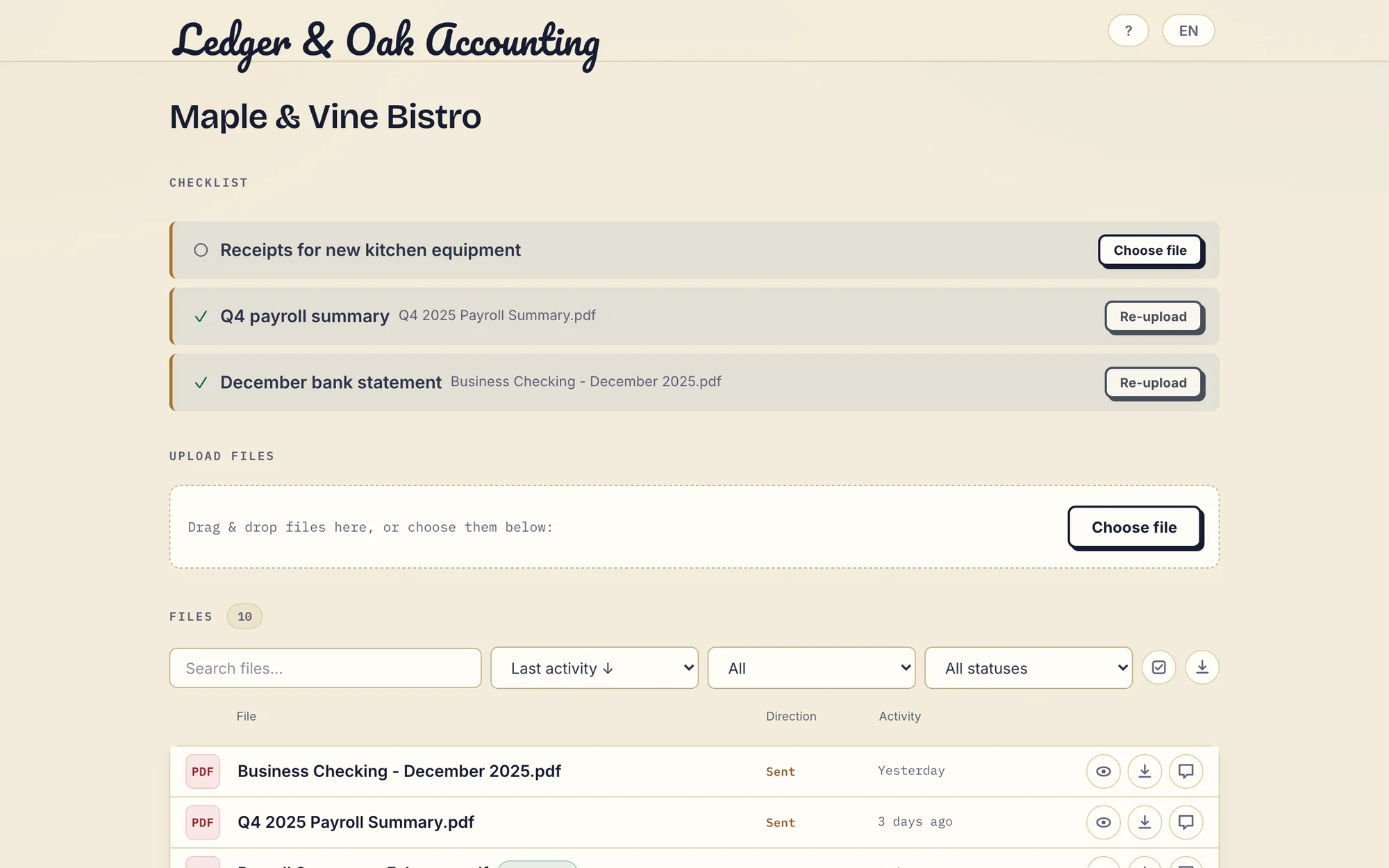
Product demonstration with fictional data: Ledger & Oak Accounting's client has supplied two documents and can upload the missing equipment receipt. This desktop capture shows the shared portal controls, not a customer result. Open the full-size portal image.
Clients do not create a Droplana account. Strict mode, the default, verifies their email on a new device, and a verified browser is remembered for 90 days. Unlike a tracked proposal link, the portal address stays the same for the whole relationship; you can revoke access at any time.
Costs and the limits of each option
Use DocSend's current plans to price the workflow you tried. For a three-person consultancy, request the total for 3 staff, 20 active clients, file requests and the required number of Spaces, including signature allowances and storage. Specify monthly or annual billing and the currency; the lowest document-sharing tier is not automatically the right collection plan.
For the same three-person consultancy, Droplana Practice costs EUR49/month or EUR490/year plus tax, with 5 seats including the owner, unlimited clients, 250 GB and 2 GB per file. Droplana prices are flat per business, not per client or per room. Free covers 3 clients, 2 GB and 100 MB per file, and keeps each file for up to 180 days after upload.
What Droplana does not do
Droplana has no page-level viewing analytics, deal-room permission system, document watermarking or native connectors. It is not a replacement for DocSend's sales or fundraising analysis. In-browser PDF signing requires an identified signer. It keeps the original and saves a signed copy, with a recorded signer, time and IP address plus a public verification page and file-hash comparison. It is not a certificate-based or qualified signature.
Choose DocSend for tracked proposals and controlled deal-room sharing. Choose Droplana when one portal with requests, files and comments covers the client work. You can use DocSend for proposals and Droplana for later exchange, but moving files between them is manual.
Questions before you choose
Can DocSend receive files from clients?
Yes. DocSend documents file requests on Standard, Advanced, Advanced Data Rooms and Enterprise. External contacts can upload without a DocSend account. Check whether the request places files in a content-library folder or a Space and who can see them.
Does a Droplana download count prove that a client read a document?
No. Download counts and first and last download times are approximate display metrics. They do not prove reading, understanding or approval. Droplana does not provide time-per-page analytics.
How large can a client upload be in Droplana?
It depends on the plan: 100 MB per file on Free, 1 GB on Solo, 2 GB on Practice and 5 GB on Studio. A storage add-on on a paid plan also raises the limit to 5 GB. Storage is shared across all clients of the business.
Can I use DocSend for proposals and Droplana for the work after?
Yes. Some teams send tracked proposals from DocSend and move the signed client into a Droplana portal for recurring requests and delivery. There is no connector between the two, so any file that belongs in both places is moved by hand.
Droplana plans
The tools you need, on every plan.
Share files, leave comments, request documents with checklists and sign PDFs in your browser. Your logo is included too.
Clients never pay or create an account. EU hosting, encryption and data export included.
Save 2 months with annual billing
Free Start here
For your first 3 clients
€0/monthNo credit card required
- Just you
- 3 clients
- 2 GB storage
- Up to 100 MB per file
- Files kept for 6 months
Solo
For independent professionals
€19/month+ tax
€190/year+ tax
- Just you
- Unlimited clients
- 50 GB storage
- Up to 1 GB per file
- Email support
Practice
For small firms
€49/month+ tax
€490/year+ tax
- Team size: 5
- Unlimited clients
- 250 GB storage
- Up to 2 GB per file
- Priority support
Studio
For growing teams
€99/month+ tax
€990/year+ tax
- Team size: Unlimited
- Unlimited clients
- 1 TB storage
- Up to 5 GB per file
- Priority support
- Personal setup call
On Free, each file expires 180 days after upload. Your clients and their access stay active, so you can keep sharing new files. Active paid plans have no plan-imposed retention limit. Expiry settings, deletion and cancellation rules still apply; a persistent portal address does not guarantee permanent file availability. Team sizes include you. No setup fees or automatic overage charges. Prices exclude applicable tax.
Compare plan details
| Included | Free | Solo | Practice | Studio |
|---|---|---|---|---|
| Team size | Just you | Just you | 5 | Unlimited |
| Clients | 3 | Unlimited | Unlimited | Unlimited |
| Storage | 2 GB | 50 GB | 250 GB | 1 TB |
| Maximum file size | 100 MB | 1 GB | 2 GB | 5 GB |
| File retention | 180 days from upload | No limit | No limit | No limit |
| Your Droplana address | Includes a random suffix | Your chosen name | Your chosen name | Your chosen name |
| Data Processing Agreement | Standard | Standard | Countersigned available | Countersigned available |
| Support | Priority | Priority | ||
| Personal setup call | Not included | Not included | Not included | Included |
Need more storage?
Add 500 GB for €15/month + tax, or €150/year + tax. Each storage add-on also raises your maximum file size to 5 GB.
Available on all paid plans from your billing page. Add more than one for another 500 GB each. Your team size stays the same.
Related guidance
For the buying criteria, read our client portal guide. An accountant can use this flow for collecting bank statements from clients with a document checklist. A consultant delivering reports can use it after the proposal stage; how to send documents to clients covers the delivery side.
Compare WeTransfer for transfer-based delivery, Onehub for data rooms and client workspaces, or email for attachment-based exchanges. The consultants page follows the ongoing engagement.