
Workspaces and deal rooms, or one portal per client
Onehub is cloud storage with client workspaces and a data room edition, priced per user by a US company. Droplana is a client document portal: each client gets one private, persistent portal to send and receive documents, with no client account, a flat price per business and files stored in Germany. They are aimed at different jobs.
Published by Droplana, one of the products compared. Onehub's pricing, features, security page and Data Processing Addendum checked September 23, 2026. The screenshot uses fictional data and is not a customer result.
Two different jobs
Onehub is cloud storage organised into workspaces, with a strong second identity as a virtual data room. Its distinctive features point that way: stealth mode, where participants see the content but not each other; automatic indexing that gives every folder and file a numbered reference; NDAs, watermarking and full audit trails in its Data Room edition. It offers 1 TB on Standard and unlimited storage above that, a DocuSign connection and a public API.
Droplana is a client document portal. Each client has one private, persistent portal for two-way exchange, with a document checklist, per-file comments, file status and in-browser PDF signing. There is no folder tree and no data room mode.
A due diligence process with forty parties reading a structured document set is Onehub's job. Two hundred clients each returning six documents a year is Droplana's. Neither is a general-purpose answer to the other.
Droplana vs Onehub side by side
| Onehub | Droplana | |
|---|---|---|
| Category | Cloud storage and virtual data room | Client document portal, two-way |
| Organising unit | Workspaces with folders and permission roles | One persistent portal per client |
| Client access | Secure links without a Onehub account, or invited roles | No client account; Strict verifies email on a new device |
| Staff access | Role-based permissions | Every team member can access every client |
| Pricing model | Per user with minimums, plus a Data Room edition | Flat per business, unlimited clients |
| Storage | 1 TB on Standard, unlimited on Advanced and above | 2 GB on Free to 1 TB on Studio, add-ons of 500 GB |
| Max file size | 5 GB through the web interface | 100 MB on Free, up to 5 GB on Studio or with an add-on |
| Request list the client sees | Tasks and comments in a workspace | Document checklist per client, with optional due dates |
| Per-file comments | Yes | Yes |
| Data room features | Stealth mode, NDAs, watermarking, indexing | None |
| E-signature | Through DocuSign | In the browser, with a public verification page |
| Custom domain and white label | Available | No; paid plans get a clean subdomain |
| Your logo in the portal | Part of its branding options | Yes, on every plan including Free |
| API | Public API | MCP server for AI assistants and automation tools; signed webhooks |
| Company and hosting | US company; AWS; DPA covers transfers to the US | Croatian (EU) company; Hetzner in Germany |
Onehub's tiers, features and prices change. Check onehub.com rather than relying on this page.
Where Onehub is clearly better
Bulk storage. Unlimited storage on Advanced and above is not something we can match at any price. Our largest plan is 1 TB, extended in 500 GB steps. If your work is storage-heavy, this comparison ends here.
Data rooms. Stealth mode, NDAs and automatic indexing answer a specific problem: a multi-party process where participants must not see each other and a document set needs stable numbered references. If you run transactions, due diligence or tenders, Droplana has nothing for you.
Roles and structure. Folder hierarchies and permission roles suit a document set with real internal structure, and let you limit what each person sees. Droplana has no folders and no staff roles; the client is the only level of organisation, and every colleague sees every client.
Custom domain, white label and a public API. Onehub has all three. Droplana shows your logo in the portal but keeps its own address, and connects through the MCP server and signed webhooks rather than a documented public API.
Watermarking and document controls. Present in Onehub, absent in Droplana.
Where Droplana is the better fit
One address per client, and no client account. Onehub's secure links also work without a Onehub account, so the difference is not "login or no login". It is structure. In Droplana each client has one private portal whose address stays the same for years, and everything you have exchanged with them sits there in order. Strict mode, the default, verifies their email on a new device and remembers the browser for 90 days. For a client who deals with you twice a year, a familiar address and no credential to remember is often the difference between a document arriving and a support conversation.
The price stops moving. Onehub is per user with minimums: three on Standard, five on Advanced. That is coherent for an organisation with many internal people in a workspace. If you are two people with four hundred clients, per-user pricing measures the wrong thing. Droplana is flat per business with unlimited clients on every paid plan.
For three staff on annual billing, Onehub Standard costs USD12.50 × 3 × 12 = USD450 a year. Droplana Practice costs EUR490 a year plus tax and includes five seats. The currencies differ and this is a file-exchange example, not a data-room price, so read it as a shape rather than a savings claim. If you need data room controls, price Onehub's Data Room edition instead.
EU storage from an EU company. This is the sharpest difference in the comparison. Onehub is based in Denver. Its security page says data is stored with Amazon Web Services, and its Data Processing Addendum says it may receive personal data in the United States from the EEA, Switzerland or the UK, relying on the Data Privacy Framework and Standard Contractual Clauses. That is a standard, lawful way to transfer data to the United States, and it is what you are choosing when you use it.
Droplana keeps files, comments and metadata on Hetzner infrastructure in Germany, with no other region, under a company registered in Croatia. For a European practice whose clients ask where their documents sit, that is a much shorter conversation. Our post on what EU-hosted actually means explains why the distinction is worth checking rather than assuming.
The client relationship is the structure. Onehub organises by workspace and folder; you decide what a workspace means. Droplana decides for you: one client, one portal. That is a limit if your work has real internal structure, and it is the point if your problem is two hundred clients and no clear view of who still owes you a document. The checklist is per client and visible to them. If a client does nothing on an incomplete checklist for seven days, they get an email naming the missing items; after fourteen days the reminder comes to you instead.
Try one month-end exchange
Illustrative trial. Take one accounting client: request payroll, a bank statement and receipts, receive the files, comment on anything unreadable, then return a report. In the screenshot, two items have arrived and the equipment receipts are still missing.
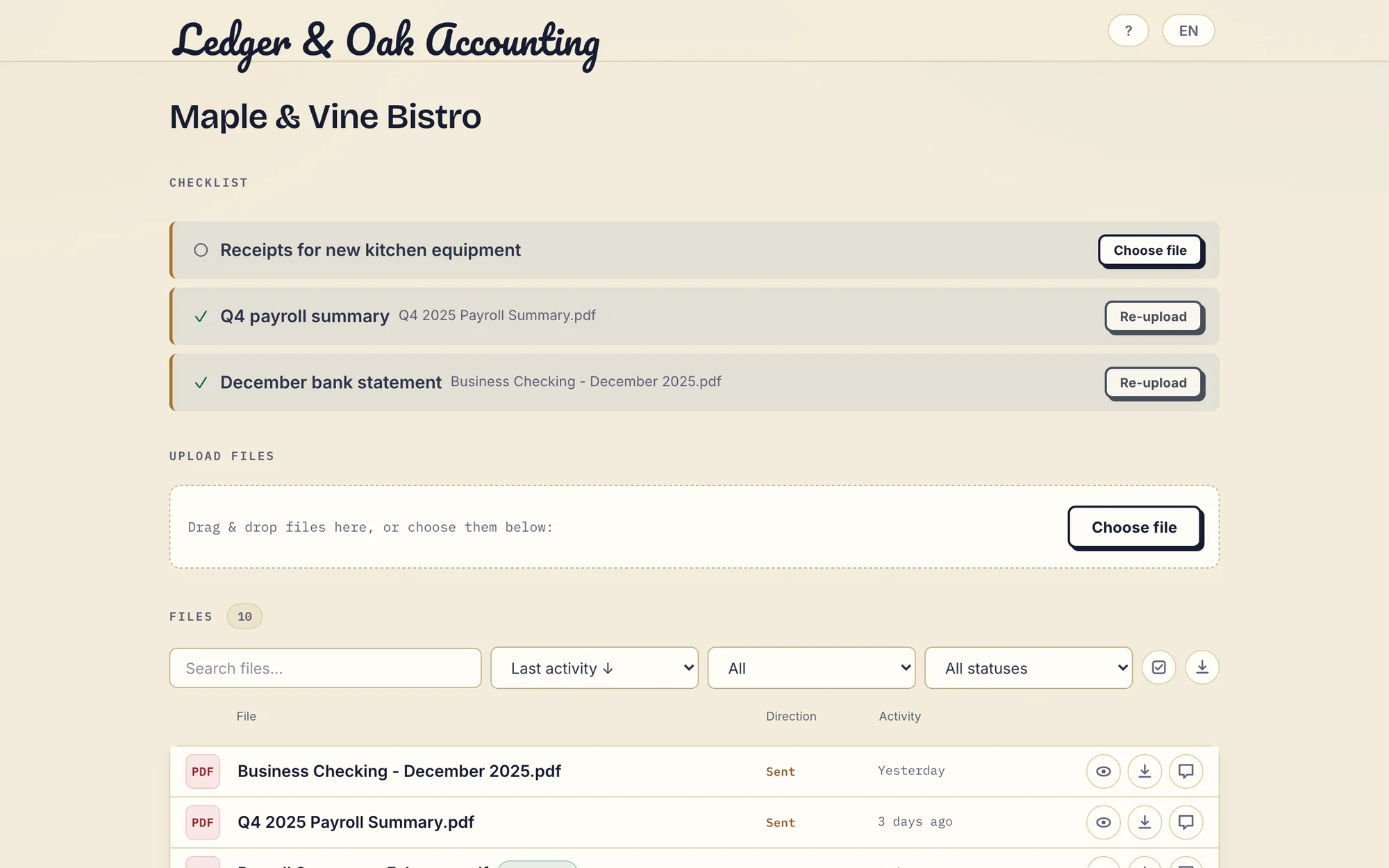
Real Droplana app with fictional Ledger & Oak Accounting and Maple & Vine Bistro data. Open the full-size portal view.
Checklist items can carry optional due dates. A due-date reminder is prepared two days before and on the date and reaches the client with their next email, which can be later that day or the next day. The business can switch these reminders off, and the client can opt out.
Signing
Onehub connects to DocuSign, an established provider with its own legal standing, at its own additional cost.
Droplana signs in the browser and includes it on every plan. An identified business user or client types, draws or uploads a signature. The signed PDF is saved as a new file with the original kept, carrying a caption and a QR code. Every signature is recorded on the server with who signed, when, from what IP and with which login, plus a public verification page anyone can open, including a file-hash comparison.
The verification page is a real differentiator. It is also not a qualified or certificate-based signature. Where a hard legal signing requirement applies, the DocuSign route is better, and that favours Onehub.
What Droplana does not do
- No data rooms, stealth mode, NDA gates or automatic indexing.
- No staff roles. Every team member can access every client.
- No folders inside a portal, no watermarking and no view-only document controls.
- No mobile app and no Onehub connector. Moving files between Onehub and Droplana is manual.
- No white label. A logo is allowed on every plan, but there is no custom domain or accent colour.
- Storage tops out at 1 TB on Studio, plus 500 GB per storage add-on. It is not a long-term archive.
Who should pick which
Onehub if you need a data room; you need bulk or unlimited storage; your documents have real internal structure; you need to limit which colleague or participant sees what; or you want a custom domain, white label or a documented public API.
Droplana if your team is small relative to your client list; you want EU storage from an EU company with no transfer to the United States involved; your clients should not have to manage an account; or your problem is recurring two-way exchange with many clients rather than one structured document set.
Some firms use both, and it is a clean split: a data room for transactions, a client portal for the ongoing relationship. There is little overlap to resolve.
The accounting practices page and the consultants page show the per-client structure in daily use, and the client portal guide is the broader buying guide. To see other options too, there is a list of Onehub alternatives.
Questions before you choose
What is the main difference between Onehub and Droplana?
Onehub is cloud storage organised into workspaces, with a Data Room edition offering stealth mode, NDAs, watermarking, automatic indexing and audit trails. Droplana is organised around the client relationship: one private, persistent portal per client for two-way document exchange, with a document checklist, per-file comments, file status and in-browser PDF signing. Onehub suits deal rooms and structured document sets; Droplana suits ongoing client work.
Can I restrict a Droplana colleague to one client?
No. Team members share access to all clients. Droplana has no granular staff roles, party isolation or data-room controls. Practice includes five seats and Studio unlimited seats, including the owner. If some colleagues or deal participants must see only selected documents, evaluate Onehub's roles first.
Which has more storage, Onehub or Droplana?
Onehub. Its pricing page lists 1 TB on Standard and unlimited storage on Advanced and above. Droplana caps storage per plan at 2 GB on Free, 50 GB on Solo, 250 GB on Practice and 1 TB on Studio, with storage add-ons of 500 GB each. If bulk storage is the requirement, Onehub is the better answer.
Where is the data stored?
Onehub is a US company based in Denver, Colorado. Its security page says data is stored with Amazon Web Services, and its Data Processing Addendum says it may receive personal data in the United States from the EEA, Switzerland or the UK, using the Data Privacy Framework and Standard Contractual Clauses. Droplana stores files, comments and metadata on Hetzner infrastructure in Germany and is operated by Ubique d.o.o., registered in Croatia, EU.
How does the pricing compare for three staff?
Onehub Standard, checked on 23 September 2026, costs 12.50 USD per user per month billed annually or 15 USD monthly, with a three-user minimum, so three staff on annual billing pay 450 USD a year. Advanced is 20 or 25 USD per user with a five-user minimum. Droplana Practice costs 490 EUR a year plus tax for five seats and unlimited clients. The currencies differ, so this is not a savings claim.
Plans and limits
Paid plans include unlimited clients: Solo EUR19/month or EUR190/year, Practice EUR49/month or EUR490/year, Studio EUR99/month or EUR990/year, plus tax. Free covers 3 clients, 2 GB and files up to 100 MB. Each paid storage add-on costs EUR15/month or EUR150/year plus tax, adds 500 GB and raises the file limit to 5 GB.
The tools you need, on every plan.
Share files, leave comments, request documents with checklists and sign PDFs in your browser. Your logo is included too.
Clients never pay or create an account. EU hosting, encryption and data export included.
Save 2 months with annual billing
Free Start here
For your first 3 clients
€0/monthNo credit card required
- Just you
- 3 clients
- 2 GB storage
- Up to 100 MB per file
- Files kept for 6 months
Solo
For independent professionals
€19/month+ tax
€190/year+ tax
- Just you
- Unlimited clients
- 50 GB storage
- Up to 1 GB per file
- Email support
Practice
For small firms
€49/month+ tax
€490/year+ tax
- Team size: 5
- Unlimited clients
- 250 GB storage
- Up to 2 GB per file
- Priority support
Studio
For growing teams
€99/month+ tax
€990/year+ tax
- Team size: Unlimited
- Unlimited clients
- 1 TB storage
- Up to 5 GB per file
- Priority support
- Personal setup call
On Free, each file expires 180 days after upload. Your clients and their access stay active, so you can keep sharing new files. Active paid plans have no plan-imposed retention limit. Expiry settings, deletion and cancellation rules still apply; a persistent portal address does not guarantee permanent file availability. Team sizes include you. No setup fees or automatic overage charges. Prices exclude applicable tax.
Compare plan details
| Included | Free | Solo | Practice | Studio |
|---|---|---|---|---|
| Team size | Just you | Just you | 5 | Unlimited |
| Clients | 3 | Unlimited | Unlimited | Unlimited |
| Storage | 2 GB | 50 GB | 250 GB | 1 TB |
| Maximum file size | 100 MB | 1 GB | 2 GB | 5 GB |
| File retention | 180 days from upload | No limit | No limit | No limit |
| Your Droplana address | Includes a random suffix | Your chosen name | Your chosen name | Your chosen name |
| Data Processing Agreement | Standard | Standard | Countersigned available | Countersigned available |
| Support | Priority | Priority | ||
| Personal setup call | Not included | Not included | Not included | Included |
Need more storage?
Add 500 GB for €15/month + tax, or €150/year + tax. Each storage add-on also raises your maximum file size to 5 GB.
Available on all paid plans from your billing page. Add more than one for another 500 GB each. Your team size stays the same.
Related comparisons
Firms comparing document platforms can read Droplana vs ShareFile and Droplana vs SharePoint. For large one-off deliveries, see Droplana vs WeTransfer.