
Send the planning pack. Get the client’s choices back.
Keep mood boards, timelines and returned preferences in one private portal per client, from the first consultation to the post-event handover.
Droplana is a client portal for event planners to share planning documents and collect files back. Each client gets one private, persistent portal with per-file comments and no signup.
Mood boards in one email, the venue shortlist in a chat, and the client's answer on menus somewhere in between. Two weeks before the event, nobody can find the timeline that was agreed. Give each client one portal for the planning documents and their replies, and keep bookings and vendors in your planning software.
Packs out, choices back
Send the planning pack and ask the client to return their preferences through the same portal.
Questions on the right file
The client comments on the venue option or timeline they mean. You answer there, not in a long thread.
Inspiration from a phone
Clients upload photos from their phone or computer, with no app and no account.
One place after the event
Recap documents and the final timeline go where the planning pack went. The client knows where to look.
A client portal for event planners, from pack to preferences
Send Celebration - Planning pack 02.pdf with the venue options you want the client to review. Ask them to return Celebration - Venue preferences.pdf through the same portal and put questions on the planning pack itself.
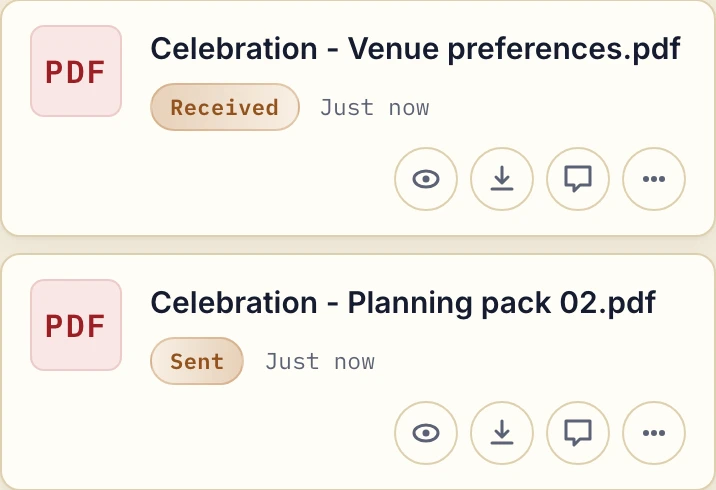
Actual product view with fictional event documents, shown as separate sent and received files.
When choices change, upload a newly named planning pack. Earlier uploads remain separate files. Tell the client which one to review rather than expecting the portal to select the current version.
Keep the event documents moving
- Initial planning: share mood boards and venue comparisons; request inspiration photographs and preferences with a document checklist.
- Vendor decisions: upload proposals and contracts relevant to the client. Keep questions on each file and ask the client to mark a reviewed file Approved or Rejected. Either side can change or clear that status.
- Event week: send the dated run-of-show, contact sheet and final timeline. Continue to manage scheduling and supplier coordination in your planning tools.
- After the event: return recap documents and highlight photos through the same portal. It is not a public photo gallery or proof-selection tool.
Decide who should see the whole portal
A couple or a corporate client can have authorised contacts, but those contacts share the same portal visibility. Do not add a vendor to the client's portal if they should see only their own contract. There are no vendor-specific file permissions or separate project areas inside a client portal.
Strict mode is the default and verifies email on a new device. A permanent access link is available only in opt-in Relaxed mode; forwarding it shares access. Read the security and access model before choosing a mode.
Files are stored in Germany and encrypted at rest per file, with a DPA available on all plans. Request only the guest or dietary information needed for the work and decide how it will be removed after the engagement.
If planning packs and client preferences are scattered through chat, compare a portal with messaging apps. The client portal buying guide helps you assess the document exchange separately from event scheduling and supplier coordination.
Try one planning decision
Send one venue pack and ask the client to return their preferences. Free includes 3 clients, 2 GB total storage and 100 MB per file. Solo costs €19/month plus tax for unlimited clients, 50 GB and 1 GB per file. Use a dedicated gallery alongside Droplana if photography delivery needs favourites or print sales.
Questions before you start
Can clients upload preferences and documents back?
Yes, when client uploads are enabled. Clients can return preference documents, guest lists or inspiration photos to their own portal and comment on individual files.
Can vendors have access to only their own documents?
No. Authorised contacts for a client share that portal’s visibility. Droplana has no vendor-specific file permissions, event project roles or shared supplier planning board.
Can a client sign a PDF agreement?
In-browser PDF signing lets an identified client type, draw or upload a signature. The signed copy is saved separately from the original, with a record of who signed, when and from what IP. It is not a qualified or certificate-based signature.
How long are post-event files available?
Free keeps each file for up to 180 days from upload, which covers most events from first consultation to recap. Paid plans have no plan limit on how long files are kept, unless you set an expiry date or delete them.
Choose a plan for your document exchange
The tools you need, on every plan.
Share files, leave comments, request documents with checklists and sign PDFs in your browser. Your logo is included too.
Clients never pay or create an account. EU hosting, encryption and data export included.
Save 2 months with annual billing
Free Start here
For your first 3 clients
€0/monthNo credit card required
- Just you
- 3 clients
- 2 GB storage
- Up to 100 MB per file
- Files kept for 6 months
Solo
For independent professionals
€19/month+ tax
€190/year+ tax
- Just you
- Unlimited clients
- 50 GB storage
- Up to 1 GB per file
- Email support
Practice
For small firms
€49/month+ tax
€490/year+ tax
- Team size: 5
- Unlimited clients
- 250 GB storage
- Up to 2 GB per file
- Priority support
Studio
For growing teams
€99/month+ tax
€990/year+ tax
- Team size: Unlimited
- Unlimited clients
- 1 TB storage
- Up to 5 GB per file
- Priority support
- Personal setup call
On Free, each file expires 180 days after upload. Your clients and their access stay active, so you can keep sharing new files. Active paid plans have no plan-imposed retention limit. Expiry settings, deletion and cancellation rules still apply; a persistent portal address does not guarantee permanent file availability. Team sizes include you. No setup fees or automatic overage charges. Prices exclude applicable tax.
Compare plan details
| Included | Free | Solo | Practice | Studio |
|---|---|---|---|---|
| Team size | Just you | Just you | 5 | Unlimited |
| Clients | 3 | Unlimited | Unlimited | Unlimited |
| Storage | 2 GB | 50 GB | 250 GB | 1 TB |
| Maximum file size | 100 MB | 1 GB | 2 GB | 5 GB |
| File retention | 180 days from upload | No limit | No limit | No limit |
| Your Droplana address | Includes a random suffix | Your chosen name | Your chosen name | Your chosen name |
| Data Processing Agreement | Standard | Standard | Countersigned available | Countersigned available |
| Support | Priority | Priority | ||
| Personal setup call | Not included | Not included | Not included | Included |
Need more storage?
Add 500 GB for €15/month + tax, or €150/year + tax. Each storage add-on also raises your maximum file size to 5 GB.
Available on all paid plans from your billing page. Add more than one for another 500 GB each. Your team size stays the same.