
Every client's plan, every progress photo, one private link.
The plan goes by email, the nutrition guide by WhatsApp, the progress photos into a group chat. Three months in, neither of you can find the original plan. Give every client one private portal where you share plans and they send check-ins back, with no account or app.
Droplana is a client portal for personal trainers and online coaches. Each client gets one private portal where you share plans and guides, and they send back check-in photos and completed logs, with no account to create.
Training plans always accessible
Upload the current training block to the portal. The client opens their link and it is there, not buried in emails from three months ago.
Clients send you progress photos privately
Each client uploads check-in photos to their own private portal. No group chats, no public sharing, no photos mixed up between clients.
Nutrition guides and resources in one place
PDFs, guides, recipes and links: share everything through the portal. The client has one link for the resources you have given them.
Update plans without confusion
Upload a revised plan as a new file, with a comment saying what changed. The old one stays for reference.
Feedback on the check-in
Comment on this week's progress photo or log. The client sees your reply next to the file, not in a busy chat.
No app for your client
They open a link in their browser, verify their email once, and they are in. No new fitness app to download on top of everything else they already use.
Why WhatsApp and email do not work for client plans
Trainers typically share materials over a mix of channels: email for the initial plan PDF, WhatsApp for quick updates, maybe a Facebook group for resources, and voice notes or video calls for feedback.
The client is left assembling their programme from multiple places. The plan is in email. The updated exercise swap is in WhatsApp. The nutrition guide link expired. The progress photo they sent last month is lost in the group chat.
A portal per client collects everything in one private place. You upload materials there, and the client goes there. It is simple by design, and each client's files are kept separate from every other client's. For the broader picture on what a client portal is and how to evaluate one, see our client portal guide. Trainers who also coach clients on habits and goals can read the page for coaches.
How personal trainers use a client portal
Onboarding
When you take on a new client, send them their portal link. Upload the programme overview and any introductory guides, so the client has what they need from day one.
Ask the client to upload their own intake documents, such as a goal form, through the portal. A document checklist shows what is still missing, and an item can carry an optional due date.
Share the next plan, get the log back
At the start of each training block, upload the new plan with its week number, for example Week 03 - Training plan.pdf. Say which log you want back and when. The client completes the log in another app or on paper, then uploads the finished file. When you swap an exercise or adjust volume, upload the updated version and note what changed in a file comment.
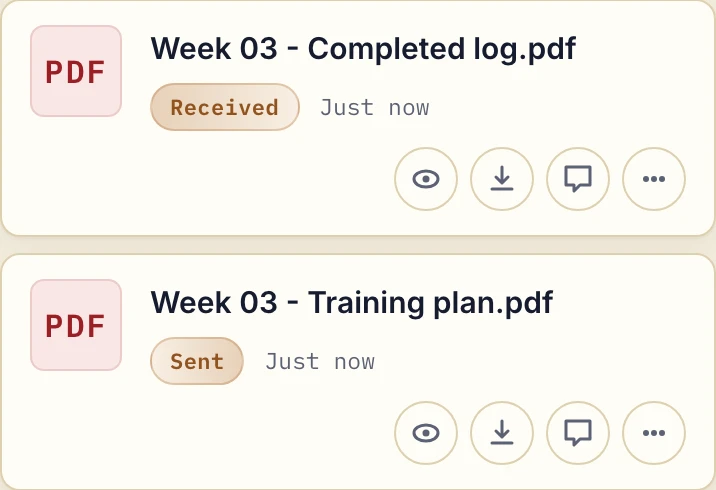
Actual app with fictional sample PDFs at phone width.
Try this request:
Your week 03 plan is in the portal. Please upload the completed log before our next session. If you use paper, send a readable photo and keep any questions beside the returned file.
Check-ins
Ask clients to upload their weekly check-in photos directly to the portal. On a phone they choose an existing image or tap Take Photo. Only you, your team and that client can see them.
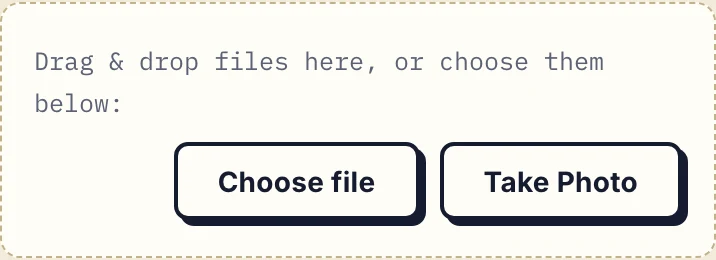
Actual client upload controls. Camera availability depends on the device and browser.
Leave feedback as a comment on the specific file. The client returns to see the response, and the conversation stays with that check-in rather than in a chat thread. There is no automatic progress chart built from the files.
Nutrition resources and guides
Upload nutrition guides, meal plan templates or recipe PDFs to the portal. Clients return to them whenever they need to. No re-sending the same document every time someone asks.
When Droplana is not the right fit
- You want workout logging, habit tracking, an exercise library or a fitness app with videos.
- You want group chat or a community for clients. Each portal is private to one client.
- You need scheduling, payments or wearable integration in the same tool.
- You need a health-record system. Droplana is not one. Before collecting health information, check your obligations, who has access and how long you keep the files. The security details and the DPA help with that check.
Check our simple pricing (or start free)
Free covers 3 clients, 2 GB total storage and files up to 100 MB. Solo costs €19/month plus tax, with unlimited clients, 50 GB storage and a 1 GB file limit. Free and Solo include one seat.
The tools you need, on every plan.
Share files, leave comments, request documents with checklists and sign PDFs in your browser. Your logo is included too.
Clients never pay or create an account. EU hosting, encryption and data export included.
Save 2 months with annual billing
Free Start here
For your first 3 clients
€0/monthNo credit card required
- Just you
- 3 clients
- 2 GB storage
- Up to 100 MB per file
- Files kept for 6 months
Solo
For independent professionals
€19/month+ tax
€190/year+ tax
- Just you
- Unlimited clients
- 50 GB storage
- Up to 1 GB per file
- Email support
Practice
For small firms
€49/month+ tax
€490/year+ tax
- Team size: 5
- Unlimited clients
- 250 GB storage
- Up to 2 GB per file
- Priority support
Studio
For growing teams
€99/month+ tax
€990/year+ tax
- Team size: Unlimited
- Unlimited clients
- 1 TB storage
- Up to 5 GB per file
- Priority support
- Personal setup call
On Free, each file expires 180 days after upload. Your clients and their access stay active, so you can keep sharing new files. Active paid plans have no plan-imposed retention limit. Expiry settings, deletion and cancellation rules still apply; a persistent portal address does not guarantee permanent file availability. Team sizes include you. No setup fees or automatic overage charges. Prices exclude applicable tax.
Compare plan details
| Included | Free | Solo | Practice | Studio |
|---|---|---|---|---|
| Team size | Just you | Just you | 5 | Unlimited |
| Clients | 3 | Unlimited | Unlimited | Unlimited |
| Storage | 2 GB | 50 GB | 250 GB | 1 TB |
| Maximum file size | 100 MB | 1 GB | 2 GB | 5 GB |
| File retention | 180 days from upload | No limit | No limit | No limit |
| Your Droplana address | Includes a random suffix | Your chosen name | Your chosen name | Your chosen name |
| Data Processing Agreement | Standard | Standard | Countersigned available | Countersigned available |
| Support | Priority | Priority | ||
| Personal setup call | Not included | Not included | Not included | Included |
Need more storage?
Add 500 GB for €15/month + tax, or €150/year + tax. Each storage add-on also raises your maximum file size to 5 GB.
Available on all paid plans from your billing page. Add more than one for another 500 GB each. Your team size stays the same.
Questions before the first exchange
Can clients send me their progress photos through the portal?
Yes. Clients upload photos and files to their own portal, or tap Take Photo on a supported phone. That works for weekly progress photos, food diary photos or a paper log. Only you, your team members and that client can see them.
Can I update a client's plan in their portal?
Yes. Upload the new version as a new file, such as Week 04 - Training plan.pdf, and add a comment saying what changed. Files cannot be overwritten, so the previous version stays in the portal for reference.
Can clients record workouts inside Droplana?
No. They complete a log in another app or on paper and upload the result. Droplana exchanges files and per-file comments; it does not track workouts, log food, book sessions or build progress charts.
Do clients need an account?
No. Under the default Strict security level, clients confirm their email on a new device, and the browser is remembered for 90 days. They do not create an account or install an app. Several email addresses on one client share the same portal and files.
How long do files stay available?
Free files expire 180 days after upload; the client portal does not expire with them. Active paid plans have no plan-imposed file expiry, but expiry dates you choose, deletion and subscription rules still apply.
Compare with other tools
vs. ShareFile
ShareFile is a full document platform priced per employee user. Droplana is a flat-rate EU client document portal with no client accounts. When each one fits.
vs. WeTransfer
WeTransfer sends large one-off transfers and can request files back. Droplana gives each client a persistent portal for ongoing two-way document exchange.
vs. SharePoint
SharePoint can be a client extranet, and Microsoft documents how. What it takes to set up and govern, and when a separate client document portal is simpler.
vs. Notion
Compare Notion pages, forms and guest access with Droplana client document exchange. Check file limits, costs and a request-and-return trial before choosing.