
You hold other people's employee records. Act like it
Outsourced HR means handling contracts, disciplinary files and payroll data for businesses that are not yours. Give each client company one private portal for that exchange in both directions, with no account for anyone on their side.
Droplana is a client document portal for outsourced HR and employment consultants. Each client company gets one private, persistent portal: you send handbooks, contracts and advice notes, and they return signed documents and completed forms. Nobody on their side creates an account.
One portal per client company
Contracts, handbooks, policy templates and signed documents for that client, in one place, reached by one permanent link.
Isolated from your other clients
Each client company sees only its own portal. There is no shared folder permission somebody has to keep correct.
Documents come back too
Signed contracts, completed forms, current policies, notes from a manager. A document checklist shows the client what is still missing, with an email reminder after 7 days.
Signed in the browser
Send a contract or policy acknowledgement and it gets signed in the portal: type, draw or upload a signature. The signed copy carries a caption and a QR code that links to a public verification page.
Access ends when you say
Revoke a client's portal access and it takes effect immediately. The files stay with your business.
Stored in Germany, run from the EU
Files, comments and metadata are stored on Hetzner infrastructure in Germany, with files encrypted at rest per file. Operated by an EU company, with a DPA on every plan.
The position you are in
Outsourced HR has a data problem that most professional services do not, and it is worth naming precisely.
You hold personal data about people who are not your clients. The employees of your client companies never chose you, never signed anything with you, and in many cases do not know your firm exists. Their contracts, their sickness records, their disciplinary files and their right-to-work evidence pass through your hands.
Some of it is as sensitive as personal data gets: health information behind a sickness absence case, trade union membership, allegations in a disciplinary matter. A document like that sitting as an attachment in a general inbox is a weak position to be in, and it is the default position for a great many small HR consultancies.
The practical fix is not complicated. Documents about a client company's people live in that client company's portal, not in an inbox, not in a general drive folder, and not in the mailbox of whichever consultant handled the case. If the category itself is new to you, our client portal guide explains what these tools do and what to compare.
An HR consultant client portal, using a policy review
Send Handbook - Review questions.pdf and ask the company's contact to return its current policy. In the example below, Handbook - Current policy.pdf arrives in the same portal. Comment on that file to clarify which provision needs updating, then send the revised policy as a new file.
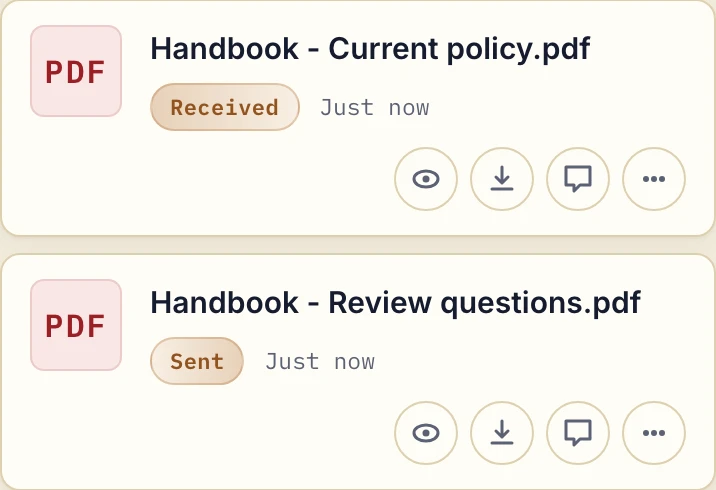
Actual product view with fictional handbook documents.
Name revised files by subject and date. Comments and the Approved or Rejected status sit on the individual file, and either side can change or clear the status. It records feedback; it does not decide that a policy is legally sound.
Why HR consultants use Droplana
The client company sees exactly one thing
Their portal. Their contracts, their policies, their people. No shared drive where a folder name reveals which other employers you work with, and no permission mistake exposing one client to another.
The exchange runs both ways without attachments
You send handbooks, template contracts, letters and advice notes. They send back signed documents, right-to-work evidence, manager statements and forms. Nothing travels as an attachment, so nothing ends up as the only copy in someone's mailbox.
The checklist replaces the chase
Onboarding a new client company means collecting a lot at once: existing contracts, current policies, employee lists, payroll contacts. A document checklist shows them what is still missing. If nothing happens for 7 days, the client gets an email naming the items, and after 14 days the reminder comes to you, so you are not writing a fourth reminder yourself.
Know who sees a sensitive case
Everyone you add as a contact for a client company sees everything in its portal. A disciplinary or grievance file belongs there only if every contact may see it. If only the HR director should, add only the HR director, or keep that case out of the portal. Within the portal, each file carries its own comments and status, so the case has a location rather than a thread.
A consultant leaving is not a problem
Documents belong to the business, not to the person who handled the client. When a consultant moves on, you remove them from the team, and nothing needs to be extracted from a mailbox. Practice has a team size of 5, including the owner. Studio has unlimited team size. The account owner can view and export (CSV) an activity trail of logins, portal visits, uploads, downloads, deletions, comments and approvals.
Retention you can apply
Employment records have retention periods that differ by document type and country. Because everything for a client company is in one place, you can find and delete what has reached the end of its period, or give a file an expiration date when you upload it.
Data protection, stated plainly
Here is what Droplana provides, so you can check it against your own obligations and your client's:
- Storage in Germany. Files, comments and metadata sit on Hetzner infrastructure in Germany, under opaque randomly generated identifiers. They are never named after a person, a filename or its contents, and never exposed on the public internet.
- Encrypted at rest, per file. Every file is encrypted with a key derived specifically for that file. This protects against a breach of the storage platform. It does not protect against a compromise of the application host, where the master key sits alongside the storage credentials, and we would rather say so than imply more than is true.
- Three portal security levels. New accounts default to Strict, requiring email verification on every new device. Controlled allows one-time or email magic links only. Relaxed also allows permanent links; for employee-record work that is usually the wrong choice, and it is opt-in rather than the default.
- Immediate revocation, per client.
- DPA on every plan, countersigned on Practice and Studio. It leaves the decision on special-category data to you.
- EU providers. Hetzner in Germany for storage, Brevo in France for mail, Creem in Estonia for payments. Mail and payment providers never receive file contents.
What it does not do: decide your lawful basis, define your retention schedule, or restrict which of your own team can open which client's portal. Those are your decisions and no tool makes them for you. The security page sets out the storage, encryption and access model in full, and GDPR-compliant file sharing with clients covers the questions to ask of any tool.
Where Droplana is not the answer
- It is not an HR information system. No employee records database, no absence tracking, no payroll, no org chart, no case management. If you are choosing a core HR system, this is not one.
- There is no per-employee structure. The organising unit is the client company. Documents about individual employees live in that company's portal and are organised by whatever naming you use.
- No granular access. Contacts on a client company share its portal, and your team members can open every client. Use a different system when managers or consultants need different access to individual employee files.
- No payroll or HRIS connector. Nothing syncs automatically, and an AI assistant connected through the MCP server works on metadata, not on the documents' contents.
- In-browser signing is not a qualified signature. Where a contract carries a hard legal signing requirement, use a dedicated provider.
- It is not archival storage. Storage is capped per plan with no overage billing: at the limit, new uploads stop and existing files stay accessible.
The general page for consultants covers advisory and strategy work. HR consultancies also often work with law firms on employment matters, accountants on payroll and recruiters on hiring, and those businesses use the same per-client structure.
Check our simple pricing (or start free)
Free provides 3 clients, 2 GB storage, 100 MB per file and one seat. Solo is €19/month plus tax with unlimited clients and 50 GB, also for one user. Practice is €49/month plus tax for 5 team members including the owner and 250 GB.
The tools you need, on every plan.
Share files, leave comments, request documents with checklists and sign PDFs in your browser. Your logo is included too.
Clients never pay or create an account. EU hosting, encryption and data export included.
Save 2 months with annual billing
Free Start here
For your first 3 clients
€0/monthNo credit card required
- Just you
- 3 clients
- 2 GB storage
- Up to 100 MB per file
- Files kept for 6 months
Solo
For independent professionals
€19/month+ tax
€190/year+ tax
- Just you
- Unlimited clients
- 50 GB storage
- Up to 1 GB per file
- Email support
Practice
For small firms
€49/month+ tax
€490/year+ tax
- Team size: 5
- Unlimited clients
- 250 GB storage
- Up to 2 GB per file
- Priority support
Studio
For growing teams
€99/month+ tax
€990/year+ tax
- Team size: Unlimited
- Unlimited clients
- 1 TB storage
- Up to 5 GB per file
- Priority support
- Personal setup call
On Free, each file expires 180 days after upload. Your clients and their access stay active, so you can keep sharing new files. Active paid plans have no plan-imposed retention limit. Expiry settings, deletion and cancellation rules still apply; a persistent portal address does not guarantee permanent file availability. Team sizes include you. No setup fees or automatic overage charges. Prices exclude applicable tax.
Compare plan details
| Included | Free | Solo | Practice | Studio |
|---|---|---|---|---|
| Team size | Just you | Just you | 5 | Unlimited |
| Clients | 3 | Unlimited | Unlimited | Unlimited |
| Storage | 2 GB | 50 GB | 250 GB | 1 TB |
| Maximum file size | 100 MB | 1 GB | 2 GB | 5 GB |
| File retention | 180 days from upload | No limit | No limit | No limit |
| Your Droplana address | Includes a random suffix | Your chosen name | Your chosen name | Your chosen name |
| Data Processing Agreement | Standard | Standard | Countersigned available | Countersigned available |
| Support | Priority | Priority | ||
| Personal setup call | Not included | Not included | Not included | Included |
Need more storage?
Add 500 GB for €15/month + tax, or €150/year + tax. Each storage add-on also raises your maximum file size to 5 GB.
Available on all paid plans from your billing page. Add more than one for another 500 GB each. Your team size stays the same.
Questions before you start
Who can see documents in a client company's portal?
Everyone you add as a contact for that company sees everything in its portal, and your own team members can open every client. Other client companies never see it. There are no per-employee or per-file permissions, so add only contacts who may see the whole portal.
Do people at the client company need accounts?
No. There is no account and no password. Under the default Strict setting they confirm their email on a new device, by magic link or by signing in with Google or Microsoft, and the browser is then remembered for 90 days.
Can documents be signed in the portal?
Yes, with in-browser PDF signing. The signer types, draws or uploads a signature, the signed copy is saved as a new file, and the signature is recorded with who signed, when and from what IP. It is not a qualified electronic signature, so use a dedicated provider where one is required.
Does Droplana replace my HR system?
No. There is no employee database, no absence tracking, no payroll and no case management, and nothing syncs into your HR systems. It is the client-facing document layer beside the systems you already run.
What happens when a client engagement ends?
You revoke the client company's portal access, and it takes effect immediately. That does not delete the files, which stay with your business. Apply your retention decisions with file expiry or deletion, and keep any required archive separately.
Compared with what HR consultants use now
- Droplana vs SharePoint: what running a client extranet on Microsoft 365 involves, and when a separate portal is simpler.
- Droplana vs a cloud drive: shared folders per client company compared with one private portal each.
- Droplana vs Content Snare: another document collection tool with reminders, compared on direction and where data lives.
- Droplana vs email: what changes when employee documents stop living as attachments.