
An encrypted drive and a client portal are not the same purchase
Proton Drive is end-to-end encrypted cloud storage from a Swiss company, often bought as part of the wider Proton suite. Droplana is a client document portal: one private, persistent portal per client for two-way document exchange, with checklists, per-file comments, in-browser PDF signing and no account for the client. Droplana is not end-to-end encrypted. If that decides it for you, this page will point you at Proton.
Published by Droplana, one of the products compared. Proton documentation checked September 21, 2026; plans and features change. The screenshot uses fictional data and is not a customer result.
What Proton Drive is better at
Putting this first, because if it decides the question for you the rest of the page does not matter.
Proton Drive encrypts files on your device before they leave it, and Proton says it cannot read the content. That is a different security model from "the provider encrypts your files for you", and the difference shows up in what a breach of the provider costs you.
Droplana does not work that way. Files are encrypted at rest with AES-256, using a key derived per file with HKDF-SHA256 from a master key and the file's storage key, never stored. Traffic is TLS. The database, application configuration and logs sit on LUKS-encrypted volumes. That is real protection against a storage-platform breach. It is not protection against a compromise of the application host, because the master key lives there next to the storage credentials. Droplana is not end-to-end encrypted, and our security page says so.
So if a client contract, a regulator or your own policy requires that the vendor cannot read the files, Proton Drive meets that and we do not. Do not move those documents into Droplana as a workaround. The rest of this page is for readers whose deciding factor is somewhere else.
The other difference, which decides more purchases
Proton Drive is a drive. Droplana is not.
Proton Drive is organised around files and folders. Sync a folder, share it, set permissions, keep versions. The mental model is storage, encrypted end to end, with sharing where you need it. It is often bought as part of the wider Proton suite, so Drive arrives alongside Mail, Calendar, VPN and Pass rather than being chosen on its own.
Droplana is organised around the client. There is no folder tree. There is a list of clients, and each one has a single portal holding everything to do with them: what you sent, what they sent back, the checklist of what is still outstanding, the comments on each file, the status of each one.
It sounds like a small distinction until you have three hundred of them. "Which folder was the March statement in" and "open that client's portal" are different amounts of work, and the gap widens every year the engagement runs.
Droplana vs Proton Drive side by side
| Proton Drive | Droplana | |
|---|---|---|
| Category | End-to-end encrypted cloud storage | Client document portal, two-way |
| Encryption model | End-to-end encrypted file content | TLS in transit, AES-256 at rest with a per-file key; not E2EE |
| Organising unit | Folders and sharing permissions | One persistent portal per client |
| Client uploads without an account | Yes, into a public shared folder with Editor access | Yes, clients have no accounts |
| Document checklist for the client | Check current capability at proton.me | Yes, per client, with optional due dates |
| Per-file comments and status | Check current capability at proton.me | Yes, on every file |
| In-browser PDF signing | Check current capability at proton.me | Yes, with a public verification page per signature |
| Desktop and mobile sync | Yes | No |
| Free plan | Up to 5 GB advertised; a limited number of Editor links | 3 clients, 2 GB, 100 MB per file, files kept 180 days |
| Pricing model | Per user, standalone Drive or bundled suite | Flat per business, unlimited clients |
| Company and storage | Swiss company; servers in Switzerland, Germany and Norway | Croatian (EU) company; Hetzner in Germany |
Proton's plans, storage and features change. Check proton.me rather than trusting any comparison page, this one included.
What the client has to do
This is where the two feel least alike.
Proton's public-link guide supports recipients uploading into an Editor-enabled shared folder without a Proton account. A shared folder can stay the place a client returns to, so you do not need a new link for every document. What a folder does not tell the client is what you are still waiting for, or what you said about the blurry copy they sent last week. That lives in your email, and the client has to search theirs.
A Droplana client has one private portal. It is the same address in month one and month forty. Opening it shows them everything you have exchanged, a checklist of what you still need, and somewhere to put it. No account, no password, nothing to install. You pick the portal security level: Strict, the default, verifies their email on each new device; Controlled allows one-time or email magic links only; Relaxed also allows permanent links, for work where that is proportionate. After verifying, the browser is remembered for 90 days.
One more detail that matters more than it should. Clients can photograph a paper document with their phone straight into the checklist item it belongs to. An engagement can stall because someone does not own a scanner.
Try the same recurring request
Illustrative trial. An adviser needs a statement and two receipts before returning a draft summary. Use invented files that your policy allows in either service.
In Proton Drive, create a folder for that client and choose the sharing permissions. Have the client upload a file, send a corrected copy, and find the returned summary. Decide where you will keep the list of missing documents and any review notes.
In Droplana, enable uploads in the client's portal and add the documents to the checklist. The client supplies a file or a phone photo. Ask for a missing page in a file comment, then upload the summary to the same portal. Check whether the client can see what remains to be sent.
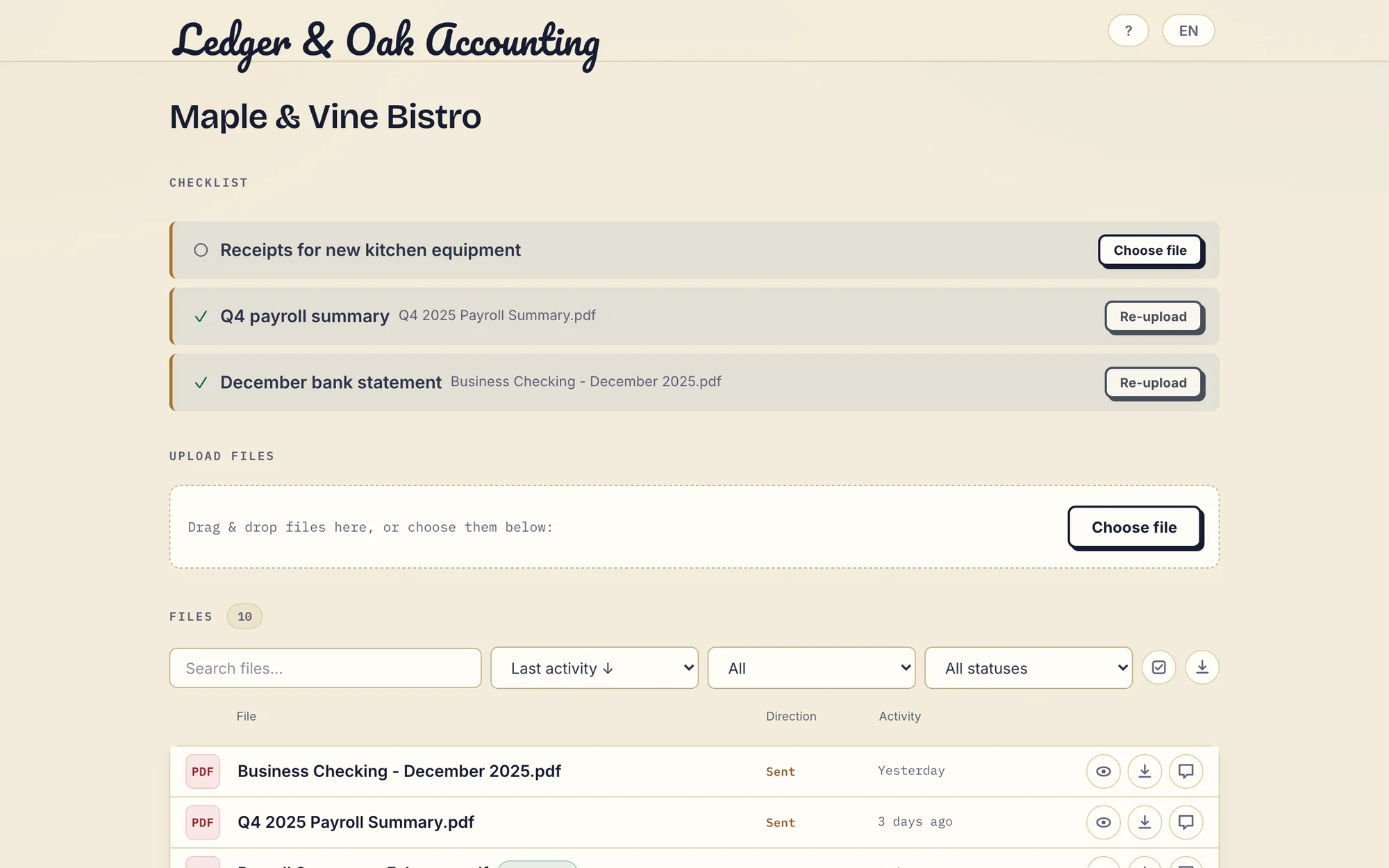
Real Droplana app with fictional data: the client has supplied two documents and can upload the missing equipment receipt. Open the full-size portal image.
The pricing axis
Proton prices per user, with a free tier, standalone Drive plans and business plans that bundle Drive with the rest of the suite. Use Proton Drive's plans to price your staff accounts, storage and external Editor links. That is a coherent model for a product your staff use every day. Adding external clients to a shared folder does not mean buying seats for them.
Droplana prices per business. Free covers 3 clients and 2 GB, and keeps each file for up to 180 days after upload. Solo is 19 EUR per month plus tax, unlimited clients, 50 GB, 1 GB maximum file size. Practice is 49 EUR, 250 GB, 2 GB files, 5 seats including the owner. Studio is 99 EUR, 1 TB, 5 GB files, unlimited team members. Annual billing costs ten months. Each storage add-on is 15 EUR per month and adds 500 GB while raising the maximum file size to 5 GB. There is no per-client fee and no overage billing: when storage runs out, new uploads stop and existing files stay accessible.
Which model is kinder depends on the shape of your firm. Twelve staff and forty clients, headcount pricing is fine. Two staff and four hundred clients, and per-user pricing measures the wrong thing.
Jurisdiction, stated carefully
Both are European answers, and they are not the same answer.
Proton is Swiss, and many buyers choose it for Swiss privacy law. Its storage explanation lists servers in Switzerland, Germany and Norway, so a Swiss operator is not a promise that every file sits in Switzerland. Switzerland is not in the European Union; EU data transfers there rest on the European Commission's adequacy decision, which for most firms is a non-issue.
Droplana is operated by an EU company and stores files, comments and metadata on Hetzner infrastructure in Germany, with a Data Processing Agreement available on every plan. If your policy or a client's contract says "data remains within the EU" rather than "data is adequately protected", read that wording again before you decide. If it does not, this section does not matter.
What Droplana does not do
- No end-to-end encryption. The first section, and the big one.
- No desktop or mobile sync. Nothing mirrors to a folder on your laptop.
- No Proton Drive connector. Files move between Proton Drive and Droplana by hand.
- Not general storage. Storage is capped per plan, and this is not meant to be your firm's drive or archive.
- Not a qualified e-signature. In-browser signing needs an identified signer. It records who signed, when, from what IP and with which login, saves the signed PDF as a new file with the original kept, and gives every signature a public verification page with a file-hash check. It is not certificate-based or qualified.
- Not for internal team collaboration. The portal faces the client. Your team keeps working in its own tools.
Who should pick which
Pick Proton Drive if end-to-end encryption is a stated requirement rather than a preference; you want an encrypted drive your team syncs to daily; you already buy Proton Mail or the business suite; or Swiss jurisdiction is what you want.
Pick Droplana if its encryption model is acceptable for the documents involved and the bottleneck is the client rather than the cryptography; you run many ongoing client relationships and want one permanent place per client; you want documents to arrive against a checklist instead of as a surprise; or you want the price to stay the same when the client list grows.
Use both if you want an encrypted internal store and a simple client-facing portal, and the documents you move into Droplana are allowed under its model.
If encryption architecture is what you are shopping on, the Tresorit comparison covers the other well-known end-to-end encrypted option, and Nextcloud covers the self-hosted route. For the per-client structure in daily practice, see the accounting practices page and the legal page, or the client portal guide for how to evaluate this category.
Questions before you choose
Is Droplana end-to-end encrypted like Proton Drive?
No. Droplana uses TLS in transit and AES-256 encryption at rest with a key derived per file. The application host can decrypt files. If the provider must be unable to decrypt the content, Droplana does not meet that requirement and Proton Drive does.
Can a client upload to Proton Drive without an account?
Yes. Proton documents public shared folders with Editor access that let recipients upload without a Proton account, and its Free plan allows a limited number of those links. Check what Editor recipients can see and change before using the folder for confidential collection.
Where does each product store files?
Proton is a Swiss company, and its storage page, checked on 21 September 2026, lists servers in Switzerland, Germany and Norway. Droplana is operated by Ubique d.o.o., an EU company registered in Croatia, and stores files, comments and metadata on Hetzner infrastructure in Germany, with a Data Processing Agreement on every plan.
Can I use Proton Drive and Droplana together?
Yes, with manual file movement, because Droplana has no Proton Drive connector. A copy uploaded to Droplana is protected by Droplana's server-side encryption, not Proton's end-to-end encryption. Do not move documents whose requirements exclude that model.
Plans and limits
The tools you need, on every plan.
Share files, leave comments, request documents with checklists and sign PDFs in your browser. Your logo is included too.
Clients never pay or create an account. EU hosting, encryption and data export included.
Save 2 months with annual billing
Free Start here
For your first 3 clients
€0/monthNo credit card required
- Just you
- 3 clients
- 2 GB storage
- Up to 100 MB per file
- Files kept for 6 months
Solo
For independent professionals
€19/month+ tax
€190/year+ tax
- Just you
- Unlimited clients
- 50 GB storage
- Up to 1 GB per file
- Email support
Practice
For small firms
€49/month+ tax
€490/year+ tax
- Team size: 5
- Unlimited clients
- 250 GB storage
- Up to 2 GB per file
- Priority support
Studio
For growing teams
€99/month+ tax
€990/year+ tax
- Team size: Unlimited
- Unlimited clients
- 1 TB storage
- Up to 5 GB per file
- Priority support
- Personal setup call
On Free, each file expires 180 days after upload. Your clients and their access stay active, so you can keep sharing new files. Active paid plans have no plan-imposed retention limit. Expiry settings, deletion and cancellation rules still apply; a persistent portal address does not guarantee permanent file availability. Team sizes include you. No setup fees or automatic overage charges. Prices exclude applicable tax.
Compare plan details
| Included | Free | Solo | Practice | Studio |
|---|---|---|---|---|
| Team size | Just you | Just you | 5 | Unlimited |
| Clients | 3 | Unlimited | Unlimited | Unlimited |
| Storage | 2 GB | 50 GB | 250 GB | 1 TB |
| Maximum file size | 100 MB | 1 GB | 2 GB | 5 GB |
| File retention | 180 days from upload | No limit | No limit | No limit |
| Your Droplana address | Includes a random suffix | Your chosen name | Your chosen name | Your chosen name |
| Data Processing Agreement | Standard | Standard | Countersigned available | Countersigned available |
| Support | Priority | Priority | ||
| Personal setup call | Not included | Not included | Not included | Included |
Need more storage?
Add 500 GB for €15/month + tax, or €150/year + tax. Each storage add-on also raises your maximum file size to 5 GB.
Available on all paid plans from your billing page. Add more than one for another 500 GB each. Your team size stays the same.
Related comparisons
If you already use a mainstream drive, see Droplana vs Google Drive, Dropbox and OneDrive.