
One is encryption-first. One is client-workflow-first.
Tresorit is end-to-end encrypted storage and sharing, built so that the provider cannot read your files, with file requests and Engage rooms for clients. Droplana is a client document portal: one private, persistent portal per client for two-way document exchange, with checklists, per-file comments and no account for the client. Droplana is not end-to-end encrypted. If that is your deciding factor, this page will send you to Tresorit.
Published by Droplana, one of the products compared. Tresorit documentation checked September 21, 2026; products and terms change. The screenshot uses fictional data and is not a customer result.
Start with the part where Tresorit wins
Most comparison pages bury the competitor's advantage. This one goes first, because if it applies to you the rest of the page does not matter.
Tresorit describes end-to-end, zero-knowledge encryption: files are encrypted on your device before they are uploaded, and the provider holds no key that can read them. That is a different security model from "encrypted at rest by the provider", and it changes what a breach of the provider means.
Droplana does not do this. We encrypt files at rest with AES-256, using a key derived per file with HKDF-SHA256 from a master key and the file's storage key, never stored. Traffic is TLS. The database, application configuration and logs sit on LUKS-encrypted volumes. That is real protection against a storage-platform breach. It is not protection against a compromise of the application host, because the master key lives there next to the storage credentials. Droplana is not end-to-end encrypted, and our security page says so.
If your requirements say the vendor must not be able to read your files, because of the work, a client contract or a regulatory position, Tresorit meets that and we do not. Do not move those documents into Droplana as a workaround. The rest of this page is for readers whose deciding factor is something else.
Specify which Tresorit you mean
Tresorit's product overview separates SecureCloud, for storage, sync and sharing, from Engage, for encrypted client rooms and workflows. There is also eSign. So "Tresorit" is not only a shared drive, and the comparison depends on which product you would buy.
SecureCloud covers collection well. Its file-request guide says uploaders do not need an account and cannot see or download what is already in the destination folder, with email verification as an option and a 5 GB limit per upload session. Returning a report to that client uses a separate share, or an Engage room.
What each tool is organised around
The encryption difference is not the deciding one for most buyers. This is.
Tresorit SecureCloud is organised around files and folders. Encrypted storage with sharing on top: sync a folder, share a link, send a file request, manage access. The mental model is a drive, and a well-secured one. Engage adds rooms where you and a client work on a set of documents.
Droplana is organised around the client. There is no folder tree. There is a list of clients, and each has one portal that holds everything to do with them: what you sent, what they sent back, the checklist of what is still missing, the comments on each file, the status of each one.
That sounds like a small distinction and is not. When a client emails asking about the statement you sent in March, "which folder was that in" and "open their portal" are different amounts of work, and the difference grows across a hundred clients.
Droplana vs Tresorit side by side
| Tresorit | Droplana | |
|---|---|---|
| Category | End-to-end encrypted storage, sharing and client rooms | Client document portal, two-way |
| Encryption model | End-to-end encrypted content | TLS in transit, AES-256 at rest with a per-file key; not E2EE |
| Collection without signup | File requests, no Tresorit account needed | Client uploads in their portal, no account |
| Client workspace | SecureCloud folders and shares; Engage client rooms | One persistent portal per client |
| List of documents still missing | Check in the product you choose | Checklist per client, with optional due dates |
| Per-file comments and status | Check current capability at tresorit.com | Yes, on every file |
| Signing | eSign offering; check product and allowance | In-browser PDF signing; not qualified |
| Upload limits | File requests: 5 GB per upload session | 100 MB on Free, 2 GB on Practice, up to 5 GB |
| Desktop sync | Yes | No |
| Pricing model | Per user or per role, by product | Flat per business, unlimited clients |
| Data location | Residency options depend on product and plan | Hetzner, Germany |
Tresorit's products, features and pricing change. Check tresorit.com rather than trusting any comparison page, this one included.
The client-side experience
This is where the two feel least alike.
A Tresorit file request works well for getting documents in without an account. Across a long client relationship, the question is where the client goes next month: to a new request link, to a share, or to an Engage room. Engage answers that with a room per client, so check its roles and allowances if that is what you need.
A Droplana client has one portal. It is the same address in month one and month forty. When they open it they see everything you have exchanged, a checklist of what you are still waiting on, and an upload button. There is no account to create, no password to reset and nothing to install. You choose the security level: Strict, the default, verifies their email on each new device; Controlled permits one-time or email magic links only; Relaxed also permits permanent links, for less sensitive work. After verifying, the browser is remembered for 90 days.
One more detail that matters more than it should: clients can photograph paper with their phone straight into the checklist item it belongs to. An onboarding can stall because someone does not own a scanner.
Try a request, a correction and a returned report
Illustrative trial. A practice requests a statement and a supporting receipt, needs a clearer copy of the receipt, and sends back a report. Use invented documents that your policy allows in either service.
In Tresorit, try a file request into a client folder, then the share or Engage room flow for the returned report. Check how the client sees your request for a clearer copy and which permissions apply.
In Droplana, create the portal, enable uploads and add the requested documents. The client uploads files or phone photos and sees which items are still missing. Ask for a replacement in the receipt's comments, then upload the report beside it.
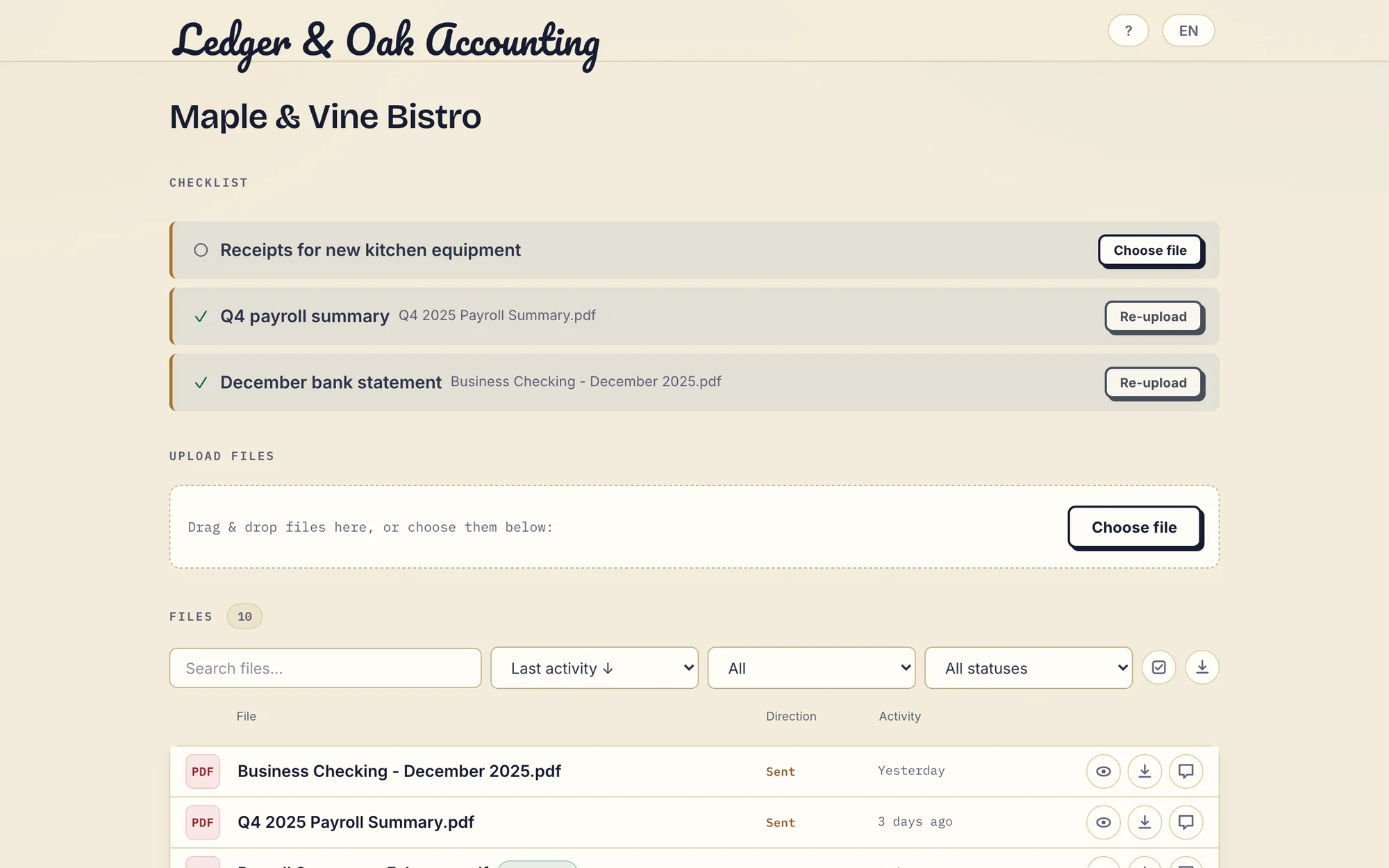
Real Droplana app with fictional data: the client has supplied two documents and can upload the missing equipment receipt. Open the full-size portal image.
Pricing shapes
Tresorit prices by product: per user for SecureCloud, and by room and role for Engage. For 3 staff, 100 client relationships and 200 GB, price the specific product that covers your whole exchange, including external participants, signing volume, storage and billing term. A storage-only seat price is not the cost of every Tresorit workflow.
Droplana prices per business. Free covers 3 clients and 2 GB, and keeps each file for up to 180 days after upload. Solo is 19 EUR per month plus tax, unlimited clients, 50 GB. Practice is 49 EUR, 250 GB, 5 seats including the owner. Studio is 99 EUR, 1 TB, unlimited team members. Annual billing costs ten months. Each storage add-on is 15 EUR per month, adds 500 GB and raises the maximum file size to 5 GB. External clients never use staff seats, and there is no overage billing: when storage runs out, new uploads stop and existing files stay accessible.
If you have twelve staff and forty clients, headcount pricing is reasonable. If you have two staff and four hundred clients, it measures the wrong thing.
Where the data sits
Tresorit publishes data-residency options; check which are available for your product and what happens when users collaborate across regions. Droplana stores files, comments and metadata on Hetzner infrastructure in Germany, under Ubique d.o.o., registered in Croatia, with a Data Processing Agreement on every plan. A fixed location is a fact, not proof that a service meets every document policy.
What Droplana does not do
Stated plainly, because a comparison that only lists strengths is not a comparison.
- No end-to-end encryption. Covered above. This is the big one.
- No desktop or mobile sync. No folder on your laptop mirroring the server.
- No Tresorit connector. Files move between Tresorit and Droplana by hand.
- No room permissions. Every team member can access every client.
- Not general storage. Storage is capped per plan and Droplana is not built to be your firm's drive or archive.
- Not a qualified e-signature. In-browser signing needs an identified signer. It records who signed, when, from what IP and with which login, keeps the original, saves a signed copy, and gives every signature a public verification page with a file-hash check. It is not certificate-based or qualified.
- Not for internal team collaboration. The portal faces the client. Your team works in its own tools.
Who should pick which
Pick Tresorit if end-to-end encryption is a stated requirement; you want an encrypted drive your team syncs to; you want encrypted client rooms with roles; or you need a specific residency option it offers.
Pick Droplana if its encryption model is acceptable for the documents involved and your pain is client-side rather than cryptographic; you manage many ongoing client relationships and want one permanent place per client; you want the price to stay the same when the client list grows; or you want documents to arrive against a checklist rather than as a surprise.
Use both if you want an encrypted internal store and a simple client-facing portal, and the documents you move into Droplana are allowed under its model.
The accounting practices page and the legal page show the per-client structure in daily use, and the client portal guide covers how to evaluate this category.
Questions before you choose
Is Droplana end-to-end encrypted like Tresorit?
No. Droplana uses TLS in transit and AES-256 encryption at rest with a key derived per file. Its application host can decrypt content. If the provider must be unable to decrypt your documents, Droplana does not meet that requirement and Tresorit does.
Can clients send files through Tresorit without an account?
Yes. Tresorit file requests allow uploads without a Tresorit account, and the uploader cannot see the destination folder's contents. The documented request flow has a 5 GB limit per upload session. Returning a document to the client uses a separate share or room.
Is Tresorit only a storage product?
No. Tresorit offers SecureCloud for storage, sync and sharing, and Engage for encrypted client rooms and workflows, alongside other offerings such as eSign. Compare the product, roles, allowances and price that cover your whole exchange, not a storage-only seat price.
Can I use Tresorit and Droplana together?
Yes, with manual file movement, because Droplana has no Tresorit connector. A copy moved into Droplana is protected by Droplana's server-side encryption, not Tresorit's end-to-end encryption. Do not move documents whose requirements exclude that model.
Plans and limits
The tools you need, on every plan.
Share files, leave comments, request documents with checklists and sign PDFs in your browser. Your logo is included too.
Clients never pay or create an account. EU hosting, encryption and data export included.
Save 2 months with annual billing
Free Start here
For your first 3 clients
€0/monthNo credit card required
- Just you
- 3 clients
- 2 GB storage
- Up to 100 MB per file
- Files kept for 6 months
Solo
For independent professionals
€19/month+ tax
€190/year+ tax
- Just you
- Unlimited clients
- 50 GB storage
- Up to 1 GB per file
- Email support
Practice
For small firms
€49/month+ tax
€490/year+ tax
- Team size: 5
- Unlimited clients
- 250 GB storage
- Up to 2 GB per file
- Priority support
Studio
For growing teams
€99/month+ tax
€990/year+ tax
- Team size: Unlimited
- Unlimited clients
- 1 TB storage
- Up to 5 GB per file
- Priority support
- Personal setup call
On Free, each file expires 180 days after upload. Your clients and their access stay active, so you can keep sharing new files. Active paid plans have no plan-imposed retention limit. Expiry settings, deletion and cancellation rules still apply; a persistent portal address does not guarantee permanent file availability. Team sizes include you. No setup fees or automatic overage charges. Prices exclude applicable tax.
Compare plan details
| Included | Free | Solo | Practice | Studio |
|---|---|---|---|---|
| Team size | Just you | Just you | 5 | Unlimited |
| Clients | 3 | Unlimited | Unlimited | Unlimited |
| Storage | 2 GB | 50 GB | 250 GB | 1 TB |
| Maximum file size | 100 MB | 1 GB | 2 GB | 5 GB |
| File retention | 180 days from upload | No limit | No limit | No limit |
| Your Droplana address | Includes a random suffix | Your chosen name | Your chosen name | Your chosen name |
| Data Processing Agreement | Standard | Standard | Countersigned available | Countersigned available |
| Support | Priority | Priority | ||
| Personal setup call | Not included | Not included | Not included | Included |
Need more storage?
Add 500 GB for €15/month + tax, or €150/year + tax. Each storage add-on also raises your maximum file size to 5 GB.
Available on all paid plans from your billing page. Add more than one for another 500 GB each. Your team size stays the same.
Related comparisons
For other encrypted or self-hosted storage, see Droplana vs Proton Drive and Droplana vs Nextcloud. For a document platform with per-user pricing, see Droplana vs ShareFile.