
Built around US tax software, or built around the client
SmartVault is a document management system for accounting and tax practices, with a client portal and integrations into US tax preparation software. Droplana is a client document portal: each client gets one private, persistent portal to send and receive documents, with no client accounts, a flat price per business and hosting in Germany. If your practice runs on supported US tax software, this is a short comparison. If it does not, it is a real one.
Published by Droplana, one of the products compared. SmartVault's pricing page checked September 23, 2026; integration pages checked September 21, 2026. The screenshots use fictional data and are not customer results.
The short version, before the detail
SmartVault was built for accounting and tax practices, and much of its value is in where it plugs in: documents routed from tax preparation software, a structured folder template per client, and workflow tied to the way a US tax practice runs a season.
Droplana was built for the client-facing side and nothing else. One private, persistent portal per client. No client accounts. Flat price per business. Servers in Germany.
Two questions usually settle it. Does your practice run on US tax software that SmartVault plugs into? And does it matter to you that data sits in the EU? A yes to the first points firmly at SmartVault. A yes to the second points the other way.
Droplana vs SmartVault side by side
| SmartVault | Droplana | |
|---|---|---|
| Category | Document management with a client portal | Client document portal, two-way |
| Built around | The practice's document estate and tax workflow | The individual client relationship |
| Integrations | Tax and accounting software from Accounting Pro | No tax or accounting software connector; MCP server and signed webhooks |
| Folder structure | Industry and tax folder templates | No folders; one portal per client |
| Client requests | Document requests and tracking | Checklist per client, with optional due dates |
| Per-file comments | Check smartvault.com | Yes |
| File status | Within its workflow | Approved or Rejected, set by either side |
| Branding | Custom branded client portal | Logo on every plan; no custom domain or accent colour |
| E-signature | Add-on on Accounting Pro; unlimited on Accounting Unlimited | In-browser PDF signing, with a public verification page |
| Staff access | Check permission options for your plan | Every team member can access every client |
| Pricing model | Per user, minimum 2 or 3 users | Flat per business, unlimited clients |
| Company and hosting | US company; confirm hosting region | Croatian (EU) company; Hetzner in Germany |
SmartVault's features, integrations and pricing change. Check smartvault.com rather than relying on this page.
Where SmartVault is clearly the better choice
Worth stating plainly.
Your practice runs on supported US tax software. SmartVault's Accounting plans list integrations with Lacerte, ProSeries, ProConnect, UltraTax CS, Drake and CCH Axcess. Its ProSeries integration, for example, supports importing clients and filing printed return copies into the client folder structure. If your season depends on that sequence, nothing on this page should talk you out of it. Droplana has no tax software connector.
You want one system for all firm documents, not only client-facing ones. SmartVault is a document management system. Internal working papers, engagement files and archived years live in the same structured repository. Droplana holds only what you exchange with a client. Your internal documents stay wherever they are now.
You want templated folder structures. A standard folder tree applied to every new client is useful at scale, and Droplana has no folders to template. The organising unit is the client.
You want a fully branded portal. SmartVault offers a custom branded client portal. Droplana shows your logo on every plan, but there is no custom domain or accent colour.
If two of those apply, the comparison is over.
Where Droplana is the better choice
Your practice is in Europe. Files, comments and metadata stay on Hetzner infrastructure in Germany. Droplana is operated by an EU company registered in Croatia, and a Data Processing Agreement is available on all plans, countersigned on Practice and Studio. Files are stored under opaque random identifiers and encrypted at rest with a key derived per file. For a European practice explaining to a client where their bank statements live, that is a much shorter conversation.
Your clients are the bottleneck, not your filing. A common complaint about portals of any kind is that clients will not use them. Droplana removes the part they resist: there is no account and no password. They open their portal; on the default Strict level they confirm their email on a new device, and the browser is remembered for 90 days. Then they see a checklist of what you are still waiting on, and a Take photo button for anything that only exists on paper. If they do nothing for seven days, they get an email naming the missing items; after fourteen days the reminder comes to you instead.
You want the price to stop moving. SmartVault's pricing page, checked September 23, 2026, lists Business Pro at USD55 per user per month billed annually with a three-user minimum, Accounting Pro at USD65 with a two-user minimum, and Accounting Unlimited at USD85. For three staff on Accounting Pro, the first plan with tax integrations: 3 × USD65 × 12 = USD2,340 a year. Droplana Practice is EUR490 a year plus tax and includes five seats. The currencies and scope differ, so this compares bills, not equivalent features. Per-user pricing prices your team; if your team is small and your client list is not, it measures the wrong thing.
You want less system, not more. Some practices do not want a document management system. They want their filing to stay as it is, and one clear place where clients send things in and collect things back. That is the whole of what Droplana does.
Try a month-end request from both sides
Illustrative trial. Create a fictional accounting client and request a payroll summary, bank statement and equipment receipts. Open the portal on another device to test verification and uploads. Check that the received statement sits against its request and the receipts are still shown as outstanding.
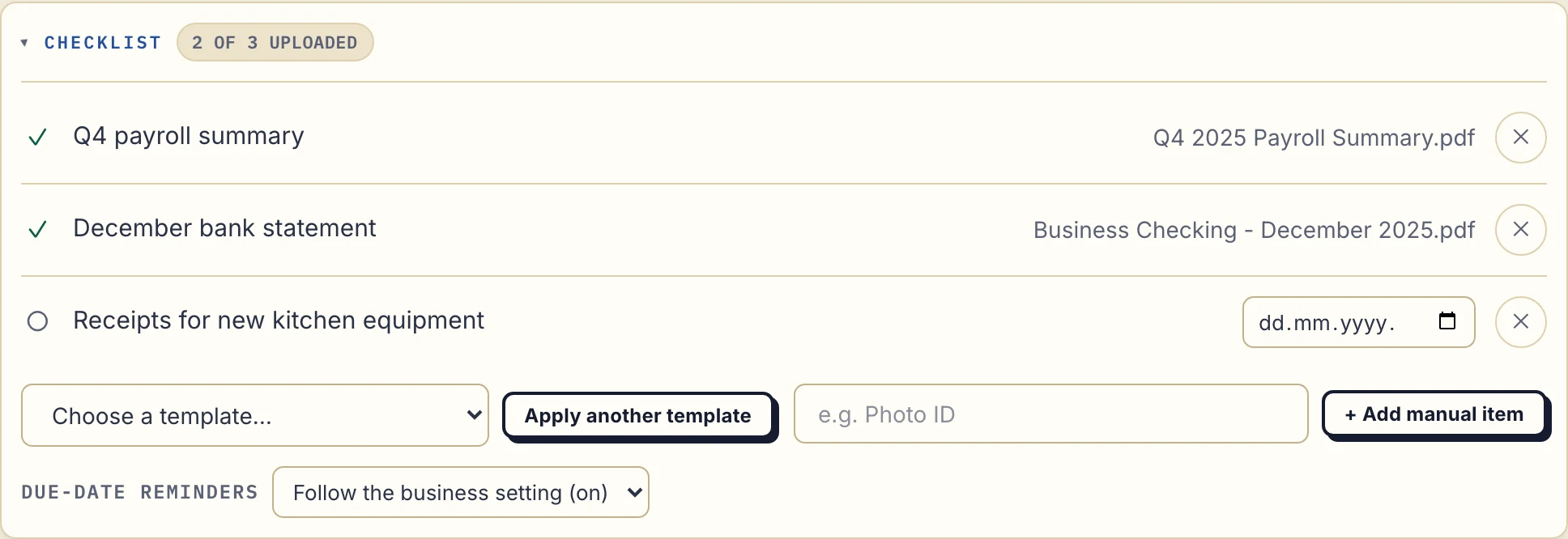
Real Droplana app with fictional data: the business sees the payroll summary and statement received, with equipment receipts still missing.
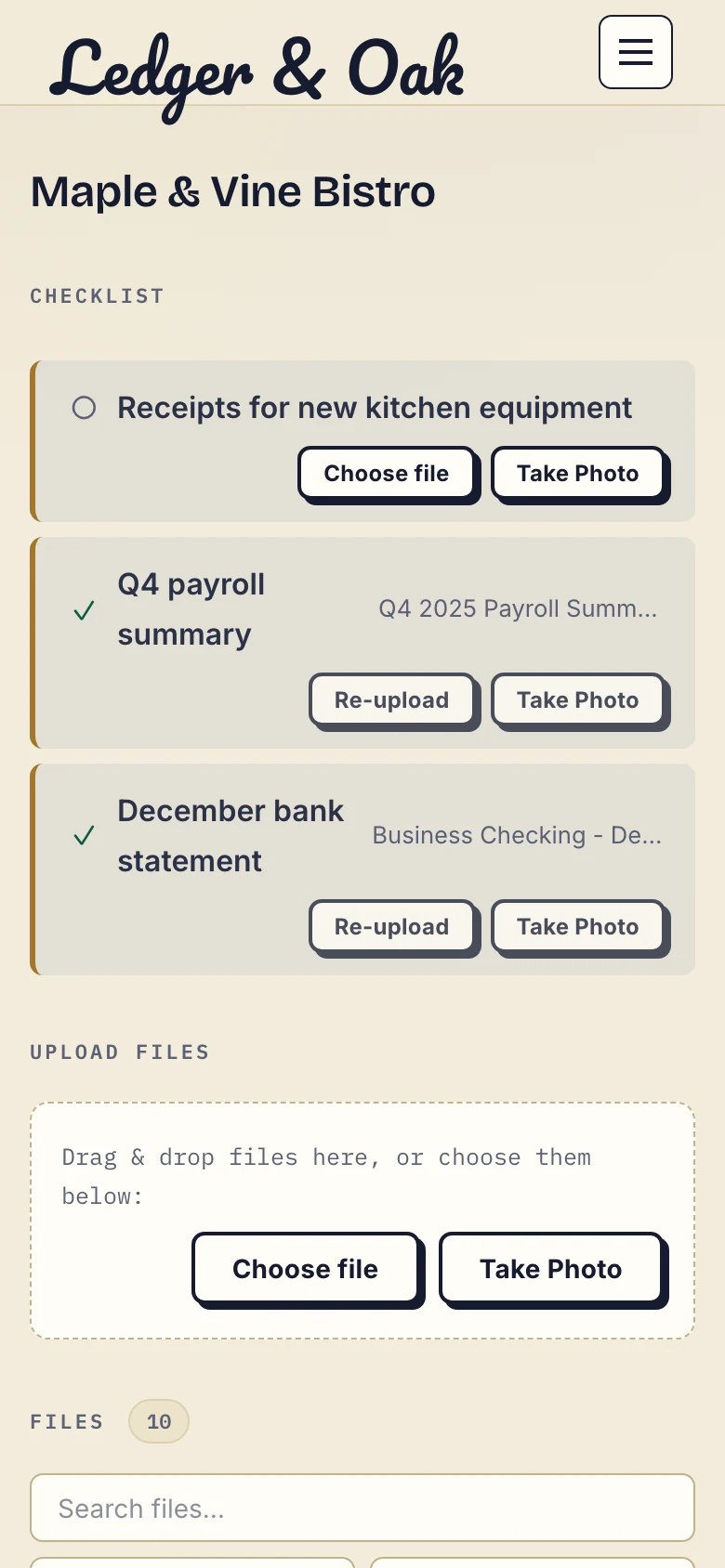
The fictional client's phone view offers a file upload or a photo for the missing receipts.
Send the completed report back through the same portal and ask a question in its file comments. Then download a received document and file it in your accounting system, checking the client, period and version by hand. That last step is the one that decides whether Droplana's narrower scope fits you.
The part where a document management system is more
The category difference matters more here than in most comparisons, because the two tools are not the same shape.
A document management system gives you consistent structure across every client and every year, permissions at the folder level, retention that can be enforced centrally, and an audit trail across your whole document estate. Those are real properties of a real category of software, and a client portal does not provide them.
Droplana gives you what you have exchanged with a client, grouped by client, with a comment and a status per file, plus a signature record with a public verification page. The owner can view and export an activity trail (logins, portal visits, uploads, downloads, deletions, comments, approvals) from Account, Activity. It covers your account, not folder-level permissions across a document estate. That is a smaller claim and a deliberate one.
If your problem is "our firm's documents are a mess", a portal will not fix it. If your problem is "the client-facing part of our document flow is a mess, and everything else is fine", a document management system is a large answer to a specific question.
What Droplana does not do
- No tax or accounting software connection. Filing is manual.
- No folders or folder templates. The client is the only level of organisation.
- No staff roles. Every team member can access every client.
- Not a system for internal working papers. It holds what you exchange with clients.
- Not a qualified e-signature. In-browser signing needs an identified signer, keeps the original, saves a signed copy and records who signed, when and from what IP. It is not certificate-based or qualified.
- Not an archive. Free keeps each file for up to 180 days after upload. Active paid plans have no plan-imposed retention limit, but a portal does not replace your retention policy.
Can you run both? Keep one system of record
Yes, and some practices should: SmartVault or another document system as the internal repository, Droplana as the client-facing side where documents arrive and leave. The portal does not need to know your internal structure, and clients do not need to see it.
The cost is a handoff you have to own. Decide where the authoritative record lives, who files corrections and how deletion rules apply. Whether that step is worth it depends on how much the client side currently costs you in chasing.
The accounting practices page covers the per-client structure in daily use, and the client portal guide is the broader buying guide for this category.
Questions before you choose
What is the main difference between SmartVault and Droplana?
SmartVault is a document management system: a structured repository for the practice, with a client portal, document requests and, on its Accounting plans, integrations into tax and accounting software. Droplana is only the client-facing portal: one private, persistent portal per client for two-way document exchange, with a document checklist, per-file comments, file status and in-browser PDF signing. SmartVault manages your document estate. Droplana manages the client-facing edge of it.
Does Droplana connect to SmartVault or tax software?
No. Droplana has no connector to tax or accounting software. Your team downloads received documents and files them in its other systems by hand. If automatic filing into your tax package is important to you, that is a real reason to choose SmartVault instead.
How much do three staff cost on each?
SmartVault's pricing page, checked on 23 September 2026, lists Accounting Pro, the first plan with tax software integrations, at 65 USD per user per month billed annually with a two-user minimum, so three staff pay 2,340 USD a year. Droplana Practice is 490 EUR a year plus tax for five seats and unlimited clients. The currencies and the scope differ, so this compares bills, not equivalent features.
Do clients need an account with Droplana?
No. Clients do not sign up and have no password. Strict mode, the default, verifies their email on a new device and remembers the browser for 90 days. They can also sign in with a Google or Microsoft account linked to their email. PDF signing needs an identified session even when a permanent portal link is enabled.
Where is data stored?
Droplana stores files, comments and metadata on Hetzner infrastructure in Germany, and is operated by Ubique d.o.o., a company registered in Croatia, EU, with a Data Processing Agreement available on all plans. SmartVault is a US company; confirm its hosting region and contract terms directly, because a vendor's headquarters does not establish where your files are stored.
Plans and limits
Paid plans include unlimited clients: Solo EUR19/month or EUR190/year, Practice EUR49/month or EUR490/year, Studio EUR99/month or EUR990/year, plus tax. Free covers 3 clients, 2 GB and files up to 100 MB. Each paid storage add-on costs EUR15/month or EUR150/year plus tax, adds 500 GB and raises the file limit to 5 GB.
The tools you need, on every plan.
Share files, leave comments, request documents with checklists and sign PDFs in your browser. Your logo is included too.
Clients never pay or create an account. EU hosting, encryption and data export included.
Save 2 months with annual billing
Free Start here
For your first 3 clients
€0/monthNo credit card required
- Just you
- 3 clients
- 2 GB storage
- Up to 100 MB per file
- Files kept for 6 months
Solo
For independent professionals
€19/month+ tax
€190/year+ tax
- Just you
- Unlimited clients
- 50 GB storage
- Up to 1 GB per file
- Email support
Practice
For small firms
€49/month+ tax
€490/year+ tax
- Team size: 5
- Unlimited clients
- 250 GB storage
- Up to 2 GB per file
- Priority support
Studio
For growing teams
€99/month+ tax
€990/year+ tax
- Team size: Unlimited
- Unlimited clients
- 1 TB storage
- Up to 5 GB per file
- Priority support
- Personal setup call
On Free, each file expires 180 days after upload. Your clients and their access stay active, so you can keep sharing new files. Active paid plans have no plan-imposed retention limit. Expiry settings, deletion and cancellation rules still apply; a persistent portal address does not guarantee permanent file availability. Team sizes include you. No setup fees or automatic overage charges. Prices exclude applicable tax.
Compare plan details
| Included | Free | Solo | Practice | Studio |
|---|---|---|---|---|
| Team size | Just you | Just you | 5 | Unlimited |
| Clients | 3 | Unlimited | Unlimited | Unlimited |
| Storage | 2 GB | 50 GB | 250 GB | 1 TB |
| Maximum file size | 100 MB | 1 GB | 2 GB | 5 GB |
| File retention | 180 days from upload | No limit | No limit | No limit |
| Your Droplana address | Includes a random suffix | Your chosen name | Your chosen name | Your chosen name |
| Data Processing Agreement | Standard | Standard | Countersigned available | Countersigned available |
| Support | Priority | Priority | ||
| Personal setup call | Not included | Not included | Not included | Included |
Need more storage?
Add 500 GB for €15/month + tax, or €150/year + tax. Each storage add-on also raises your maximum file size to 5 GB.
Available on all paid plans from your billing page. Add more than one for another 500 GB each. Your team size stays the same.
Related comparisons
Firms comparing document platforms can also read Droplana vs ShareFile and Droplana vs SharePoint. If documents mostly arrive as attachments today, see Droplana vs email.